
On-Page SEO
On-Page SEO Analysis with Claude Code: Check Any URL
Run an on-page SEO analysis with Claude Code: score titles, headings, content, technical tags, schema, and images on one URL, then fix issues by priority.
An on-page SEO analysis checks everything on a single URL that affects how well it can rank: the title and meta description, headings, content quality, technical tags, structured data, and images. With Claude Code, /claudeseo page <url> runs that analysis in one command and returns a score card out of 100, issues ranked from critical to low, and ready-to-use JSON-LD for any schema the page is missing.
This guide explains what an on-page analysis covers, what the command checks, how to run it, and how to fix what it finds.
Key takeaways
- On-page SEO analysis looks at one URL in depth: the content and HTML you control, plus the technical tags each page carries.
/claudeseo page <url>scores five areas out of 100: on-page SEO, content quality, technical, schema, and images.- Issues come back sorted from critical to low, and schema suggestions arrive as ready-to-paste JSON-LD.
- Core Web Vitals can't be measured from HTML alone, so the analysis flags likely LCP, INP, and CLS risks instead of reporting field data.
- Use it on pages that matter: before launch, after a template change, or when a page slips in rankings.
What is on-page SEO analysis and when should you run one?
On-page SEO covers everything on the page that you control: the words, headings, title and meta description, links, images, and the tags in the HTML <head>. It's different from off-page SEO (links and mentions from other sites) and from site-wide technical SEO (crawling, indexing, sitemaps, and server setup), although a page-level analysis does check the technical tags each page carries.
The analysis asks a practical question. When a searcher or a search engine lands on this URL, does everything on it say clearly what the page is about, show it's worth reading, and work properly? Google's SEO starter guide covers the same ground: descriptive titles, helpful content, clear headings, descriptive link text, and well-labeled images.
A single-page analysis is the right tool when one URL matters more than the whole site:
- Before publishing an important page, such as a new service page or a launch post.
- After a template or CMS change, to confirm the new layout didn't break titles, canonicals, or headings.
- When a page slips in rankings, to rule out on-page problems before you look elsewhere.
- On your top landing pages, which deserve regular checks.
- On a competitor's page, to see what a page that outranks you does differently.
When you need the same checks across hundreds of pages, a site audit fits better. We compare the two below.
What the /claudeseo page command does
The command is part of the Claude SEO skill suite. Give it one URL, and Claude Code analyzes the page in six areas, then combines the results into a single score card:
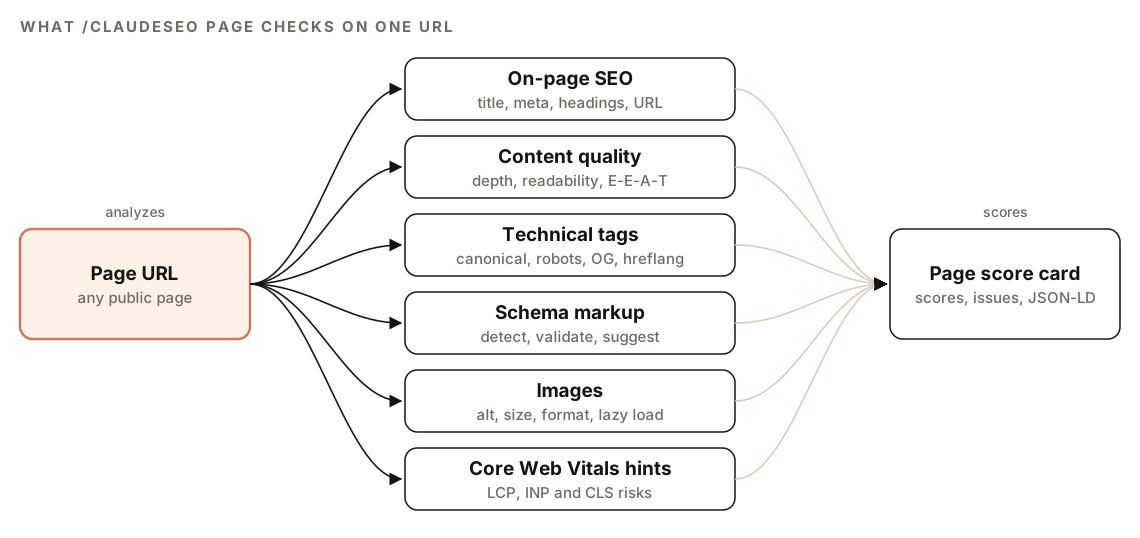
- On-page SEO. Title tag, meta description, H1, heading hierarchy, URL, internal links, and external links.
- Content quality. Word count against page-type minimums, readability, natural keyword use, E-E-A-T signals, and freshness.
- Technical elements. Canonical tag, meta robots, Open Graph and Twitter Card tags, and hreflang on multi-language pages.
- Schema markup. Every structured data type on the page, validated for required properties, plus missing opportunities.
- Images. Alt text, file size, format, dimensions, and lazy loading.
- Core Web Vitals hints. Likely causes of slow loading, slow interaction, or layout shift that show up in the HTML.
The first five areas each get a score out of 100, and the score card adds an overall score. Core Web Vitals are reference only, because real performance can't be measured from HTML.
What a single-page analysis checks
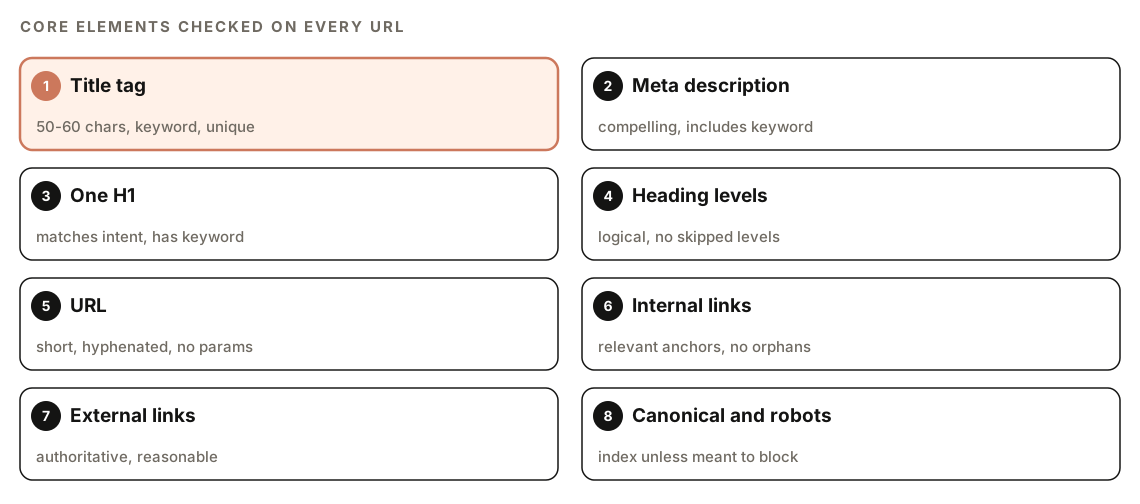
On-page elements
| Element | What the analysis wants |
|---|---|
| Title tag | 50 to 60 characters, includes the primary keyword, unique to the page |
| Meta description | Compelling, includes the keyword |
| H1 | Exactly one, matches the page's intent, includes the keyword |
| H2 to H6 | A logical hierarchy with no skipped levels and descriptive wording |
| URL | Short, descriptive, hyphenated, with no parameters |
| Internal links | Enough of them, with relevant anchor text, and no orphan pages |
| External links | Authoritative sources, in a reasonable number |
The title deserves the most care, because it's usually the first thing a searcher reads. Our guide to title tags and meta descriptions with Claude Code shows how to write and check both at scale.
Content quality
The analysis compares the page's word count with a minimum for its page type, measures readability with a Flesch Reading Ease score and grade level, and checks that the keyword is used naturally with semantic variations. It looks for E-E-A-T signals such as an author bio, credentials, and first-hand experience, and checks for a publication date and a last-updated date. For a deeper review of trust signals, run the dedicated E-E-A-T content audit.
Technical tags
- Canonical: present, and either self-referencing or pointing to the correct URL.
- Meta robots: index and follow, unless the page is intentionally blocked.
- Open Graph: og:title, og:description, og:image, and og:url, which control how the page looks when shared.
- Twitter Card: twitter:card, twitter:title, and twitter:description.
- Hreflang: correctly implemented if the page has other language versions.
These are page-level checks. Crawlability, sitemaps, redirects, and other site-wide issues belong to a technical SEO audit.
Schema markup
The analysis detects every structured data type on the page, preferring JSON-LD, validates required properties, and identifies types the page could use. It never recommends HowTo markup, and it doesn't recommend FAQ markup as a route to rich results. Existing FAQPage markup is kept as a signal for AI citation, and QAPage is suggested for genuine question-and-answer pages. Our guide to schema markup with Claude Code goes deeper, and Google's Rich Results Test confirms what Google can read.
Images
Each image is checked for descriptive alt text (with keywords only where natural), file size, format, and width and height attributes, which prevent layout shift. Oversized files are flagged at warning and critical levels, and WebP or AVIF is recommended over JPEG and PNG.
Lazy loading gets a careful check. The analysis reports how each image is lazy-loaded: natively, through a JavaScript plugin or library, or not at all. It doesn't flag an image as "not lazy-loaded" when a JavaScript lazy-loader such as Perfmatters, EWWW, or lazysizes is in use, because those tools deliberately replace the native loading="lazy" attribute with placeholders. That avoids a false alarm on sites that use them. The image SEO audit guide covers the full image checklist.
Core Web Vitals hints
Core Web Vitals measure loading, interactivity, and visual stability. For a good score, Largest Contentful Paint (LCP) should be 2.5 seconds or less, Interaction to Next Paint (INP) 200 milliseconds or less, and Cumulative Layout Shift (CLS) 0.1 or less. These need real loading data, so the analysis treats them as reference only and flags likely risks in the HTML:
- LCP risks: huge hero images and render-blocking resources.
- INP risks: heavy JavaScript and scripts without async or defer.
- CLS risks: images without dimensions and content injected after load.
How to run a single-page SEO analysis
Open Claude Code with ClaudeSEO installed and pass the URL:
/claudeseo page https://www.example.com/services/emergency-plumbingOr describe what you want in plain English, and Claude picks the matching skill:
Analyze the SEO of https://www.example.com/services/emergency-plumbing and tell me the three most important fixes.Three situations limit what the analysis can see:
- The URL is unreachable. It reports the error and doesn't guess at the content.
- The page needs a login (401 or 403). It says so and suggests you provide the rendered HTML directly or a public URL.
- The content is rendered by JavaScript. If the HTML body is empty, it analyzes what's there, flags that results may be incomplete, and suggests a browser-rendered snapshot.
If you've connected DataForSEO MCP tools, the analysis can add the page's real SERP positions and backlink data, including spam scores. That's optional, it needs a DataForSEO account, and DataForSEO's own pricing applies.
How to read the page score card
The report opens with a score card:
Overall Score: XX/100

On-Page SEO:     XX/100
Content Quality: XX/100
Technical:       XX/100
Schema:          XX/100
Images:          XX/100
Three sections follow:
- Issues Found, sorted by priority: critical, high, medium, then low.
- Recommendations, each a specific action with its expected impact.
- Schema Suggestions, as ready-to-use JSON-LD for the opportunities it detected.
The category scores show where problems cluster, but the issues list is what you act on. Fix anything that could stop the page from being indexed first, such as an accidental noindex or a canonical pointing to the wrong URL. Then work down the list in priority order.
How to fix common on-page problems
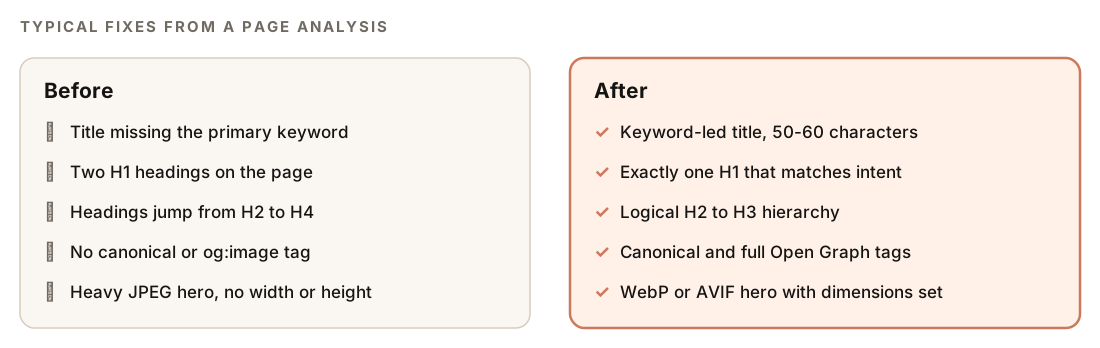
Most fixes happen in the page template or the CMS fields for that page. Here's a <head> that covers the title, description, canonical, and social tag checks:
<title>[Primary keyword]: [Specific benefit] | [Brand]</title>
<meta name="description" content="[Summary of the page that includes the primary keyword]">
<link rel="canonical" href="https://www.example.com/services/emergency-plumbing">
<meta property="og:title" content="[Page title]">
<meta property="og:description" content="[Page summary]">
<meta property="og:image" content="https://www.example.com/images/emergency-plumbing.jpg">
<meta property="og:url" content="https://www.example.com/services/emergency-plumbing">
<meta name="twitter:card" content="summary_large_image">
<meta name="twitter:title" content="[Page title]">
<meta name="twitter:description" content="[Page summary]">
There's no robots tag on purpose. Without one, search engines treat the page as index, follow.
For images, serve a modern format with a fallback and always set dimensions:
<picture>
  <source srcset="/images/hero.avif" type="image/avif">
  <source srcset="/images/hero.webp" type="image/webp">
  <img src="/images/hero.jpg" alt="[What the image shows]" width="1200" height="630">
</picture>
Once you've reviewed the report, Claude Code can apply the fixes:
Using the page analysis for /services/emergency-plumbing, fix the critical and high issues in this repo: rewrite the title to lead with the primary keyword, merge the two H1s into one, fix the skipped heading levels, add the canonical and Open Graph tags, add width and height to every image, and add the suggested JSON-LD. Show me the diff before saving.After you deploy, run /claudeseo page again to confirm the issues are gone. If you're checking a new post before it goes live, our guide to writing a blog post with Claude Code shows where on-page checks fit in the workflow.
Single-page analysis vs a full site audit
| Command | Scope | Use it when |
|---|---|---|
| /claudeseo page | One URL, all six areas | One page matters and you want depth |
| /claudeseo content | One URL, content and E-E-A-T | Trust and content quality are the concern |
| /claudeseo audit | The whole site, with specialist agents | You want a site-wide health score and fix list |
If the same issue shows up on every page of a type, such as a missing canonical on all product pages, the cause is a template. That's when a full site audit earns its time: it finds every affected URL at once.
Doing it without the skill
A plain Claude Code prompt covers the basics:
Fetch [URL] and check its on-page SEO. Report: the title tag and its length, the meta description, how many H1s there are, whether heading levels are skipped, the URL structure, the canonical tag and meta robots, Open Graph and Twitter Card tags, every JSON-LD type and whether its required properties are present, and each image's alt text, format, file size, and width and height. Flag likely LCP, INP, and CLS risks visible in the HTML. Sort the problems from critical to low and suggest a fix for each.The skill adds consistent five-category scoring, page-type word count minimums, lazy-loader detection that avoids false alarms, schema rules that skip deprecated types, ready-to-use JSON-LD, and clear handling of blocked or JavaScript-rendered pages.
Mistakes to avoid
- Chasing the overall score. The score points to problem areas. The issues list is what to fix.
- Treating Core Web Vitals hints as measurements. They're risks spotted in the HTML. Confirm them with real data from PageSpeed Insights or Search Console.
- Trusting raw HTML on a JavaScript site. If the report warns that results may be incomplete, provide a rendered snapshot.
- Fixing one page when the template is broken. Repeated issues across a page type need a template fix and a site audit.
- Copying schema from other sites. Use the JSON-LD the analysis suggests, which skips types such as HowTo that no longer produce rich results.
Related guides
- E-E-A-T content audit with Claude Code for a deeper look at trust signals on one page
- Schema markup with Claude Code to detect, validate, and generate JSON-LD
- Image SEO audit with Claude Code for alt text, file sizes, and formats
- The full Claude SEO skill list for every command in the suite
FAQ
What is on-page SEO analysis?
It's a review of one URL's content and HTML: the title, meta description, headings, URL, links, content quality, technical tags, structured data, and images. The goal is to find anything on the page that makes it harder to understand, trust, or rank.
What is the difference between on-page and technical SEO?
On-page SEO is about the content and HTML of an individual page. Technical SEO is about whether search engines can crawl, render, and index the site as a whole, covering sitemaps, redirects, robots rules, and performance. A page analysis checks the technical tags on one page, such as the canonical and meta robots, but not site-wide setup.
Can Claude Code check Core Web Vitals for a page?
The page analysis flags likely LCP, INP, and CLS risks it can see in the HTML, such as huge hero images, render-blocking resources, heavy JavaScript, and images without dimensions. Real Core Web Vitals need loading data, so confirm them with PageSpeed Insights or Search Console.
Can I analyze a competitor's page?
Yes. The command works on any public URL. Running it on a page that outranks yours shows how its title, headings, schema, and images compare, which helps you decide what to change on your own page.
What is a good on-page SEO score?
There's no universal cutoff. Use the scores to see which areas need work and to track the same page over time. The better test is the issues list: a page with no critical or high-priority issues is in good shape.
How often should I run a page analysis?
Run it before publishing important pages, after template or CMS changes, and whenever a key page drops in rankings. For your top landing pages, a regular check catches problems that template updates introduce.