
Content Operations
How to Write a Blog Post with Claude Code (Step-by-Step)
The complete 10-step Claude Code blog workflow: style guide, SERP check, brief, sourced research, drafting, editing, SEO checks, images, and publishing.
Yes, Claude Code can write blog posts, and for SEO content it has a real advantage over a chat app: it works inside your website's code. It can read your existing posts, match their format, link to pages that actually exist, save the draft straight into your content folder, and check the result before you publish.
This guide is the complete workflow we use, in 10 steps, with every prompt, template, and checklist you need. It covers the parts most AI writing guides skip: checking what already ranks, keeping facts sourced, adding diagrams, and getting the post indexed.
Key takeaways
- Put your writing rules in a
CLAUDE.mdfile so every draft follows them without repeating yourself.- Check the top Google results before writing. Match the format that ranks, then cover what it misses.
- Separate research from writing, and keep a source for every number.
- The edit is where ranking value comes from. Add experience, examples, and screenshots only you have.
- Publishing isn't the finish line. Link to the post, request indexing, and update it from real Search Console data.
Can Claude Code write blog posts?
Yes. Claude Code can plan, research, draft, edit, and save a blog post as a file in your website's repository, then run your build to check it. What it can't do is know your business, your results, or your opinion. Those are the parts readers and Google value most, so the workflow below is built around Claude Code doing the heavy lifting and you adding what only you can.
| Claude Code does well | You still need to do |
|---|---|
| Comparing the top-ranking pages | Choosing the angle and the audience |
| Turning research into a structured brief | Checking the important facts at the source |
| Drafting long posts section by section | Adding your experience, results, and screenshots |
| Matching your site's format and frontmatter | Deciding what to cut |
| Finding internal links that really exist | Approving every change before it goes live |
| Checking titles, headings, links, and the build | Promoting the post and earning links |
Why use Claude Code instead of a chat app?
A chat app gives you text. You then copy it, paste it into your CMS, fix the formatting, find the links, and hope nothing broke on the way. Claude Code removes those manual hops because it works on your files directly.
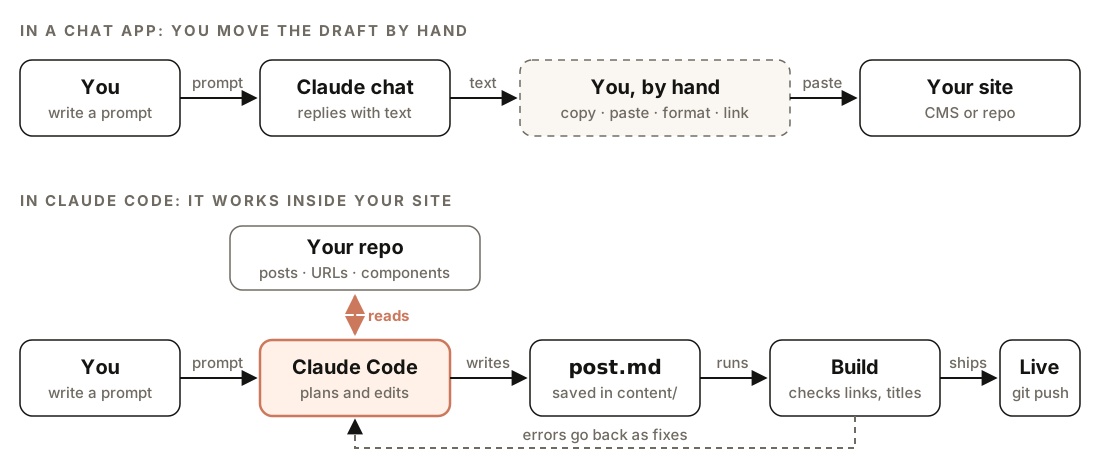
The two arrows that matter are reads and errors go back as fixes. Because Claude Code can read your existing posts, it matches your voice and format and only links to URLs that exist. Because it can run your build, a broken link or a malformed heading gets caught and fixed before you publish, not after.
The workflow at a glance
Here's the full process. Each step produces a file you can open, review, and change, so you're never stuck with a black-box draft.
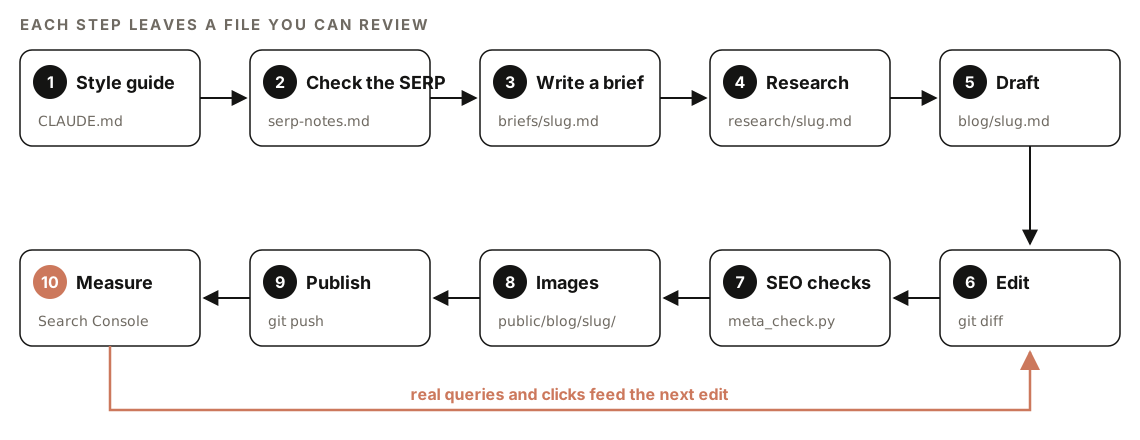
| Step | What happens | File it leaves |
|---|---|---|
| 1. Style guide | Your writing rules, written once | CLAUDE.md |
| 2. Check the SERP | What ranks, what format, what's missing | serp-notes.md |
| 3. Brief | Angle, outline, title, internal links | briefs/slug.md |
| 4. Research | Facts and statistics with sources | research/slug.md |
| 5. Draft | The full post in your site's format | content/blog/slug.md |
| 6. Edit | Cut, check, and add your experience | Same file, reviewed with git diff |
| 7. SEO checks | Title, meta, headings, links, schema | Script output |
| 8. Images | Diagrams, screenshots, alt text | public/blog/slug/ |
| 9. Publish | Build, push, request indexing | Live URL |
| 10. Measure | Queries, clicks, and updates | Search Console data |
What you need before you start
- Claude Code installed and working in your terminal.
- Your website in a local folder. Sites that store posts as Markdown or MDX files (Next.js, Astro, Hugo, Jekyll, and similar) are easiest. WordPress works too, but you'll paste the final draft into the editor.
- A target keyword and a clear idea of who the post is for.
- Google Search Console set up for your site, so you can request indexing and measure results.
- Time to edit. Plan to spend real time on step 6. Skipping it is the most common reason AI posts don't rank.
A simple folder layout keeps every step's output in one predictable place:
your-site/
├── CLAUDE.md            # writing rules Claude Code reads every session
├── briefs/              # one brief per post
├── research/            # facts and sources per post
├── content/blog/        # the posts themselves
└── public/blog/         # images and diagrams, one folder per post
Step 1: Write a style guide Claude Code reads every time
Claude Code reads a file called CLAUDE.md in your project at the start of every session. Put your writing rules there once, and every brief and draft follows them without you repeating yourself in each prompt.
## Blog writing rules

### Audience and voice
- Readers: marketers and founders who know basic SEO but aren't developers
- Voice: direct and practical. Short sentences. No hype words ("revolutionary", "game-changing", "unlock")
- Write "you" for the reader and "we" for us

### Structure
- Open with a 2–3 sentence answer to the main question, before any background
- Use question-style H2s that match how people search
- One idea per paragraph. Use tables for comparisons and numbered lists for steps
- End with an FAQ answering real "People also ask" questions

### Facts
- Every statistic needs a source link. No source, no number
- Prefer official documentation and original data over other blogs
- Never invent quotes, case studies, or customer results

### Format
- Posts live in content/blog/<slug>.md and copy the frontmatter of existing posts
- Link to 3–5 relevant pages that exist on this site
- Images go in public/blog/<slug>/ with descriptive file names and alt text
Keep it to one page. Short, specific rules beat a long document Claude has to interpret. When you notice the same correction twice in your edits, add it as a rule.
Step 2: Check what's ranking before you write
Before writing a word, search your keyword in Google and study the first page. You're looking for four things:
- Format. Are the top results step-by-step guides, lists, comparisons, tools, or product pages? Google is telling you what searchers want. Match it.
- Coverage. Which subtopics does every top result cover? Those are the minimum your post needs.
- Gaps. What's outdated, vague, or missing? That's your angle.
- Who ranks. If the first page is all big brands, a new site will struggle. If it's personal blogs, forums, and small sites, you have a real chance.
Here's the check we ran for this guide's keyword, "how to write a blog post with claude code", on October 15, 2026:
| Position | Result | Type |
|---|---|---|
| 1 | How I Use Claude Projects to Write Blog Posts That… | Online publication |
| 2 | Use Claude AI to write blogs, Use Claude Code to add to site | Reddit thread |
| 3 | Streamlining Blog Writing with Claude Code: My Complete… | Personal blog |
| 4 | AgriciDaniel/claude-blog | GitHub repository |
| 5 | Building an AI Blog Editor with Claude Skills | Personal blog |
| 6 | Building a Claude Code Blog Skill: What I Learned… | Personal blog |
Every result was either a personal workflow story, a forum thread, or a code repository. None of the titles promised a complete, SEO-focused process from keyword to measurement. That gap became this guide's angle, and the mix of small sites told us the keyword was winnable.
Google's "People also ask" box for the same search included "Can Claude Code write blogs?", so we answer that question near the top and again in the FAQ.
To have Claude Code do the comparison for you, paste the top URLs in:
Fetch these pages and compare them. For each one, list its format, its H2 headings, roughly how detailed it is, and when it was published or updated. Then tell me which subtopics all of them cover, which ones none of them cover well, and what format a new post should use. Save the result to serp-notes.md.
[paste the top 5–6 URLs]
Step 3: Turn the research into a brief
A brief is the contract for the post: who it's for, what it promises, and how it's structured. Fixing a weak angle here takes five minutes. Fixing it after a 3,000-word draft takes an afternoon.
Using serp-notes.md, write a content brief for the keyword "[keyword]". Include: the search intent, the reader's main question, a working title under 60 characters, a meta description under 155 characters, an H2 outline written as questions where it fits, 3–5 internal links to existing pages in this repo (check they exist), the People also ask questions to answer, and the one thing our post will do better than the current top results. Save it to briefs/[slug].md.Here's a trimmed version of the brief behind this guide:
# Brief: how to write a blog post with Claude Code

Intent: how-to. Reader wants a repeatable process, not a story.
Main question: how do I use Claude Code to write a post that can rank?
Title: How to Write a Blog Post with Claude Code (Step-by-Step)
Angle: the only result covering the full process, from SERP check to
Search Console, with copy-paste prompts and real examples from our own site.
Must cover: style guide, SERP check, brief, sourced research, drafting,
editing, on-page SEO, images, publishing, measurement.
Answer: "Can Claude Code write blogs?" (People also ask)
Internal links: /claude-blog, /features/blog/agent-pipeline,
/blog/title-tags-meta-descriptions-claude-code, /blog/internal-linking-with-claude-code
Read the brief before you move on and ask: would I click this title, and does the angle give someone a reason to choose our post over the top result? If not, rework it now.
Step 4: Research with sources you can check
Ask for facts and sources in a separate step from the writing. When research and drafting happen in one prompt, it's hard to tell which statements came from a source and which were simply plausible.
Research this brief. List the key facts, steps, definitions, and statistics the post needs. For each item, give the source URL and a one-line summary of where it appears on that page. Prefer official documentation and original data. Mark anything you couldn't verify, and don't include it as fact. Save the list to research/[slug].md.A simple table format makes the research easy to check:
| Claim | Source | Checked |
|---|---|---|
| Claude Code reads CLAUDE.md at the start of a session | Official Claude Code docs | Yes |
| [statistic] | [URL] | Not yet |
Not all sources are equal. In order of trust: official documentation and primary sources, then original research and data, then reputable publications, then other blogs. If the only source for a number is another blog that doesn't cite anything, leave the number out.
Then open the sources for anything important and confirm them yourself. Two minutes of checking is what separates a trustworthy post from a confident-sounding one.
Step 5: Draft the post into your repo
With a brief and verified research, the draft is the easy part:
Write the post from briefs/[slug].md using only the verified items in research/[slug].md. Follow the rules in CLAUDE.md. Copy the frontmatter and formatting of the most recent post in content/blog/. Save it as content/blog/[slug].md.For long posts, draft one section at a time. Ask for the introduction and first two H2s, review them, then continue. You'll catch a wrong direction early, and each section gets Claude Code's full attention instead of the second half of the post feeling rushed.
If your posts use frontmatter, Claude Code will copy the pattern from your existing files. A typical example:
---
title: "How to Write a Blog Post with Claude Code (Step-by-Step)"
description: "A 10-step workflow with prompts, templates, and checklists."
date: "2026-10-15"
author: "Your Name"
---
If your site uses MDX components such as callouts or comparison tables, name the components you want and point Claude Code at an existing post that uses them. It will follow the real pattern instead of guessing.
Step 6: Edit like an editor, not a proofreader
This is the step that decides whether the post ranks. A first draft from any AI model reads smoothly and says what a thousand other pages say. Your edit is what makes it worth ranking.
Work in three passes:
- Structure. Does the post answer the main question in the first few sentences? Does every section earn its place? Move, merge, or cut.
- Accuracy. Is every claim either common knowledge or linked to a source? Are the steps in the right order, and do the commands work?
- Experience. Where can you add something only you know?
Claude Code is a useful second editor for the first two passes:
Edit content/blog/[slug].md. Cut filler sentences and repeated points, aiming for about 15% shorter. Flag every claim that has no source. Replace generic advice with specific steps or examples. Then list the 5 questions a reader is most likely to still have after reading, and tell me where the post should answer them.The third pass is yours. Experience means things like:
- What happened when you followed the process yourself, including what went wrong
- Real numbers from your own analytics, Search Console, or tests
- Screenshots of your actual setup, results, or output
- A clear opinion: what you'd recommend and what you'd skip
Here's an example from our own site. We launched it with five long guides published on the same day. Two months later, a site: search on Google showed none of them were indexed. That's the kind of detail no AI model can invent and readers remember, which is why it appears in this guide.
Review the changes with git diff before you accept them. It shows exactly what Claude Code changed, line by line.
Step 7: Run on-page SEO checks
Before publishing, check the parts of the page that search engines and readers use to judge it. Each part has a specific job:
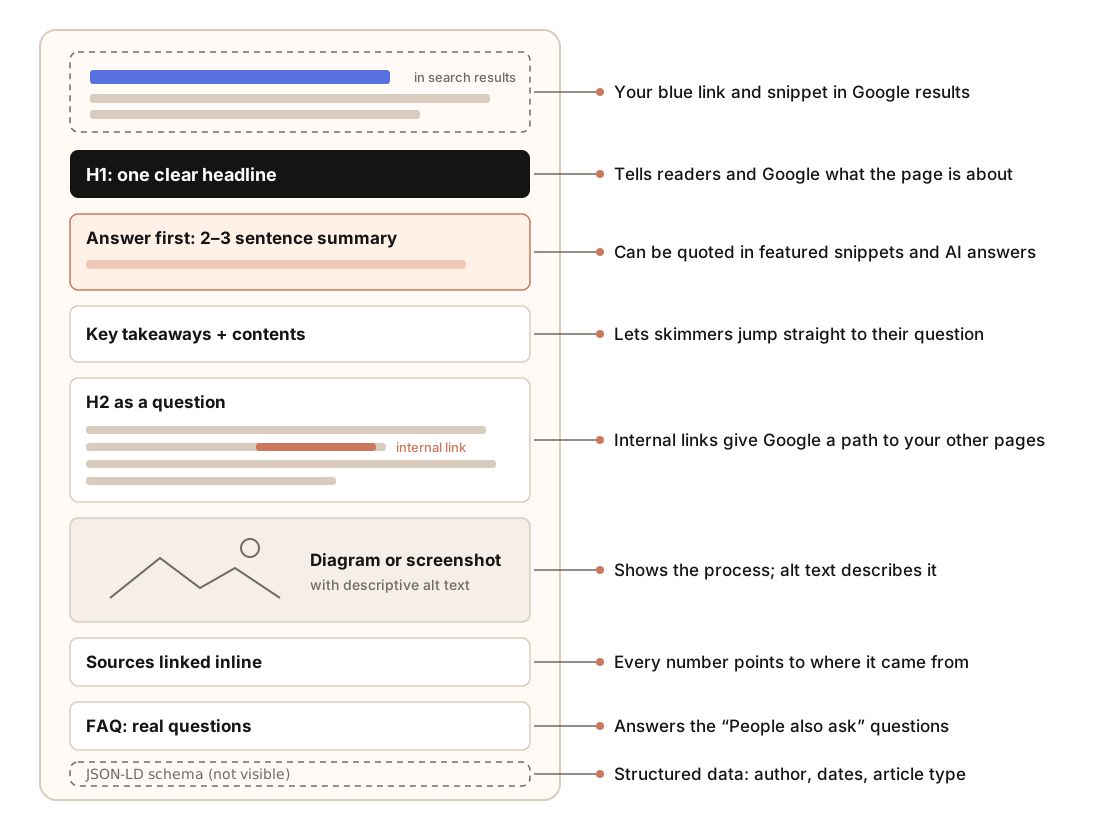
Use this checklist:
| Check | Target |
|---|---|
| Title tag | About 50–60 characters, main keyword near the start |
| Meta description | About 140–160 characters, says what the reader gets |
| H1 | One per page, matching the title's topic |
| H2s | Descriptive, question-style where natural, no skipped levels |
| Opening | Answers the main question in the first 2–3 sentences |
| Internal links | 3–5 links to relevant pages that exist |
| External links | A source for every statistic |
| Images | Descriptive file names and alt text, compressed |
| Structured data | Article or BlogPosting schema with author and dates |
Then ask Claude Code to run the checks:
Check content/blog/[slug].md against this checklist. Verify every internal link points to a page that exists in this repo. Build the site and confirm the page renders with the right title and meta description. Fix what you can and list anything you need from me.For titles and descriptions across your whole site, we use a small Python script that reads the sitemap and flags anything too long, missing, or duplicated. Here's its output for this guide and the posts around it:
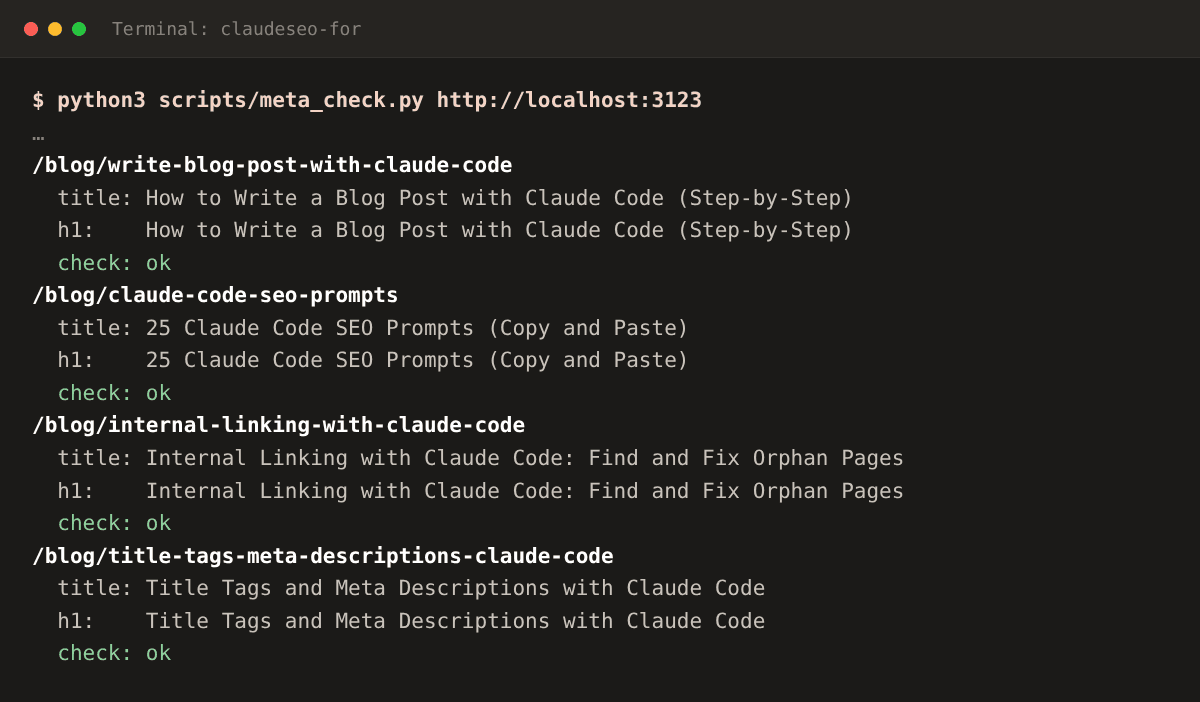
The full script and how to use it are in our guide to title tags and meta descriptions with Claude Code. For links, internal linking with Claude Code includes a script that counts the links pointing at every page.
Step 8: Add images and diagrams
Images aren't decoration. A good diagram explains a process faster than three paragraphs, a screenshot proves you actually did the thing, and both make a long post easier to skim. Images can also bring visitors from Google Images.
| Image type | Use it for | Example in this guide |
|---|---|---|
| Diagram | Showing a process, a flow, or a comparison | The workflow and the chat-versus-Claude Code figure |
| Screenshot | Proving a result or showing real output | The script output in step 7 |
| Annotated wireframe | Explaining the parts of something | The post anatomy figure |
| Social image | The preview when the post is shared | The 1200 × 630 image at the top |
Claude Code can make diagrams itself, because an SVG diagram is just code. Every diagram in this guide is an SVG file written as code by Claude, then reviewed and adjusted by eye:
Draw an SVG diagram for the "[section name]" section of content/blog/[slug].md that shows [the process or comparison]. Use our brand colors from the CSS, a white background, readable text (at least 15px at 1000px wide), and labeled arrows. Save it to public/blog/[slug]/[name].svg and add it to the post with descriptive alt text and a caption.Whatever the image type, follow these rules:
- Alt text describes what the image shows, in a sentence, for someone who can't see it. Don't stuff keywords into it.
- File names describe the content:
post-anatomy.svg, notimage-3.svg. - Set width and height (or use your framework's image component) so the page doesn't jump while images load.
- Compress raster images. Diagrams as SVG stay sharp and small. Screenshots as PNG or WebP should usually be well under 200 KB.
- Make a social image at 1200 × 630 pixels, so the post looks good when shared on X, LinkedIn, or Slack.
Step 9: Publish and get it indexed
- Build and preview locally. Open the page, check the images load, the links work, and it reads well on a phone.
- Commit and push. If your site deploys on Vercel, Netlify, or similar, the post goes live automatically.
- Request indexing. In Google Search Console, paste the URL into URL Inspection and choose "Request indexing".
- Link to it from older posts. A new post starts with no internal links pointing at it. Add some on day one.
- Share it where your readers are, and tell people who would genuinely find it useful.
Claude Code can handle step 4 for you:
Find 3–5 existing posts in content/blog/ where a reader would genuinely benefit from a link to the new post [slug]. For each, show the exact sentence where a link fits and a descriptive anchor text. Apply the links after I approve them.Step 10: Measure and update
Check the post in Search Console after two to four weeks. Look at impressions (is Google showing it?), average position (where?), and the queries it appears for (for what?). The queries are the most useful part: they show what searchers actually want from the page, which is often a little different from what you planned.
Here's the Search Console export for /blog/[slug] covering the last 28 days: [file.csv]. List the queries with the most impressions, and for each, tell me whether the post fully answers it. Suggest specific additions or changes to the post, and a better title if the click-through rate is low for queries where we rank in the top 10.If there are no impressions at all after a month, the problem is usually discovery, not the writing. Check that the page is indexed, that it's in your sitemap, and that other pages link to it. On a new site, links from other websites matter more than anything you can change on the page.
Update important posts whenever the facts change, and review them at least every few months. Change the "updated" date only when the content really changed.
Doing it faster with the Claude Blog skill
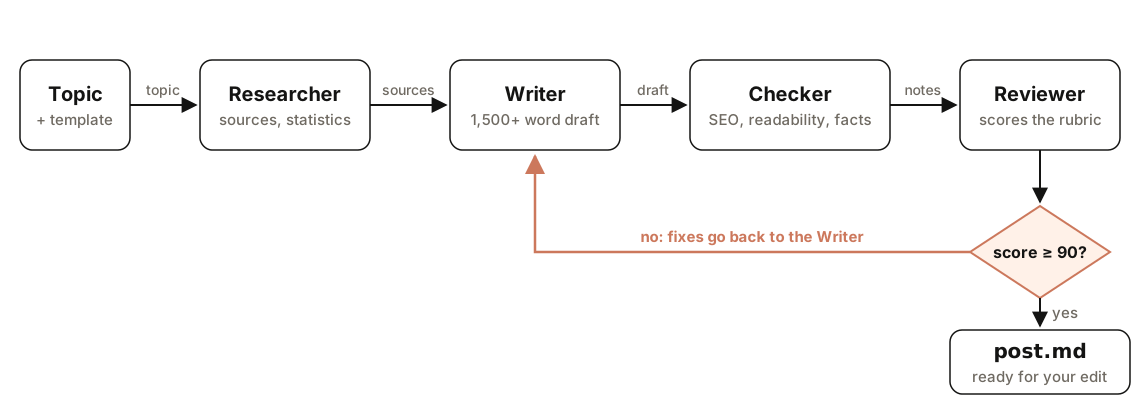
Every step above works with plain prompts. If you publish often, rewriting the same prompts gets old. A skill packages them so you can run each step with one command. Claude Blog is a set of skills for exactly this workflow, and its writing step runs four agents in sequence with a quality gate at the end:
| Workflow step | Claude Blog command |
|---|---|
| Plan topics | /claudeblog calendar and /claudeblog strategy <niche> |
| Brief and outline | /claudeblog brief <topic> and /claudeblog outline <topic> |
| Research and draft | /claudeblog write <topic> |
| Score the draft | /claudeblog analyze <file> |
| Check sources | /claudeblog factcheck <file> |
| SEO checks and schema | /claudeblog seo-check <file> and /claudeblog schema <file> |
| Update an older post | /claudeblog rewrite <file> |
| Reuse the post | /claudeblog repurpose <file> |
The 4-agent pipeline and the 100-point scoring deep dives explain what each stage checks. Even with a skill, keep step 6 for yourself. The skill makes the draft better; your edit makes it yours.
Mistakes that stop AI blog posts from ranking
- Publishing the first draft. It reads fine and adds nothing new. Edit it and add experience.
- Numbers without sources. AI drafts can produce plausible statistics that don't exist. Check every one or delete it.
- Ignoring search intent. If the top results are step-by-step guides, an opinion essay won't rank, however well it's written.
- Expecting new posts to rank on their own. On a new site, links from other sites and from your own homepage matter more than how many posts you publish. Our own launch guides taught us that.
- No internal links. A post nothing links to is hard for Google to find. Link to it from related posts the day you publish.
- Walls of text. Long posts need structure: a summary up top, clear headings, tables, and diagrams.
- Never updating. Rankings move. Revisit posts with Search Console data and keep them accurate.
FAQ
Can Claude Code write blogs?
Yes. Claude Code can research, draft, edit, and save blog posts directly into your website's files, and it can check links, titles, and the build before you publish. You still need to verify the facts and add your own experience.
Is AI-written content bad for SEO?
Not by itself. Google's guidance is that it rewards helpful, original content however it's produced, while using automation mainly to manipulate rankings breaks its spam policies. AI drafts that are edited, fact-checked, and genuinely useful can rank. Mass-produced, unedited posts usually don't.
How long should a blog post be?
As long as it takes to fully answer the question, and no longer. Look at the top results for your keyword: if they're detailed guides, a short post probably won't compete. If they're quick answers, padding won't help. This guide is long because the process has ten steps.
How long does it take for a new blog post to rank?
It varies a lot. On an established site with good internal links, a new post can be indexed within days. On a new site with few links from other websites, it can take months, and some posts may not be indexed at all until the site earns more links.
Do I need to know how to code to use Claude Code for blogging?
You need to be comfortable opening a terminal and running a few commands, and your posts should live in files on your computer. Claude Code does the file editing. Reviewing its changes with git diff before you publish is the one habit worth learning.
What's the difference between Claude Code and the Claude app for writing?
The Claude app is a chat: you paste content in and copy text out. Claude Code works inside a folder on your computer, so it can read your existing posts, write files, run scripts, and check your site. For one-off writing either works. For publishing on a website you manage, Claude Code saves the manual steps.