
On-Page SEO
Search Experience Optimization (SXO) with Claude Code
Search experience optimization with Claude Code: read the SERP backwards, catch page-type mismatches, score personas, and rebuild pages to match intent.
Search experience optimization (SXO) is the practice of making a page match what searchers actually want for a keyword: the right type of page, the right depth, and a clear next step. With Claude Code, the /claudeseo sxo command reads the search results for your keyword backwards, tells you whether your page is the kind of page those results reward, and scores it from the point of view of the people searching.
This guide explains what SXO is, how the command works, how to read its SXO Gap Score, and how to fix a page-type mismatch.
Key takeaways
- A page can be technically clean and still not rank because it's the wrong type of page for the keyword. SXO finds that gap.
/claudeseo sxo <url>classifies the top results, finds the dominant page type, and flags a mismatch from critical to aligned.- The SXO Gap Score adds up seven dimensions to 100 points and is reported separately from the SEO Health Score.
- User stories and persona scores turn search results into concrete page changes, ranked weakest persona first.
- Fix a page-type mismatch before you polish copy, schema, or speed.
What is search experience optimization and why does it matter?
Search experience optimization combines two disciplines. SEO asks whether search engines can find, understand, and trust a page. User experience (UX) asks whether a visitor gets what they came for. SXO asks one question that joins them: does this page deserve to rank for this keyword, given what Google already shows for it?
The answer starts with search intent, the reason behind a query. Someone searching "what is a standing desk" wants an explanation. Someone searching "best standing desk" wants to compare options. Someone searching "buy standing desk online" wants a product page. Each intent calls for a different page type, and the results page shows you which type Google currently rewards.
That's why a technical audit alone can mislead you. A fast page with valid schema and good title tags can still stall if it's a blog post competing against product listings, or a sales page competing against calculators. On-page polish doesn't fix the wrong format. The page has to change shape.
SXO treats the results page as evidence. The page types that rank, the questions in People Also Ask, the themes in ad copy, the related searches, and the format of the featured snippet all describe what searchers expect. Google's guidance on creating helpful, people-first content makes the same point from the other side: pages should serve the people searching, not just the ranking systems.
What the /claudeseo sxo command does
The command is part of the Claude SEO skill suite. You give it a URL, and optionally a keyword, and Claude Code works through a fixed pipeline:
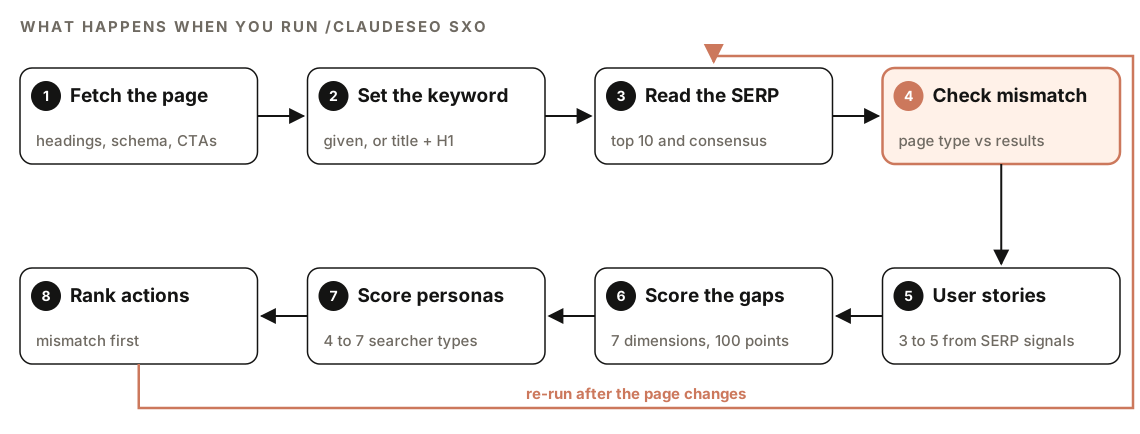
- Fetch the page. It renders the URL (handling JavaScript-heavy pages) and extracts the title, H1, meta description, heading hierarchy, word count, schema markup, calls to action, and media.
- Set the keyword. If you don't supply one, it takes the primary keyword from the overlap between the title tag and the H1. If it can't find one, it asks you.
- Read the results page. It searches the keyword and records the top 10 organic results: page type, content format, estimated depth, schema signals, media, and a rough authority tier (brand, niche authority, or unknown). It also records SERP features such as featured snippets, People Also Ask, ads, related searches, local or shopping results, and AI Overviews.
- Check for a mismatch. It classifies your page with the same page-type taxonomy and compares it to the dominant type in the results. If there's a mismatch, that becomes the lead finding.
- Derive user stories. It turns results-page signals into three to five user stories, each citing the signal it came from.
- Score the gaps. It scores your page against the results across seven dimensions for a 0-100 SXO Gap Score.
- Score personas. It derives four to seven searcher personas and scores your page for each one.
- Rank actions. Fixing a mismatch comes first, then the gaps for the weakest personas.
The skill aims to analyze at least five results. If a search returns fewer, it proceeds and notes the limited sample. If the results page has no organic results at all, only ads, it reports a highly commercial results page and analyzes the ad copy instead.
What does the SXO analysis check?
Results consensus
Before it judges your page, the skill works out what the results agree on. It finds the dominant page type and labels the consensus by how much of the top 10 that type covers: above 60% is strong consensus, 40% to 60% is mixed, and below 40% is fragmented. It also sets expectations for content depth, the most common structured data types, and whether video or images look essential.
When no page type dominates, the report flags an opportunity to stand out with a different format.
Page-type mismatch
This is the core of SXO. The skill compares your page type with the dominant type and rates the gap:
| Your page | Results expect | Severity | Recommended change |
|---|---|---|---|
| Blog post | Product pages | Critical | Create a dedicated product page |
| Blog post | Comparison pages | High | Restructure as a comparison with a matrix |
| Product page | Informational pages | High | Add an educational content layer |
| Landing page | Tools or calculators | High | Build an interactive tool component |
| Service page | Local results | Medium | Add location signals and local schema |
| Same type | Same type | Aligned | Focus on content depth and UX |
User stories
User stories describe what searchers are trying to do, in a fixed format. People Also Ask questions reveal knowledge gaps and concerns. Ad copy reveals commercial triggers. Related searches show what comes before and after the query. The featured snippet format shows the expected answer structure, and an AI Overview shows what Google treats as the core answer.
As a [persona derived from signal],
I want to [goal derived from query intent],
because [emotional driver from ad copy or PAA tone],
but I'm blocked by [barrier derived from PAA questions or related searches].
Each story cites the signal behind it, and the set covers at least two journey stages (awareness, consideration, or decision).
The SXO Gap Score
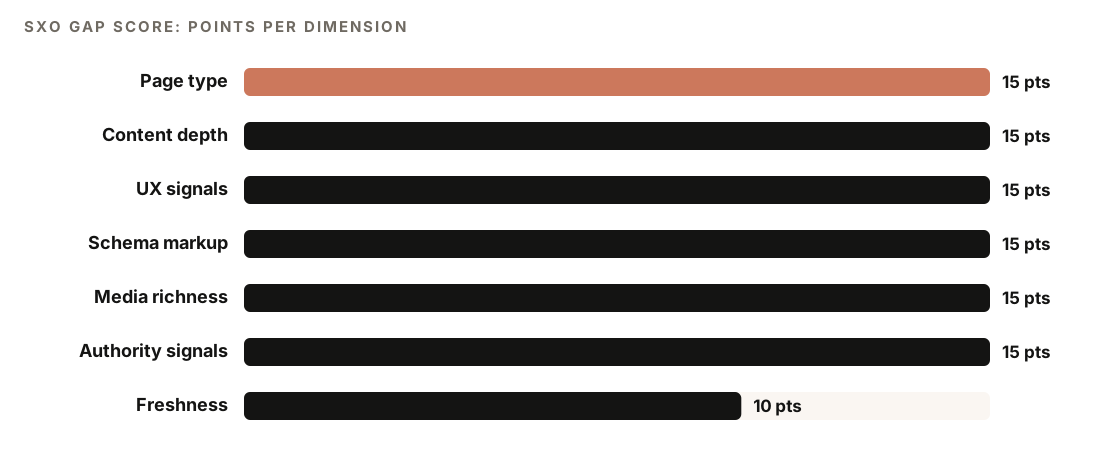
The gap analysis scores seven dimensions, each with evidence:
- Page type (15 points): your type against the dominant type.
- Content depth (15): word count, heading depth, and topic coverage.
- UX signals (15): call-to-action clarity, above-the-fold content, and mobile layout.
- Schema markup (15): structured data you have against the types the results show.
- Media richness (15): images, video, and interactive elements against the norm.
- Authority signals (15): E-E-A-T markers, social proof, and credentials.
- Freshness (10): last-updated dates and other recency signals.
Persona scoring
Each persona is scored on four dimensions worth 25 points each: relevance (does the page address this persona's need?), clarity (can they find their answer within 10 seconds?), trust (are there enough trust signals for them?), and action (is there a clear next step?). Personas come from clustering People Also Ask questions by theme, segmenting ad copy by audience, and mapping related searches to journey stages.
How to run an SXO analysis with Claude Code
Open your project in Claude Code with ClaudeSEO installed, then run:
/claudeseo sxo https://www.example.com/standing-desksTo analyze a specific keyword instead of the one detected from the page, add it after the URL:
/claudeseo sxo https://www.example.com/standing-desks best standing desk for small spacesTwo subcommands narrow the job:
/claudeseo sxo wireframe https://www.example.com/standing-desks
/claudeseo sxo personas https://www.example.com/standing-desks
The wireframe subcommand produces current-state and target-state outlines of the page. The personas subcommand runs persona scoring only and skips the results-page analysis.
You can also ask in plain English, and Claude picks the matching skill:
Why isn't https://www.example.com/standing-desks ranking for "best standing desk"? Check whether it's the right page type for that search.By default the skill uses web search for results-page data. If you've connected DataForSEO's MCP tools, it can use them for more precise result positions, features, snippets, and keyword volume. It runs a cost estimate and asks you to confirm before any paid call, and falls back to web search, telling you so, if the cost exceeds a threshold. DataForSEO needs its own account, and DataForSEO's pricing applies. Our guide to DataForSEO with Claude Code covers that setup.
How to read the SXO report
The report follows the same structure every time:
## SXO Analysis: [URL]
### Target Keyword: [keyword]

### 1. SERP Landscape
- Dominant page type: [type] ([XX]% consensus)
- SERP features: [list]
- Content depth norm: [word count range]
- Schema expectation: [types]

### 2. Page-Type Alignment
- Your page type: [type]
- SERP expects: [type]
- Verdict: [ALIGNED or MISMATCH (severity)]

### 3. User Stories
### 4. Gap Analysis (SXO Score: XX/100)
### 5. Persona Scores
### 6. Priority Actions
### 7. Limitations
Read section 2 first. If the verdict is a mismatch, everything else is secondary until you change the page type. Then use the gap table in section 4 to see which dimensions lose the most points, and the persona cards in section 5 to see who the page fails. Recommendations are sorted weakest persona first.
Keep the two scores apart. The SEO Health Score measures technical compliance, such as crawlability, speed, and schema. The SXO Gap Score measures how well the page fits what the results reward. A page can score high on the first and low on the second: technically sound, strategically misaligned. When both are available, the skill reports them together.
Don't skip Limitations. It states what couldn't be assessed, such as a small results sample, JavaScript content that couldn't be fully read, or reduced precision from web search.
How to fix a page-type mismatch
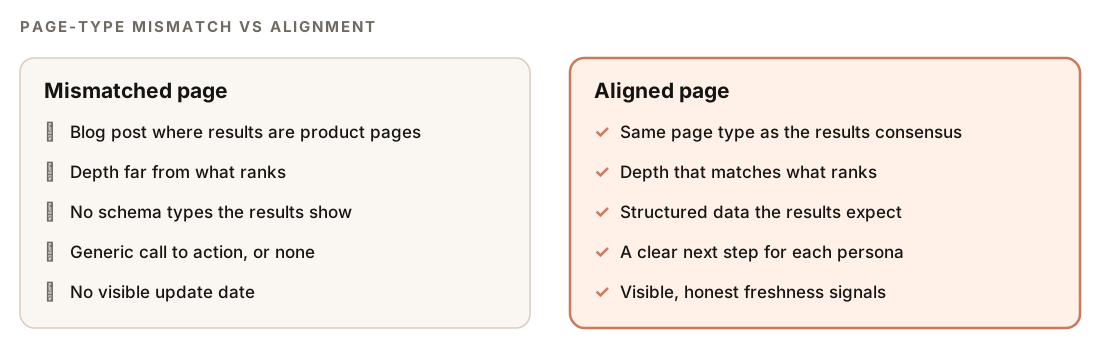
Start with the recommendation in the mismatch table. Sometimes the fix is a new page, not a rewrite: if the results are product pages, a dedicated product page should target the keyword, and your blog post can target an informational query and link across.
Then work through the weakest dimensions. The report points specific gaps to other commands:
- E-E-A-T gaps go to
/claudeseo contentfor a deeper audit. - Missing schema types go to
/claudeseo schemafor generation. - Local intent in the results goes to
/claudeseo local. - Content depth gaps go to
/claudeseo page. - Image and media gaps go to
/claudeseo images. - Technical problems found during the fetch go to
/claudeseo technical.
Use the wireframe for the rebuild
The wireframe output compares an IST outline (the page as it is today) with a SOLL outline (the page it should become). The terms come from German for "as is" and "should be". The target outline is built from the results consensus, the gap analysis, and the persona weaknesses, and it uses concrete placeholders. "Add a CTA here" isn't accepted; "Add pricing CTA with annual savings badge below hero, linking to /pricing#enterprise" is the expected level of detail. The output is an annotated, semantic HTML section outline.
Once you've reviewed the target outline, ask Claude Code to apply it:
Restructure the page template for /standing-desks to match the SOLL wireframe from the SXO report. Keep existing copy where it fits, mark new sections with placeholders, and show me the diff before saving.The E-E-A-T content feature covers the trust side of persona gaps, and the search and AI readiness checks cover structure that helps both Google and AI answers.
Doing it without the skill
You can run a basic SXO check with plain Claude Code prompts:
Search Google for "[keyword]". For each of the top 10 organic results, record the URL, the page type (blog post, product page, category page, comparison, tool, local page, or other), the content format, and any visible rich results. Then list the People Also Ask questions and related searches. Tell me which page type dominates and what share of the results it covers.Fetch [my URL]. Classify its page type and compare it with the dominant type from the results above. If they differ, explain what the page would need to become to match. Then write three user stories in the format "As a [persona], I want to [goal], because [driver], but I'm blocked by [barrier]", citing the results signal behind each one.The skill adds what's hard to keep consistent by hand: one taxonomy for every classification, fixed consensus thresholds, a weighted 100-point gap score, persona scoring, a limitations section, optional DataForSEO data, and wireframes.
SXO mistakes to avoid
- Optimizing the wrong page. If the results want a product page, a better blog post usually won't get there. Build the right page.
- Treating one check as permanent. Results pages change. Re-run the analysis when rankings move.
- Ignoring fragmented results. No dominant type can mean room for a different format, not a dead end.
- Writing user stories from opinion. Every story should trace to a real signal on the results page.
- Averaging away weak personas. A good average can hide one audience the page fails completely. Fix the weakest first.
- Merging the scores. Report the SXO Gap Score next to the SEO Health Score, not inside it.
Related guides
- E-E-A-T content audit with Claude Code for the authority and trust gaps SXO surfaces
- Single-page SEO analysis with Claude Code for deeper on-page work
- Comparison and alternatives pages with Claude Code when the results expect a comparison
- The full Claude SEO skill list for every command in the suite
FAQ
What is the difference between SEO and SXO?
SEO focuses on whether search engines can crawl, understand, and rank a page. SXO focuses on whether the page fits what searchers want for a specific keyword, judged by what already ranks. A page can pass every technical check and still fail SXO because it's the wrong type of page.
What is a page-type mismatch?
A page-type mismatch happens when your page is a different kind of page from the ones ranking for your keyword, such as a blog post where the results are product pages. The SXO skill rates mismatches from critical to medium, or aligned when the types match.
How do I find the search intent of a keyword?
Look at the results page. The dominant page type, the featured snippet format, People Also Ask questions, ad copy, and related searches all show what searchers expect. The /claudeseo sxo command records these signals and turns them into a consensus and user stories.
What is a good SXO Gap Score?
Higher is better: the score runs from 0 to 100, and a higher number means your page is closer to what the results reward. Use the per-dimension breakdown to see where points are lost, and fix any page-type mismatch first.
Do I need DataForSEO to run an SXO analysis?
No. The skill works with web search by default and notes reduced precision in its output. If you connect DataForSEO's MCP tools, it can use them for more precise results data after showing a cost estimate and getting your confirmation. DataForSEO's own pricing applies.
What does IST and SOLL mean in an SXO wireframe?
IST is the current state of the page and SOLL is the target state, from the German words for "is" and "should". The wireframe subcommand outputs both as annotated HTML section outlines, with concrete placeholders for each change.