
Technical SEO
Schema Markup with Claude Code: Detect, Validate, Generate
Use schema markup with Claude Code: detect JSON-LD, Microdata and RDFa, fix validation errors, avoid deprecated types, and generate linked JSON-LD.
Schema markup with Claude Code lets you find, validate, and write the structured data on your pages without leaving your editor. One command detects every JSON-LD, Microdata, and RDFa block on a page, checks each one against Google's rules, flags deprecated types, and generates corrected JSON-LD with clearly marked placeholders for anything it can't verify.
This guide explains what schema markup does, how the ClaudeSEO /claudeseo schema and /claudeblog schema commands work, how to read the report, and how to fix the errors it finds.
Key takeaways
- Schema markup describes a page's entities (an article, a product, a business, an author) in a vocabulary search engines and AI systems can read reliably.
/claudeseo schema <url>detects all three markup formats, validates every block against an eight-point checklist, and generates JSON-LD for the gaps it finds./claudeblog schema <file>builds a complete@graphfor a blog post, with entities linked by stable@idreferences.- The skill never recommends deprecated types such as HowTo, and it treats existing FAQPage markup as an Info note, not an error.
- Generated markup uses only truthful data. Anything the skill can't verify becomes a placeholder for you to fill in.
What is schema markup and why does it matter?
Schema markup is code you add to a page to describe what's on it, using the shared vocabulary published at Schema.org. Instead of leaving a search engine to guess, you state it directly: this is a Product, this is its name and price, and this Organization sells it.
Structured data comes in three formats:
- JSON-LD: a script block in the page, separate from the visible HTML. This is the format Google recommends.
- Microdata: attributes such as
itemscopeanditempropadded to existing HTML elements. - RDFa: attributes such as
typeofandproperty, also written inline in the HTML.
Schema matters for three reasons:
- Rich results. Structured data makes a page eligible for enhanced listings, such as product details, review stars, or breadcrumbs. Eligibility isn't a promise; Google decides when to show them.
- Entity understanding. Markup connects an article to its author and the author to the organization, so search engines and AI systems can see who is behind the content.
- Template errors repeat. Markup usually comes from a theme or component, so one mistake repeats on every page that uses it.
The rules also change. Google retires rich result types over time, so markup that once earned a search feature can stop producing one.
Google's introduction to structured data is the reference for how Google reads markup.
What the /claudeseo schema command does
The command is part of the Claude SEO skill suite and is the engine behind our schema markup feature. You give it a URL, and Claude Code works through the page in a fixed order:
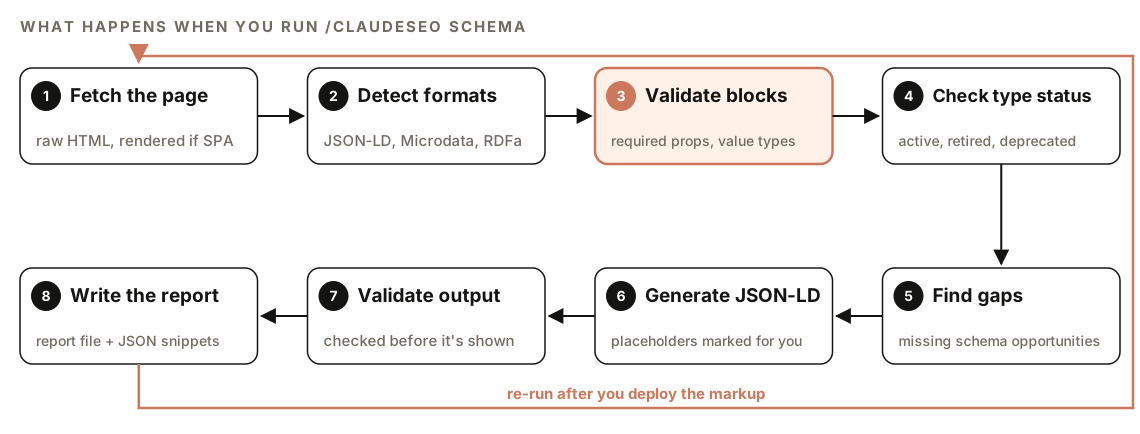
- Fetch the page. It fetches the raw HTML and only renders the page in a headless browser when it detects a single-page app shell. Many JavaScript frameworks inject JSON-LD on the client, so the raw HTML can look empty even when the rendered page has full markup.
- Detect formats. It scans for JSON-LD script blocks, Microdata attributes, and RDFa attributes.
- Validate blocks. Each block is checked for the required properties of its type, correct value types, and common errors.
- Check type status. Each type is compared with the skill's list of active, retired, and deprecated types.
- Find gaps. It works out what the page is and identifies schema it should have but doesn't.
- Generate JSON-LD. It writes markup for the recommended additions, with all required and recommended properties.
- Validate output. The generated code goes through the same checks before you see it.
- Write the report. Results go into
SCHEMA-REPORT.md, and ready-to-use snippets go intogenerated-schema.json.
If the page has no structured data, the command says so and recommends types based on the page content. If the URL can't be reached, it reports the status code and suggests checking whether the page sits behind a login.
When the schema check runs as part of a full site audit, its findings feed the Schema / Structured Data category of the audit report.
What the schema check validates
The validation checklist
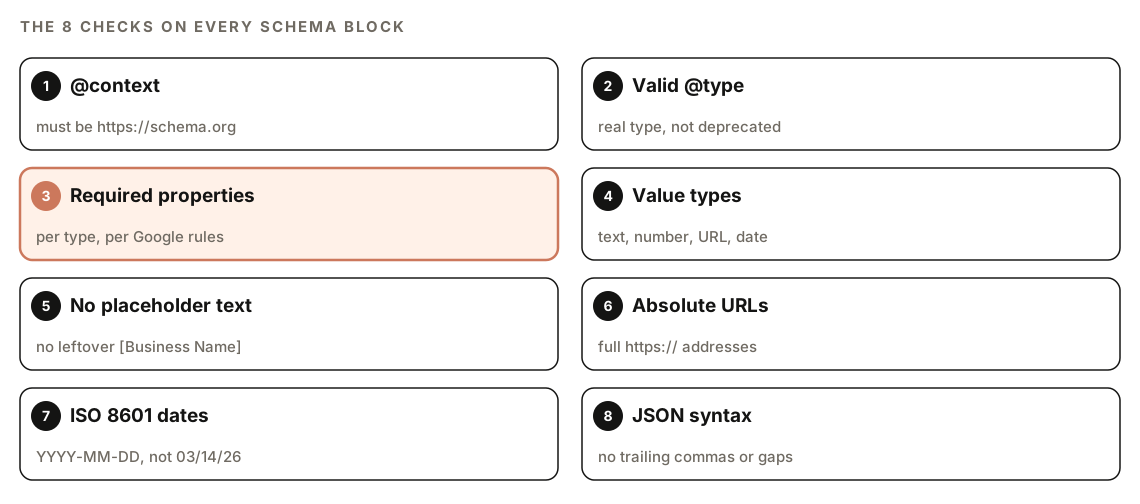
Every block, whether it's already on your page or was just generated, is checked for the following:
@contextishttps://schema.org, not the olderhttp://form.@typeis a real Schema.org type and isn't deprecated.- Every required property for that type is present.
- Property values match the expected types, such as a date where a date belongs.
- No placeholder text, such as
[Business Name], is left in the markup. - URLs are absolute (
https://example.com/logo.png, not/logo.png). - Dates use ISO 8601 format (
YYYY-MM-DD, optionally with a time). - The JSON-LD parses, with no missing brackets, trailing commas, or unquoted keys.
When a block is broken, the report names the specific syntax problem and gives you corrected JSON-LD.
JSON-LD first
The skill detects all three formats but always recommends JSON-LD as the primary one. It's Google's stated preference, and it's easier to maintain because the markup lives in one block instead of being spread across HTML attributes. If your site uses Microdata today, the report shows what it found, and the generated code gives you the JSON-LD version.
Active, retired, and deprecated types
The skill recommends a defined set of active types freely, including Organization, LocalBusiness, Product, Offer, Service, Article, BlogPosting, Review, BreadcrumbList, Person, VideoObject, Event, JobPosting, and Course.
It never recommends the types its list marks as deprecated or retired from rich results: HowTo, SpecialAnnouncement, CourseInfo, EstimatedSalary, LearningVideo, ClaimReview, VehicleListing, Practice Problem, and Dataset. The blog command's list also includes Sitelinks Search Box. When the page audit finds one of these, it flags the type, notes when it was retired, and recommends the current replacement, or removal if there isn't one.
FAQPage: no rich result, still kept
FAQPage is a special case. Google no longer shows FAQ rich results for most sites, so the markup won't change how your listing looks. The skill still doesn't treat existing FAQPage markup as an error. It flags it at Info priority and doesn't recommend removing it, because the question-and-answer structure can still help AI systems understand and cite the page. Add new FAQPage markup for AI visibility if you like, but don't expect a search feature from it.
Server-rendered versus JavaScript-injected markup
Structured data added by JavaScript can be processed later than markup in the initial HTML. For time-sensitive markup, especially Product and Offer, the skill recommends putting JSON-LD in the server-rendered HTML. On single-page apps, it can compare the raw HTML with the rendered page, so you can see whether your schema exists before any JavaScript runs.
How to run a schema audit with Claude Code
Open your project in Claude Code with ClaudeSEO installed (our guide to installing SEO skills in Claude Code covers setup), then run:
/claudeseo schema https://www.example.com/products/blue-widgetYou can also ask in plain English. The skill responds to words such as "schema", "structured data", "rich results", "JSON-LD", and "markup":
Check the structured data on https://www.example.com/pricing and tell me which schema blocks have errors and what's missing.For a blog post in your repository, point the blog command at the file instead of a URL:
/claudeblog schema content/blog/my-post.mdNeither command needs a third-party API key for its core job. The one optional extra: /claudeblog schema can pull embedded video details from the YouTube Data API if you've connected Google APIs through /claudeblog google.
Generating complete blog post schema with /claudeblog schema
The SEO command audits pages. The blog command writes markup for content you're about to publish. It reads one post and produces every entity the post needs, combined into a single script tag:
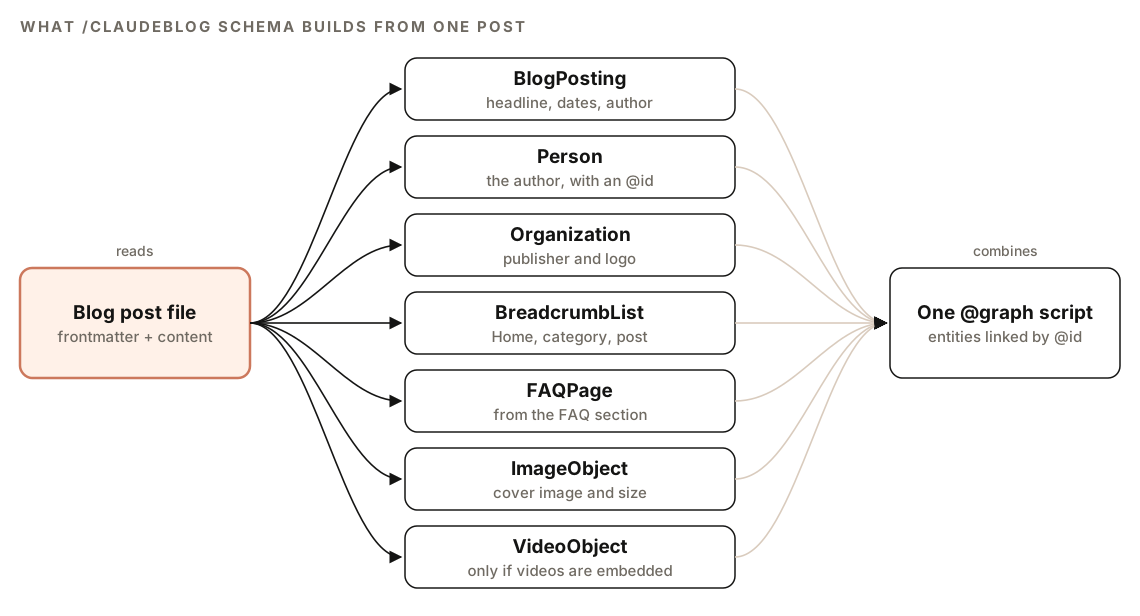
It extracts the title, author details, dates, meta description, FAQ pairs, images, organization details, categories, and slug, then builds each entity. BreadcrumbList falls back to "Blog" when the post has no category. ImageObject uses the cover image's real dimensions and a caption that matches its alt text. VideoObject is added once per embedded YouTube video.
The key idea is the @graph pattern. Each entity gets a stable @id, and other entities point to it instead of repeating it. Here's the shape of the output, shortened, with placeholders in brackets:
<script type="application/ld+json">
{
  "@context": "https://schema.org",
  "@graph": [
    {
      "@type": "BlogPosting",
      "@id": "https://example.com/blog/[slug]#article",
      "headline": "[Post title]",
      "datePublished": "[YYYY-MM-DD]",
      "dateModified": "[YYYY-MM-DD]",
      "author": { "@id": "https://example.com/author/[author-slug]#person" },
      "publisher": { "@id": "https://example.com#organization" },
      "image": { "@id": "https://example.com/blog/[slug]#primaryimage" }
    },
    {
      "@type": "Person",
      "@id": "https://example.com/author/[author-slug]#person",
      "name": "[Author name]",
      "jobTitle": "[Role]"
    },
    {
      "@type": "Organization",
      "@id": "https://example.com#organization",
      "name": "[Organization name]",
      "logo": { "@type": "ImageObject", "url": "https://example.com/logo.png" }
    }
  ]
}
</script>
Before handing it over, the blog command runs its own validation rules:
| Check | Rule |
|---|---|
| @id references | Every reference resolves to an entity in the graph |
| Dates | dateModified is the same as or later than datePublished |
| Headline | 110 characters or fewer |
| Description | Between 50 and 160 characters |
| URLs | All absolute |
| Images | Width and height are positive whole numbers |
| Breadcrumbs | Positions run in order starting from 1 |
| FAQPage | At least two questions |
You choose the output: embedded HTML for the <head> or before </body>, standalone JSON for a CMS schema field, or an MDX component if your project uses MDX. The schema can go into the post file or a separate file.
How to read the schema report
The page audit produces two files. SCHEMA-REPORT.md holds detection and validation results in roughly this shape:
## Schema Report

### Detection
- Formats found: [JSON-LD / Microdata / RDFa / none]

### Validation Results
| Schema | Type | Status | Issues |
|--------|------|--------|--------|
| [block] | [type] | [Pass / Warning / Fail] | [issue list] |

### Recommendations
- Missing schema opportunities
- Validation fixes needed
- Generated code for implementation
generated-schema.json holds the ready-to-use JSON-LD snippets that the Recommendations section refers to.
Each row of the Validation Results table is one schema block, with a status and its issues. We suggest fixing blocks that fail to parse or miss required properties first, because those can't produce rich results at all, then deprecated types, then warnings, then the missing opportunities.
| Issue | What it means | Fix |
|---|---|---|
| Invalid JSON syntax | The block can't be parsed, so it's ignored | Use the corrected JSON-LD from the report |
| Missing required property | The block isn't eligible for its rich result | Add the property using real page data |
| Relative URL | A logo or image path like /logo.png | Use the full https:// address |
| Placeholder text | Template text was never replaced | Fill in the real value or remove the property |
| Deprecated type | No rich result, never recommended | Replace it or remove it |
| Existing FAQPage | Info only, not an error | Keep it if the Q&A content is genuine |
How to fix common schema errors
Most schema problems live in one template, so a single fix corrects every page that uses it. Here's a typical broken Article block:
{
  "@context": "http://schema.org",
  "@type": "Article",
  "headline": "[Title]",
  "image": "/images/cover.jpg",
  "datePublished": "14/03/2026"
}
It has four problems: an http context, a leftover placeholder, a relative image URL, and a non-ISO date. It also leaves out the author and publisher that the skill's Article template includes. The corrected version:
{
  "@context": "https://schema.org",
  "@type": "Article",
  "headline": "How to Choose a Standing Desk",
  "image": "https://example.com/images/cover.jpg",
  "datePublished": "2026-03-14",
  "author": { "@type": "Person", "name": "Jane Doe" },
  "publisher": {
    "@type": "Organization",
    "name": "Example Co",
    "logo": { "@type": "ImageObject", "url": "https://example.com/logo.png" }
  }
}
Once you've reviewed the generated snippets, ask Claude Code to apply them where the markup is produced:
Apply the JSON-LD from generated-schema.json to the component that renders the <head> for product pages. Replace every placeholder with real values from the product data, keep the markup server-rendered, and show me the diff before saving.After deploying, test a few live URLs in Google's Rich Results Test, then re-run /claudeseo schema to confirm every block passes.
One rule matters more than any validator: mark up only what visitors can see. The skill marks anything it can't verify as a placeholder. Never fill those with invented ratings, prices, or credentials just to make a block pass.
Doing it without the skill
You can run a basic schema check with a plain Claude Code prompt. This works well for a handful of pages:
Fetch https://www.example.com/page and extract every <script type="application/ld+json"> block, plus any Microdata (itemscope, itemprop) or RDFa (typeof, property) markup. For each block, check: is @context "https://schema.org", is @type a valid Schema.org type that Google still supports, are the required properties for that type present, are all URLs absolute, are dates ISO 8601, and is any placeholder text left? Output a table with block, type, status, and issues, then write corrected JSON-LD for each failing block.And to generate linked schema for a post:
Read content/blog/my-post.md and generate JSON-LD as a single @graph with BlogPosting, Person (the author), Organization (the publisher), and BreadcrumbList. Give each entity a stable @id and reference entities by @id instead of repeating them. Use only data that appears in the post or its frontmatter, and mark anything missing as a [placeholder].Plain prompts rely on the model's general knowledge of which types Google still supports, and that list changes. The skill adds a written list of active and deprecated types, the same checklist on every block, rendering for JavaScript-heavy pages, consistent report files, and the blog graph's own validation rules.
Schema mistakes to avoid
- Marking up content that isn't on the page. Ratings, prices, and reviews in your markup must match what visitors see.
- Shipping placeholders.
[Business Name]in production markup is a validation failure, not a harmless gap. - Adding deprecated types for rich results. HowTo and the other retired types won't produce a search feature.
- Injecting product markup only with JavaScript. Put time-sensitive Product and Offer markup in the server-rendered HTML.
- Repeating the same entity in several blocks. Define the author and organization once with an
@idand reference them. - Treating valid markup as a ranking guarantee. Valid schema makes a page eligible for rich results; it doesn't promise them.
Related guides
- Technical SEO audit with Claude Code for rendering, canonicals, and indexing
- How to run a full SEO audit with Claude Code, which includes the schema check
- E-commerce SEO with Claude Code for Product schema and shopping feeds
- The generative engine optimization guide for AI search visibility
FAQ
What is schema markup in SEO?
Schema markup is structured data, written in the Schema.org vocabulary, that tells search engines what a page contains, such as an article, a product, or a business. It can make a page eligible for rich results and helps search engines and AI systems understand it.
Does schema markup improve rankings?
Not directly. Google uses structured data to understand pages and to decide which are eligible for rich results, but having markup doesn't promise higher positions. Its value is clearer listings and clearer entity information.
Is JSON-LD better than Microdata?
For most sites, yes. Google recommends JSON-LD, and it's easier to maintain because the markup sits in one script block instead of being spread across HTML attributes. The schema check detects all three formats but recommends JSON-LD.
Should I still use FAQ schema?
Google no longer shows FAQ rich results for most sites, so don't add it expecting a search feature. If you already have accurate FAQPage markup, the skill flags it as Info and doesn't recommend removing it, because the structure can still help AI systems understand the page.
Can Claude Code generate schema markup automatically?
Yes. /claudeseo schema <url> generates JSON-LD for missing or broken markup on a page, and /claudeblog schema <file> builds a full linked graph for a blog post. Both use placeholders for anything they can't verify, so review the output and fill in real values before you deploy.
How do I test schema markup after adding it?
Deploy the change, then test a live URL with Google's Rich Results Test to see which rich results the page is eligible for. Then re-run /claudeseo schema to confirm every block passes the full checklist.