
On-Page SEO
Blog Post SEO Checklist: Validate Posts with Claude Code
A blog post SEO checklist you can run in Claude Code: validate titles, meta descriptions, headings, links, canonicals, social tags, and URLs before publishing.
A blog post SEO checklist is the list of on-page elements every post should get right before it goes live: the title tag, meta description, headings, links, canonical URL, social sharing tags, and URL. In Claude Code, /claudeblog seo-check <file> validates all of them against a finished draft and returns a pass/fail report with a specific fix for every failure.
This guide explains what belongs on a blog post SEO checklist, what the ClaudeSEO command checks and why, how to run it, and how to fix the failures it finds.
Key takeaways
- Run the checklist after writing and before publishing, while every fix is still a quick edit.
/claudeblog seo-check <file>checks the title, meta description, headings, internal and external links, canonical URL, Open Graph and Twitter Card tags, and URL structure.- Every check gets PASS, FAIL, WARN, or N/A, and the report ends with the three most impactful fixes.
- It also catches duplicate links in the body, statistics without a named, dated source, and linked pages that don't link back.
- It validates on-page SEO only. Writing quality and depth belong to the broader 100-point score.
What is a blog post SEO checklist?
On-page SEO covers everything on the page itself that helps search engines understand it and helps searchers choose it: the title shown in results, the description under it, a clear heading structure, links to related pages, and a clean URL. A checklist turns those elements into specific pass/fail tests you can run on every post.
Templates handle some of this, but many fields are written by hand for each post: the title, description, slug, canonical, social image, and every body link. Those are the fields that slip. A title runs long, a description is copied from another post, or the same page is linked three times with "click here" as the anchor.
None of these mistakes is dramatic alone. Together, they affect how your result reads in search, how shared links look, and how well search engines understand where the post fits on your site. A checklist catches them before the post is indexed.
For titles and descriptions in depth, including how Google rewrites titles and how to audit a whole site, see our guide to title tags and meta descriptions with Claude Code. This guide covers the full per-post checklist.
What the /claudeblog seo-check command does
The command is part of the Claude Blog skill suite. It runs after you've written a post and before you publish it. It works like an on-page SEO reviewer: it identifies issues and prescribes fixes, but it doesn't rewrite your content.
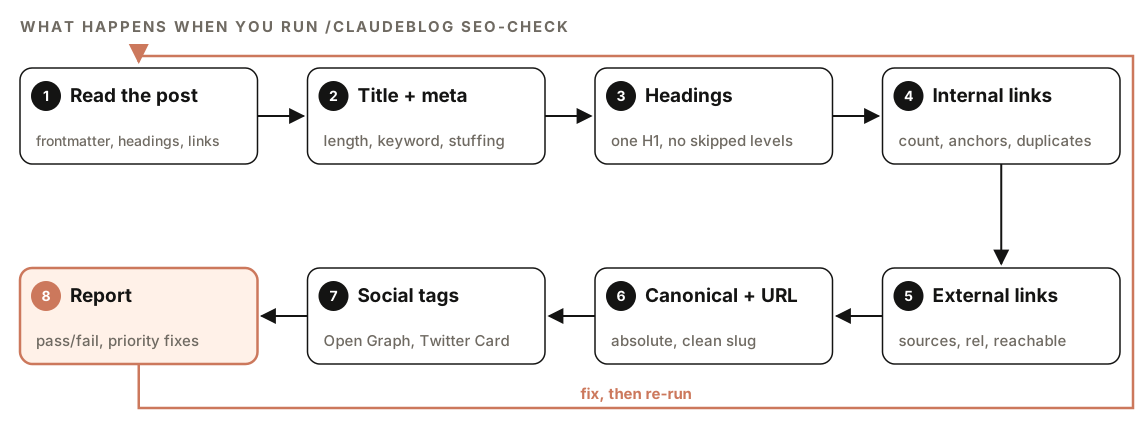
- Read the post. It extracts the frontmatter (title, description, date, last updated, author, tags, canonical, og:image, and slug), the full heading structure, every link with its anchor text, the meta tags, and the body text. If you pass a URL instead of a file, it fetches the page.
- Title and meta description. It checks length, keyword placement, and keyword stuffing.
- Headings. It checks for one H1, no skipped levels, and the share of question-style H2s.
- Internal links. It counts links, judges anchor text, flags duplicates, and checks your project for pages that don't link back.
- External links. It checks source quality, rel attributes, and whether the top links are reachable.
- Canonical and URL. It confirms the canonical is absolute and self-referencing and the slug is clean.
- Social tags. It checks the Open Graph and Twitter Card tags that control how shared links look.
- Report. It writes a pass/fail table with a fix for each failure and a short list of priority fixes.
What's on the checklist
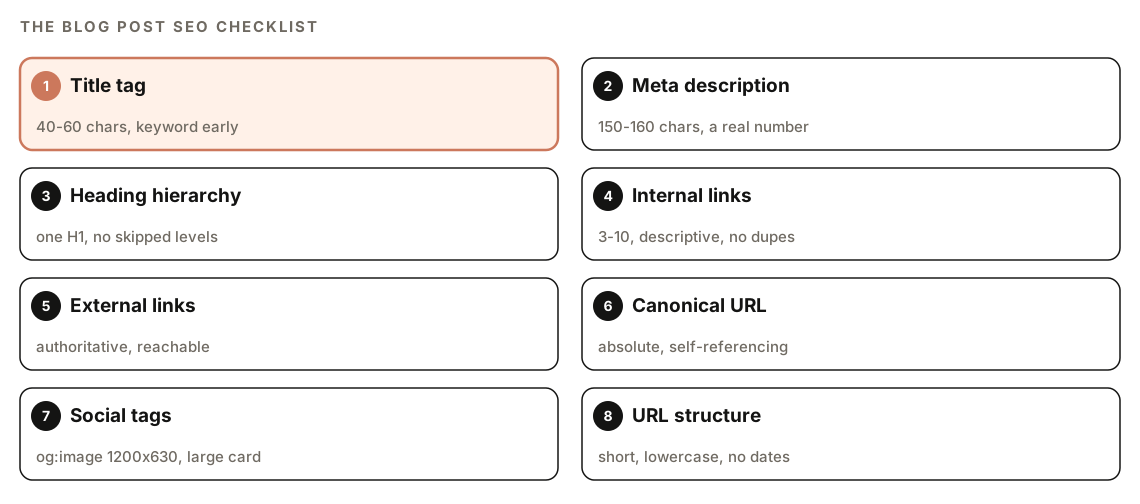
Title tag
The skill passes titles of 40 to 60 characters with the primary keyword in the first half. It also checks that nothing important is lost if a search result cuts the title at 60 characters, that the title is specific to this post rather than generic, and that it contains at least one "power word" such as Guide, How, Why, Complete, or Essential. That last test is about click appeal, not a ranking rule.
Our title tag guide recommends aiming for about 50 to 60 characters, so treat 50 as a practical floor even though the skill's own range starts at 40. Google's guidance on title links in search results explains how Google builds the title it shows and when it rewrites yours.
Meta description
The skill's setting is 150 to 160 characters, the top end of the roughly 120 to 160 range in our title and meta guide. It also wants:
- At least one specific number or data point from the post.
- The primary keyword, used naturally and no more than once.
- A clear reader benefit at the end, with wording that implies action, such as learn, discover, or see.
Heading hierarchy
The page should have exactly one H1 (the title) and never skip a level, so an H2 is followed by H3s, not H4s. The skill looks for the primary keyword in 2 to 3 headings, 6 to 8 H2 sections in a standard post, every heading under 70 characters, and 60 to 70% of H2s phrased as questions. Question-style headings mirror how people search. The report shows the hierarchy as a tree, so you can see where a level is skipped.
Internal links
Internal links help readers move to related posts and help search engines find and understand your pages. The skill wants 3 to 10 internal links per post, with descriptive anchor text rather than "click here" or "read more", spread through the post instead of bunched in one section. The post must link to at least 3 other pages and never to itself.
It also scans your project for the pages you link to and flags any that don't link back. And it flags repetition: each URL should appear only once in the body. URLs that differ only by a trailing slash, query string, or #fragment count as the same URL, header and footer navigation is exempt, and when a link repeats, the skill recommends keeping the instance with the most descriptive anchor. Our internal linking guide covers planning links across a whole blog.
External links and citations
The skill wants at least 3 external links, all to authoritative sources rather than SEO blogs, and no unnecessary links to direct competitors. Sponsored and user-generated links need a qualifying rel attribute such as nofollow, and links that open in a new tab need rel="noopener". It fetches the top external links to confirm they still resolve and lists any broken ones.
For every public statistic, it applies a three-part evidence test: the year appears in the prose before the number ("In [year], ..."), the citation names both the publisher and the report, and a sources block at the end gives the URL and the date it was retrieved. A statistic that fails should be dropped or replaced with a verified one. Our guide to fact-checking AI content goes deeper on verifying the numbers themselves.
Canonical URL
A canonical URL tells search engines which address is the main version of a page. The check confirms one is defined, that it's a full absolute URL (with https:// and the domain), that it points to the post itself unless you've deliberately set a cross-domain canonical, and that it follows your site's trailing slash convention.
Open Graph and Twitter Card tags
These tags control the title, description, and image shown when someone shares the post on social platforms or in messaging apps. The check looks for og:title, og:description, og:image (at least 1200 by 630 pixels, as an absolute URL), og:type set to article, og:url matching the canonical, and og:site_name. For X, it wants twitter:card set to summary_large_image, a title under 70 characters, a description under 200 characters, an image, and twitter:site if you have an account. In a Markdown-only project with no HTML head, N/A is an acceptable result for social tags and the canonical.
URL structure
The slug should be short (the skill flags paths over 75 characters), contain the primary keyword or a close variant, and use only lowercase letters, numbers, and hyphens. It should have no date segments such as /2026/, no file extensions such as .html, and as few stop words ("the", "a", "and", "of") as possible. Google's URL structure guidelines also recommend simple, readable URLs.
How to run the SEO check
Open your project in Claude Code with Claude Blog installed and point the command at a draft:
/claudeblog seo-check content/blog/my-new-post.mdIt also works on a published page:
/claudeblog seo-check https://www.example.com/blog/my-new-postOr ask in plain English:
Run an SEO check on content/blog/my-new-post.md before I publish it, and list the failures with fixes.When the post has a published URL and you've set up Google API access for Claude Blog (through /claudeblog google [command] [args]), the check can add a live performance section: Lighthouse scores for performance, accessibility, best practices, and SEO, Core Web Vitals field data for LCP, INP, and CLS with traffic-light ratings, and the top three opportunities. This needs your own Google credentials, and Google's own pricing and quotas apply. Without credentials, or for an unpublished draft, the check skips this section.
How to read the SEO validation report
The report follows the same structure every time:
## SEO Validation Report: [Title]

**File**: [path or URL]
**Date**: [check date]
**Overall**: [X/Y checks passed] - [PASS/NEEDS WORK/FAIL]

### Results
| # | Check | Status | Details | Fix |
|---|-------|--------|---------|-----|
| 1 | Title length | [PASS/FAIL] | [XX chars] | [fix or -] |
| 2 | Title keyword | [PASS/FAIL] | [where the keyword appears] | [fix or -] |
| 3 | Meta description length | [PASS/FAIL] | [XXX chars] | [fix or -] |

### Summary
**Passed**: [N] checks
**Failed**: [N] checks

### Priority Fixes
1. [Most impactful fix: what to change and where]
2. [Second most impactful fix]
3. [Third most impactful fix]

### Notes
Each check has one of four statuses:
| Status | Meaning |
|---|---|
| PASS | Meets the criteria |
| FAIL | Doesn't meet the criteria; a fix is provided |
| WARN | Partly meets the criteria or is an edge case |
| N/A | Doesn't apply, such as Twitter tags on a site without an X account |
Start with Priority Fixes, the three changes with the most impact, then work down the results table. Title and meta failures are quick to fix and show up in every search impression, and the report gives exact character counts for both.
How to fix common failures
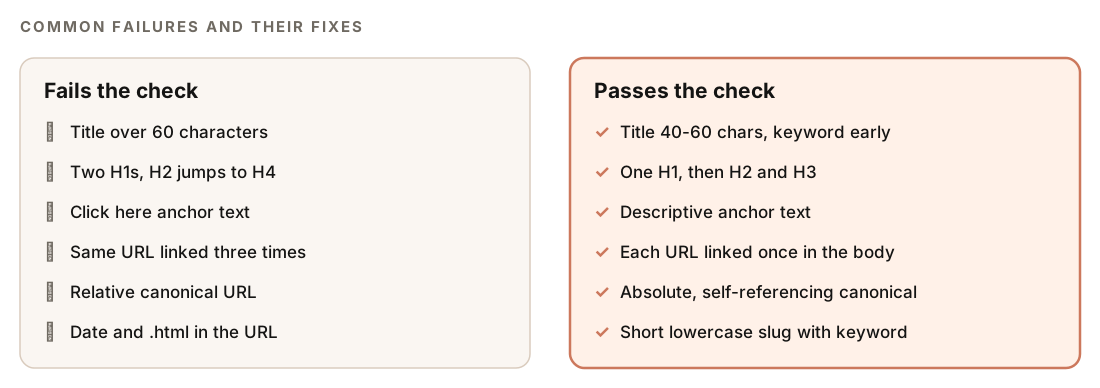
Most fixes live in two places: the post's frontmatter and the template that renders the page head. If your social tags or canonical are missing on every post, fix the template once rather than each post. A complete head for a blog post looks like this:
<link rel="canonical" href="https://www.example.com/blog/post-slug" />
<meta property="og:title" content="[Post title]" />
<meta property="og:description" content="[Description of the post]" />
<meta property="og:image" content="https://www.example.com/images/post-slug.png" />
<meta property="og:type" content="article" />
<meta property="og:url" content="https://www.example.com/blog/post-slug" />
<meta property="og:site_name" content="[Blog name]" />
<meta name="twitter:card" content="summary_large_image" />
<meta name="twitter:title" content="[Post title]" />
<meta name="twitter:description" content="[Description of the post]" />
<meta name="twitter:image" content="https://www.example.com/images/post-slug.png" />
For the per-post failures, give Claude Code the report and let it make the edits:
Apply the fixes from the SEO validation report to content/blog/my-new-post.md: shorten the title, rewrite the meta description, fix the skipped heading level, replace vague anchors, and remove duplicate links. Don't change the body text otherwise, and show me the diff before saving.Changing the slug of a published post changes its URL, so only do it before publishing, or add a redirect from the old address.
How the SEO check fits with scoring and AI readiness
The SEO check is one of three checks you can run on a draft, and each answers a different question:
- `/claudeblog seo-check`: are the on-page SEO elements correct?
- `/claudeblog analyze`: how good is the post overall? It scores content quality, SEO, E-E-A-T, technical elements, and AI citation readiness out of 100, as our guide to scoring a blog post before publishing and the 100-point content scoring page explain.
- `/claudeblog geo`: is the post ready to be cited in AI answers? See search and AI readiness.
A post can pass every SEO check and still be thin, so use the score for depth and the SEO check for correctness.
Doing it without the skill
You can run a basic version with a plain Claude Code prompt:
Read content/blog/my-new-post.md. Check: title length (50-60 characters) and whether the main keyword is in the first half; meta description length (120-160 characters) and keyword use; exactly one H1 and no skipped heading levels; internal links (count, anchor text, any URL linked more than once); external links (source quality, rel attributes); an absolute self-referencing canonical; og:title, og:description, og:image, og:type, and twitter:card; and a short lowercase slug with no dates. Output a table with check, PASS or FAIL, details, and fix.The skill adds a fixed set of tests run the same way every time, the link-back check across your project, URL normalization for duplicate links, the evidence test for statistics, reachability checks on external links, and the optional live performance data.
Blog post SEO mistakes to avoid
- Checking after publishing. The page may already be indexed with the wrong title or URL.
- Adding dates to URLs. A dated slug makes an updated post look old.
- Reusing a description. Every post needs its own.
- Linking the same page repeatedly. Link it once, with the clearest anchor.
- Relative canonicals. Always use the full URL, including
https://and the domain. - Chasing a perfect checklist. The checks support a useful post; they can't replace one.
Related guides
- Title tags and meta descriptions with Claude Code
- How to score a blog post before publishing
- Internal linking with Claude Code
- The full Claude Blog skill list
FAQ
What should a blog post SEO checklist include?
At minimum: a title tag of the right length with the keyword early, a meta description with the keyword and a clear benefit, one H1 and a clean heading hierarchy, descriptive internal links, authoritative external links, an absolute canonical URL, Open Graph and Twitter Card tags, and a short keyword-based URL. /claudeblog seo-check tests all of these on one post.
How long should a blog post title be?
Aim for about 50 to 60 characters, with the main keyword near the start. Longer titles are often cut off in search results. The SEO check's own range is 40 to 60 characters, and it also checks that the title still makes sense if it's cut at 60.
How many internal links should a blog post have?
The SEO check passes posts with 3 to 10 internal links, with descriptive anchors spread through the text. What matters most is that each link helps the reader and that you link each page once.
Should blog post URLs include dates?
Usually not. A date in the URL makes a post look old once the year changes, even after an update, and removing it later means a URL change and a redirect. The SEO check flags date segments such as /2026/.
Do Open Graph tags help SEO?
Not as a ranking signal. They control the title, description, and image shown when someone shares your post on social platforms and in messaging apps, which affects whether people click. Without them, each platform picks a title, description, and image on its own.
What's the difference between an SEO check and a content score?
The SEO check is a pass/fail test of on-page elements such as titles, headings, links, and tags. A content score, such as the one from /claudeblog analyze, rates the whole post out of 100, including content quality, E-E-A-T, and AI citation readiness. Run both before publishing.