
On-Page SEO
Image SEO Audit with Claude Code: Alt Text, Size, Formats
Run an image SEO audit with Claude Code: fix alt text, oversized files, missing dimensions and lazy loading, and convert images to WebP or AVIF.
An image SEO audit checks every image on a page for the things that affect both search visibility and speed: descriptive alt text, sensible file sizes, modern formats, correct lazy loading, and set dimensions. With Claude Code, the /claudeseo images command runs those checks on any URL and returns a prioritized fix list, with file optimizations sorted by the savings they bring. It can also convert and tag the image files themselves.
This guide explains what image SEO covers, what the command checks, how to run it, how to read the report, and how to fix the most common image problems.
Key takeaways
- Image SEO has two jobs: help search engines understand your images, and stop images from slowing your pages down.
/claudeseo images <url>checks alt text, file size, format, responsive markup, lazy loading, dimensions, file names, and CDN caching for every image.- File size limits are tiered by image type, so a hero image and a thumbnail are judged against different thresholds.
- Never lazy-load the hero or LCP image. Give it
fetchpriority="high"instead, and lazy-load only images below the fold./claudeseo images optimize <path>converts files to WebP or AVIF, adds metadata, and builds responsive variants.
What is image SEO and why does it matter?
Image SEO is the work of making images easy for search engines to understand and cheap for browsers to load. It matters in three places.
- Understanding. Search engines can't see an image the way people do. They rely on alt text, file names, and the text around the image to work out what it shows. That affects whether and where the image appears in Google Images and in image features within regular results.
- Speed. Images are often the heaviest files on a page, and the hero image is frequently the Largest Contentful Paint (LCP) element. Images without set dimensions also cause layout shift as the page loads. Both feed into Core Web Vitals, where Google's "good" thresholds are an LCP of 2.5 seconds or less and a Cumulative Layout Shift (CLS) of 0.1 or less. See web.dev's guide to Core Web Vitals for the details.
- Accessibility. Screen readers read alt text aloud. A missing or meaningless alt attribute leaves those users with nothing.
The fixes are usually small: a better alt attribute, a converted file, one attribute added or removed. The hard part is finding every problem on every image, which is where an automated audit helps. Google's image SEO best practices are the reference for how Google treats images.
What the /claudeseo images command does
The command is part of the Claude SEO skill suite and complements our technical SEO audit, which covers Core Web Vitals in more depth. Give it a URL, and Claude Code parses every <img> element on the page, runs eight checks on each image, and merges the results into one report:
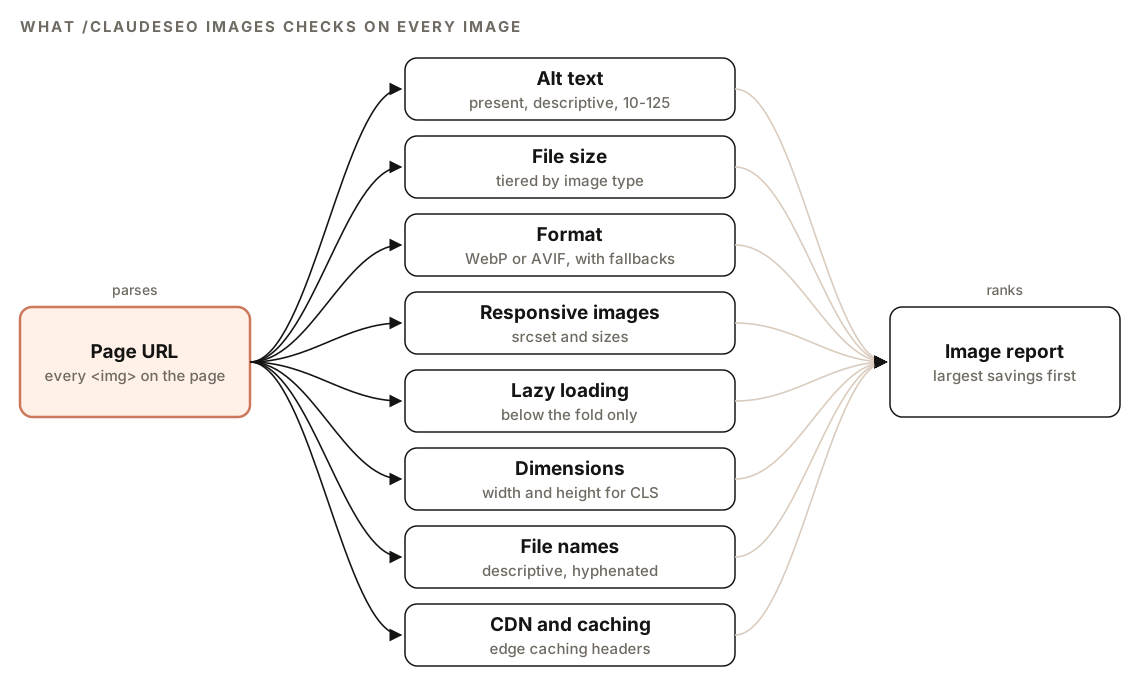
For each image, it reads the markup (alt text, source, width and height, loading, srcset, fetchpriority) and, where it can reach the file, measures the size and format. It also identifies how each image is lazy-loaded, so a JavaScript lazy-loader isn't mistaken for a missing attribute.
The command has three modes:
- Audit (
/claudeseo images <url>): the page checks described in this guide. - Image SERP analysis (
/claudeseo images serp <keyword>): compares your images with what ranks in Google Images for a keyword. - File optimization (
/claudeseo images optimize <path>): converts, compresses, and tags local image files.
If no images are found, the command says so and suggests checking whether images load through JavaScript or as CSS background images. If images sit behind a CDN or a login it can't access, it reports what the markup shows (alt text, dimensions, format) and flags the files it couldn't measure.
In a full site audit, a separate visual analysis agent complements these checks. It captures desktop and mobile screenshots in a headless browser and checks that the hero image loads properly above the fold, that images scale at different widths, and that nothing shifts on load.
What the image audit checks
Alt text
Every <img> needs alt text, except purely decorative images marked with role="presentation". The skill checks that alt text describes what the image shows, includes relevant keywords only where they fit naturally, and falls between 10 and 125 characters.
- Good: "Professional plumber repairing kitchen sink faucet"
- Bad: "image.jpg", which is a file name, not a description
- Bad: "plumber plumbing plumber services", which is keyword stuffing
- Bad: "Click here", which describes nothing
File size by image type
The skill uses tiered size thresholds, because a hero banner and a thumbnail have very different jobs. These are the skill's settings:
| Image type | Target | Warning | Critical |
|---|---|---|---|
| Thumbnails | Under 50KB | Over 100KB | Over 200KB |
| Content images | Under 100KB | Over 200KB | Over 500KB |
| Hero and banner images | Under 200KB | Over 300KB | Over 700KB |
It recommends compressing toward the target wherever that's possible without visible quality loss.
Modern formats
The skill recommends WebP as the default and AVIF where you want the best compression. JPEG remains the fallback for photos, PNG is for graphics that need transparency, and SVG is for icons, logos, and illustrations. It also checks for a <picture> element that serves the most efficient format first and falls back for older browsers:
<picture>
  <source srcset="image.avif" type="image/avif">
  <source srcset="image.webp" type="image/webp">
  <img src="image.jpg" alt="Descriptive alt text" width="800" height="600" loading="lazy" decoding="async">
</picture>
Responsive images
Phones shouldn't download desktop-sized files. The skill checks for a srcset attribute with several sizes, a sizes attribute that matches your layout breakpoints, and resolutions that suit high-density screens.
Lazy loading done right
loading="lazy" tells the browser to wait until an image is near the viewport. That's good for images below the fold and harmful for the hero, because it delays the LCP image. The skill checks both sides: lazy loading on below-the-fold images, and no lazy loading on above-the-fold images.
It also recommends fetchpriority="high" on the LCP image, so the browser downloads it early, and decoding="async" on other images, so decoding doesn't block the main thread.
The report shows how each image is lazy-loaded: the native attribute, a WordPress plugin such as Perfmatters or EWWW Image Optimizer, a generic JavaScript library, or nothing. If your site uses a JavaScript lazy-loader, the missing loading attribute is intentional, and the report makes that clear.
Dimensions and layout shift
Images without width and height attributes (or a CSS aspect-ratio) make content jump as they load, which hurts CLS. The skill flags every image without dimensions.
File names and CDN
File names should be descriptive, lowercase, and hyphenated: blue-running-shoes.webp, not IMG_1234.jpg. The skill also checks whether images come from a CDN and carry edge caching headers, and recommends a CDN for image-heavy sites.
How to run an image SEO audit with Claude Code
Open your project in Claude Code with ClaudeSEO installed (our guide to installing SEO skills in Claude Code covers setup), then run:
/claudeseo images https://www.example.com/products/running-shoesOr ask in plain English. The skill responds to phrases such as "image SEO", "alt text", "image audit", "optimize images", and "convert to webp":
Audit the images on https://www.example.com/blog/my-post. Which ones are missing alt text, oversized, or lazy-loaded above the fold?To compare your images with what ranks in Google Images:
/claudeseo images serp running shoesThis pulls Google Images results for the keyword and shows which domains hold the most image positions, common alt text patterns among top images, the mix of formats, and keywords where your pages rank but your images don't. It needs the DataForSEO extension and a DataForSEO account, and DataForSEO's own pricing applies. Without it, the command tells you and skips that section. Our guide to using DataForSEO with Claude Code covers setup.
To optimize local image files:
/claudeseo images optimize ./public/imagesOptimization runs on tools installed on your machine: exiftool for metadata, cwebp for WebP, and ImageMagick or FFmpeg as fallbacks. The skill checks which are available first and falls back when one is missing.
How to read the image audit report
The audit report has three parts:
## Image Audit Summary
| Metric | Status | Count |
|--------|--------|-------|
| Total Images | - | XX |
| Missing Alt Text | Fail | XX |
| Oversized (>200KB) | Warning | XX |
| Wrong Format | Warning | XX |
| No Dimensions | Warning | XX |
| Not Lazy Loaded | Warning | XX |

## Prioritized Optimization List
| Image | Current Size | Format | Issues | Est. Savings |
|-------|--------------|--------|--------|--------------|
| [image file] | XX KB | [format] | [issues] | XX KB |

## Recommendations
1. Convert X images to WebP format (est. XX KB savings)
2. Add alt text to X images
3. Add dimensions to X images
4. Enable lazy loading on X below-fold images
5. Compress X oversized images
The summary gives you the scale of each problem. Missing alt text is the only metric marked as a failure; the rest are warnings. The optimization list is sorted by file size impact, largest savings first, so the top rows are where compression and conversion pay off most.
When you decide what to fix first, it helps to know how the skill weighs each factor for Google Images:
| Factor | How the skill rates it | Where you set it |
|---|---|---|
| Alt text | Critical for ranking | The img alt attribute |
| File name | High for ranking | The file system |
| Page context | High for ranking | Text around the image |
| File size and speed | Medium, through Core Web Vitals | Compression and format |
| IPTC creator and copyright | Low, display only | Image file metadata |
| EXIF camera data | None | Not relevant for SEO |
| IPTC keywords | None | Ignored by Google |
How to fix common image problems
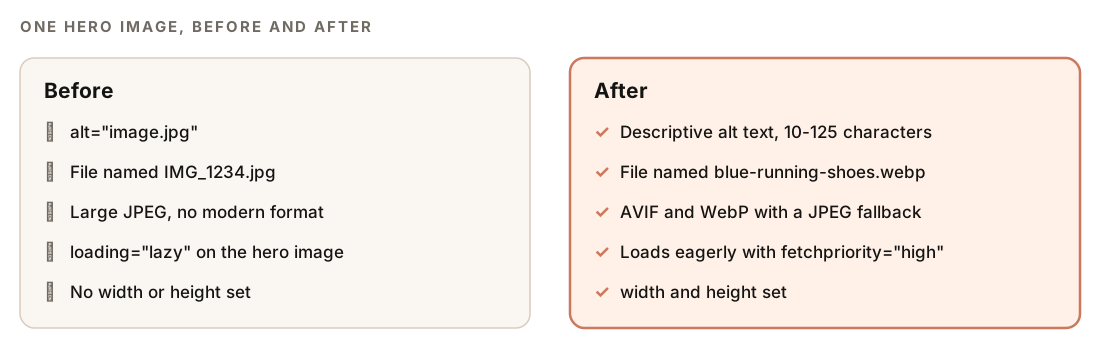
The hero image is where most pages lose the most. Here's a correct hero: no lazy loading, a high fetch priority, and set dimensions.
<img src="hero.webp" fetchpriority="high" alt="Runner tying blue trail shoes on a rocky path" width="1200" height="630">And a correct below-the-fold image: lazy, async decoding, dimensions set, and a responsive srcset.
<img
  src="image-800.webp"
  srcset="image-400.webp 400w, image-800.webp 800w, image-1200.webp 1200w"
  sizes="(max-width: 600px) 400px, (max-width: 1200px) 800px, 1200px"
  alt="Close-up of the shoe's grip pattern"
  width="800" height="600" loading="lazy" decoding="async">
Most of these fixes belong in the image component or template, not in individual pages. Once you've reviewed the report, ask Claude Code to apply them:
Using the image audit report, update the image component in this repo: remove loading="lazy" from the hero image and add fetchpriority="high", add width and height to every image, and add decoding="async" to images below the fold. Then list every image still missing alt text so I can write descriptions. Show me the diff first.Write the alt text yourself or review every suggestion. Only you know exactly what each image shows and why it's on the page.
Converting and tagging files with optimize
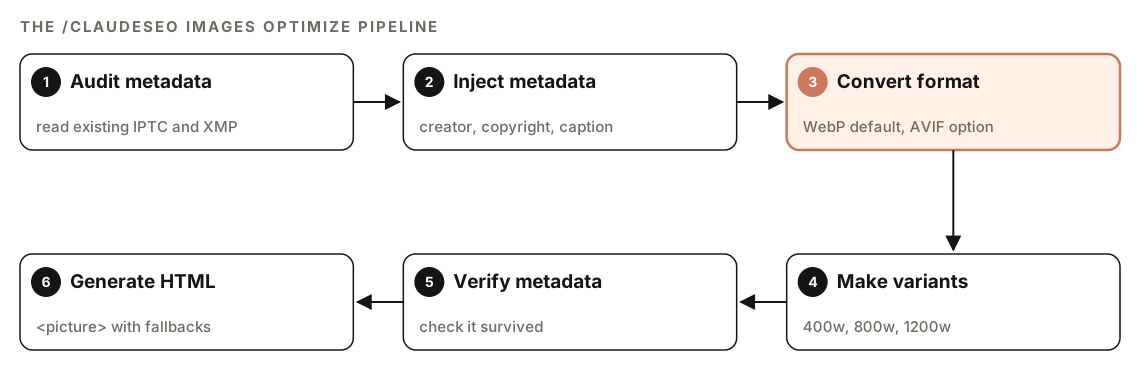
The optimize mode runs a six-step pipeline on each file. The skill's WebP commands use a quality setting of 82, and it generates 400, 800, and 1200 pixel wide variants:
cwebp -q 82 -metadata all input.jpg -o output.webp
convert input.jpg -resize 800x -quality 82 image-800.webp
It can also add creator, credit, and copyright details. Google Images can show these in results; the image metadata documentation explains how. This is display information, not a ranking factor. WebP files don't support IPTC fields natively, so the skill writes the XMP equivalents instead.
For AI-generated product images, the skill handles the IPTC DigitalSourceType label, which Google Merchant Center requires on generative AI product imagery. When you optimize AI-generated assets, it asks you to confirm the source type (fully AI-generated, a composite, or a real photograph) and writes the matching value.
Doing it without the skill
You can run a useful image check with a plain Claude Code prompt:
Fetch https://www.example.com/page and list every <img> with its src, alt, width, height, loading, fetchpriority, and srcset. Request each image file and record its size and content type. Flag images with missing or filename-style alt text, alt text over 125 characters, files over 200KB, JPEG or PNG photos with no WebP or AVIF version, missing dimensions, and loading="lazy" on images that appear above the fold. Output a table sorted by file size, largest first.And to convert a folder of images:
Write a script that converts every JPEG and PNG in ./public/images to WebP at quality 82 using cwebp, keeps the metadata, creates 400, 800, and 1200 pixel wide variants, and leaves the originals untouched.The skill adds the tiered size thresholds, detection of plugin and JavaScript lazy-loaders, a report sorted by savings, image SERP analysis, and a metadata pipeline that knows which formats need XMP instead of IPTC.
Image SEO mistakes to avoid
- Lazy-loading the hero image. It delays the LCP element, the opposite of what you want.
- Using the file name as alt text. "IMG_1234.jpg" tells search engines and screen reader users nothing.
- Stuffing keywords into alt text. Describe the image; add a keyword only if it's genuinely in the picture.
- Leaving out width and height. It's the simplest CLS fix there is.
- Serving one huge file to every device. Use
srcsetso phones get smaller files. - Spending time on EXIF data or IPTC keywords. The skill rates both as having no SEO value.
Related guides
- Technical SEO audit with Claude Code for Core Web Vitals, rendering, and crawlability
- How to run a full SEO audit with Claude Code, which includes image checks
- AI images for SEO with Claude Code for generating OG, hero, and blog images
FAQ
What is an image SEO audit?
An image SEO audit checks every image on a page for search and performance problems: missing or weak alt text, oversized files, outdated formats, missing dimensions, and lazy loading in the wrong places. The result is a list of fixes, ideally sorted by how much each one saves.
How long should alt text be?
The ClaudeSEO skill checks for alt text between 10 and 125 characters. In practice, write one clear sentence or phrase that describes what the image shows. Decorative images that add no information can be marked with role="presentation" instead.
What is the best image format for SEO?
WebP is the sensible default for photos and most graphics, and AVIF compresses further. Serve them through a <picture> element with a JPEG fallback. Use PNG only when you need transparency, and SVG for icons and logos.
Should I lazy load all images?
No. Lazy-load images below the fold, but never the hero or LCP image, because lazy loading delays it and hurts LCP. Give the LCP image fetchpriority="high" so the browser downloads it early.
Does image file size affect SEO?
Indirectly. Large images slow down pages, and the hero image is often the LCP element that Core Web Vitals measure. The skill rates file size as a medium factor, working through page speed rather than as a direct ranking signal.
Does image metadata affect rankings?
No. Google Images can display IPTC creator, credit, and copyright details, which helps with attribution, but the skill treats that as display-only. It rates EXIF camera data and IPTC keywords as having no SEO value.