
Analytics
Google Search Console API in Claude Code: GSC, GA4, PSI
Connect the Google Search Console API, GA4, PageSpeed Insights and CrUX to Claude Code: set up credentials, pull real data, and read the results.
With the Google Search Console API, Claude Code can read your real clicks, impressions, average positions, and index status straight from Google instead of guessing from a crawl. ClaudeSEO's /claudeseo google command handles that Google Search Console API Claude Code connection, and adds GA4 organic traffic, PageSpeed Insights, and Chrome field data from CrUX on top.
This guide covers what each Google data source tells you, how to set up access, how to run the commands, and how to act on the results.
Key takeaways
- Crawl-based checks can't see what Google did with your pages. Google's APIs show how real Chrome users experience them, which are indexed, and which queries bring clicks.
- Access comes in tiers: an API key covers PageSpeed and CrUX, a service account or OAuth adds Search Console, a GA4 property ID adds traffic, and Google Ads access adds keyword data.
/claudeseo googleand/claudeblog googleshare one config file, so you set up credentials once.- The Indexing API is officially for job posting and livestream pages only. For everything else, rely on sitemaps and internal links.
- Google's own quotas, pricing, and terms apply to every API call.
Why use Google's own data in Claude Code?
Most SEO checks are crawl-based: a tool fetches your pages and inspects the HTML. That can't tell you what Google did with those pages, or what real visitors experienced. Google's APIs fill that gap.
Search Console reports how your site performs in Google Search through four core metrics: clicks, impressions (how often a result was shown), click-through rate (CTR), and average position. Its URL Inspection API reports how Google sees one URL: whether it's indexed, which canonical Google chose, and whether the page could be fetched.
PageSpeed Insights runs Lighthouse, a lab test that loads your page once in a controlled environment. CrUX (the Chrome User Experience Report) is field data: Core Web Vitals from real Chrome users over a rolling 28-day window, reported at the 75th percentile (p75). Lab data helps you debug. Field data is what users actually got.
GA4 shows what happens after the click: sessions, users, and engagement from the Organic Search channel.
Core Web Vitals use fixed thresholds, documented on web.dev. The Google commands rate every metric against them with a traffic-light label:
| Metric | Good | Needs improvement | Poor |
|---|---|---|---|
| LCP (Largest Contentful Paint) | 2.5s or less | 2.5s to 4s | Over 4s |
| INP (Interaction to Next Paint) | 200ms or less | 200ms to 500ms | Over 500ms |
| CLS (Cumulative Layout Shift) | 0.1 or less | 0.1 to 0.25 | Over 0.25 |
INP replaced First Input Delay (FID) as the responsiveness metric, and the skills never report FID.
What the /claudeseo google command does
The command is part of the Claude SEO skill suite, and Claude Blog has a matching /claudeblog google command. Every run follows the same steps:
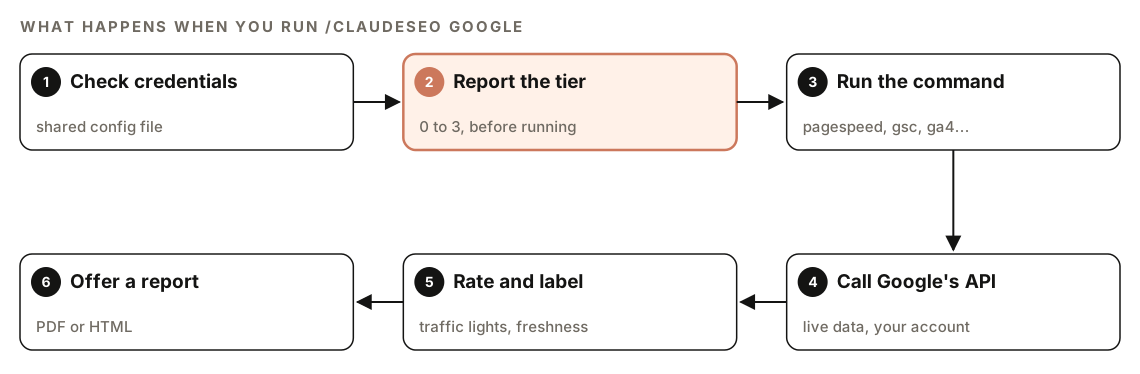
- Check credentials. Before any command, the skill checks the config file for an API key, a service account or OAuth client, a GA4 property ID, and Google Ads details.
- Report the tier. It tells you which credential tier it detected, so you know which commands will work before you run one.
- Run the command. You pick the data source:
pagespeed,gsc,inspect,ga4, and so on. - Call Google's API. The data comes from Google, for your property, under your credentials.
- Rate and label. Core Web Vitals get traffic-light ratings, results are labeled as Google API data to separate them from crawl findings, and every report notes how fresh the data is.
- Offer a report. After an analysis, it offers to build a PDF or HTML report.
If something fails, the skill says what succeeded and what didn't rather than failing silently.
What Google data can you pull?
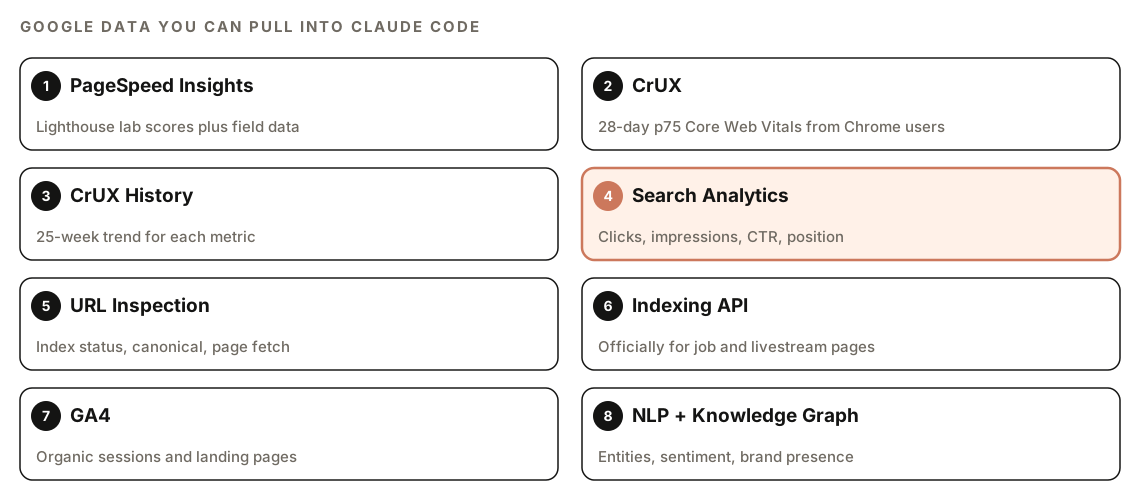
Search Console
gsc <property> pulls Search Analytics for the last 28 days, grouped by query and page, for web search, up to 1,000 rows. It also flags quick wins: queries where you rank in positions 4 to 10 with high impressions, where a modest improvement could lift you into the top results.
inspect <url> returns Google's verdict (pass or fail), coverage state, robots.txt status, indexing state, page fetch state, the canonical Google selected, mobile usability, and rich results. inspect-batch <file> inspects a list of URLs, one per line, within Google's daily inspection quota per site.
sitemaps <property> lists submitted sitemaps with their status, errors, and warnings. It shows submitted counts only; URL Inspection tells you whether specific URLs are indexed.
PageSpeed Insights and CrUX
pagespeed <url> runs Lighthouse for both mobile and desktop across all categories, then merges the lab scores with CrUX field data. CrUX tries URL-level data first and falls back to origin-level data for the whole site. crux <url> returns field data only and skips Lighthouse, so it's faster. crux-history <url> shows a 25-week trend for each metric, with its direction (improving, stable, or degrading), percentage change, and weekly p75 values.
GA4 organic traffic
ga4 reports daily sessions, users, pageviews, bounce rate, and engagement for the last 28 days, filtered to the Organic Search channel group. In the SEO suite, ga4-pages ranks your top organic landing pages by sessions.
Indexing API
index <url> notifies Google that a URL was added or updated, and index-batch <file> submits up to 200 URLs while tracking quota. Google's Indexing API is officially for pages with job posting or livestream (BroadcastEvent) structured data, and the skill always tells you so. For ordinary pages, keep your XML sitemap accurate and link new pages internally.
Entities, video, keywords, and safety
nlp runs Google's Natural Language API for entities, sentiment, and content classification, which feeds E-E-A-T analysis. youtube <query> searches YouTube videos on a topic, and keywords <seed> pulls ideas from Google Ads Keyword Planner. The SEO suite adds entities (entities only, less quota), volume for specific keywords, entity <query> for a Knowledge Graph brand check, and safety <url> for Google's Web Risk malware and social engineering check.
How to set up Google API access
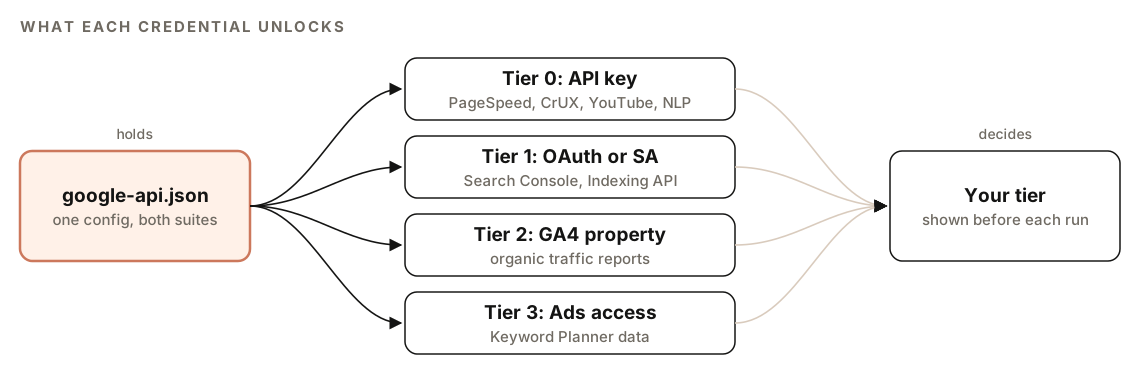
Setup needs a Google Cloud project with an API key, a service account or OAuth client, or both. Start with the setup command, which checks what's configured and walks you through the rest:
/claudeseo google setupThe tiers build on each other:
| Tier | You add | Commands unlocked |
|---|---|---|
| 0 | An API key | pagespeed, crux, crux-history, youtube, nlp |
| 1 | A service account or OAuth token | Tier 0 plus gsc, inspect, index (and sitemaps in the SEO suite) |
| 2 | A GA4 property ID | Tier 1 plus ga4 (and ga4-pages in the SEO suite) |
| 3 | A Google Ads developer token and customer ID | Tier 2 plus keywords (and volume in the SEO suite) |
A few details trip people up:
- Search Console access. A service account is its own Google identity. Add its
client_emailas a user in Search Console under Settings, then Users, then Add, or every query returns a permission error. - Property format. A domain property is written as
sc-domain:example.com. - GA4 property ID. Find it in GA4 under Admin, then Property Details.
- Natural Language API. It requires billing to be enabled on the Google Cloud project.
- Keyword Planner. It needs a Google Ads account, plus the developer token and customer ID in the config.
- Enabled APIs. Google only accepts calls to APIs that are enabled for the Cloud project behind your key or service account.
Both suites read the same file, ~/.config/claude-seo/google-api.json:
{
  "api_key": "[your Google API key]",
  "service_account_path": "/path/to/service_account.json",
  "default_property": "sc-domain:example.com",
  "ga4_property_id": "properties/XXXXXXXXX",
  "ads_developer_token": "[optional, for Tier 3]",
  "ads_customer_id": "[optional, for Tier 3]"
}
If you use OAuth instead of a service account, set oauth_client_path to your OAuth client file. Keep the service account file outside your project folder so it never ends up in version control.
Google's own pricing, quotas, and terms apply to every API. Run /claudeseo google quotas to see the rate limits for each API.
How to run the Google commands
Once credentials are in place, run the data source you need:
/claudeseo google gsc sc-domain:example.com
/claudeseo google inspect https://www.example.com/pricing
/claudeseo google pagespeed https://www.example.com
/claudeseo google crux-history https://www.example.com
/claudeseo google ga4-pages properties/XXXXXXXXX
The blog suite uses the same pattern for a published post:
/claudeblog google pagespeed https://www.example.com/blog/my-post
/claudeblog google gsc sc-domain:example.com
You can also ask in plain English, and Claude picks the matching skill:
Pull my Search Console data for sc-domain:example.com and show me queries in positions 4 to 10 with the most impressions.To share results, generate a report. The types are cwv-audit (Core Web Vitals with gauges and timelines), gsc-performance (query tables and quick wins), indexation (coverage from batch inspection), and full:
/claudeseo google report gsc-performancePDF output needs some system libraries. In the blog suite, the report falls back to HTML if they're missing.
How to read the results
Start with the tier line and the freshness note: what the report could see, and how current it is. CrUX is a rolling 28-day window and Search Console data runs a few days behind, so yesterday's fix won't show up yet.
For performance, read the field data before the lab score. A green Lighthouse score with red field data means real users on real devices are having a worse time than the test suggests.
For Search Console, start with the quick wins. Then inspect any important page with few impressions: if the verdict is a fail, or Google picked a different canonical than you declared, fix that before touching the content.
Reports are saved as GOOGLE-API-REPORT-[domain].md, with metrics in tables, traffic-light ratings, and priorities from critical to low.
How Google data feeds your other workflows
When credentials exist, the full site audit brings in a Google data specialist that scales with your tier: PageSpeed and CrUX on the homepage plus origin-level CrUX history at Tier 0, then Search Console top queries and pages, URL Inspection on key pages, and sitemap status at Tier 1, then GA4 organic traffic at Tier 2. The results appear as their own Google SEO Data category. The technical SEO checks use the same PageSpeed script for real field data.
In Claude Blog, the SEO check runs PageSpeed and CrUX on a published post, rewrites use NLP to find missing entities, the GEO check uses Search Console data, and the blog audit checks Core Web Vitals and indexation across published URLs. Without credentials, these skills carry on without Google data.
Search Console exports also drive two content workflows. The content decay check compares two quarters of page-level clicks to find posts losing traffic. And query-and-page data is one way to confirm keyword cannibalization: when two of your URLs get impressions for the same query, they may be competing.
How to fix common errors
| Error | What it means | Fix |
|---|---|---|
| No credentials configured | The config file is missing or empty | Run /claudeseo google setup; Tier 0 commands work with just an API key |
| CrUX returns 404 | Not enough Chrome traffic for field data | Use the Lighthouse lab data instead |
| Indexing API quota exceeded | The daily publish limit is used up | Submit only your most important eligible URLs |
| Rate limit (429) | Too many requests per minute | The skill backs off and retries automatically |
Doing it without the skill
You can query Google's APIs with plain Claude Code prompts. Claude will write and run a script for you:
Write a Python script that uses the service account file at [path] to query the Search Console Search Analytics API for the property sc-domain:example.com. Get the last 28 days with the dimensions query and page. Then list queries with an average position between 4 and 10, sorted by impressions, as a table with clicks, impressions, CTR, and position.Call the PageSpeed Insights API v5 for [URL] with my API key from the environment variable PSI_KEY, for the mobile strategy. Report the field data p75 values for LCP, INP, and CLS, rate each as good, needs improvement, or poor using the Core Web Vitals thresholds, and tell me whether the data is URL-level or origin-level.The skill adds tier detection, one shared config for both suites, CrUX history, batch inspection, quota tracking, retries, consistent reports, and the hand-off of Google data to audits and blog checks.
Mistakes to avoid
- Judging speed on lab scores alone. Field data is what users experience. Use Lighthouse to debug, not as the verdict.
- Trusting sitemap counts as index counts. A submitted sitemap shows what you sent, not what Google indexed. Use URL Inspection.
- Committing credentials. Keep service account files and API keys out of your repository.
- Ignoring other search engines. Bing doesn't use Google's APIs. Our Bing Webmaster Tools and IndexNow guide covers that side.
Related guides
- How to run a full SEO audit with Claude Code, which pulls in Google data when credentials exist
- Detect content decay with Search Console and Claude Code
- Find and fix keyword cannibalization with Claude Code
- The full Claude SEO skill list for every command in the suite
FAQ
Can Claude Code connect to Google Search Console?
Yes. With ClaudeSEO installed and a service account or OAuth token configured, /claudeseo google gsc pulls clicks, impressions, CTR, and average position by query and page, and /claudeseo google inspect returns Google's index status for a URL.
Do I need a service account or OAuth for the Search Console API?
You need one or the other. An API key is enough for PageSpeed Insights and CrUX, but Search Console, URL Inspection, and the Indexing API need a service account or an OAuth token, because they work with data tied to your verified property.
Why does CrUX show no data for my page?
CrUX only reports pages and sites with enough Chrome traffic to measure. A 404 from CrUX means there isn't enough data, not that your setup is broken. The skill then falls back to Lighthouse lab data.
Can I use the Indexing API to get blog posts indexed faster?
Google's Indexing API is officially for pages with job posting or livestream structured data, and the skill tells you this before you use it. For blog posts and other pages, keep your XML sitemap accurate and link new pages from existing ones.
What is the difference between lab data and field data?
Lab data comes from a single controlled test, such as a Lighthouse run in PageSpeed Insights. Field data comes from real Chrome users over the past 28 days, reported at the 75th percentile in CrUX. Lab data helps you find causes. Field data shows what users actually experienced.
Do Claude SEO and Claude Blog need separate Google credentials?
No. Both suites read the same config file at ~/.config/claude-seo/google-api.json, so one setup covers /claudeseo google and /claudeblog google. The SEO suite adds a few commands, such as sitemaps and inspect-batch.