
Technical SEO
Claude Code SEO Audit: How to Run a Full Site Audit
Run a full Claude Code SEO audit: crawl 500 pages, run up to 15 specialist agents, read the weighted health score, and fix issues in priority order.
A Claude Code SEO audit checks your whole site in one pass: crawlability, indexing, content quality, on-page basics, structured data, page speed, images, and AI search readiness. With ClaudeSEO installed, one command crawls up to 500 pages, hands the work to specialist agents that run in parallel, and returns a 0-100 health score with a prioritized action plan saved as files in your project.
This guide explains what a full SEO audit should cover, how the /claudeseo audit command works, how the health score is weighted, and how to turn the report into fixes.
Key takeaways
/claudeseo audit <url>crawls up to 500 pages and runs up to 15 specialist agents: 8 on every audit and up to 7 more depending on your site.- The health score weights content, technical, and on-page SEO most heavily. It's a prioritization heuristic, not a Google metric.
- Every finding gets a priority from Critical to Low, and the action plan starts with critical fixes in week one.
- All outputs land in one
{domain}-audit/folder: report, action plan, per-specialist findings, JSON, and screenshots.- Google, DataForSEO, and backlink API credentials are optional extras. The core audit runs without them.
What is a full SEO audit and why does it matter?
An SEO audit is a structured review of everything that affects how search engines find, understand, and rank your pages. A full audit looks at the whole site, not one page, because the most damaging problems are usually site-wide: a template that prints the wrong canonical tag, a robots.txt rule that blocks a folder, or a theme that ships oversized images on every product page.
A complete audit answers five questions:
- Can search engines reach and index the pages that matter? Robots.txt, sitemaps, status codes, redirects, canonicals, and
noindex. - Is the content worth ranking? Depth, originality, real experience and expertise, and thin or duplicate pages.
- Is every page clearly labeled? Titles, meta descriptions, headings, internal links, and structured data.
- Is the experience good enough? Core Web Vitals, mobile layout, and image weight.
- Can AI search systems use it? Whether Google AI Overviews, ChatGPT, and Perplexity can reach and quote your content.
Most of these checks are mechanical. The hard part is deciding what to fix first. An agent-based audit collects the evidence, then ranks the findings so you start with problems that block indexing, not ones that are merely nice to fix.
If you only need the crawl-and-index layer, our technical SEO audit guide goes deeper on that investigation.
What the /claudeseo audit command does
The audit is the flagship command in the Claude SEO skill suite. You give it a URL, and Claude Code works through seven stages:
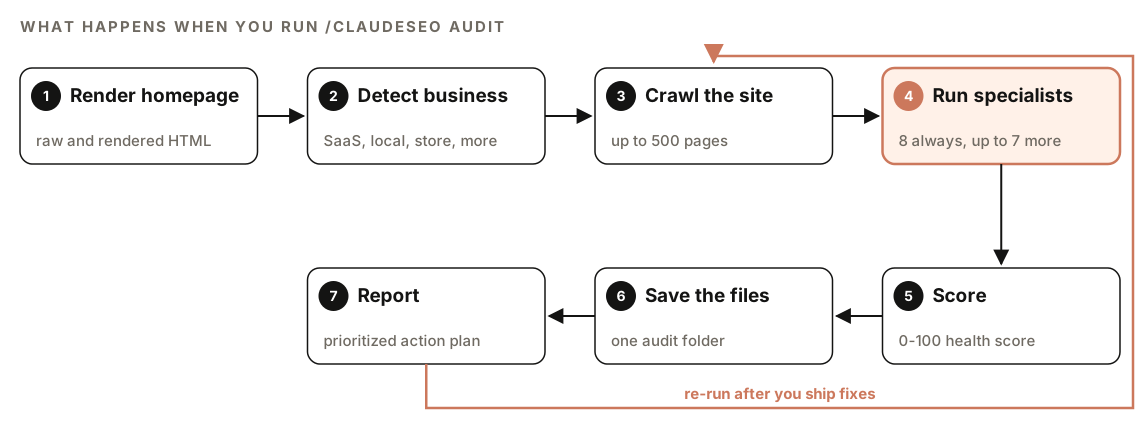
- Render the homepage. It captures the raw and rendered HTML, the main text, and whether the site is a single-page app, so content that needs JavaScript is still visible.
- Detect the business type. Homepage signals suggest SaaS (pricing page, "free trial"), a local service (address, Maps embed), e-commerce (
/products, "add to cart"), a publisher (author pages, dates), or an agency (/case-studies). If two types look equally likely, it asks you to confirm. - Crawl the site. It follows internal links up to 500 pages and respects robots.txt. If you've connected Firecrawl, it can map the site's URLs first.
- Run the specialists. Specialist agents work in parallel. Each has its own checklist and writes its own findings file.
- Score. Category results roll up into one SEO health score from 0 to 100.
- Save the files. Every output goes into a
{domain}-audit/folder in your project. - Report. It writes a prioritized action plan and offers to produce a PDF report.
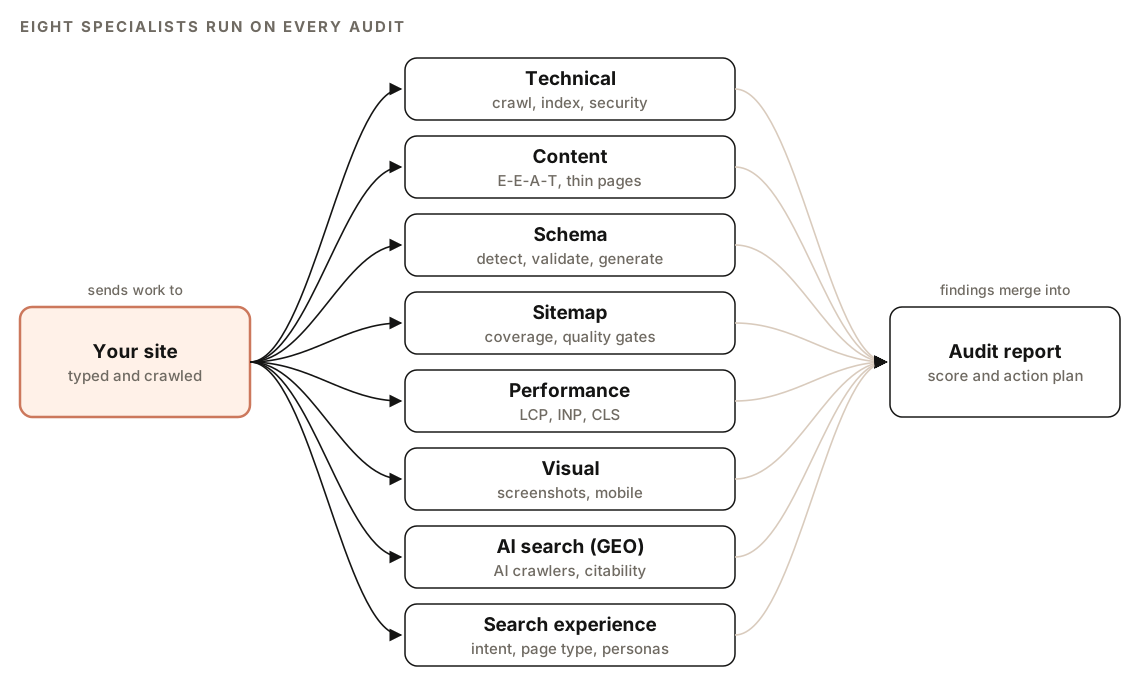
The eight specialists that run on every audit
| Specialist | What it covers |
|---|---|
| Technical | Crawlability, indexability, security, URLs, mobile, Core Web Vitals, structured data, JavaScript rendering, IndexNow |
| Content | E-E-A-T signals, readability, thin content, freshness, AI citation readiness |
| Schema | Detects JSON-LD, Microdata, and RDFa, checks required properties, generates missing JSON-LD |
| Sitemap | XML validity, URL status codes, lastmod accuracy, crawl versus sitemap coverage |
| Performance | LCP, INP, and CLS, with the bottleneck behind each |
| Visual | Desktop and mobile screenshots, above-the-fold H1 and call to action, mobile layout |
| AI search (GEO) | AI crawler rules in robots.txt, llms.txt, passage-level citability, authority signals |
| Search experience (SXO) | Whether your page type matches what ranks, user stories, persona scoring |
The search experience check compares your page with the pages that rank for its keyword. If the top results are mostly comparison pages and yours is a product page, that mismatch becomes the lead finding, because on-page polish can't fix the wrong page type. Its result is reported separately as an "SXO Gap Score" and isn't part of the health score.
The seven conditional specialists
| Specialist | When it runs | What it adds |
|---|---|---|
| Local | A local service business is detected | Business Profile signals, NAP consistency, reviews, local schema |
| Maps | A local business is detected and DataForSEO is connected | Geo-grid rank tracking, competitor radius mapping |
| Google API credentials are found | CrUX field data, Search Console indexation, GA4 organic traffic | |
| Backlinks | Moz or Bing Webmaster Tools API keys are found | Referring domains, anchor text, toxic links |
| Cluster | Blog, pillar page, or topic cluster signals | Semantic clustering of your content |
| Drift | A saved drift baseline exists for the URL | Comparison against your last known-good state |
| E-commerce | An online store is detected | Product schema and marketplace visibility |
The Google specialist matters most for performance. Without it, Core Web Vitals come from lab tests that simulate one page load. With it, the audit prefers CrUX field data from real Chrome users over 28 days, falling back to lab data when a page lacks traffic. Our guide to Search Console, GA4, and PageSpeed data in Claude Code covers the setup.
A connected DataForSEO account adds live SERP positions, backlink spam scores, business listings, and AI visibility checks. These integrations run on your own accounts, so each provider's pricing applies.
How the SEO health score works
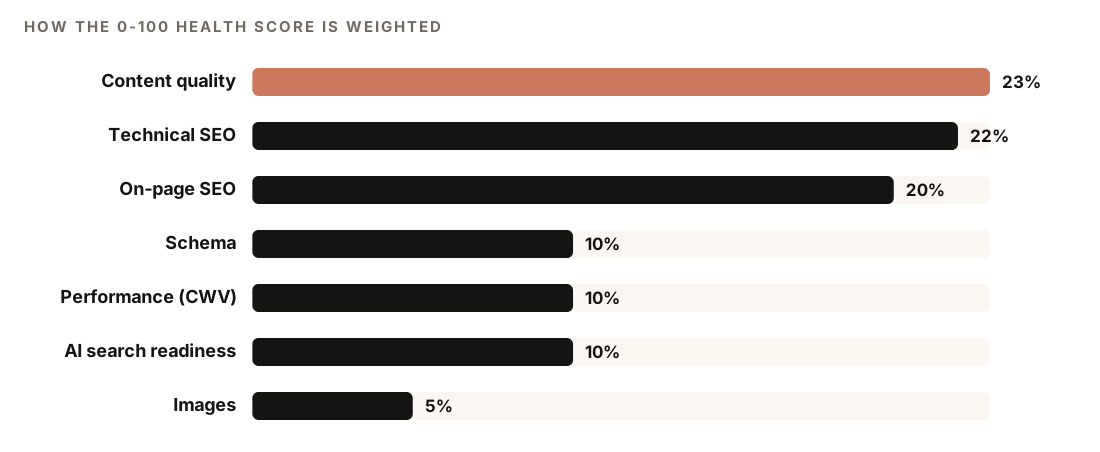
The health score is a weighted combination of seven category scores. The skill weights them like this:
| Category | Weight | What it includes |
|---|---|---|
| Content quality | 23% | E-E-A-T, thin content, duplicate content, readability |
| Technical SEO | 22% | Crawlability, indexability, security, Core Web Vitals status |
| On-page SEO | 20% | Title tags, meta descriptions, headings, internal linking gaps |
| Schema | 10% | Current markup, validation errors, missing opportunities |
| Performance (CWV) | 10% | LCP, INP, CLS, resource optimization, third-party scripts |
| AI search readiness | 10% | Citability, structure, authority signals |
| Images | 5% | Missing alt text, oversized images, formats |
Be clear about what the number is. The health score is a prioritization heuristic, not a Google metric. Google doesn't use it or see it, and a higher score doesn't mean higher rankings. Use it to spot weak categories and to track progress between audits of the same site. The evidence behind each finding matters more than the total.
How to run a Claude Code SEO audit
Install ClaudeSEO first. Our guide to installing SEO skills in Claude Code walks through it. Then open Claude Code in your project folder and run:
/claudeseo audit https://www.example.comYou can also ask in plain English. Phrases like "analyze my site", "full SEO check", or "website health check" load the same skill:
Run a full SEO audit of https://www.example.com and give me a prioritized fix list.The crawl is gentle on your server. It sends at most five requests at a time with a one-second delay, waits up to 30 seconds per page, and follows up to three redirect hops. Screenshots need Playwright with Chromium: /claudeseo setup installs the runtime, and /claudeseo doctor checks that it's ready.
The audit also handles the awkward cases honestly:
- Blocked paths: it lists what robots.txt blocks and audits only what it can reach.
- Large sites: past the page cap, it reports on the pages crawled and estimates the total site scope.
- Rate limits: on a 429 (too many requests) response, it backs off and marks unfinished sections.
- Unreachable URLs: it reports the error instead of guessing at site content.
- A failed specialist: you still get the other results, plus a note on what failed.
How to read the audit report
Everything lands in one folder:
example.com-audit/
  FULL-AUDIT-REPORT.md    comprehensive findings
  ACTION-PLAN.md          recommendations, Critical to Low
  audit-data.json         scores and findings as structured data
  findings/               one file per specialist (technical.md, content.md, ...)
  screenshots/            desktop and mobile captures
Start with the executive summary at the top of the full report. The structure is the same every time:
## Executive Summary
- SEO Health Score: XX/100
- Business type detected: [type]
- Top 5 critical issues
- Top 5 quick wins

## Technical SEO
## Content Quality
## On-Page SEO
## Schema & Structured Data
## Performance
## Images
## AI Search Readiness
Then use the priority levels to decide what to do this week:
| Priority | Meaning | When to fix |
|---|---|---|
| Critical | Blocks indexing or causes penalties | Immediately |
| High | Significantly impacts rankings | Within 1 week |
| Medium | Optimization opportunity | Within 1 month |
| Low | Nice to have | Backlog |
The action plan turns those priorities into four phases: critical fixes in week 1, high-impact improvements in weeks 2 and 3, content and authority work in month 2, then ongoing monitoring.
What a good recommendation looks like
Before it assigns priorities, the audit checks its own reasoning. Each recommendation should carry the observation it rests on, what it depends on or unblocks, a "how would we know this failed?" check, and a leading indicator you can watch without re-running the audit. The last two make the plan testable. "Add width and height to product images" is a task. "Add width and height to product images, then watch CLS on product templates" is a task you can verify.
How to fix what the audit finds
Work top-down: every Critical item first, then High. Most fixes land in a template, a layout, or a config file, so one change can clear the same finding across hundreds of pages. Ask Claude Code to work from the action plan:
Read example.com-audit/ACTION-PLAN.md. For each Critical item, find the file in this repo that causes it, propose the smallest fix, and show me the diff before saving. Stop after the Critical items.Indexing blockers
Critical findings are usually about access: a robots.txt rule that blocks an important folder, a noindex tag left over from staging, or canonical tags pointing at the wrong URL. These are often one-line fixes with site-wide effect. A robots.txt file copied from staging often looks like this, which blocks the entire site:
User-agent: *
Disallow: /
The fix allows crawling, keeps private paths out, and lists the sitemap:
User-agent: *
Disallow: /admin/
Sitemap: https://www.example.com/sitemap.xml
Core Web Vitals
The performance specialist names the usual causes. Slow LCP often comes from an unoptimized hero image, render-blocking CSS or JavaScript, or slow server response. Poor INP usually means long JavaScript tasks or heavy event handlers. CLS comes from images without dimensions and content injected after load. Aim for LCP of 2.5 seconds or less, INP of 200 milliseconds or less, and CLS of 0.1 or less at the 75th percentile of page visits, as Google's Web Vitals guide describes.
Two common fixes in one snippet:
<!-- Start loading the hero image early, and reserve its space to prevent layout shift -->
<link rel="preload" as="image" href="/images/hero.webp" fetchpriority="high">
<img src="/images/hero.webp" width="1200" height="630" alt="[describe the image]">
Content and on-page issues
Content findings need judgment, not code. The content specialist's word-count minimums are coverage floors, not targets, and word count alone isn't a ranking factor. Treat a thin-page finding as a prompt to add first-hand detail, clearer answers, and evidence. Titles and meta descriptions are quicker; see our guide to title tags and meta descriptions with Claude Code.
When fixes are live, re-run the audit. The weights stay the same between runs, so two audits of the same site show which categories improved.
Doing it without the skill
You can run a smaller audit with plain Claude Code prompts. This works well for a handful of key pages:
Fetch https://www.example.com/robots.txt and https://www.example.com/sitemap.xml. Then fetch these pages: [list 5-10 key URLs]. For each page, report the HTTP status, canonical URL, meta robots, title length, meta description length, H1 count, whether JSON-LD is present, and images missing alt text. Flag anything that blocks indexing as Critical, and list everything else by priority in a table.If the site's code is in your repo, you can also audit the templates directly:
Review the templates in this repo that render the <head>. List every page type and the title, canonical, meta robots, and structured data each one outputs. Flag any page type where these are missing, duplicated, or hard-coded.The skill adds what's slow to do by hand: a polite 500-page crawl, business type detection, up to 15 specialists working from consistent checklists, JavaScript rendering, weighted scoring, and a saved, phased action plan you can re-run and compare.
Mistakes to avoid
- Treating the health score as a ranking factor. It's a weighting of audit findings. Google never sees it.
- Starting with the easy items. Fix Critical issues first, even when a Low item takes five minutes.
- Trusting a score from a blocked crawl. If robots.txt blocks part of the site, the audit only covers what it could reach.
- Running one audit and stopping. Re-run after major releases, and use SEO drift monitoring to catch regressions between audits.
Related guides
- The full site audit feature page for what the audit includes
- Technical SEO audit with Claude Code for a deeper crawl-and-index investigation
- The technical SEO feature page for the nine technical categories
- SEO drift monitoring with Claude Code for catching regressions
FAQ
What is included in a full SEO audit?
A full SEO audit covers crawlability and indexing, content quality, on-page elements, structured data, page speed, images, and AI search readiness. The /claudeseo audit command also checks sitemaps, mobile layout, and search intent, and adds local, e-commerce, and backlink analysis when they apply to your site.
How long does a Claude Code SEO audit take?
It depends on the size of the site and how many specialists run. The crawl is deliberately gentle, with five concurrent requests, a one-second delay, and a 500-page cap, so small sites finish much sooner than large ones.
Is the SEO health score a Google ranking score?
No. It's a prioritization heuristic that weights seven categories of audit findings. Google doesn't use it, and a better score doesn't mean better rankings. Use it to decide what to fix first and to track progress on your own site.
Do I need API keys to run a full SEO audit?
No. The core audit works from the pages it crawls. Google API credentials add real-user Core Web Vitals, Search Console, and GA4 data. Moz or Bing Webmaster Tools keys add backlink data, and DataForSEO adds live SERP and maps data. Each uses your own account, so the provider's pricing applies.
Can Claude Code audit a JavaScript-heavy site?
Yes. The audit renders pages when it detects a single-page app, so it sees content that only appears after JavaScript runs. It also flags content that depends on client-side rendering, because crawlers find it harder to pick up.
What's the difference between /claudeseo audit and /claudeseo technical?
/claudeseo technical runs the nine-category technical check on its own. /claudeseo audit includes the same check, runs at least seven more specialists alongside it, and combines everything into one score and action plan. For a single URL, use /claudeseo page.