
Content Operations
Content Decay: Detect It with Search Console and Claude Code
Detect content decay with Search Console and Claude Code: flag pages that lost 20%+ of clicks, find the cause, and schedule refreshes in your calendar.

Content decay is the slow loss of search traffic on a page that used to perform well, usually because the page has aged while the search results around it moved on. With Search Console data and Claude Code, you can compare two quarters of clicks, flag every page that lost 20% or more, and turn that list into a refresh schedule instead of a vague worry about old posts.
This guide explains what content decay is and what causes it, how the ClaudeSEO /claudeblog decay and /claudeblog calendar commands find decaying posts, how to export the right data, and how to decide what to refresh first.
Key takeaways
- Content decay is a gradual decline, not a sudden drop. Sudden drops usually point to a technical problem or an algorithm update instead.
/claudeblog decay <current-gsc> <previous-gsc>compares two Search Console exports and flags pages whose clicks fell 20% or more quarter over quarter./claudeblog calendar [period]adds a date-based view: it reads update dates from your posts' frontmatter and holds high-traffic posts to the strictest freshness thresholds.- Diagnose before you rewrite. Falling impressions and falling click-through rates have different causes and different fixes.
- Refreshes belong in the editorial calendar, with a next-refresh date for every important post, so decay gets caught early.
What is content decay?
Content decay is what happens to most blog posts over time. A post climbs in search, peaks, holds for a while, and then starts to slide. Clicks fall a little each month. Nothing breaks, so nobody notices until a post that used to bring in steady traffic brings in a trickle.
It matters because older posts are often a blog's biggest traffic drivers. If they decay quietly while the team focuses only on new content, the blog can publish steadily and still lose traffic overall.
Decay is different from two things it gets confused with:
- A sudden drop. If a page loses most of its clicks within days, look for a technical cause first, such as an accidental noindex, a broken redirect, or a template change. A sharp drop that lines up with a known Google update is a different investigation too.
- Seasonality. A post about holiday gift ideas will lose traffic every January. That's demand moving, not the page decaying. The way to tell is to compare against the same period last year, not just the previous quarter.
What causes content decay?
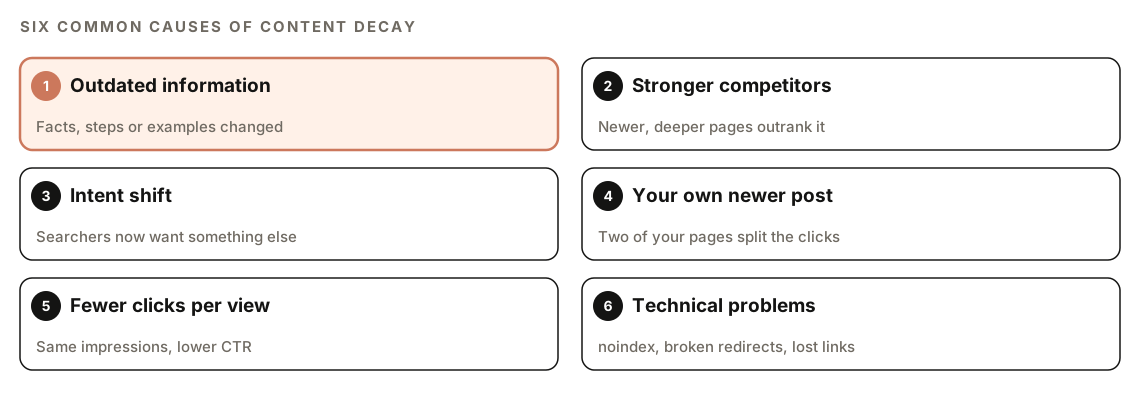
The common causes are:
- Outdated information. Steps, screenshots, prices, or recommendations no longer match reality, and searchers notice.
- Stronger competitors. Other sites published newer, more complete answers to the same question.
- Intent shift. What searchers want from a query changes. A query that used to want a definition might now want a tool comparison.
- Your own newer post. You published a second post on the same topic, and the two now split clicks. Our guide to finding keyword cannibalization covers this case.
- Fewer clicks per view. The page still appears as often, but fewer people click, because the snippet looks dated or the results page layout changed.
- Technical problems. Lost backlinks, broken internal links, or indexing issues weaken a page without any change to its content.
Falling impressions or falling CTR?
The most useful first question is whether impressions fell along with clicks. Search Console reports both. If impressions dropped, the page is showing up less often: it lost rankings, or demand for the topic fell. If impressions held steady but clicks fell, the page is still being shown and people are choosing other results. That points to the title, the meta description, or a change in what appears around your result.
A ranking loss usually needs better content. A click-through problem can sometimes be fixed with a better title and description.
How the /claudeblog decay command works
The decay command is part of the Claude Blog skill suite. It does one job: it compares two Search Console exports, one for the current period and one for the previous period, and flags pages whose clicks fell 20% or more quarter over quarter.
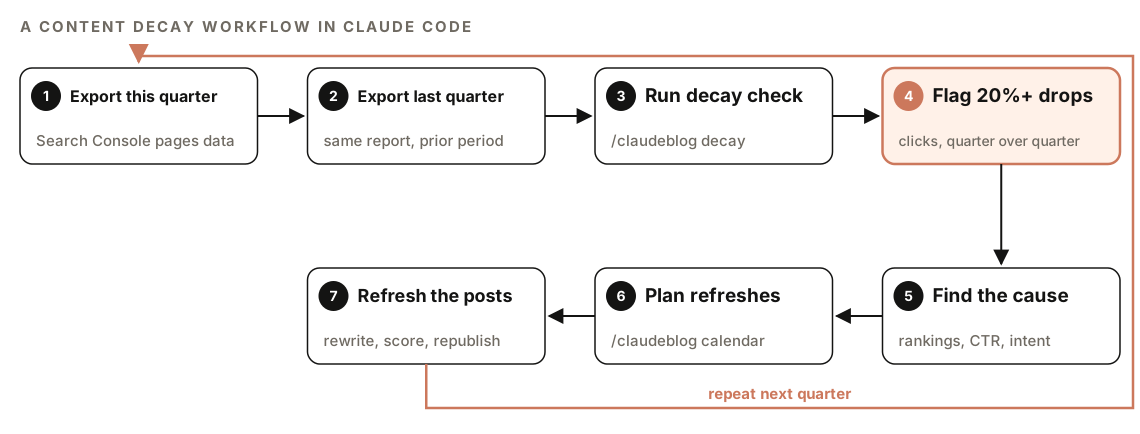
The full workflow around it looks like this:
- Export this quarter. Pull page-level performance data from Search Console for the most recent quarter.
- Export last quarter. Pull the same report for the quarter before it.
- Run the decay check. Give both files to
/claudeblog decay. - Flag 20%+ drops. The command flags every page whose clicks fell by 20% or more between the two periods.
- Find the cause. For each flagged page, work out why, using the causes above.
- Plan refreshes. Use
/claudeblog calendarto put the refreshes into your publishing schedule. - Refresh the posts. Update each post, check its quality, republish, and measure again next quarter.
The 20% threshold works as a filter. Every page's clicks move around between quarters, and a small dip isn't worth a rewrite.
Why compare quarters?
Weekly and monthly numbers are noisy. A holiday, a news event, or a short ranking wobble can make a good page look bad for a few weeks. Comparing full quarters smooths out most of that noise. The tradeoff is seasonality, which a quarter-over-quarter comparison can't see. Before you rewrite a flagged post, check whether the same drop happened in the same quarter last year.
How the editorial calendar detects stale posts
The second command looks at decay from a different angle. When you run /claudeblog calendar, part of the planning process is a content decay check based on dates rather than traffic. It scans your existing posts for lastUpdated or date fields in their frontmatter and classifies each one by how long it has gone without an update.
The thresholds depend on how much traffic a post carries, so important posts are held to a stricter standard:
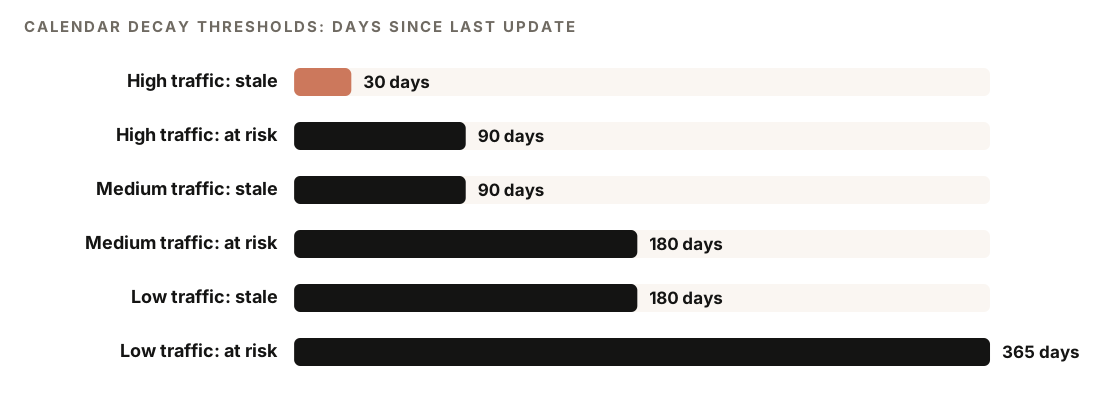
| Traffic level | Stale after | At risk after |
|---|---|---|
| High-traffic posts | 30 days since update | 90 days |
| Medium-traffic posts | 90 days since update | 180 days |
| Low-traffic posts | 180 days since update | 365 days |
Each post then gets a priority:
- Critical: a high-traffic post not updated in more than 30 days. Refresh it immediately.
- High: any post past its stale threshold. Schedule it this month.
- Medium: a post approaching its threshold. Schedule it this quarter.
- Low: a post within its threshold. No action needed.
The two commands complement each other. The decay command shows which pages are already losing clicks. The calendar's date check shows which important pages haven't been touched in a while, often before traffic falls.
How to run a content decay check
Step 1: Export two quarters from Search Console
In Google Search Console, open the Performance report for your site. Set the date range to the most recent three months, open the Pages tab, and use the Export button. Then set a custom date range covering the three months before that and export the same view again. Because the decay command compares pages by clicks, you want page-level data for both periods.
Name the two files clearly, for example with the quarter in the file name, so you don't swap them.
Step 2: Run the decay command
Open your project in Claude Code with ClaudeSEO installed and pass the current export first, then the previous one:
/claudeblog decay ./gsc/pages-current-quarter.csv ./gsc/pages-previous-quarter.csvYou can also ask in plain English:
Compare my two Search Console exports in ./gsc and tell me which pages lost 20% or more of their clicks since last quarter.Step 3: Plan the refreshes with the calendar
Then generate an editorial calendar. The period can be monthly or quarterly:
/claudeblog calendar quarterlyThe calendar asks about your niche, your publishing cadence (it assumes two posts a week if you don't say), the timeframe, and your business goals, and it scans your existing posts. Run it in the same session as the decay check and tell Claude to put the flagged pages at the top of the freshness queue, so the traffic data and the date data end up in one plan.
The calendar's content mix formula sets aside room for this work: it plans 60% new content, 30% freshness updates, and 10% repurposed content. At two posts a week, that's five new posts, two refreshes, and one repurposed piece each month. If you want the planning side in more depth, our guide to blog strategy and editorial calendars covers clusters, cadence, and seasonal planning.
How to read the decay results and decide what to fix
The calendar's decay report uses a fixed format:
## Content Decay Report
| Post | Last Updated | Days Stale | Priority | Action |
|------|-------------|-----------|----------|--------|
| [slug] | [date] | [N] | Critical | Refresh immediately |
| [slug] | [date] | [N] | High | Schedule this month |
| [slug] | [date] | [N] | Medium | Schedule this quarter |
It also builds a freshness schedule that gives posts a next refresh date, a priority, and an owner:
## Freshness Schedule: Next 30 Days
| Post | Last Updated | Next Refresh Date | Priority | Owner |
|------|-------------|-------------------|----------|-------|
| [slug] | [date] | [date + 30] | High | [name] |
| [slug] | [date] | [date + 90] | Medium | [name] |
To decide what to fix first, put the two views together:
- Posts flagged by the decay command that are also Critical or High in the calendar. These are losing clicks and haven't been updated. Start here.
- Posts flagged by the decay command that were updated recently. Freshness isn't the problem, so look at intent, competitors, cannibalization, or technical issues.
- Critical calendar items with stable traffic. Refresh them on schedule before they start to slide.
The calendar's own guidance is to review the decay report weekly and deal with Critical items first, and to list refreshes by next refresh date so the most urgent work is always at the top.
How to fix content decay
Most decayed posts need a refresh, not a new post, because keeping the same URL preserves the links the page has built up. The usual fixes:
| Cause | Fix |
|---|---|
| Outdated information | Update facts, steps, screenshots, and examples |
| Stronger competitors | Fill the gaps: cover what better pages cover, and add first-hand detail |
| Intent shift | Restructure the post around what searchers want now |
| Your own newer post | Merge the two posts or give each a distinct keyword |
| Fewer clicks per view | Rewrite the title and meta description |
| Technical problems | Fix indexing, redirects, and broken links first |
Google's guidance on creating helpful, people-first content makes a good refresh checklist: is this still the most useful page for the person searching?
For the refresh itself, our guide to refreshing and rewriting old blog posts walks through the rewrite step by step. The calendar recommends a rewrite pass for each scheduled refresh, which you can run with /claudeblog rewrite <file> or its freshness-focused alias /claudeblog update <file>. Before republishing, score the refreshed post with 100-point content scoring so you know it's actually better than the version that decayed.
After each refresh, update the lastUpdated field in the post's frontmatter, which is how the calendar knows the post is fresh again. If your posts carry BlogPosting schema, make sure dateModified matches that field; the blog audit checks this for you. Only change the date when the content has changed in a meaningful way.
You can ask Claude Code to do the bookkeeping:
For each post I refreshed this week, set lastUpdated in the frontmatter to today's date, check that the dateModified value in its schema matches, and list any refreshed post where the two don't match.Doing it without the skill
You can run a basic content decay check with plain Claude Code prompts. Start with the traffic comparison:
Read gsc-current.csv and gsc-previous.csv, two Search Console page exports for consecutive quarters. Match rows by page URL. For each page, calculate the change in clicks, impressions, CTR, and average position. Flag pages where clicks fell by 20% or more, and ignore pages with very few clicks in the previous quarter. For each flagged page, say whether impressions also fell (likely a ranking or demand loss) or held steady (likely a click-through problem). Output a table sorted by clicks lost.Then add the date-based view from your content files:
Scan ./content/blog for .md and .mdx files. For each post, read the lastUpdated field, or the date field if there is no lastUpdated. Calculate the days since the last update and list the posts in order, oldest first, with their title and file path.The skills add the structure that's hard to keep consistent by hand: a fixed 20% decay threshold across quarters, traffic-tiered staleness thresholds, Critical-to-Low priorities with a clear action for each, a freshness schedule with next refresh dates, and a calendar that reserves room for refreshes every month.
Content decay mistakes to avoid
- Mistaking seasonality for decay. Compare against the same quarter last year before rewriting a seasonal post.
- Changing the date without changing the post. Updating
lastUpdatedon an unchanged page doesn't make it fresher for readers, and it makes your own records unreliable. - Rewriting before diagnosing. A post with steady impressions and falling clicks may only need a new title, not a new body.
- Deleting decayed posts. A post that still earns some traffic and links is worth refreshing or merging. If you do remove one, redirect it to the closest relevant page.
- Refreshing low-value posts first. Start with the high-traffic posts the calendar marks Critical, where a refresh protects the most clicks.
- Checking once and stopping. Decay is continuous. Re-run the comparison every quarter and keep the freshness schedule current.
Refreshes work best as a standing part of your editorial workflow, alongside planning, writing, and scoring, rather than an occasional cleanup project.
Related guides
- How to refresh and rewrite old blog posts, the next step for every decayed post
- Blog content audit with Claude Code, which also flags posts that haven't been updated in 90+ days
- Blog strategy and editorial calendars with Claude Code for the planning side
- The full ClaudeSEO skill list for every command in both suites
FAQ
What is content decay?
Content decay is the gradual decline in search traffic to a page after it has peaked. It usually happens because the content ages, competitors publish better pages, or search intent changes. It's different from a sudden drop, which usually has a technical cause or lines up with an algorithm update.
How do you identify content decay in Google Search Console?
Compare clicks for each page across two equal periods, such as this quarter and last quarter, using the Pages tab of the Performance report. Pages with a large, steady decline are decay candidates. Check the same period last year to rule out seasonality, and compare impressions to see whether rankings or click-through rate is the problem.
How often should you update old blog posts?
It depends on how important the post is. The ClaudeSEO calendar treats high-traffic posts as stale 30 days after their last update, medium-traffic posts after 90 days, and low-traffic posts after 180 days. Evergreen posts should also be updated whenever the facts they rely on change.
Is a traffic drop always content decay?
No. A sudden drop is more likely a technical issue, such as an accidental noindex or a broken redirect, or the effect of an algorithm update. A seasonal dip repeats every year. Content decay is a steady decline over months on a page that otherwise looks healthy.
Should I update the published date when I refresh a post?
Update the "last updated" or modified date when you make meaningful changes, and keep it consistent with the dateModified value in your schema. Don't change dates on posts you haven't actually improved. The original publish date can stay as it is.