
Content Operations
Keyword Cannibalization: Find and Fix It with Claude Code
Find keyword cannibalization across your blog with Claude Code, rank each overlap by severity, and decide whether to merge, differentiate, or canonicalize.
Keyword cannibalization happens when two or more posts on your own site target the same keyword and the same search intent, so they compete with each other instead of with other sites. With Claude Code, you can scan every post in your blog folder, see which ones overlap, get each overlap ranked by severity, and get a clear recommendation for each pair: merge, differentiate, canonicalize, or leave alone.
This guide explains what keyword cannibalization is and when it actually hurts, how the ClaudeSEO /claudeblog cannibalization command finds it, how to run it with or without search data, and how to fix each kind of overlap.
Key takeaways
- Keyword cannibalization is about shared intent, not shared words. Two posts can use the same phrase and still serve different searchers.
/claudeblog cannibalization [dir]reads your posts locally, extracts a primary keyword for each one, clusters overlapping targets, and rates every cluster from Critical to Low.- An optional
--apimode adds DataForSEO ranking data, which needs your own DataForSEO account.- Every flagged pair gets one of four actions: MERGE, DIFFERENTIATE, CANONICAL, or NO ACTION, with the reasoning written out.
- Fixes only work if you carry them through: redirects for merged URLs, new titles and H1s for retargeted posts, and internal links that point to the right page.
What is keyword cannibalization and why does it matter?
Keyword cannibalization is a site competing with itself. It happens when two or more of your pages are built to answer the same query for the same kind of searcher. Search engines generally limit how many results from one site they show for a query, so they have to pick. Sometimes they pick the weaker page. Sometimes they switch between the two, and neither page settles into a stable position.
It isn't a penalty, and neither page is wrong on its own. The problem is that your effort is split:
- Links and signals are divided. Links that could support one strong page are spread across two average ones.
- The wrong page can rank. An old, thin post with more links can outrank the thorough guide you published later.
- Your editorial plan gets blurry. If three posts target the same phrase, nobody knows which one to update, link to, or promote.
Blogs are especially prone to this because they grow one post at a time, often over years and across several writers. Someone writes "email marketing tips", someone else later writes "email marketing best practices", and nobody checks the archive first. Annual roundups republished as new URLs cause the same problem.
Shared words are not the same as shared intent
The most important idea in cannibalization is search intent: what the searcher actually wants. "Best CRM software" and "top CRM tools" are different words with the same intent: both searchers want a shortlist of products to compare. Those posts compete. On the other hand, "React hooks" and "React state management" share a word but serve different questions. Those posts can rank side by side without trouble. A good cannibalization check has to judge intent, not just match strings.
How you notice it in Search Console
In the Google Search Console Performance report, filter by a query and open the Pages tab. If two or more of your URLs get impressions for it, and the ranking URL keeps changing or both sit on page two, cannibalization is a likely cause. That works one query at a time. Comparing every post against every other post is the job the command automates.
What the /claudeblog cannibalization command does
The command is part of the Claude Blog skill suite. You point it at the folder that holds your posts, and Claude Code works through them in a fixed order:
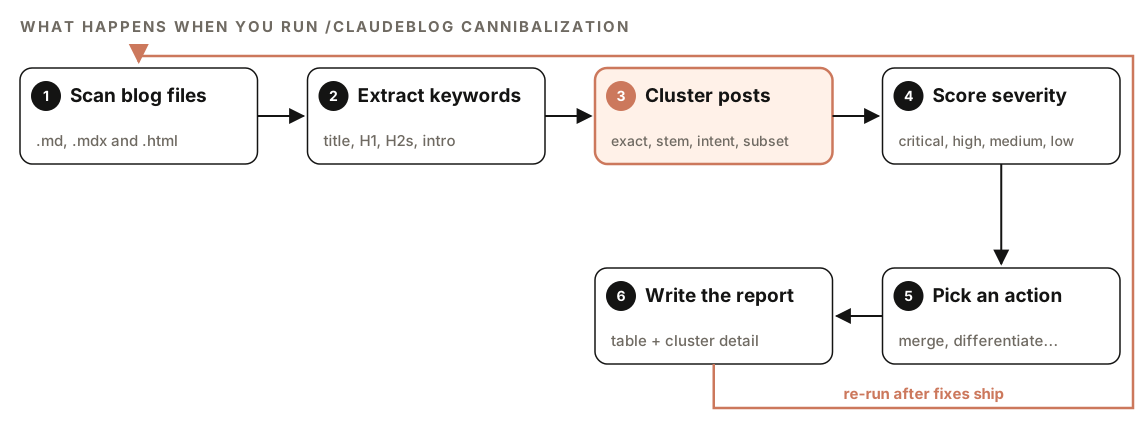
- Scan blog files. It finds every
.md,.mdx, and.htmlfile in the target directory and skipsnode_modules/,.git/, anddrafts/. - Extract keywords. For each post, it reads the title or H1 (the strongest signal), the H2 headings, the first paragraph, and the meta description if your frontmatter has one.
- Cluster posts. It groups posts whose primary keywords overlap, using four matching rules.
- Score severity. Every cluster of two or more posts gets a level from Critical to Low.
- Pick an action. Each cluster gets one recommendation: MERGE, DIFFERENTIATE, CANONICAL, or NO ACTION.
- Write the report. You get a summary table plus a detailed section for every flagged cluster.
How it picks each post's primary keyword
You don't tag posts with keywords; the skill works them out. It breaks the title and H1 into one-, two-, and three-word phrases, scores each phrase by how often it appears across the title, the H2s, and the first paragraph, and selects the top-scoring two- or three-word phrase as the primary keyword. Phrases from the H2 headings are recorded as secondary keywords.
The four matching rules
Posts are clustered using four rules, in priority order:
- Exact match. Two or more posts share the identical primary keyword.
- Stem match. The keywords share a root word, such as "optimize" and "optimization".
- Semantic overlap. Claude judges that two different keywords target the same search intent, like "best CRM software" and "top CRM tools".
- Subset match. One keyword contains the other, such as "email marketing" and "email marketing for startups".
A simple script can catch exact and stem matches. The semantic rule, judging that two differently worded titles answer the same question, is where Claude's language understanding matters.
How severity is scored
Not every overlap deserves the same urgency. The skill uses four levels.
In local mode, which needs nothing but your files, severity comes from how closely the keywords match:
| Severity | Local mode rule |
|---|---|
| Critical | Exact primary keyword match between posts |
| High | Stem match on the primary keyword, or 3+ shared H2 keywords |
| Medium | Semantic overlap on the primary keyword |
| Low | Subset match only, or shared secondary keywords |
In API mode, the levels are tied to real ranking data, and each comes with a suggested urgency:
| Severity | API mode criteria | When to act |
|---|---|---|
| Critical | Same exact keyword, both pages in the top 20 | Immediately |
| High | Same keyword cluster, one page outranks the other | This week |
| Medium | Related keywords with partial SERP overlap | This month |
| Low | Semantic similarity but different confirmed intents | Monitor |
API mode also calculates a severity score for each pair, so you can sort the list:
severity_score = overlap_count x avg_search_volume x (1 / position_gap)Here overlap_count is the number of keywords both pages rank for, avg_search_volume is the mean monthly search volume of those shared keywords, and position_gap is the difference between the two pages' average positions, with a minimum of 1. A higher score means a more urgent problem: many shared keywords, real demand, and two pages ranking close together.
How to run a keyword cannibalization check
Open your project in Claude Code with ClaudeSEO installed, then run the command on your content folder:
/claudeblog cannibalization ./content/blogYou can also ask in plain English, and Claude picks the matching skill:
Check the posts in ./content/blog for keyword cannibalization and tell me which ones compete for the same search intent.Local mode
Local mode is the default. It reads your files and needs no API keys or accounts, so it also works before you publish, when there are no rankings yet. Anything inside a drafts/ folder is skipped.
API mode with DataForSEO
Add the --api flag to bring in search data from DataForSEO:
/claudeblog cannibalization ./content/blog --apiAPI mode needs a DataForSEO account. Set your credentials as environment variables before you start Claude Code:
export DATAFORSEO_LOGIN="your-login"
export DATAFORSEO_PASSWORD="your-password"
DataForSEO's own pricing applies to every call. In this mode, the skill collects your published URLs (from you or from your sitemap), uses the Ranked Keywords endpoint to build a keyword profile for each URL, then runs the Page Intersection endpoint on URL pairs that share keyword clusters. Page Intersection returns the keywords both pages rank for, with position, search volume, and CPC. Our guide to using DataForSEO with Claude Code covers account setup in more detail.
If the credentials are missing, the command falls back to local mode automatically and tells you. If DataForSEO returns a rate-limit error, it waits and retries once, then switches to local mode for the remaining URLs. If your folder has only one post, it reports that the analysis needs at least two posts and stops.
How to read the cannibalization report
The report always starts with a summary table, one row per competing pair:
| Post A | Post B | Shared Keywords | Severity | Recommendation |
|--------|--------|-----------------|----------|----------------|
| /[post-a] | /[post-b] | [keyword 1], [keyword 2] | Critical | MERGE |
| /[post-c] | /[post-d] | [keyword 3] | High | DIFFERENTIATE |
| /[post-e] | /[post-f] | [keyword 4], [keyword 5] | Critical | CANONICAL |
| /[post-g] | /[post-h] | [keyword 6] | Low | NO ACTION |
Below the table, each flagged cluster gets a detail section with:
- Both post titles and URLs
- The full list of overlapping keywords, with search volume in API mode
- Which post is stronger, judged on depth and structure
- The specific recommendation and the reasoning behind it
Work through the table from Critical down. Low pairs are mostly there for the record.
Read the "which post is stronger" line carefully, because it decides which URL survives a merge and which gets retargeted. If you're unsure, compare both posts for depth, first-hand experience, and sourcing, which is what our E-E-A-T content analysis is built to score.
How to fix keyword cannibalization
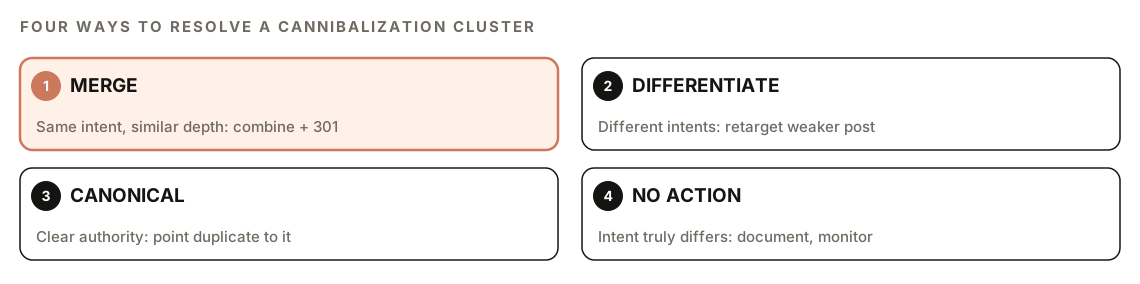
MERGE
Use this when both pages cover the same intent at a similar depth, or when both are thin. Combine the best content from both into one complete post, then 301 redirect the weaker URL to the merged one. Keep every internal link that pointed at either URL working. Ideally, update those links to point straight at the merged post instead of going through the redirect.
A merge is really a rewrite. Our guide to refreshing and rewriting old blog posts covers how to rebuild the surviving post so it's better than either original.
DIFFERENTIATE
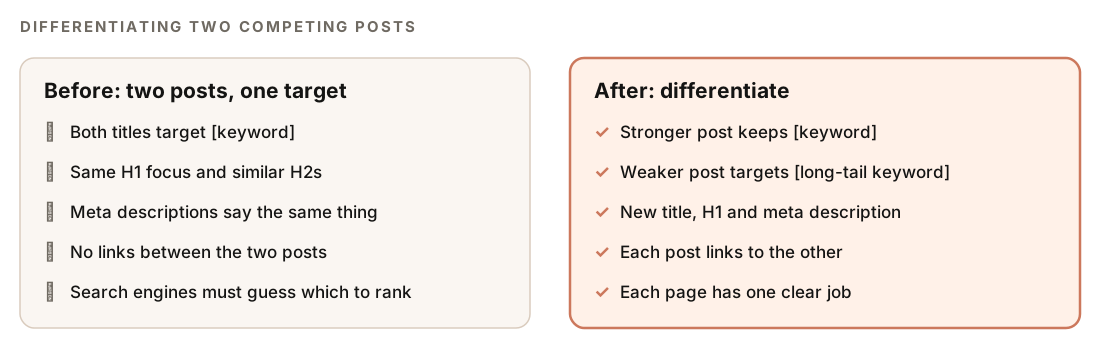
Use this when the posts serve different intents but their keyword targeting overlaps. Shift the weaker post's primary keyword to a related long-tail phrase, then update its title, H1, and meta description to match the new focus. Finally, add internal links between the two posts so each one covers its own angle and points to the other.
CANONICAL
Use this when one post is clearly the authority and the other is a lesser duplicate you want to keep live. Add a canonical tag to the weaker page pointing at the authority, and link from the weaker page to the authority page:
<link rel="canonical" href="https://example.com/blog/[authority-post]/" />The skill also suggests noindexing the weaker page if it adds no unique value. Pick one of those two signals per page rather than combining them, since a canonical says "treat this as a copy" while noindex says "drop this page". Google's documentation on consolidating duplicate URLs explains how canonical signals are treated.
NO ACTION
Use this when the intent is genuinely different despite similar wording. Write down why, so the next audit doesn't reopen the question. Check the two posts' rankings quarterly, and re-evaluate the pair if either one drops.
Applying fixes with Claude Code
Once you've decided on each cluster, ask Claude Code to make the changes in your repo:
For the DIFFERENTIATE pairs in the cannibalization report, rewrite the weaker post's title, H1, and meta description to target the long-tail keyword suggested, and add a contextual link between each pair. For MERGE pairs, show me a merge plan first: which sections to keep from each post, and the redirect to add. Show diffs before saving.Then re-run /claudeblog cannibalization to confirm the clusters are gone, and check redirects and links in the diff. Our guide to internal linking with Claude Code covers how to find links that still point at old URLs.
Doing it without the skill
You can run a basic cannibalization check with plain Claude Code prompts. This works well on a small blog:
List every .md and .mdx file in ./content/blog. For each one, extract the title, H1, H2 headings, and first paragraph, and propose a 2-3 word primary keyword. Then group posts that share the same primary keyword, a variant of the same root word, or the same search intent. For each group, output a table with both posts, the shared keywords, which post is more thorough, and whether to merge, retarget, canonicalize, or leave them alone, with one sentence of reasoning.If you have Search Console data grouped by both query and page (the Search Console API returns this when you request both dimensions), you can check real rankings too:
Read gsc-query-page.csv. Find every query where two or more of my URLs received impressions. For each, list the URLs with their clicks, impressions, and average position, and flag queries where the URLs rank within a few positions of each other. Sort by total impressions.The skill adds the parts that are tedious to repeat: consistent keyword extraction, four-rule clustering with intent judgment, a fixed severity scale, the API-mode score, automatic fallbacks, and the same report format every run.
Keyword cannibalization mistakes to avoid
- Treating every overlap as a problem. Similar words with different intents are fine. Forcing a merge can remove a page that ranked for its own audience.
- Merging without a redirect. Deleting the weaker URL throws away its links and leaves visitors on a 404. Always 301 it to the merged post.
- Canonicalizing pages that aren't duplicates. A canonical tag is a hint, and search engines can ignore it when the two pages are clearly different. Use DIFFERENTIATE for pages with distinct content.
- Publishing before you check. Run the command before a new post goes live, so you catch the overlap before it splits your rankings.
- Changing only the title. A retargeted post needs a new H1 and meta description too, or the old focus stays obvious.
Our editorial workflow shows where cannibalization checks sit alongside planning, writing, scoring, and refreshing.
Related guides
- Keyword clustering and topic clusters with Claude Code, to plan posts that don't overlap from the start
- Blog content audit with Claude Code, which checks overall blog health alongside cannibalization
- How to refresh and rewrite old blog posts, the next step after a merge
- The full ClaudeSEO skill list for every command in both suites
FAQ
What is keyword cannibalization?
Keyword cannibalization is when two or more pages on the same site target the same keyword and search intent. They compete with each other, which can split links and signals, cause the ranking URL to switch back and forth, or let a weaker page rank instead of the better one.
Is keyword cannibalization always bad?
No. Pages that share words but answer different questions can rank side by side. It becomes a problem when the intent is the same and search engines have to pick between your pages. That's why the report can recommend NO ACTION.
How do I check for keyword cannibalization?
Run /claudeblog cannibalization on your content folder to compare every post against every other post. For a single query, you can also use the Google Search Console Performance report: filter by the query and check whether more than one of your pages gets impressions for it.
Should I merge or delete cannibalizing pages?
Merge rather than delete. Combine the best content into the stronger post and 301 redirect the weaker URL to it, so its links and visitors carry over. Deleting without a redirect discards that value.
Does a canonical tag fix keyword cannibalization?
It can, when one page is a lesser duplicate of the other. The canonical tag tells search engines which version to treat as the main one, but it's a hint, so it works best on near-duplicates. For pages with different content, retargeting the weaker one is usually the better fix.