
Technical SEO
XML Sitemap Audit with Claude Code: Find and Fix Issues
Run an XML sitemap audit with Claude Code: validate XML, find broken, redirected and noindexed URLs, fix lastmod dates, and generate clean sitemaps.
An XML sitemap audit checks that the file you hand to search engines lists the pages you want indexed, and only those: live, canonical, indexable URLs with honest modification dates. With Claude Code, one command validates the XML, checks the status of every URL, compares the sitemap with a crawl of your site, and ranks each problem by severity.
This guide explains what a sitemap is for, what the ClaudeSEO /claudeseo sitemap command checks, how to read its report, how to fix common problems, and how to generate a new sitemap without shipping thin pages.
Key takeaways
- A sitemap is a hint to search engines, not a command. It works best when every URL in it is one you actually want indexed.
/claudeseo sitemap <url>checks XML validity, the 50,000-URL limit, status codes, noindex and redirect problems, lastmod accuracy, and the robots.txt reference.- It also compares the sitemap with a crawl, so you see pages missing from the sitemap and listed pages that 404 or redirect.
- Issues are ranked from Critical to Info, so you fix broken XML and oversized files before cosmetic tags.
- In generate mode, quality gates warn at 30 or more location pages and stop at 50 or more until you justify them.
What is an XML sitemap and why audit it?
An XML sitemap is a file that lists the URLs on your site you want search engines to know about. The format comes from the sitemaps.org protocol: a <urlset> element holds one <url> entry per page, each with a <loc> (the address) and an optional <lastmod> (when the page last changed in a meaningful way).
<?xml version="1.0" encoding="UTF-8"?>
<urlset xmlns="http://www.sitemaps.org/schemas/sitemap/0.9">
  <url>
    <loc>https://example.com/page</loc>
    <lastmod>YYYY-MM-DD</lastmod>
  </url>
</urlset>
Sitemaps help search engines discover pages, especially on large sites, new sites with few links pointing in, and sites where some pages are hard to reach through internal links. They don't force anything. Listing a URL doesn't guarantee it gets crawled or indexed.
Each sitemap file can hold up to 50,000 URLs and be up to 50MB uncompressed. Larger sites split their URLs across several files and list those files in a sitemap index.
So why audit something so simple? Because sitemaps are usually generated by a CMS, a plugin, or a build script, and they drift out of step with the real site:
- Deleted pages stay listed. The sitemap keeps sending crawlers to URLs that now return 404.
- Migrations leave redirects behind. After a URL change, the sitemap often still lists the old addresses.
- Noindexed pages slip in. The sitemap asks search engines to index a page whose own robots meta tag says not to.
- Dates stop meaning anything. Many generators stamp every URL with the build time, so
<lastmod>stops being useful.
Each of these weakens the sitemap as a signal. Google's guide to building and submitting a sitemap covers the formats and limits in detail.
What the /claudeseo sitemap command does
The command is part of the Claude SEO skill suite and sits alongside our technical SEO audit. It has two modes: analyze an existing sitemap, or generate a new one. When you give it a live site, it runs the analysis in a fixed order:
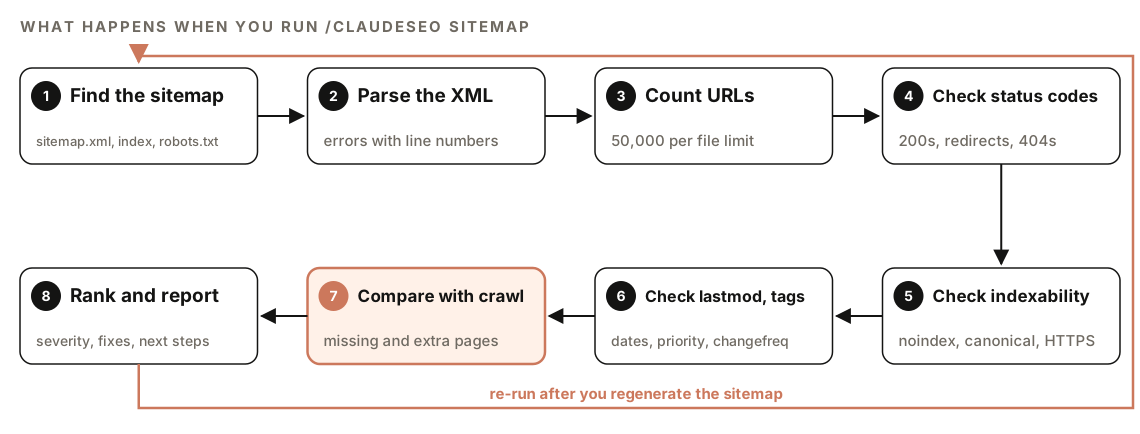
- Find the sitemap. Before reporting that no sitemap exists, it checks
/sitemap.xml,/sitemap_index.xml, and anySitemap:line in robots.txt. - Parse the XML. Invalid XML is reported with the specific parsing errors and their line numbers.
- Count URLs. Each file is checked against the 50,000-URL protocol limit.
- Check status codes. Every listed URL should return HTTP 200.
- Check indexability. Listed URLs shouldn't be noindexed, non-canonical, redirected, or served over plain HTTP.
- Check lastmod and tags. It flags identical
<lastmod>values and the<priority>and<changefreq>tags. - Compare with a crawl. It compares crawled pages with the sitemap to find pages that are missing from it.
- Rank and report. Every issue gets a severity and a fix.
If the site can't be reached, the command reports the HTTP status code and suggests checking that the site is live. If it detects rate limiting, it backs off and reports partial results with a note about when to retry, rather than hammering your server.
When the sitemap check runs inside a full site audit, its findings on coverage, XML validity, URL status, and quality gates feed the Sitemap category of the audit report.
What the sitemap audit checks
Valid XML and the URL limit
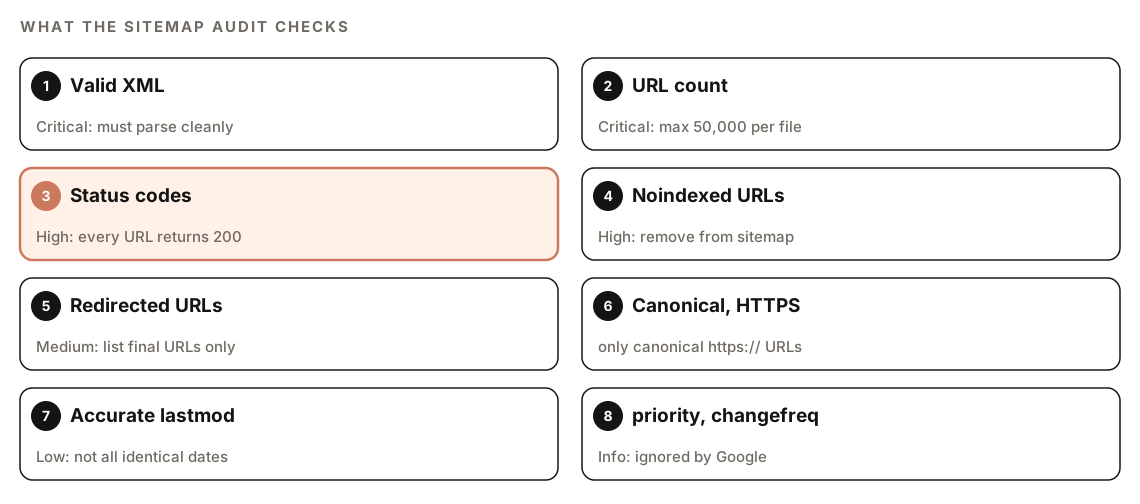
A sitemap that doesn't parse is useless, so invalid XML is Critical. So is a file with more than 50,000 URLs, because it breaks the protocol limit. The fix is to split URLs across several files and list them in a sitemap index.
Status codes
Every URL in a sitemap should return 200. URLs that return errors are a High-severity issue: they waste crawl attempts and make the sitemap a less reliable list of your pages. The report lists these as extra pages, meaning URLs that are in the sitemap but return 404 or redirect.
Noindexed, redirected, and non-canonical URLs
A sitemap should list only the final, canonical version of each page. The skill flags:
- Noindexed URLs (High): the sitemap says "index this" while the page says "don't".
- Redirected URLs (Medium): list the destination instead of the old address.
- Non-canonical URLs: if a page's canonical tag points elsewhere, list the canonical URL instead.
- HTTP URLs: every listed URL should use HTTPS.
Accurate lastmod dates
<lastmod> is only useful when it's accurate. If every URL carries the same date, it almost certainly reflects when the file was generated, not when pages changed. The skill flags this as Low severity and recommends using each page's real modification date.
priority and changefreq
Google ignores <priority> and <changefreq>. The skill flags them at Info level: removing them is optional, but there's no reason to maintain them for Google.
Coverage and structure
The crawl comparison shows missing pages (found in the crawl but not in the sitemap) alongside the extra pages above. The skill also checks that the sitemap is referenced in robots.txt, and looks for good structure: a sitemap index once you pass 50,000 URLs, and separate files by content type, such as pages, posts, images, and videos.
How to run an XML sitemap audit with Claude Code
Open your project in Claude Code with ClaudeSEO installed (see our guide to installing SEO skills in Claude Code), then run:
/claudeseo sitemap https://www.example.comYou can also ask in plain English. The skill responds to phrases such as "sitemap", "sitemap issues", "XML sitemap", and "generate sitemap":
Check the XML sitemap on https://www.example.com and list every URL that redirects, returns an error, or is noindexed.To start generate mode, describe what you need:
Generate a new XML sitemap structure for https://www.example.com. It's a local services business with a blog.No third-party account or API key is needed for the sitemap check.
How to read the sitemap report
The analysis writes VALIDATION-REPORT.md, with a pass or fail for each check, an issues list with severities, and recommendations. Its shape looks roughly like this:
## Sitemap Validation Report

### Checks
| Check | Result | Severity |
|---|---|---|
| Valid XML | [Pass / Fail] | Critical |
| URL count per file | [Pass / Fail] | Critical |
| Non-200 URLs | [count] | High |

### Missing pages (in crawl, not in sitemap)
- [URL]

### Extra pages (in sitemap, but 404 or redirected)
- [URL] [status code]

### Quality gate warnings
### Recommendations
Work through issues in severity order. The skill uses this scale:
| Issue | Severity | Fix |
|---|---|---|
| Invalid XML | Critical | Fix the syntax errors at the reported lines |
| More than 50,000 URLs in one file | Critical | Split the URLs and add a sitemap index |
| Non-200 URLs | High | Remove them or fix the broken pages |
| Noindexed URLs included | High | Remove them from the sitemap |
| Redirected URLs included | Medium | Replace them with the final URLs |
| All lastmod dates identical | Low | Use each page's real modification date |
| priority or changefreq used | Info | Remove them if you like; Google ignores them |
Then look at the missing pages list. A page that's live, indexable, and important but absent from the sitemap often points to a generator rule that excludes it, such as a content type the plugin doesn't know about.
How to fix common sitemap problems
Almost every sitemap problem comes from the generator, not the file. Fix the rule that produces the sitemap and every future build is corrected.
Split large sitemaps with an index
Once you pass 50,000 URLs, split by content type and list each file in an index:
<?xml version="1.0" encoding="UTF-8"?>
<sitemapindex xmlns="http://www.sitemaps.org/schemas/sitemap/0.9">
  <sitemap>
    <loc>https://example.com/sitemap-pages.xml</loc>
    <lastmod>YYYY-MM-DD</lastmod>
  </sitemap>
  <sitemap>
    <loc>https://example.com/sitemap-posts.xml</loc>
    <lastmod>YYYY-MM-DD</lastmod>
  </sitemap>
</sitemapindex>
Splitting by type also makes problems easier to spot. If one file is full of redirects, you know which content type to look at.
Reference the sitemap in robots.txt
Add one line to robots.txt with the full URL of your sitemap or sitemap index:
Sitemap: https://www.example.com/sitemap_index.xmlSubmitting the sitemap in Google Search Console is worth doing too. Its Sitemaps report shows whether Google could read the file and how many URLs it discovered.
Fix the generator with Claude Code
Once you've reviewed the report, ask Claude Code to fix the code that builds the sitemap:
Update the sitemap generator in this repo so it only includes canonical, indexable URLs that return 200. Use each page's real last-modified date for lastmod, drop priority and changefreq, and split into a sitemap index above 50,000 URLs. Show me the diff before saving.Deploy, then re-run /claudeseo sitemap to confirm the issues are gone.
Generating a new sitemap with quality gates
Generate mode is for new sites, rebuilds, and sites whose sitemap is beyond repair. It works through these steps:
- Ask for your business type, or detect it from the existing site.
- Load a matching industry template for the site structure.
- Plan the structure with you interactively.
- Apply quality gates to location pages.
- Generate valid XML.
- Split at 50,000 URLs with a sitemap index.
- Write
STRUCTURE.md, which documents the site architecture.
You get sitemap.xml (or split files with an index), STRUCTURE.md, and a summary of the URL count and how URLs are organized.
The quality gates exist because large sets of near-identical location pages are a classic doorway page pattern, which Google's spam policies treat as spam. At 30 or more location pages, the skill warns and requires at least 60% unique content per page. At 50 or more, it stops and asks you to justify the pages before it continues.
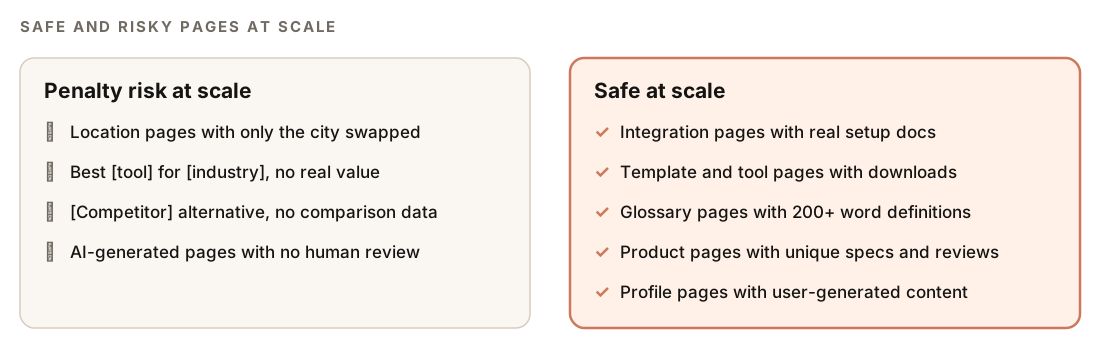
The skill draws a clear line. Pages are safe at scale when each one carries its own substance: integration pages with real setup docs, glossary pages with definitions of 200 words or more, product pages with unique specs. They're a risk when only a name changes between them. Our guide to programmatic SEO with Claude Code covers how to build large page sets that clear this bar.
Doing it without the skill
You can run a solid sitemap check with plain Claude Code prompts. Ask Claude to write and run a script:
Fetch https://www.example.com/sitemap.xml, and every child sitemap if it's an index. Write and run a Python script that: reports XML parsing errors with line numbers; counts URLs per file; requests each URL without following redirects and records the status code; for each 200 URL, checks for a noindex robots meta tag or X-Robots-Tag header and whether the canonical points elsewhere; flags http:// URLs; and reports whether all lastmod values are identical. Output a table of problems grouped by type.And to check coverage against your codebase:
Compare the URLs in my sitemap with the public routes and content files in this repo. List pages that exist but are missing from the sitemap, and sitemap URLs that no longer match any page.The skill adds the fixed severity scale, the fallback locations it checks before reporting "not found", polite handling of rate limits, a crawl comparison against the live site, and a generate mode with industry templates and location-page quality gates.
Sitemap mistakes to avoid
- Listing pages you don't want indexed. Internal search results, noindexed tag pages, and parameter URLs don't belong in a sitemap.
- Stamping every URL with the build date. It makes
<lastmod>meaningless. - Relying on priority and changefreq. Google ignores both, so they won't change how your pages are crawled.
- Forgetting the sitemap after a migration. Old URLs that now redirect should be replaced with their destinations.
- Using the sitemap to hide weak internal linking. A page that only appears in the sitemap is still hard for users and crawlers to reach.
- Mass-producing location pages. If only the city name changes, the pages are a risk however correct the XML is.
Related guides
- Technical SEO audit with Claude Code for crawlability, canonicals, and indexing
- How to run a full SEO audit with Claude Code, which includes the sitemap check
- Hreflang audit with Claude Code if your sitemap carries hreflang annotations
FAQ
What is an XML sitemap audit?
An XML sitemap audit checks that your sitemap is valid XML, stays within protocol limits, and lists only live, canonical, indexable URLs with accurate dates. A good audit also compares the sitemap with a crawl of the site to find important pages that are missing.
How many URLs can an XML sitemap contain?
Each sitemap file can contain up to 50,000 URLs and be up to 50MB uncompressed. If you have more, split the URLs across several files and list them in a sitemap index. A sitemap index has the same limits on the number of sitemaps it lists.
Does Google use priority and changefreq?
No. Google ignores both tags. It does use <lastmod> when the dates are consistently accurate, which is why the audit flags sitemaps where every URL has the same date.
Should noindexed pages be in my sitemap?
No. A sitemap tells search engines which pages you want indexed, so listing a noindexed page sends a contradictory signal. The skill treats noindexed URLs in a sitemap as a High-severity issue and recommends removing them.
Does a sitemap guarantee my pages get indexed?
No. A sitemap helps search engines discover URLs, but whether a page is crawled and indexed depends on its quality, its indexability, and how it's linked. A clean sitemap removes obstacles; it doesn't override those decisions.
Where should I put my XML sitemap?
Most sites serve it at the root, such as /sitemap.xml or /sitemap_index.xml. Add a Sitemap: line to robots.txt with the full URL and submit it in Google Search Console. The skill checks those common locations and the robots.txt line before reporting that no sitemap exists.