
Integrations
IndexNow and Bing Webmaster Tools with Claude Code
Set up IndexNow with Claude Code: host your key file, submit changed URLs to Bing and other engines, and pull Bing Webmaster Tools link data in one place.
IndexNow lets you tell search engines the moment a page is added, updated, or deleted, instead of waiting for their crawlers to notice. With ClaudeSEO, you can submit changed URLs to IndexNow and pull Bing Webmaster Tools link data from inside Claude Code, using one command: /claudeseo bing.
This guide explains how IndexNow works and what it can't do, why Bing visibility matters, how to set up the key file on your domain, and how to run each subcommand.
Key takeaways
- IndexNow is a push protocol: you notify participating search engines when a URL changes, and a key file on your own domain proves you control the site.
- Participating engines include Bing, Yandex, Seznam, and Naver, and a URL submitted to one is shared with the others. Google isn't a participant.
/claudeseo binghas five subcommands:links,compare,submit,submit-batch, andverify-indexnow.- You need a Bing Webmaster Tools API key. For IndexNow submissions, the skill also expects a host key of at least 32 characters, published on your domain.
- Microsoft Copilot draws on the Bing index, so Bing indexing also affects whether Copilot can cite your pages.
What is IndexNow and how does it work?
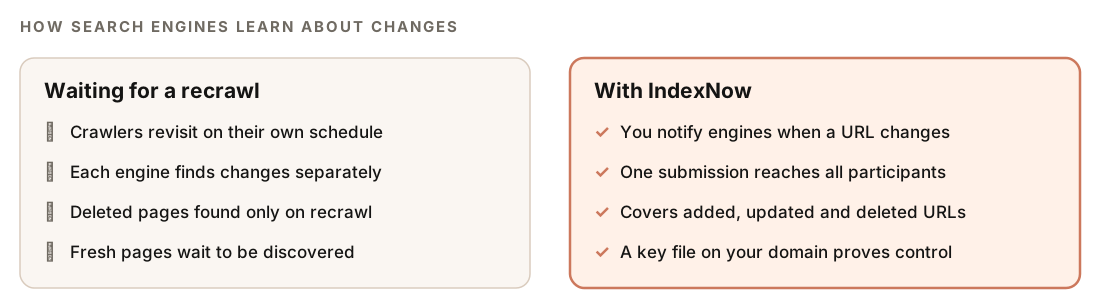
Search engines normally find changes by pulling. Their crawlers revisit pages on their own schedule, and your XML sitemap tells them which URLs exist. A new page can wait to be discovered, and an updated page can show old content in results until the next visit.
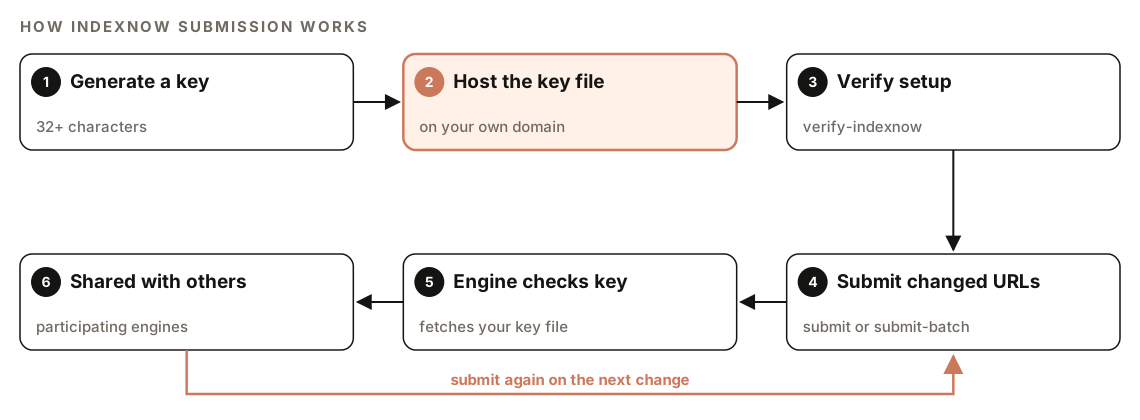
IndexNow reverses that. When a URL changes, you send it to an IndexNow endpoint, and the search engine knows to look at it. The protocol has three parts:
- A key. You generate a random string of letters, numbers, and dashes.
- A key file on your domain. You host a plain text file containing the key, usually at the root, for example
https://www.example.com/<key>.txt. When you submit, the engine fetches this file to check that the person submitting controls the site. - A submission. You send the changed URLs together with your key, either one URL in a simple request or a list of URLs in one JSON request.
A batch submission looks like this:
{
  "host": "www.example.com",
  "key": "your-indexnow-key",
  "keyLocation": "https://www.example.com/your-indexnow-key.txt",
  "urlList": [
    "https://www.example.com/new-page",
    "https://www.example.com/updated-page"
  ]
}
Participating engines share submissions with each other, so one submission reaches all of them. According to IndexNow.org, which keeps the current list, participants include Microsoft Bing, Yandex, Seznam, and Naver. Google isn't a participating engine. For Google, your sitemap and Search Console are still the route.
What IndexNow doesn't do
IndexNow is a signal that a URL changed. It isn't a promise that the URL will be crawled soon, indexed, or ranked. The engine still decides whether the page is worth indexing, so thin or duplicate pages won't get in just because you submitted them.
It also isn't a replacement for a sitemap or good internal links. Keep both. IndexNow speeds up discovery of changes; your sitemap and links tell engines what your site contains.
Submit URLs when they actually change: new pages, meaningful updates, and deleted pages (so the engine sees the 404 or 410 sooner). Re-submitting unchanged URLs over and over adds nothing.
What is Bing Webmaster Tools, and why does Bing matter?
Bing Webmaster Tools is Microsoft's equivalent of Google Search Console. You add and verify your site, submit sitemaps, and see how Bing crawls and indexes it, how it performs in Bing search, and which sites link to it. An API key lets tools such as Claude Code read that data.
Bing matters beyond its own search results. Microsoft Copilot draws on the Bing index for web answers, so a page Bing hasn't indexed is unlikely to show up as a Copilot citation. If you care about visibility in AI answers, which our GEO and AI search features cover, Bing indexing is part of the job.
Bing's link data is also useful on its own. The skill uses it for competitor backlink analysis because Bing tracks links that Google's API doesn't surface.
What the /claudeseo bing command does
The command is part of the Claude SEO skill suite. It has two jobs: reading link data from Bing Webmaster Tools and submitting URLs through IndexNow.
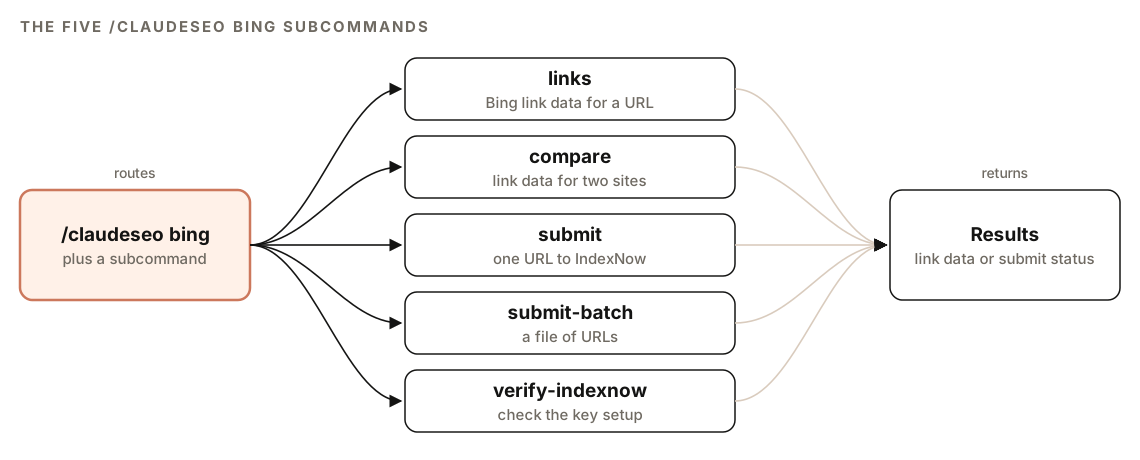
| Subcommand | Input | What it does |
|---|---|---|
| links | A URL | Pulls Bing's link data for that URL |
| compare | Two URLs | Compares Bing link data for two sites, such as yours and a competitor's |
| submit | One URL | Submits a single changed URL through IndexNow |
| submit-batch | A file of URLs | Submits a list of changed URLs in one go |
| verify-indexnow | None | Checks your IndexNow key setup without submitting anything |
The skill applies in three situations:
- You've published new pages and want Bing to ingest them, which also makes them eligible for Copilot citations.
- You want fresh URLs picked up faster by Bing, Yandex, Seznam, and Naver.
- You're analyzing competitor backlinks and want Bing's link data alongside other sources.
It also knows its limits. For Google indexing, which works differently (sitemap-driven, with no IndexNow), it points you to the Google integration covered in our guide to Search Console, GA4 and PageSpeed data in Claude Code. For a backlink analysis that weights several data sources by confidence, it hands off to /claudeseo backlinks, which already combines Bing with Moz and Common Crawl.
How to set up Bing Webmaster Tools and IndexNow
You need:
- The Bing Webmaster Tools extension for Claude SEO. It has an installer for macOS and Linux and one for Windows.
- A Bing Webmaster Tools API key, generated in your Bing Webmaster Tools account. Your site needs to be added and verified there for Bing to show you its data.
- An IndexNow host key for submissions. The skill expects at least 32 characters, published at the URL you declare as
INDEXNOW_KEY_LOCATION.
Bing Webmaster Tools and IndexNow are run by their providers, and their own terms and pricing apply. If you haven't installed the skill suite yet, start with our guide to installing SEO skills in Claude Code.
Generate a 32-character key:
python3 -c "import secrets; print(secrets.token_hex(16))"Save it as a text file named after the key, containing only the key, and deploy it to your site's root so it's served at https://www.example.com/<key>.txt. In many static site frameworks, a file in the public folder is served at the root. Set INDEXNOW_KEY_LOCATION to that full URL, then confirm the setup:
/claudeseo bing verify-indexnowKeep the Bing API key out of your repository. The IndexNow key is different: it has to be public, because engines fetch it from your site.
How to run the Bing commands
Submit one URL you just published or updated:
/claudeseo bing submit https://www.example.com/blog/new-postSubmit a batch of changed URLs from a file:
/claudeseo bing submit-batch changed-urls.txtPull Bing link data for your site, or compare it with a competitor:
/claudeseo bing links https://www.example.com
/claudeseo bing compare https://www.example.com https://www.competitor.example
You can also ask in plain English, and Claude picks the matching subcommand:
I just published three posts under /blog/. Submit them to IndexNow, then show me Bing's link data for the blog section.A natural habit is to submit after every deploy that adds, changes, or removes pages. Ask Claude Code to list the URLs your last commit touched, write them to a file, and run submit-batch on it. Some CMS platforms and CDNs can also send IndexNow pings for you; if yours does, don't submit the same URLs twice.
How to read IndexNow responses and Bing link data
IndexNow answers each submission with an HTTP status code. These are the ones you'll see:
| Code | Meaning | What to do |
|---|---|---|
| 200 OK | The URLs were received | Nothing |
| 202 Accepted | Received, key check still pending | Nothing, unless it keeps failing later |
| 400 Bad Request | The request format is invalid | Check the URLs and the request body |
| 403 Forbidden | The key isn't valid | Check the key file exists and matches the key |
| 422 Unprocessable Entity | URLs don't belong to the host, or the key doesn't fit the protocol's format | Submit only URLs on the host that serves the key |
| 429 Too Many Requests | Too many requests, possibly seen as spam | Slow down and submit only changed URLs |
A 200 or 202 means the submission arrived. It doesn't mean the page is indexed. To check that, look up the URL in Bing Webmaster Tools later.
For link data, focus on who links to you, not raw totals. Compare your site with one or two real competitors. Sites that link to a competitor but not to you are your outreach shortlist, if they're relevant to your topic. Bing's data is one view of the web's links; for a fuller picture with toxic link checks and a health score, run the backlink audit with Claude Code.
How to fix common IndexNow problems
Most IndexNow failures come from the key file.
The key file returns 404. Check the exact URL in a browser. The filename must match the key, the file must be deployed to production, and it must not sit behind a login or redirect to another host.
The key doesn't match. The file should contain the key and nothing else. Watch for extra spaces, quotes, or a key that was regenerated after the file was deployed.
URLs are on a different host. The key file has to be on the same host as the URLs you submit. www.example.com and example.com are different hosts, and so is every subdomain. Each needs its own key file.
The key file is in a subfolder. A key file's location limits which URLs it covers. A file at https://www.example.com/blog/<key>.txt only covers URLs under /blog/. Put the file at the root if you submit URLs from the whole site.
To have Claude Code check your setup:
Fetch the IndexNow key file at the URL in INDEXNOW_KEY_LOCATION. Confirm it returns 200 without redirects, contains only the key, and sits on the same host as the URLs in changed-urls.txt. Then run /claudeseo bing verify-indexnow and explain any failure.Doing it without the skill
IndexNow is a simple HTTP protocol, so plain Claude Code can set it up in a project you control:
Generate a 32-character hex IndexNow key. Create public/<key>.txt containing only the key. Then write scripts/indexnow.sh that reads changed-urls.txt and sends the URLs as a JSON POST to https://api.indexnow.org/indexnow with host, key, keyLocation, and urlList fields. Print the HTTP status and explain what it means.For Bing link data without the API, download the backlinks report from Bing Webmaster Tools and ask Claude Code to group the linking domains and compare them with a competitor's export.
The skill adds a key verification check, single and batch submission from one command, live link data and two-site comparisons through the Bing API, and hand-offs to the Google and backlink skills when they fit better.
IndexNow mistakes to avoid
- Expecting IndexNow to help with Google. Google isn't a participant. Use sitemaps and Search Console for Google.
- Submitting unchanged URLs. Submit when content is added, meaningfully updated, or deleted, not on a schedule.
- Treating a 200 as indexed. It only means the submission arrived.
- Hiding the key file. It must be publicly reachable on the same host as the URLs, without redirects.
- Dropping your sitemap. IndexNow speeds up discovery of changes. Your XML sitemap still describes the whole site.
- Ignoring Bing entirely. Bing indexing also affects Copilot, so check your pages in Bing Webmaster Tools too.
Related guides
- Technical SEO features, including IndexNow checks in the technical audit
- Generative engine optimization guide for visibility in AI answers
- Backlink audit with Claude Code, which combines Bing link data with other sources
- Search Console, GA4 and PageSpeed data in Claude Code for the Google side
FAQ
What is IndexNow?
IndexNow is a protocol that lets site owners notify search engines when a URL is added, updated, or deleted. You host a key file on your domain to prove ownership, then submit changed URLs. Participating engines share each submission with each other.
Does Google support IndexNow?
Google isn't a participating search engine in IndexNow. For Google, keep your XML sitemap up to date and use Search Console.
Where do I put the IndexNow key file?
Usually at the root of your site, named after the key, for example https://www.example.com/<key>.txt, containing only the key. It must be on the same host as the URLs you submit, and a file in a subfolder only covers URLs under that folder.
Does IndexNow guarantee indexing?
No. It tells engines a URL changed, but each engine still decides whether to crawl and index it. A 200 or 202 response only means your submission was received.
Do I need Bing Webmaster Tools to use IndexNow?
The IndexNow protocol itself only needs a key file on your domain. The /claudeseo bing command needs a Bing Webmaster Tools API key, and its link data comes from a site you've verified there.
Does IndexNow help with AI search?
Indirectly. Microsoft Copilot draws on the Bing index, and IndexNow helps Bing find new and changed pages sooner. It can't make a page more citable; that depends on the content itself.