
Integrations
Firecrawl and Claude Code: Crawl Any Site for SEO
Use Firecrawl with Claude Code to map, crawl, and scrape any website, including JavaScript pages, then turn the crawl data into technical SEO fixes.
The Firecrawl Claude Code integration from ClaudeSEO lets you crawl a whole website, including pages that only show their content after JavaScript runs, and turn the results into SEO findings in the same session. One command, /claudeseo firecrawl, gives you four modes: crawl a site, map its URLs, scrape a single page, or search inside a site.
This guide explains what a site crawl is and why JavaScript rendering matters, how the command works, how to set it up, and how to use crawl data to find and fix technical problems.
Key takeaways
- You need a Firecrawl account and API key. Firecrawl bills usage in credits, and Firecrawl's own pricing applies.
/claudeseo firecrawlhas four subcommands:crawl,map,scrape, andsearch.- Firecrawl renders JavaScript, so it sees content and links that a plain HTML fetch misses on single-page apps.
- Start with
map, which lists URLs without fetching content, then crawl only the sections that matter. The skill tells you the estimated credit usage before large crawls.- Crawl data feeds the other Claude SEO skills: broken links, redirect chains, sitemap gaps, thin content, and schema coverage.
What is a site crawl, and why does JavaScript rendering matter?
A crawler starts at one URL, reads the page, collects every link on it, and then visits those links in turn. For each page it records the content, the metadata (title, meta description, headings, canonical), and the links it found. Crawl depth is how many clicks a page sits from the starting URL. A page at depth 1 is linked from the homepage; a page at depth 4 takes four clicks to reach.
Search engines discover most pages this way, so an SEO crawl is a way of seeing your site the way a search engine does. It answers questions no single-page check can: which internal links are broken, which pages nothing links to, and which sections are full of near-identical URLs.
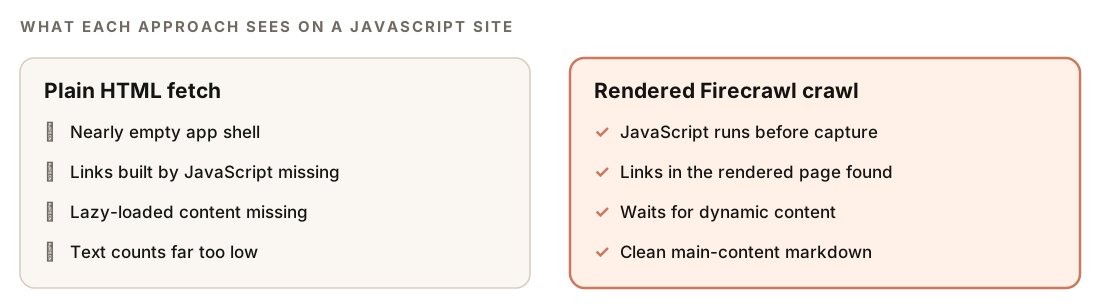
The catch is JavaScript. Many modern sites built with React, Vue, or Angular send the browser a nearly empty HTML shell, then build the page with JavaScript. A crawler that only reads the raw HTML sees almost no text and few links, so it underreports your content and misses whole sections.
Google handles JavaScript in three phases: crawling, rendering, and indexing. Its guide to JavaScript SEO basics explains that rendering may not happen right away, and that links need to be real <a href> elements to be followed. If your audit tool can't render JavaScript, it can't tell you what Google sees after rendering.
Firecrawl is a hosted crawling and scraping service that loads pages in a browser, runs the JavaScript, waits for dynamic content, and returns the result as clean markdown, HTML, or a list of links.
What the /claudeseo firecrawl command does
The command is part of the Claude SEO skill suite. It talks to Firecrawl through the Firecrawl MCP server. MCP (Model Context Protocol) is the standard Claude Code uses to call outside tools. A typical run works like this:
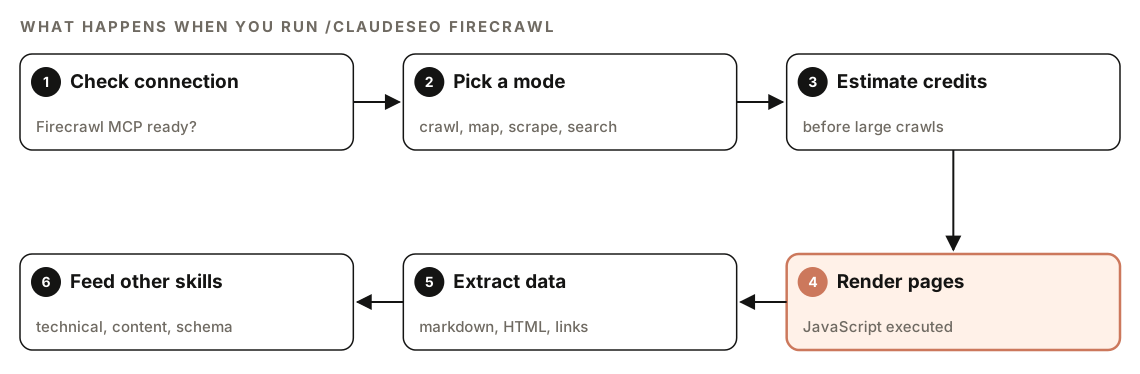
- Check the connection. Before using any Firecrawl tool, the skill confirms the Firecrawl MCP tools are available in your session. If they aren't, it tells you the extension isn't installed and how to install it.
- Pick a mode. The subcommand decides what happens:
crawl,map,scrape, orsearch. - Estimate credits. Before a large crawl, the skill tells you the estimated credit usage, so you can narrow the scope first.
- Render pages. Firecrawl loads each page and runs its JavaScript.
- Extract data. Results come back as markdown, HTML, links, or, for
scrape, a screenshot. - Feed other skills. The crawled content goes to the technical, content, schema, and sitemap skills for analysis.
If Firecrawl isn't available, the skill doesn't fail silently. It tells you, suggests Claude SEO's built-in page fetcher for single-page analysis, and shows the Firecrawl install step.
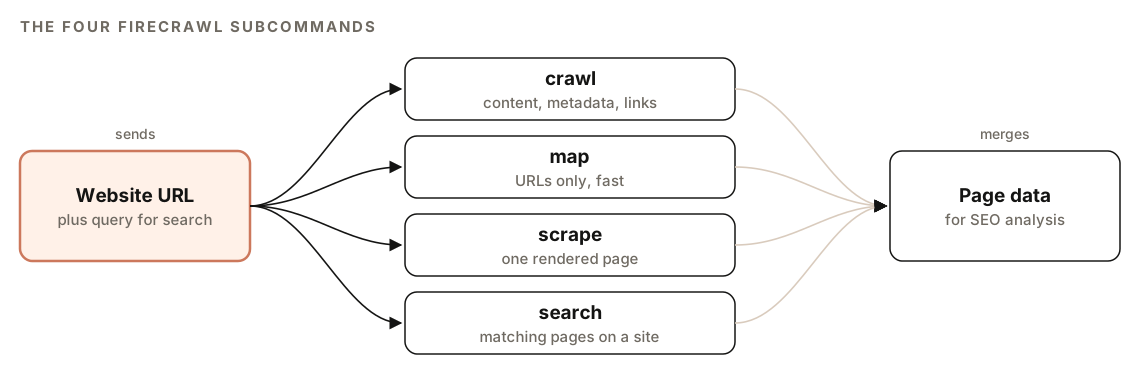
The four Firecrawl subcommands
| Subcommand | What it does | Main settings |
|---|---|---|
| crawl | Full-site crawl with content, metadata, and links | Page limit, depth, include and exclude paths, formats |
| map | Lists a site's URLs without fetching content | URL limit, optional search filter |
| scrape | One page, fully rendered | Formats, main content only, wait, timeout, actions |
| search | Finds pages on one site that match a query | Query, site URL, result limit |
crawl: full-site crawl
crawl starts from your URL and returns the content, metadata, and links for every page it discovers. The skill's settings default to 100 pages, with a maximum of 500 per crawl, and a depth of 3 links from the starting URL. You can limit the crawl with include patterns such as /blog/* and keep it out of areas like /admin/* or /api/* with exclude patterns. Output formats are markdown, HTML, and links.
Typical uses are a comprehensive audit crawl, a section-only crawl of /blog/* or /products/*, broken link detection from the link lists, and a content inventory of every page title, meta description, and H1.
map: site structure discovery
map finds a site's URLs without downloading their content, so it's fast and the skill treats it as the credit-efficient option. It discovers up to 5,000 URLs by default, and you can add a search term to filter them. The result is a URL count and a breakdown by URL pattern.
Use it to compare discovered URLs with your XML sitemap, spot URL patterns that suggest duplicates or parameter bloat, compare the number of indexable pages with the number linked from the homepage, and decide which sections deserve a full crawl.
scrape: one page, fully rendered
scrape loads a single page with full JavaScript rendering. It can return markdown, HTML, links, or a screenshot. By default it strips navigation, footer, and sidebar, keeping only the main content, which is what you want for an E-E-A-T review. You can tell it to wait for a CSS selector or a number of milliseconds, raise the timeout (30 seconds by default), and run browser actions such as click, scroll, and wait before it captures the page.
That makes it the right tool for single-page apps, content that lazy-loads below the fold, and pages where you suspect content sits behind a login or paywall.
| Situation | Better choice |
|---|---|
| Static HTML page | Built-in page fetcher, no Firecrawl credits |
| JavaScript-rendered app | Firecrawl scrape |
| You need response headers | Built-in page fetcher |
| You need clean markdown | Firecrawl scrape |
search: site-scoped search
search takes a query and a site and returns matching pages, 10 by default. Use it to check whether you already have content on a keyword before writing a new page, to find pages that mention a topic and could link to each other, to find near-duplicates by searching for a key phrase, or to see what a competitor has published on a subject.
How to set up Firecrawl in Claude Code
You need two things:
- A Firecrawl account and API key. Every page crawled or scraped uses credits, and Firecrawl's own pricing applies.
- The Firecrawl extension for Claude SEO. Its installer connects the Firecrawl MCP server to Claude Code with your API key.
If you haven't installed the skill suite yet, our guide to installing SEO skills in Claude Code covers it. Then try a cheap first request:
/claudeseo firecrawl map https://www.example.comIf the API key is missing, the skill reports FIRECRAWL_API_KEY not set and points you to the extension installer. Keep the key out of your repository and any file you commit.
How to run Firecrawl commands
Each subcommand takes a URL. search also takes a query:
/claudeseo firecrawl map https://www.example.com
/claudeseo firecrawl crawl https://www.example.com
/claudeseo firecrawl scrape https://www.example.com/pricing
/claudeseo firecrawl search "return policy" https://www.example.com
The limits, paths, and formats are Firecrawl settings the skill passes for you, so you can state them in plain English:
Crawl only the /blog/ section of https://www.example.com, up to 200 pages, and list every page's title, meta description, and H1.For a full audit, the skill documents a sensible order. Map the site first, pick the most important pages (the homepage and key sections), crawl those, and hand the content to the technical, content, and schema analysis:
1. map the site to get every URL
2. pick the top pages, for example 50
3. crawl those pages with a matching limit
4. send the content to technical, content, and schema analysis
When Firecrawl is connected during a full SEO audit with Claude Code, the audit uses it this way and reports the total crawlable pages, the URL patterns, and the crawl depth.
How to read the results
The map output is a URL count and a pattern breakdown:
Site: example.com
Pages discovered: XX

URL Pattern Breakdown:
  /blog/*          - XX pages (XX%)
  /products/*      - XX pages (XX%)
  /category/*      - XX pages (XX%)
  / (root pages)   - XX pages (XX%)
Look for a section with far more URLs than you have real pages, which often means parameters, filters, or tag archives creating duplicates. Then compare the total with the URL count in your sitemap: a big gap in either direction is worth a closer look.
If a run fails, the error tells you why:
| Error | Cause | What to do |
|---|---|---|
| FIRECRAWL_API_KEY not set | MCP server not configured | Run the Firecrawl extension installer |
| 402 Payment Required | Credits used up | Check usage in your Firecrawl account |
| 429 Too Many Requests | Rate limited | Wait 60 seconds and reduce concurrency |
| 408 Timeout | Page too slow to render | Raise the timeout |
| 403 Forbidden | Site blocks crawling | Check robots.txt; you may need to skip the site |
How to use crawl data to fix SEO problems
The other Claude SEO skills turn crawl data into findings:
| Check | Skill | What gets flagged |
|---|---|---|
| Broken links | Technical | Internal links that return 404 |
| Redirect chains | Technical | Chains longer than 2 hops |
| Mixed content | Technical | HTTP resources on HTTPS pages |
| Canonical check | Technical | Canonical URLs that differ from the actual URL |
| Sitemap coverage | Sitemap | Crawled pages missing from the sitemap, sitemap URLs returning 404 or 410 |
| Thin content | Content | Pages under 300 words |
| Duplicate content | Content | Near-duplicate pages |
| Schema coverage | Schema | Share of pages with JSON-LD, plus batch validation |
Fix broken links where they're printed. If a template or menu holds the bad link, one edit fixes every page. For redirect chains, point the links and the first redirect straight at the final URL. For pages missing from the sitemap, update whatever generates it; our guide to XML sitemap audits with Claude Code covers the details. For thin pages, decide whether to expand, merge, or remove them.
If the crawl finds fewer links than you expect on a JavaScript site, check how links are built. Google follows links in real <a href> elements, not click handlers:
<!-- Crawlers may not follow this -->
<span onclick="location.href='/pricing'">Pricing</span>

<!-- A crawlable link -->
<a href="/pricing">Pricing</a>
Once you've reviewed the findings, ask Claude Code to make the changes:
Using the crawl results, list every internal link that returns 404 or passes through more than one redirect. Group them by the template or content file that prints them, propose the correct target for each, and show me the diff before saving.The site structure you get from map and crawl is also the starting point for internal linking with Claude Code, since you can see which pages sit deep in the site and which get few links.
Doing it without the skill
On a small site with a sitemap, plain Claude Code can do a basic crawl check without Firecrawl:
Fetch https://www.example.com/sitemap.xml and request every URL in it. For each URL, record the status code, the final URL after redirects, the number of redirect hops, the title, the meta description, the H1, and the canonical. Flag 404s, chains of more than 2 hops, missing titles, and canonicals that point elsewhere. Save the results to crawl.csv.To check whether a page depends on JavaScript, compare raw and rendered HTML:
Write and run a small Playwright script that loads https://www.example.com/pricing, waits for the network to go idle, and saves the rendered HTML. Then fetch the raw HTML with curl. List the headings, links, and main text that only appear after rendering.The skill adds JavaScript rendering across many pages, discovery of URLs that aren't in your sitemap, include and exclude patterns, credit estimates before large crawls, clean main-content extraction, and hand-offs to the technical, content, schema, and sitemap analysis.
Mistakes to avoid when crawling with Firecrawl
- Crawling everything first. Run
mapto see the site's shape, then crawl the sections that matter. - Forgetting exclude patterns. Keep crawls out of admin areas, APIs, carts, and filter URLs that waste credits.
- Using Firecrawl for static pages. The built-in fetcher handles static HTML at no Firecrawl cost and returns response headers.
- Crawling sites you shouldn't. Respect robots.txt and site terms. A 403 means the site blocks crawling, so skip it.
- Treating a crawl as an index report. A crawl shows what's reachable. Search Console shows what Google actually indexed.
- Not re-crawling after fixes. Run the same crawl again to confirm broken links and chains are gone.
Related guides
- Technical SEO audit with Claude Code for crawlability, indexability, and rendering checks
- Full site audit, where Firecrawl can map URLs before specialist agents analyze them
- Technical SEO features for the checks that use crawl data
- XML sitemap audit with Claude Code to close the gaps a crawl reveals
FAQ
What is Firecrawl used for in SEO?
Firecrawl crawls and scrapes websites with JavaScript rendering. In SEO, that means you can discover the URLs on a site, extract titles, meta descriptions, headings, and links at scale, and see content on JavaScript-heavy pages that a plain HTML fetch would miss.
Does Firecrawl render JavaScript?
Yes. Firecrawl loads pages in a browser and runs their JavaScript before returning the content. The scrape subcommand can also wait for a specific element to appear and run actions such as clicking or scrolling first.
How many pages can I crawl with the Firecrawl command?
The skill's crawl settings default to 100 pages and allow up to 500 per crawl, at a depth of 3 links from the start URL. map discovers up to 5,000 URLs by default. Your Firecrawl plan's credits also limit how much you can crawl.
What is the difference between crawl and map?
map only lists URLs, so it's fast and uses fewer credits. crawl fetches each page's content, metadata, and links. Use map to understand a site's structure, then crawl the sections you want to analyze.
Do I need a Firecrawl account to use the command?
Yes. The command needs a Firecrawl API key, set up through the Firecrawl extension for Claude SEO, and Firecrawl's own pricing applies. Without it, the skill tells you Firecrawl isn't installed and offers the built-in page fetcher for single pages.