
Integrations
How to Use DataForSEO with Claude Code: Live SEO Data
Use DataForSEO with Claude Code for live SERPs, keyword volume, backlinks and AI visibility, with a cost check before every API call and daily budget controls.
Using DataForSEO with Claude Code gives you live search data, such as real Google results, keyword volumes, backlink profiles, and AI citations, inside the same session where you analyze and edit your site. The ClaudeSEO DataForSEO Claude Code integration adds a /claudeseo dataforseo command with more than twenty subcommands, a cost check before every API call, and a "DataForSEO (live)" label on every result.
This guide explains what DataForSEO provides, how the command works, how to set it up and control spending, and how other ClaudeSEO commands use the same data.
Key takeaways
- You need a DataForSEO account and API credentials. DataForSEO bills per API call, and its own pricing applies.
- Subcommands cover six areas: SERP analysis, keyword research, domains and competitors, technical and on-page data, content and listings, and AI visibility.
- Before every API call, the skill estimates the cost and either proceeds, asks for your approval, or blocks the call if it would break your daily budget.
- Results default to the United States and English unless you ask for another location or language.
- When DataForSEO is connected, other commands such as the full audit, backlink audit, and GEO analysis can use its live data.
What is DataForSEO and why use it with Claude Code?
DataForSEO is an API provider of SEO data. Rather than a point-and-click SEO tool, it offers programmatic access to things like live search results, keyword metrics, backlink indexes, on-page crawls, and business listings. You pay for what you request.
Much of what Claude Code does on its own is static analysis: it reads your HTML, your content files, and your configuration. That's powerful, but it can't tell you where you rank today, how many people search for a phrase, or which sites ChatGPT cites for your topic. DataForSEO fills that gap with live data from search engines and its own indexes.
The Claude SEO skill suite connects to DataForSEO through the DataForSEO MCP server. MCP (Model Context Protocol) is an open standard Claude Code uses to talk to outside tools. Once it's connected, you can ask for a live SERP, compare it with your page in the repo, and draft the fix in one conversation.
What the /claudeseo dataforseo command does
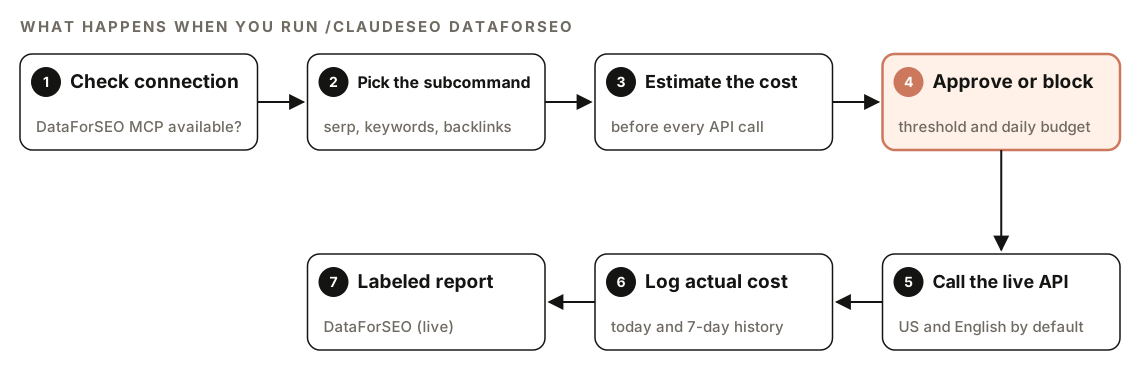
- Check the connection. Before any call, the skill confirms the DataForSEO MCP tools are available. If they aren't, it tells you the extension isn't installed and how to install it.
- Pick the subcommand. Your request maps to the right DataForSEO tools, using bulk endpoints where possible to save credits.
- Estimate the cost. The skill runs a cost estimate for the endpoint before calling it.
- Approve or block. If the estimate is within your settings, the call proceeds. If it needs approval, you see the estimate and confirm. If it would exceed your daily budget, the call doesn't run.
- Call the live API. Requests default to the United States and English (and desktop for SERPs) unless you say otherwise.
- Log the actual cost. After each call, the real cost is recorded, so you can review spending later.
- Return a labeled report. Results use tables, priority levels, and XX/100 scores where they apply. Each is marked "DataForSEO (live)", with timestamps on time-sensitive data such as rankings and backlink counts.
The skill also tries not to waste credits. It skips re-fetching data it already retrieved in the same session, and it warns you before expensive operations such as full backlink crawls or large keyword lists.
What data can you get from DataForSEO?
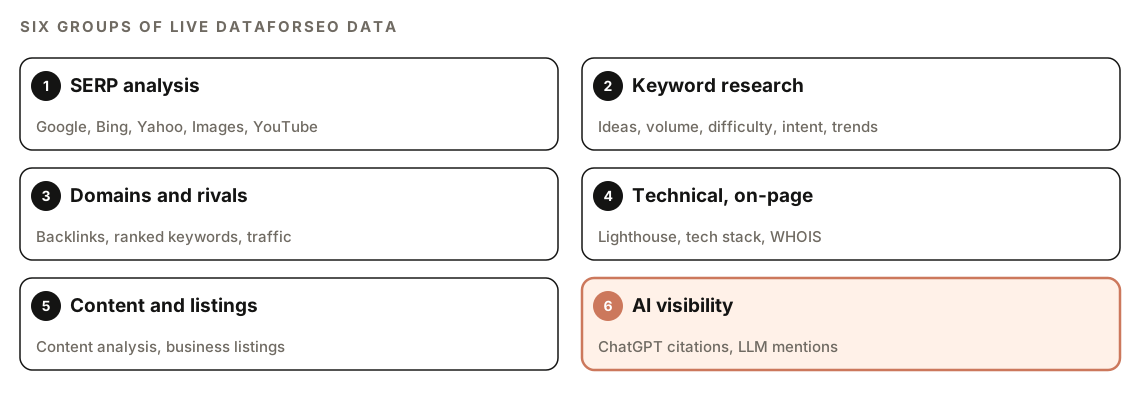
| Group | Subcommands |
|---|---|
| SERP analysis | serp, serp-images, serp-youtube, youtube |
| Keyword research | keywords, volume, difficulty, intent, trends |
| Domains and competitors | backlinks, competitors, ranked, intersection, traffic, subdomains, top-searches |
| Technical and on-page | onpage, tech, whois |
| Content and listings | content, listings |
| AI visibility | ai-scrape, ai-mentions |
SERP analysis
serp fetches live Google organic results: rank, URL, title, description, domain, featured snippets, AI Overview references, and People Also Ask questions. The same tool can switch to Bing or Yahoo. serp-images shows which images and domains rank in Google Images, and the skill adds analysis of domain dominance, alt text patterns, image formats, and keywords where you rank organically but have no image presence. serp-youtube returns YouTube results, and youtube analyzes one video's details, top comments, and transcript.
Keyword research
keywords turns a seed into ideas, suggestions, and related terms with volume, CPC, competition, difficulty, and trend. volume gets monthly search volume and trend data for a list you supply. difficulty scores how hard each keyword is to rank for, from 0 to 100, with a label from Easy to Very Hard. intent classifies keywords as informational, navigational, commercial, or transactional, with a confidence score. trends pulls Google Trends data to show direction and seasonality. Our keyword research guide shows how to turn these numbers into a plan.
Domains and competitors
backlinks returns a domain's backlink profile: totals, referring domains, domain rank, spam score, top anchors, dofollow ratio, and new and lost links over time. competitors finds competing domains with keyword overlap and estimated traffic. ranked lists the keywords a domain ranks for, with positions, URLs, and SERP features. intersection finds shared keywords and backlink sources across 2 to 20 domains. traffic estimates organic traffic in bulk, subdomains lists subdomains with ranking data, and top-searches finds popular queries where a domain appears.
Technical and on-page
onpage combines a quick page check (status codes, meta tags, content size, timing, broken links) with content parsing and a full Lighthouse audit covering performance, accessibility, best practices, SEO, and Core Web Vitals. tech detects a domain's technology stack, such as its CMS, analytics, and CDN. whois returns registration data: registrar, creation and expiry dates, and nameservers.
Content and listings
content searches content by topic with quality scores, sentiment, and readability, summarizes a URL, and tracks phrase trends over time. listings searches business listings for local competitive analysis, returning name, category, address, phone, rating, review count, and whether the listing is claimed.
AI visibility
These two matter for generative engine optimization (GEO), which is about being cited in AI answers. ai-scrape shows what ChatGPT's web search returns for a query, including the sources and domains it cites. ai-mentions tracks how large language models mention brands, domains, and topics: mention counts, the most cited domains and pages, trends over time, and comparisons across models. Our GEO and AI search features build on this data.
How to set up DataForSEO in Claude Code
You need three things:
- A DataForSEO account with an API login and password. DataForSEO charges per API call, and its own pricing applies.
- The DataForSEO extension for Claude SEO, which installs and configures the DataForSEO MCP server with your credentials.
- The API modules you plan to use enabled on your account. If a module isn't enabled, the skill tells you which one is needed.
If you're starting from scratch, our guide to installing SEO skills in Claude Code covers the base install. Then test the connection with a single small request:
/claudeseo dataforseo volume "project management software"If authentication fails, the skill reports invalid credentials. Re-run the extension installer to update your DataForSEO API login and password.
How to run DataForSEO commands
Each subcommand takes a keyword, a list of keywords, a domain, or a URL:
/claudeseo dataforseo serp "best crm for startups"
/claudeseo dataforseo keywords "email marketing"
/claudeseo dataforseo difficulty "crm software, crm for startups, free crm"
/claudeseo dataforseo ranked example.com
/claudeseo dataforseo intersection example.com competitor-a.com competitor-b.com
/claudeseo dataforseo onpage https://www.example.com/pricing
/claudeseo dataforseo ai-mentions "crm software"
You can also describe what you need in plain English, including a location or language:
Use DataForSEO to get the live Google results for "steuerberater berlin" in Germany, in German, and tell me which result types appear above the organic listings.If a location code is wrong, the skill reports the error and points you to the location lookup to find the right code. If a query returns nothing, it says "no data found" and suggests broadening the query or checking the location and language.
How DataForSEO cost guardrails work
Because every call costs credits, the skill runs a cost check before each one. The check returns one of three results:
| Result | What happens |
|---|---|
| approved | The call runs |
| needs_approval | You see the estimate and confirm before it runs |
| blocked | The call would exceed your daily budget, so it doesn't run |
Three cost commands let you see and control spending:
/claudeseo dataforseo costs today
/claudeseo dataforseo costs summary
/claudeseo dataforseo costs config --mode threshold --threshold <amount>
costs today breaks down today's spending, costs summary shows the last seven days, and costs config sets the approval mode, such as asking for approval above a threshold you choose.
A few habits keep costs down. Ask for bulk endpoints over many single calls. Keep the default location and language unless you need another market. Avoid re-running the same request in a session. And expect a warning before filtered image searches that use site: or filetype: operators, because those cost more.
How other ClaudeSEO commands use DataForSEO
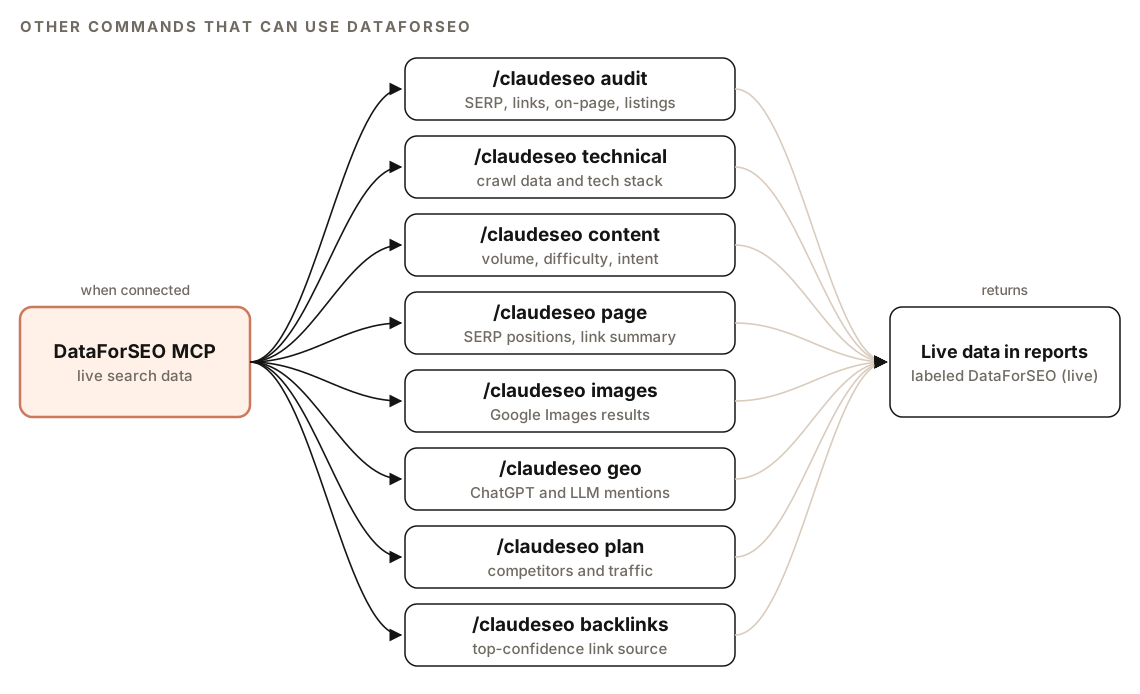
When the DataForSEO tools are available, other skills can draw on them:
- The [full site audit](/features/seo/full-site-audit) (
/claudeseo audit <url>) can bring in a DataForSEO agent for real SERP, backlink, on-page, and listings data. - `/claudeseo technical <url>` can use real crawl and Lighthouse data and technology detection.
- `/claudeseo content <url>` can use live volume, difficulty, intent, and content quality data.
- `/claudeseo page <url>` can check real SERP positions and a backlink summary.
- `/claudeseo images <url>` can compare your images with competitors in Google Images.
- `/claudeseo geo <url>` can check real ChatGPT visibility and LLM mentions.
- `/claudeseo plan <type>` can use competitor, keyword overlap, and traffic data.
- `/claudeseo backlinks <url>` treats DataForSEO as its highest-confidence source, and it's the only source for tracking new and lost links. See our backlink audit guide.
How to read DataForSEO results
Layouts vary by subcommand, but every report follows the same conventions, in outline:
## [Report title], DataForSEO (live), retrieved [date and time]

| [Item]    | [Metric] | [Metric] | Source            |
|-----------|----------|----------|-------------------|
| [keyword] | XX       | XX       | DataForSEO (live) |

### Critical
### High
### Medium
### Low
### Recommendations
The "DataForSEO (live)" label separates real search data from what the skill inferred from your HTML. Check the timestamp on anything time-sensitive, since rankings and backlink counts change. Where a report ranks issues, start with Critical and work down.
Doing it without the skill
You can call DataForSEO's REST API from plain Claude Code. Ask it to write a small script that keeps your credentials out of the code:
Write a Python script that calls the DataForSEO Google organic live SERP endpoint for a keyword passed on the command line. Read the API login and password from the DATAFORSEO_LOGIN and DATAFORSEO_PASSWORD environment variables, request US English desktop results, and save the raw JSON to ./serp/<keyword>.json. Print the top 10 URLs and titles.Then analyze what you saved:
Read the SERP JSON files in ./serp. For each keyword, list the result types that appear (featured snippet, People Also Ask, AI Overview, video, local pack), which domains appear most often across all keywords, and where example.com ranks, if at all.The skill adds what's tedious to build: dozens of mapped endpoints, a cost check and log for every call, daily budgets, location lookups, consistent labeled reports, and the hooks that let other commands use live data.
Mistakes to avoid with DataForSEO
- Forgetting the default market. Results are US and English unless you ask for another location and language.
- Running large jobs without a budget. Set a threshold and daily budget with
costs configfirst. - Making single calls in a loop. Bulk endpoints use fewer credits for the same data.
- Treating estimates as analytics. Traffic figures are modeled; use Search Console for your own clicks.
- Ignoring timestamps. A ranking from last month isn't today's ranking.
Related guides
- Backlink audit with Claude Code, which uses DataForSEO for full-confidence link data
- Ahrefs data in Claude Code for Domain Rating and Ahrefs backlink data
- Track brand citations in AI answers for ongoing AI visibility monitoring
- The full Claude SEO skill list for every command in the suite
FAQ
Do I need a DataForSEO account to use it with Claude Code?
Yes. The integration calls DataForSEO's API with your own credentials, so you need a DataForSEO account with an API login and password. DataForSEO bills per call under its own pricing.
How do I control DataForSEO costs in Claude Code?
The skill estimates the cost of every call before it runs. Calls within your settings proceed, larger ones ask for approval, and anything that would exceed your daily budget is blocked. Use costs today and costs summary to review spending, and costs config to set your approval threshold.
Can DataForSEO show results for countries other than the US?
Yes. The skill defaults to the United States and English, but you can ask for another location and language. If a location code is invalid, the skill reports it and points you to the location lookup.
Can DataForSEO check whether ChatGPT cites my site?
Yes. ai-scrape shows what ChatGPT's web search returns for a query and which sources it cites. ai-mentions tracks how often language models mention a brand or domain, which pages they cite most, and how that changes over time.
Is DataForSEO data the same as Google Search Console data?
No. Search Console shows your own site's real impressions and clicks from Google. DataForSEO shows live search results and modeled metrics for any keyword or domain, including competitors. They answer different questions, and they work well together.
What happens if the DataForSEO extension isn't installed?
The skill checks for the DataForSEO tools before any call. If they're missing, it tells you the extension isn't installed and shows how to install it, instead of failing silently.