
Technical SEO
SEO Regression Monitoring with Claude Code: Drift Checks
Set up SEO regression monitoring in Claude Code: baseline key pages, compare after every deploy, and fix lost canonicals, noindex tags, and schema fast.
SEO regression monitoring catches changes that quietly hurt your search performance, such as a removed canonical tag, a stray noindex, or a deleted schema block, before they cost you traffic. With Claude Code and ClaudeSEO, /claudeseo drift saves a known-good baseline of a page's SEO elements, compares the live page against it after every deploy, and labels each change as critical, warning, or info.
This guide explains why SEO regressions happen, what the drift command captures and compares, how to build it into your release routine, and how to fix what it finds.
Key takeaways
- SEO drift is any unplanned change to the elements search engines rely on: titles, canonicals, robots directives, headings, schema, and status codes.
/claudeseo drifthas three actions:baselinesaves a known-good snapshot,comparediffs the live page against it, andhistoryshows every snapshot and comparison.- Comparisons run 17 rules across three severity levels. Critical findings, such as an added
noindexor a removed canonical, need an immediate fix.- Baselines are per URL and stored locally, so cover your homepage, top landing pages, and one page per template.
- Core Web Vitals tracking is optional and needs a PageSpeed Insights API key. Without one, the CWV rules are skipped and everything else still runs.
What is SEO drift and why do regressions happen?
SEO drift is any change to SEO-critical page elements away from a state you know works. An SEO regression is drift that hurts: a change that makes a page harder to crawl, index, understand, or rank.
Regressions rarely come from SEO work. They come from everything else that touches a website:
- Deploys and refactors. A developer rebuilds the header component, and the canonical tag doesn't make it across.
- Staging settings that leak. A
noindexmeant for the staging site ships to production. - CMS edits. Someone rewrites a title for a campaign and drops the main keyword, or deletes the H1.
- Plugin, theme, and framework updates. An update changes how structured data is printed, or removes it.
- Server and routing changes. A page that returned 200 starts returning a 404 or a 5xx error.
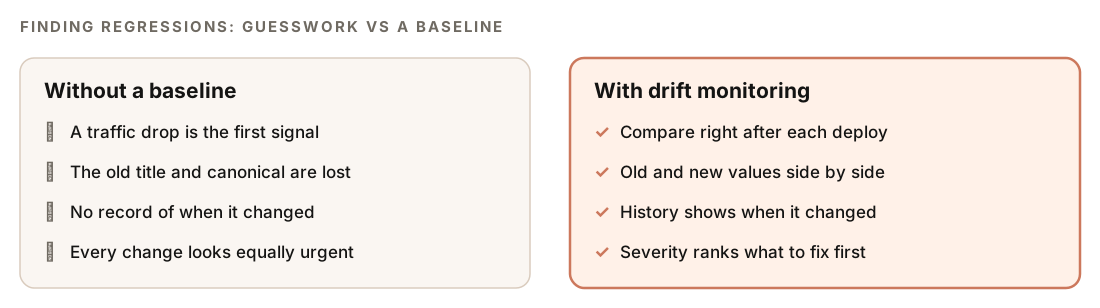
These changes are dangerous because they're silent. The page still looks fine to visitors, and nothing fails in the build. Search engines notice on their next crawl. You notice weeks later when traffic drops, and by then the cause is buried under dozens of other changes.
A periodic audit doesn't fully solve this. An audit compares a site against best practice and answers "what's wrong?" Drift monitoring compares a page against its own last known-good state and answers "what changed?" Both are useful, but the second is the question you need answered right after a deploy.
What the /claudeseo drift command does
/claudeseo drift is part of the Claude SEO skill suite. Think of it as version control for your on-page SEO: save a snapshot, make changes, then diff.

| Action | What it does |
|---|---|
baseline | Saves the current state of a page as a known-good snapshot |
compare | Fetches the live page and diffs it against the most recent baseline |
history | Lists every baseline and comparison for a URL, newest first |
When you run baseline, Claude Code:
- Validates the URL and blocks private or internal addresses.
- Fetches the page.
- Parses the SEO elements from the HTML.
- Optionally fetches Core Web Vitals from PageSpeed Insights.
- Hashes the HTML body and the schema content with SHA-256.
- Stores the snapshot in a local SQLite database.
When you run compare, it loads the most recent baseline (or an older one you name), fetches and parses the live page, runs all 17 comparison rules, classifies each finding by severity, stores the result, and reports the diff. It then offers to build an HTML report you can share.
Baselines and comparisons are stored locally on your machine. The database has two tables, one for each, and it's created automatically the first time you run the command.
What a drift baseline captures
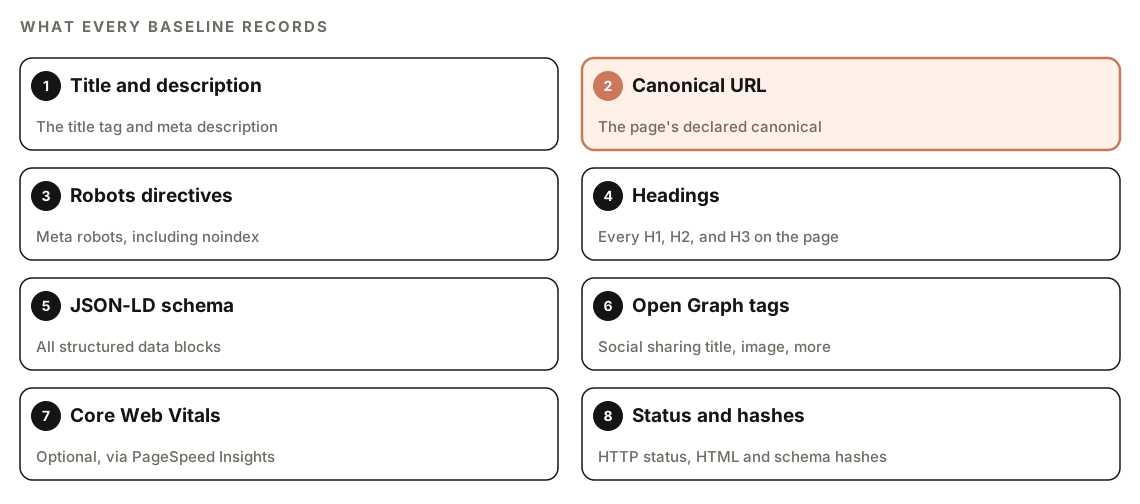
| Element | What's recorded |
|---|---|
| Title tag | The title text |
| Meta description | The description text |
| Canonical URL | The declared canonical |
| Robots directives | The meta robots value |
| Headings | Every H1, H2, and H3 |
| JSON-LD schema | Every structured data block |
| Open Graph tags | The social sharing tags |
| Core Web Vitals | Metrics from PageSpeed Insights, if available |
| HTTP status code | The response status |
| HTML content hash | A SHA-256 fingerprint of the page body |
| Schema content hash | A SHA-256 fingerprint of the structured data |
The two hashes act as tripwires. A hash is a short fingerprint of some content: change a single character and the fingerprint changes. The schema hash catches structured data edits that are easy to miss by eye. The HTML hash tells you the page body changed at all, even when every tracked element stayed the same.
How URLs are matched
Drift normalizes URLs before matching them to a baseline. It lowercases the scheme and host, strips default ports (80 and 443), sorts query parameters, removes UTM parameters, and strips trailing slashes. So https://Example.com/pricing/?utm_source=newsletter and https://example.com/pricing share one baseline, and a campaign link won't start a separate history.
How drift comparison and severity work
Every comparison runs 17 rules, and each rule that fires gets one of three severity levels:
| Severity | Meaning | Response time |
|---|---|---|
| Critical | SEO-breaking change, likely traffic loss | Immediately |
| Warning | Potential impact, needs investigation | Within 1 week |
| Info | Awareness only, may be intentional | When convenient |
Critical changes
These can drop a page from search results or break how search engines understand it:
- Schema removed
- Canonical changed or removed
noindexadded- Title or H1 removed
- H1 changed by more than 50%
- Status code changed to a 4xx or 5xx error
Warnings
These might be intentional, but they deserve a look within the week:
- Title or meta description changed
- A Core Web Vitals metric regressed by more than 20%
- Performance score dropped by 10 or more points
- Open Graph tags removed
- Schema modified
Info
These are worth knowing about, and they're often expected:
- New schema added
- H2 structure changed
- HTML content hash changed
The severity levels do the triage for you. A changed title after a planned content update is a Warning you can confirm in seconds. A removed canonical after a routine dependency update is a Critical you fix today.
If Core Web Vitals couldn't be fetched when the baseline was saved, those fields are stored as empty and the CWV rules are skipped during comparison. A missing API key never produces false performance alarms.
How to run SEO drift monitoring
Install ClaudeSEO first; our guide to installing SEO skills in Claude Code covers it. Save a baseline while the page is in a good state:
/claudeseo drift baseline https://www.example.com/pricingAfter a change, compare the live page with that baseline:
/claudeseo drift compare https://www.example.com/pricingTo see every snapshot and comparison over time:
/claudeseo drift history https://www.example.com/pricingPlain English works too. Phrases like "did anything break", "SEO regression", "before and after", and "deployment check" load the same skill:
Did anything break SEO-wise on https://www.example.com/pricing since the last baseline?The skill documents three options you can ask for: skip Core Web Vitals for a faster capture (--skip-cwv), compare against a specific older baseline instead of the latest (--baseline-id), and limit how many entries the history shows (--limit).
Three workflows that catch regressions
Pre- and post-deploy check. Baseline your key pages before a release, then compare right after it goes live. This is the most valuable habit, because you catch regressions while the change is fresh and easy to roll back.
Ongoing monitoring. Baseline once, then compare every few weeks to catch slow drift from CMS edits and plugin updates. Use history to review what changed and when.
Investigating a traffic drop. When a page loses traffic, compare shows what's different from the baseline, and history shows when it changed. Match that date against your deploy log and Search Console.
Before you start
- Choose pages carefully. Baselines are per URL. Cover your homepage, top landing pages, and one page per template, since a template bug shows up on every page that uses it.
- Core Web Vitals need an API key. CWV capture uses PageSpeed Insights, which needs a Google API key, and Google's own terms apply. Our guide to Search Console, GA4, and PageSpeed data in Claude Code covers the setup.
- Private addresses are blocked. For security, the command refuses localhost, private IP addresses, and reserved ranges, and it never bypasses that check. Baseline a publicly reachable URL.
- Error pages still get captured. If a page returns a 4xx or 5xx when you baseline it, the snapshot is saved anyway, because the status code is a tracked field.
- No baseline yet?
comparetells you and suggests runningbaselinefirst. If the URL is unreachable, it reports the error instead of guessing.
How to read a drift report
Every comparison is presented in the same order: a summary line, a table of triggered rules, and follow-up recommendations.
Summary: X CRITICAL, X WARNING, X INFO

| Severity | Rule              | Old value       | New value       | Action               |
|----------|-------------------|-----------------|-----------------|----------------------|
| CRITICAL | [rule name]       | [old value]     | [new value]     | [recommended action] |
| WARNING  | [rule name]       | [old value]     | [new value]     | [recommended action] |
| INFO     | [rule name]       | [old value]     | [new value]     | [recommended action] |

Recommended follow-up:
- [skill to run for each Critical or Warning finding]
Read it top-down. The summary tells you whether the deploy is safe. Then work through each Critical row, comparing the old and new values, before you look at Warnings. Every Critical and Warning finding comes with a follow-up skill to run. The optional HTML report is built from the comparison and is easy to share with the developers who shipped the change.
history returns every baseline for the URL, newest first, with timestamps and a summary of each comparison. That's your timeline when you need to show when a regression started.
How to fix common SEO regressions
Each type of finding maps to a deeper check in the suite:
| Finding | Follow-up command |
|---|---|
| Schema removed or modified | /claudeseo schema <url> |
| Core Web Vitals regression | /claudeseo technical <url> |
| Title or meta description changed | /claudeseo page <url> |
| Canonical changed or removed | /claudeseo technical <url> |
noindex added | /claudeseo technical <url> |
| H1 or heading structure changed | /claudeseo content <url> |
| Open Graph tags removed | /claudeseo page <url> |
| Status code changed to an error | /claudeseo technical <url> |
Because Claude Code works inside your repository, it can also find the commit that caused a regression. The old and new values in the report make precise search terms:
The drift report says the canonical tag on /pricing was removed. Search the git history for the commit that changed how canonical tags are rendered, explain what changed, and propose a fix. Show me the diff before saving.The most common Critical finding is a leaked noindex. It usually looks like this in production:
<!-- Regression: a staging-only directive shipped to production -->
<meta name="robots" content="noindex, nofollow">
The fix is to remove the tag from production, or to output it only when the environment is staging, so it can't leak again. Google's documentation on blocking indexing with noindex explains how search engines treat the directive.
After the fix ships, run compare again. Once the result is clean, or the remaining differences are intentional, save a new baseline so future comparisons start from the new known-good state.
Doing it without the skill
You can build a simple drift check with plain Claude Code and a file in your repo. First, save a snapshot:
Fetch https://www.example.com/pricing and save a JSON snapshot to seo-baselines/pricing.json with the HTTP status, title, meta description, canonical, meta robots, every H1 to H3, every JSON-LD block, and all og: tags. Include today's date.Then, after a deploy:
Fetch https://www.example.com/pricing again and compare it field by field with seo-baselines/pricing.json. List every difference with the old and new value. Mark a removed canonical, an added noindex, a removed title or H1, removed schema, or a 4xx or 5xx status as Critical.The skill adds what's tedious to rebuild: 17 consistent rules with severity levels, content hashes, URL normalization, optional Core Web Vitals tracking, a stored history of every comparison, protection against fetching internal addresses, shareable HTML reports, and a follow-up skill for each finding.
Mistakes to avoid
- Baselining a broken page. A baseline is your definition of "good". If you aren't sure the page is healthy, audit it first.
- Comparing only after something goes wrong. The value comes from comparing right after each deploy, while a rollback is still easy.
- Never updating the baseline. After you verify an intentional change, save a new baseline, or every comparison will flag the same expected differences.
- Watching only one page. Template bugs hit every page that uses the template, so baseline one page per template.
- Ignoring a pattern of Info findings. One changed content hash is usually harmless. A string of unexplained changes deserves a look.
Related guides
- How to run a full SEO audit with Claude Code, which adds drift analysis when a baseline exists
- Technical SEO audit with Claude Code for diagnosing canonical, indexing, and status code regressions
- Schema markup with Claude Code for fixing removed or broken structured data
- The technical SEO feature page for the checks behind most Critical findings
FAQ
What is SEO drift?
SEO drift is an unplanned change to the elements search engines depend on, such as titles, canonical tags, robots directives, headings, structured data, and status codes. It usually comes from deploys, CMS edits, or plugin updates rather than deliberate SEO work. When drift hurts indexing or rankings, it's called an SEO regression.
How do I know if a deploy broke my SEO?
Save a baseline of your key pages before the deploy, then compare them right after it goes live. /claudeseo drift compare <url> lists every changed element with its old and new value, and flags SEO-breaking changes, such as an added noindex or a removed canonical, as Critical.
How often should I check for SEO regressions?
After every deploy that touches templates, routing, or the page head, and every few weeks for pages edited in a CMS. Comparisons right after a deploy catch the most problems, because the cause is fresh and easy to roll back.
Does SEO drift monitoring need an API key?
Only for Core Web Vitals. CWV capture uses PageSpeed Insights, which needs a Google API key, and Google's terms apply. Without a key, the CWV fields stay empty, the CWV rules are skipped, and every other check runs as normal.
Can I monitor a staging or local site?
Public staging URLs work like any other page. Localhost, private IP addresses, and reserved ranges are blocked by the command's security checks, so a local development server can't be baselined.
Is drift monitoring part of the full SEO audit?
Yes, once a baseline exists. If you've saved a drift baseline for the URL, the full site audit adds a drift specialist automatically and includes its findings in the report. Without a baseline, the audit skips it.