
E-commerce SEO
Ecommerce SEO Audit with Claude Code: Schema and Shopping
Run an ecommerce SEO audit with Claude Code: score product pages, validate Product schema, and compare Google Shopping and Amazon pricing with DataForSEO.
An ecommerce SEO audit checks whether your product pages can rank and earn rich results: titles and meta descriptions, images, product descriptions, internal links, and above all Product schema. With Claude Code, the ClaudeSEO /claudeseo ecommerce command audits a product page from its URL, scores it out of 100, validates its Product structured data against a fixed set of rules, and can add live Google Shopping and Amazon data to show how you compare.
This guide explains what an ecommerce SEO audit covers, what the command checks, how to run it, and how to fix the problems it finds most often.
Key takeaways
- Product pages compete in organic results, Google Shopping, and marketplaces, so an ecommerce SEO audit looks at on-page SEO, structured data, and marketplace visibility together.
/claudeseo ecommerce <url>scores a product page across six categories, with schema completeness weighted highest.- Product schema is validated against seven rules, such as a
pricewith no currency symbol and an ISO 4217priceCurrency, then scored on a ladder from 50 to 100.- With DataForSEO connected, the skill adds Google Shopping pricing and seller data, Amazon comparisons, and keyword gaps between organic and Shopping visibility.
- Paid data calls go through a cost check first. Amazon requests always need your approval.
What is an ecommerce SEO audit and why does it matter?
An ecommerce SEO audit reviews the pages that make you money: product pages, and the category pages and links that lead to them. Product pages have problems most other pages don't:
- Duplicate content. Many stores paste the manufacturer's description, so the same text appears on dozens of other sites.
- Variants. Color and size variants often share one H1 and near-identical content across many URLs.
- Structured data. Price, availability, ratings, and shipping details only reach search features reliably when they're in valid Product markup.
- Images. Products sell on visuals, so missing alt text, generic file names, and heavy files hurt both search visibility and the shopping experience.
- More than one search surface. The same product can appear in organic results, in Google Shopping, and on Amazon, each with its own competition.
Product structured data deserves special attention. Google uses it for two kinds of rich results: product snippets, which can show ratings and price in ordinary results, and merchant listing experiences for pages where people can buy the product. Valid markup makes a page eligible; Google still decides whether to show the enhancement. Google's Product structured data documentation is the reference.
What the /claudeseo ecommerce command does
The command is part of the Claude SEO skill suite and builds on our schema markup feature. You give it a product page URL, and Claude Code works through it in order:
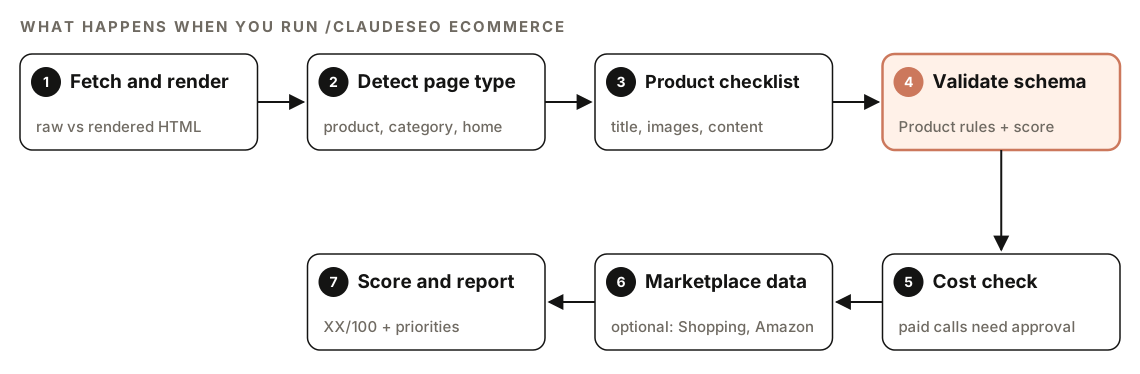
- Fetch and render. Many storefront platforms and headless builds inject product schema with JavaScript. The skill renders product pages and compares the raw HTML with the rendered page, so you know whether your JSON-LD is server-rendered.
- Detect the page type. It looks for ecommerce signals: Product schema, price elements, add-to-cart buttons, carts, product grids, and Shopify, WooCommerce, or Magento markers. If the URL is a category page or homepage, it adjusts the scope and suggests
/claudeseo ecommerce schemainstead. - Run the product checklist for titles, meta descriptions, headings, images, internal links, and content.
- Validate Product schema against the skill's rules and score its completeness.
- Run a cost check before any paid data call.
- Pull marketplace data from Google Shopping and Amazon, if DataForSEO is connected.
- Score and report, with recommendations ranked Critical, High, Medium, and Low.
If there's no Product schema at all, the skill analyzes the page content and generates recommended schema for it. If schema parsing fails, it falls back to reading product signals from the raw HTML.
What the ecommerce audit checks
The product page score is out of 100, with these weights:
| Category | Weight | What it covers |
|---|---|---|
| Schema completeness | 25% | Required and recommended Product fields |
| Image optimization | 20% | Alt text, format, sizing, image count |
| Content quality | 20% | Unique description, specs, reviews |
| Title and meta | 15% | Keyword placement, length, format |
| Internal linking | 10% | Breadcrumbs, related products, category links |
| Technical | 10% | Page speed, mobile rendering, canonical |
Title, meta description, and headings
The skill checks that the title tag contains the primary product keyword and the brand, stays under 60 characters, and follows a [Product Name] - [Key Feature] | [Brand] pattern. The meta description should include the product keyword and a benefit, a price or "from $XX", and a call to action, in under 155 characters. The page needs a single H1 matching the product name, H2s for sections such as Features, Specifications, Reviews, and Related Products, and no duplicate H1s across product variants.
Product images
Each product should have at least three images (hero, detail, and lifestyle), with alt text that names the product and a distinguishing feature, and descriptive file names instead of IMG_001.jpg. The skill checks for WebP with a JPEG fallback and images at least 800 pixels in size. It also checks that lazy loading is used only on images below the fold. Lazy-loading the hero image delays what is often the page's Largest Contentful Paint. Our image SEO audit guide covers image checks in depth.
Content and internal linking
The skill flags manufacturer copy-and-paste descriptions and expects at least 200 words in the description body, a specifications table rather than specs buried in prose, and user reviews on the page. For internal links, it looks for breadcrumbs (Home > Category > Subcategory > Product), a related products section, a link back to the category page with a descriptive anchor, and a link to the full reviews page if reviews live elsewhere.
Product schema validation
This is where the skill is strictest. Its required set is name, image, description, brand, and an offers block with url, priceCurrency, price, availability, and seller. Recommended properties are sku, a global identifier (gtin13, gtin14, or mpn), aggregateRating, review, variant attributes such as color, material, and size, shippingDetails, and hasMerchantReturnPolicy.
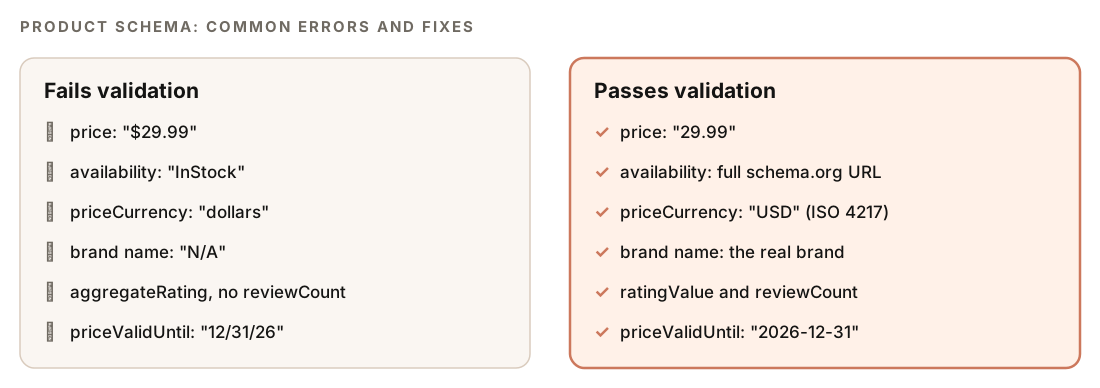
Every Product block is checked against seven rules:
priceis a number string such as"29.99", with no currency symbol.availabilityuses the full Schema.org URL, such ashttps://schema.org/InStock.imageis an array with at least one high-resolution image URL.priceCurrencyis an ISO 4217 code such as USD, EUR, or GBP.brand.nameisn't empty or "N/A".priceValidUntildates use ISO 8601 format.- If
aggregateRatingis present, it includesratingValueandreviewCount.
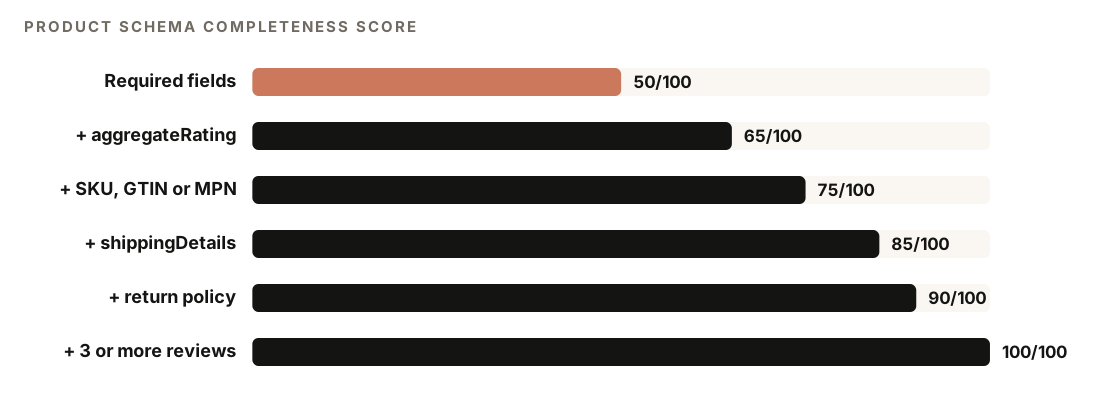
Completeness is then scored on a ladder. All required fields earn 50 out of 100, and each recommended addition moves the score up:
Marketplace intelligence with DataForSEO
The on-page and schema checks need no API keys. With DataForSEO connected, the skill adds live marketplace data. DataForSEO needs your own account, and its pricing applies.
Before every Merchant API call, the skill runs a cost check. An approved call goes ahead, a call that needs approval shows you the cost and asks, and a call over your daily budget is blocked and the skill offers the free analysis instead. Each call's cost is logged afterwards. Amazon endpoints always need your approval.
Google Shopping analysis reports:
- Pricing: minimum, maximum, median, 25th and 75th percentiles, outliers more than two standard deviations from the median, and how price relates to rating
- Sellers: the top 10 sellers by listing count, merchant rating distribution, how common free shipping is, and new versus established sellers
- Listing quality: title keyword patterns in top listings, average rating and review count benchmarks, images per listing, and availability status
Amazon comparison puts Google Shopping and Amazon side by side on average price, median rating, average review count, top seller share, and free shipping share. If Amazon times out, the skill retries and falls back to Google-only data.
Keyword gaps cross-reference the keywords your domain ranks for organically with your Google Shopping presence:
| Gap type | Meaning | Recommended action |
|---|---|---|
| Organic only | You rank organically but have no Shopping listings | Create a Google Merchant Center feed and bid on these keywords |
| Shopping only | Visible in Shopping, weak or absent organically | Create content such as buying guides and comparison pages |
| Both present | Visible in both channels | Keep prices consistent and enhance your schema |
| Neither | No visibility in either | Low priority unless the volume is high |
For shopping-only gaps, our guide to comparison pages with Claude Code shows how to build that content.
How to run an ecommerce SEO audit with Claude Code
With ClaudeSEO installed (see our guide to installing SEO skills in Claude Code), run the full audit on a product page:
/claudeseo ecommerce https://www.example.com/products/example-productOr use a subcommand:
/claudeseo ecommerce schema https://www.example.com/products/example-product
/claudeseo ecommerce products "trail running shoes"
/claudeseo ecommerce gaps example.com
schema validates and enhances Product markup and needs no DataForSEO. products (Google Shopping competitive analysis) and gaps (organic versus Shopping keywords) require DataForSEO. You can also ask in plain English:
Audit the product page at https://www.example.com/products/example-product for ecommerce SEO. Check the Product schema and tell me what's missing for rich results.The ecommerce specialist also runs during a full site audit when the audit detects an online store.
How to read the ecommerce SEO report
The report follows this template:
## E-commerce SEO Report: [URL or keyword]

### Overall Score: XX/100

### Product Page SEO
- Schema Completeness: XX/100
- Title & Meta: XX/100
- Image Optimization: XX/100
- Content Quality: XX/100
- Internal Linking: XX/100

### Marketplace Intelligence (if DataForSEO available)
- Google Shopping Listings: N products found
- Price Range: $XX - $XX (median: $XX)
- Top Seller: [name] (XX% market share)
- Amazon Comparison: [available / not checked]

### Top Recommendations
1. [Critical] ...
2. [High] ...
3. [Medium] ...
Findings note their data source, either "DataForSEO Merchant (live)" or "On-page analysis (static)", so you know which numbers came from live marketplace data. Start with Schema Completeness: it carries the most weight, and fixes usually happen in one product template. Then work through Top Recommendations in priority order. If marketplace data is included, compare your price with the Shopping median and check whether outliers sit far above or below it.
How to fix common ecommerce SEO problems
Most Product schema problems come from one template, so one fix corrects every product page. Here's a Product block that passes the skill's rules and includes the properties at the top of its scoring ladder. Replace every placeholder with real values:
{
  "@context": "https://schema.org",
  "@type": "Product",
  "name": "[Product Name]",
  "image": ["https://www.example.com/images/product-front.jpg"],
  "description": "[Unique product description]",
  "sku": "[SKU]",
  "gtin13": "[13-digit GTIN]",
  "brand": { "@type": "Brand", "name": "[Brand]" },
  "offers": {
    "@type": "Offer",
    "url": "https://www.example.com/products/example-product",
    "priceCurrency": "USD",
    "price": "29.99",
    "priceValidUntil": "2026-12-31",
    "availability": "https://schema.org/InStock",
    "seller": { "@type": "Organization", "name": "[Store Name]" },
    "shippingDetails": {
      "@type": "OfferShippingDetails",
      "shippingRate": { "@type": "MonetaryAmount", "value": "0", "currency": "USD" },
      "shippingDestination": { "@type": "DefinedRegion", "addressCountry": "US" },
      "deliveryTime": {
        "@type": "ShippingDeliveryTime",
        "handlingTime": { "@type": "QuantitativeValue", "minValue": 0, "maxValue": 1, "unitCode": "DAY" },
        "transitTime": { "@type": "QuantitativeValue", "minValue": 1, "maxValue": 5, "unitCode": "DAY" }
      }
    },
    "hasMerchantReturnPolicy": {
      "@type": "MerchantReturnPolicy",
      "applicableCountry": "US",
      "returnPolicyCategory": "https://schema.org/MerchantReturnFiniteReturnWindow",
      "merchantReturnDays": 30,
      "returnMethod": "https://schema.org/ReturnByMail",
      "returnFees": "https://schema.org/FreeReturn"
    }
  }
}
Add aggregateRating and review only when real customer reviews appear on the page. Test the result in Google's Rich Results Test and see our guide to schema markup with Claude Code for deeper validation. Then ask Claude Code to apply the fix to your template:
Update the product page template so its Product JSON-LD matches the report: remove the currency symbol from price, use the full schema.org URL for availability, add sku, gtin13, shippingDetails, and hasMerchantReturnPolicy from our product data, and render the JSON-LD on the server. Show me the diff before saving.Other common fixes:
- Manufacturer descriptions. Rewrite them in your own words with real detail, and move specs into a table.
- Variant duplicates. Give each variant page a distinct H1 or consolidate variants on one URL with a canonical.
- Weak titles. Follow the
[Product Name] - [Key Feature] | [Brand]pattern under 60 characters. - Missing breadcrumbs. Add the Home > Category > Subcategory > Product trail so every product links back to its category.
Doing it without the skill
You can check Product schema with a plain Claude Code prompt:
Fetch https://www.example.com/products/example-product. Extract every Product JSON-LD block from the raw HTML, then render the page and extract them again, and tell me whether the schema is server-rendered. Check each block: price is a number string with no currency symbol, priceCurrency is an ISO 4217 code, availability is a full schema.org URL, image is an array, brand.name is not empty or N/A, priceValidUntil is ISO 8601, and aggregateRating (if present) has ratingValue and reviewCount. Then list which of sku, gtin13 or mpn, shippingDetails, hasMerchantReturnPolicy, and review are missing.And a catalog-wide content check if your product descriptions live in the repo:
Read every product description in ./content/products/. Flag descriptions under 200 words, descriptions with no specifications table, and pairs of descriptions with near-identical text. Output a table sorted by the most serious issue.The skill adds the weighted page score, the schema completeness ladder, page type detection, the full product checklist, and, with DataForSEO, Shopping pricing, seller and Amazon data, and keyword gaps, all behind a cost check.
Ecommerce SEO mistakes to avoid
- Currency symbols in `price`. Write
"29.99"and put the currency inpriceCurrency. - "N/A" as the brand. Use the real brand name, or your store name for own-brand products.
- Lazy-loading the hero image. Lazy-load only images below the fold.
- Prices that disagree. Keep the price in your schema, on the page, and in Shopping the same.
- Markup only in the browser. If your platform injects JSON-LD with JavaScript, check that it appears in the rendered page, and prefer server rendering for price and availability.
- Copying the manufacturer. Shared descriptions give search engines no reason to rank your page over every other retailer's.
Related guides
- Schema markup with Claude Code for validating and generating every schema type
- Image SEO audit with Claude Code for alt text, formats, and file sizes
- How to use DataForSEO with Claude Code for live SERP and marketplace data
- The full Claude SEO skill list for every command in the suite
FAQ
What is an ecommerce SEO audit?
An ecommerce SEO audit reviews the pages that drive sales, mainly product pages, for search visibility. It checks titles and meta descriptions, images, product descriptions, internal links, technical health, and Product structured data, and with marketplace data it can compare your pricing and visibility with competitors in Google Shopping and on Amazon.
What schema markup does a product page need?
The ClaudeSEO skill's required set is a Product block with a name, image, description, brand, and an Offer containing the price, currency, availability, URL, and seller. Identifiers such as SKU and GTIN, shipping details, a return policy, and genuine reviews make it more complete. Google's own required properties differ between product snippets and merchant listings, so check its documentation for the feature you want.
Why isn't my product schema showing rich results?
Valid markup makes a page eligible, but Google decides whether to show the enhancement. Common causes are formatting errors, such as a currency symbol in the price or an incomplete aggregateRating, missing properties, and markup that doesn't appear in the rendered page. Test the page in the Rich Results Test and fix every error first.
Do I need DataForSEO for ecommerce SEO in Claude Code?
No. The product page audit and schema validation work without any API keys. DataForSEO is only needed for Google Shopping analysis, Amazon comparisons, and keyword gap analysis, and its own pricing applies. If it isn't connected, the skill runs the on-page analysis and notes what it couldn't check.
How long should a product description be?
There's no official minimum from Google. The ClaudeSEO skill checks for at least 200 words in the description body, written in your own words rather than copied from the manufacturer, with specifications in a table. What matters most is that the description answers the questions buyers ask.