
Content Operations
AI Images for SEO with Claude Code: OG, Hero and Blog
Create AI images for SEO with Claude Code: OG cards, hero and blog images at the right sizes, with alt text, WebP, schema and responsible-use rules.
AI images for SEO are generated visuals, such as social preview cards, blog hero images and concept illustrations, made at the sizes platforms expect and then named, compressed, described and marked up so they help a page instead of slowing it down. In Claude Code, ClaudeSEO handles both halves: /claudeseo image-gen creates SEO assets like OG images, and /claudeblog image generates and edits blog images, each followed by a checklist for alt text, file names, WebP and schema.
This guide covers when AI images help SEO and when they don't, how both commands work, how to set them up, and how to use generated images responsibly.
Key takeaways
- AI images suit OG cards, hero images and concept illustrations. Real products, real people and real data still need real photos and real charts.
/claudeseo image-gen [use-case] <desc>maps each SEO use case, such as og, hero or product, to a preset aspect ratio and resolution./claudeblog imagewrites a six-part creative brief before generating, and can edit existing images instead of starting over.- Both commands use Google's Gemini image models, so you need a Google AI API key, and Google's pricing applies.
- Every image still needs SEO work after generation: descriptive alt text, a descriptive file name, WebP conversion, a size budget, and OG or ImageObject markup.
When do AI images help SEO?
Images do three jobs for search. The Open Graph (OG) image makes links look worth clicking in social and chat previews. Images help pages appear in image search. And they make long pages easier to read. Google's image SEO best practices cover how Google finds and understands images.
A generator doesn't do those jobs by itself. What helps is a well-chosen image at the right size, in a light format, with alt text and markup. Generation is the fast part; the SEO is in everything around it.
AI images are a good fit when the image's job is to set a mood or explain an idea:
- OG and social preview cards for pages that would otherwise share with no image or a generic logo.
- Blog hero images for posts about abstract topics, where there's no obvious photo to take.
- Concept illustrations for processes and ideas that are hard to photograph.
- Section dividers and backgrounds, which are decorative by design.
They're a poor fit when the image is evidence. A product photo, a software screenshot, a team photo or a chart of your results needs to be real. Faking them misleads readers.
What the /claudeseo image-gen command does
The command is part of the Claude SEO skill suite. You give it a use case and a description, and Claude Code turns that into a finished SEO asset:
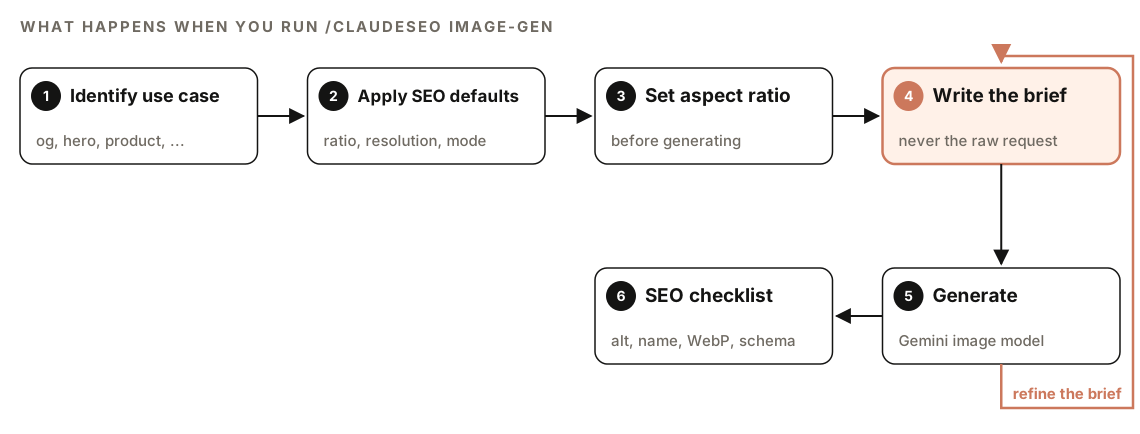
- Identify the use case. From the subcommand or from what you describe: an OG card, a hero image, a product shot and so on.
- Apply SEO defaults. Each use case has a preset aspect ratio, resolution and style mode. If you've saved brand presets, the matching one is applied too.
- Set the aspect ratio. The ratio is fixed before generation, so the image is composed for its final shape.
- Write the brief. Claude writes a specific description of what the camera should see, instead of passing your words straight to the model.
- Generate. The image is created with a Gemini image model.
- Run the SEO checklist. You get alt text, a file name, a WebP conversion command and markup for the new image.
If the result is off, refine the brief and generate again.
Use cases and their defaults
| Use case | Aspect ratio | Resolution | Style |
|---|---|---|---|
| OG or social preview | 16:9 | 1K | Clean, text-friendly |
| Blog hero | 16:9 | 2K | Editorial, atmospheric |
| Schema image | 4:3 | 1K | Clean, descriptive |
| Social square | 1:1 | 1K | Platform-friendly square |
| Product photo | 4:3 | 2K | White background, studio light |
| Infographic | 2:3 | 4K | Vertical, data-heavy |
| Favicon or icon | 1:1 | 512 | Minimal, recognizable |
| Pinterest pin | 2:3 | 2K | Tall vertical card |
Four use cases have their own subcommands: og, hero, product and infographic. There's also custom, which runs the full creative pipeline on any description, and batch, which generates several variations of one idea (three by default). The other use cases are picked from context when you describe what you need.
What /claudeblog image adds for blog posts
The Claude Blog suite has its own image command with three modes: generate, edit and setup. Its rule is to never send your raw request to the model. Claude acts as a creative director and writes a full brief first.
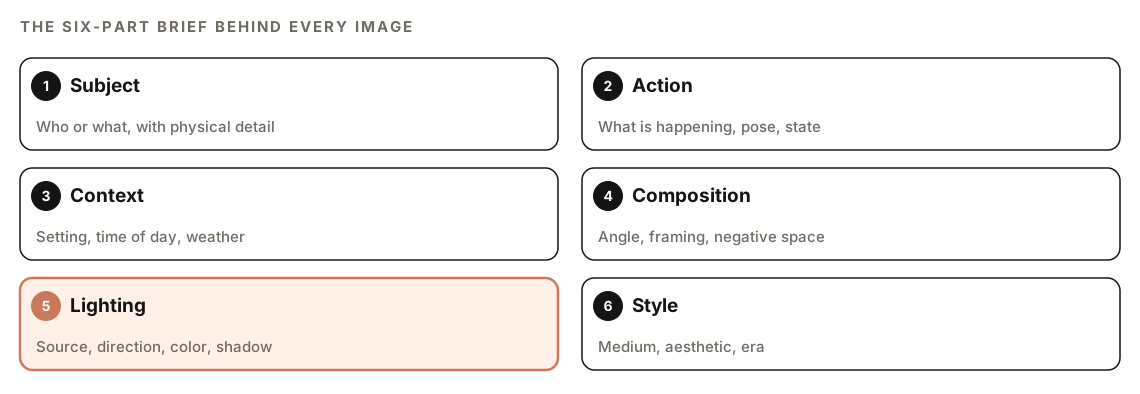
The brief covers six parts: the subject with physical detail, the action or state, the context or setting, the composition (camera angle, framing, negative space), the lighting, and the style. It's written as natural sentences, not a keyword list. When an image comes out poorly, the skill reviews the brief and checks the lighting first, which it treats as the biggest single factor in quality.
Before writing the brief, Claude picks one of six domain modes that shape the prompt: Editorial, Product, Landscape, UI/Web, Infographic or Abstract. If your request is vague, it asks one clarifying question about use case and style.
Blog image types
The skill matches each image to where it will sit in the post:
- Hero or cover: 16:9, 2K or 4K, set in the
coverImagefrontmatter field. - OG or social card: 16:9, 1K, set in the
ogImagefield. - Inline illustration: 16:9 or 4:3, placed after an H2 and before the body text.
- Inline product shot: 4:3 or 1:1, within product sections.
- Section divider: a wide 8:1 or 4:1 strip between major sections.
Edit instead of re-rolling
If an image is mostly right, the skill edits it in the same session instead of regenerating, so the style stays consistent. A slightly cold color or a missing detail is an edit; a wrong composition is a regeneration with a revised brief. Edit requests are enhanced too: "make it warmer" becomes a specific color temperature change with notes on what to preserve.
Images and charts inside the writing workflow
/claudeblog write and /claudeblog rewrite can call the image skill for hero and inline images as part of the content pipeline. If image generation isn't set up, the workflow continues with stock photos instead of stopping.
Charts are handled separately, on purpose. When the writing workflow finds chart-worthy data, such as three or more comparable metrics, a trend or a before-and-after comparison, it builds an inline SVG chart from the actual values, with a title, description, ARIA label and source line, in a style that works in dark and light mode. Data visuals come from data, not from an image model that might draw the wrong number.
How to set up AI image generation in Claude Code
Both commands generate with Google's Gemini image models through an API key:
- A Google AI API key from Google AI Studio. Generation is billed by Google, and its own pricing applies.
- For Claude SEO: install the image generation extension. If it's missing, the skill tells you and shows the install step.
- For Claude Blog: run
/claudeblog image setup, which configures the image server and your key. It needs Node.js 18 or newer.
If you choose a project-level configuration for Claude Blog, setup references the key through an environment variable and refuses to write the literal key into a tracked file. Keep keys out of your repository either way. New to the suites? Start with installing SEO skills in Claude Code.
Then generate:
/claudeseo image-gen og a clean dashboard showing a project timeline for a project management tool
/claudeseo image-gen hero a quiet home office at dawn, laptop open, coffee steaming
/claudeseo image-gen batch abstract illustration of a search results page 4
/claudeblog image generate cover image for a post about planning a vegetable garden
/claudeblog image edit ./public/images/garden-hero.png make it warmer
/claudeblog image edit ./public/images/garden-hero.png crop for social
Or ask in plain English:
Create an OG image for our pricing page: a simple, bright illustration of three plan cards on a soft background, with room on the left for a headline.Generation costs money, so the SEO skill shows an estimated cost before it generates, especially for batches, and logs every generation so you can ask for a usage summary.
What you get back
After each image, you get everything needed to publish it:
Image path: [where the file was saved]
Crafted prompt: [the full brief sent to the model]
Settings: [model], [aspect ratio], [resolution or domain mode]
SEO checklist:
- Alt text: [suggested sentence]
- File name: [keyword-description-1200x630.webp]
- Conversion: [WebP command]
Markup: [ImageObject schema, og:image tags or frontmatter]
The crafted prompt is shown so you can learn from it and adjust one detail instead of starting over.
The post-generation SEO checklist
Alt text
Write a full sentence that describes what the image shows and why it's on the page. The blog skill keeps alt text between 10 and 125 characters, with topic keywords used naturally, never stuffed. "Gardener planting tomato seedlings in a raised bed in early spring" works. "garden tips vegetable garden best garden blog image" doesn't.
File name, format and size
Rename the file in a descriptive format such as keyword-description-widthxheight.webp, then convert it. The skills use ImageMagick:
magick input.png -resize 1200x630^ -gravity center -extent 1200x630 og-image.png
magick og-image.png -quality 85 og-image.webp
magick hero.png -quality 80 hero.avif
The first line crops a 16:9 image to the standard 1200x630 OG size. The SEO skill's size targets are under 200KB for hero images and under 100KB for thumbnails.
OG tags and schema
For social preview images, the skill reminds you to add the OG tags, including width, height and alt text:
<meta property="og:image" content="https://example.com/images/og-image.webp" />
<meta property="og:image:width" content="1200" />
<meta property="og:image:height" content="630" />
<meta property="og:image:alt" content="Descriptive alt text" />
It also suggests ImageObject markup for the new asset:
{
  "@context": "https://schema.org",
  "@type": "ImageObject",
  "url": "https://example.com/images/keyword-description.webp",
  "width": 1200,
  "height": 630,
  "caption": "Descriptive caption with target keyword"
}
For blog posts, the image command returns a frontmatter snippet instead:
coverImage: "/images/garden-hero.webp"
coverImageAlt: "Gardener planting tomato seedlings in a raised bed in early spring"
ogImage: "/images/garden-og.webp"
Our guide to schema markup with Claude Code covers validating the markup once it's in place.
Find which pages need images first
Start with an audit, not with generation. During a full site audit with /claudeseo audit, an image analyst agent checks each page for a valid og:image tag, OG images of at least 1200x630, populated ImageObject properties, alt text quality, modern formats such as WebP and AVIF, and file size. It never generates anything itself. Instead, it returns a plan:
### Image Audit Summary
| Metric                   | Value | Status    |
|--------------------------|-------|-----------|
| Pages with OG images     | X/Y   | Pass/Fail |
| OG images correct size   | X/Y   | Pass/Fail |
| Schema ImageObject usage | X/Y   | Pass/Fail |
| WebP/AVIF adoption       | XX%   | Pass/Fail |
| Average image file size  | XKB   | Pass/Fail |

### Image Generation Plan
| Page   | Issue            | Suggested use case | Prompt idea   | Priority |
|--------|------------------|--------------------|---------------|----------|
| [page] | Missing OG image | og                 | [prompt idea] | Critical |
Priorities run from Critical to Low, highest-traffic pages first, and the plan estimates the cost of the full set. You then run /claudeseo image-gen for each row you approve. For the existing images on a page, /claudeseo images <url> finds missing alt text and oversized files, and our image SEO audit guide explains how to fix them.
How to use AI images responsibly
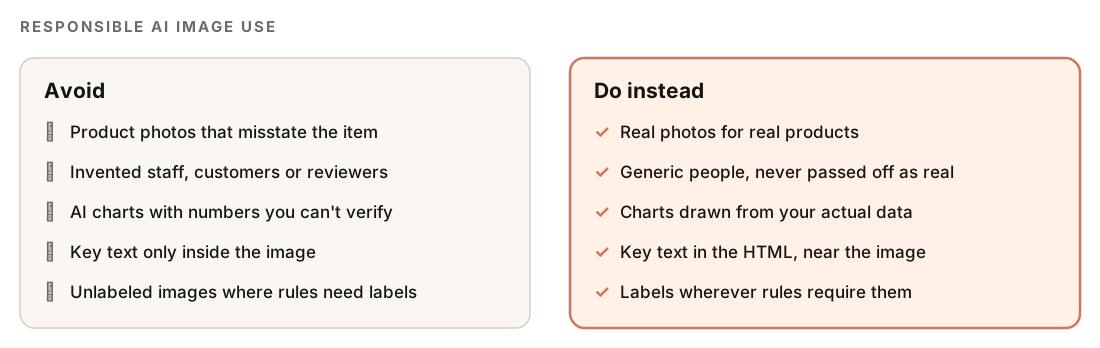
- Label AI images where rules require it. Platforms, ad networks, marketplaces and some laws require AI-generated or AI-edited images to be disclosed, and the rules differ by channel and country.
- Don't fake product photos. Shoppers expect a product image to show the actual item. Use AI for lifestyle backdrops or concept art, and real photos for what you sell.
- Don't invent people. Never present a generated face as a team member, customer or reviewer. When a safety filter blocks a prompt involving a person, the blog skill makes the person generic, removing anything that resembles a real individual.
- Write honest alt text. Describe what the image actually shows, not what you wish it showed.
- Keep important text in the HTML. Text inside generated images can come out garbled, and it's harder for search engines and screen readers to use.
- Respect blocked topics. If Gemini's filter blocks a harmless prompt, the blog skill rephrases it positively and retries up to three times. If a topic is prohibited outright, it stops.
Google's guidance on using generative AI content focuses on accuracy, quality and added value, and the same test applies to images.
Doing it without the skill
Plain Claude Code can't generate images by itself, but it can write a strong brief for any image tool:
Write an image-generation prompt for the hero image of the post in content/blog/raised-beds.md. Describe the subject with physical detail, the action, the setting and time of day, the camera angle and framing, the lighting (source, direction, color temperature) and the style, as two narrative paragraphs. Aim for 16:9 with empty space on the left for a headline.Then let it handle the SEO steps for the files you create:
For every PNG in public/og/: crop to 1200x630 with center gravity, convert to WebP at quality 85, rename to a descriptive keyword-description-1200x630.webp name based on the page it belongs to, write a one-sentence alt text for each, and add og:image, og:image:width, og:image:height and og:image:alt tags to the matching pages. Show me the diff.The skills add the parts that are tedious to repeat: use-case presets for ratio and resolution, generation and editing in one session, cost estimates before batches, an audit-driven generation plan, and the full checklist and markup after every image.
Mistakes to avoid
- Skipping the conversion step. A large PNG straight from the model is much heavier than the page needs.
- Keyword-stuffed alt text. Describe the image in a sentence instead.
- Generating before auditing. Fix the pages that matter most, starting with missing OG images on high-traffic pages.
- Trusting generated text and numbers. Check every word and figure, or build the chart from data instead.
Related guides
- Image SEO audit with Claude Code for alt text, file sizes and formats
- Writing a blog post with Claude Code for the full writing workflow
- Schema markup with Claude Code for ImageObject and other structured data
- The full Claude SEO skill list for every command in the suite
FAQ
Are AI-generated images bad for SEO?
Not in themselves. What matters is whether an image is relevant, fast to load and properly described with alt text and markup. Problems start when AI images replace evidence readers expect to be real, such as product photos, team photos or data charts.
Does Google penalize AI-generated images?
Google's guidance on generative AI content focuses on quality, accuracy and usefulness rather than on how content was made. Mass-producing low-value content is still a problem whatever the method, and some channels, such as shopping and advertising platforms, have their own rules about AI images.
What size should an OG image be?
1200x630 pixels is the standard size for Open Graph images, and the ClaudeSEO audit treats it as the minimum. Generate at 16:9, crop to 1200x630, convert to WebP, and set og:image:width, og:image:height and og:image:alt alongside og:image.
Should I label AI-generated images?
Label them wherever a platform, marketplace or law requires it, and check the rules for each channel you publish to. Beyond that, never present an AI image as a real photo of a product, person or event.
Do I need an API key to generate images with Claude Code?
Yes. Both /claudeseo image-gen and /claudeblog image generate with Google's Gemini image models, so you need a Google AI API key, and Google's pricing applies.
Can Claude Code edit existing images?
Yes. /claudeblog image edit <path> <instructions> takes an existing image and an instruction, such as "make it warmer" or "crop for social", and turns it into a detailed edit request.