
Local SEO
Geo-Grid Rank Tracking and Maps SEO with Claude Code
Run geo-grid rank tracking with Claude Code: measure Share of Local Voice, audit your Google Business Profile, analyze reviews and map nearby competitors.
Geo-grid rank tracking checks where a business ranks in Google Maps from dozens of points across an area, instead of from one location. It shows how your local visibility changes street by street: strong near your address, perhaps invisible two neighborhoods away. With Claude Code, the ClaudeSEO /claudeseo maps command runs geo-grid scans and audits your Google Business Profile, reviews, competitors, and listings on other map platforms, all in one report.
This guide explains how geo-grid tracking and Share of Local Voice work, what the command does at each capability tier, how to run it, and how to act on the results.
Key takeaways
- Local rankings depend on where the searcher is, so a single rank check from your office tells you little. A geo-grid checks your rank from a grid of points around your business.
/claudeseo maps grid <keyword> <location>runs a 7x7 grid over a 5 km radius by default and reports Share of Local Voice (SoLV): the share of grid points where you rank in the top three.- The command works in tiers. Without any paid API it maps competitors, generates schema, and guides NAP checks. Geo-grid scans, live profile audits, and review intelligence need DataForSEO.
- Before every geo-grid scan, the skill shows the grid size and an estimated cost and waits for your approval.
- It audits the map platforms themselves; for local signals on your website, run
/claudeseo local <url>instead.
What is geo-grid rank tracking?
When someone searches "emergency plumber" on their phone, Google doesn't show everyone the same local results. Google says local results depend mainly on relevance, distance, and prominence, and distance means the searcher's location changes the ranking. A plumber can hold the top spot for searchers a few blocks from its office and not appear at all for searchers across town.
That makes a traditional rank check, one query from one location, misleading for local businesses. You see your rank from wherever the check runs, which may not be where your customers are.
Geo-grid rank tracking solves this by placing a grid of points over the area you serve and checking your rank for a keyword from each point. A 7x7 grid gives 49 checks. The result is usually drawn as a heatmap: each cell shows your rank from that location, so you can see where you're strong, where you fade, and where competitors take over.
What is Share of Local Voice (SoLV)?
Share of Local Voice turns the grid into a single number. The ClaudeSEO skill calculates it as:
SoLV = (grid points where you rank in the top 3 / total grid points) x 100The top three matters because the local pack on a Google results page typically shows three businesses. If you rank in the top three at 20 of 49 points, your SoLV is about 41. Tracking SoLV over time, with the same keyword, grid, and center point, tells you whether your local visibility is growing or shrinking.
What the /claudeseo maps command does
The command is part of the Claude SEO skill suite and our local SEO feature. It analyzes how your business appears on map platforms through APIs. That's the key difference from /claudeseo local, which reads local signals from your website's HTML. The two are designed not to overlap.
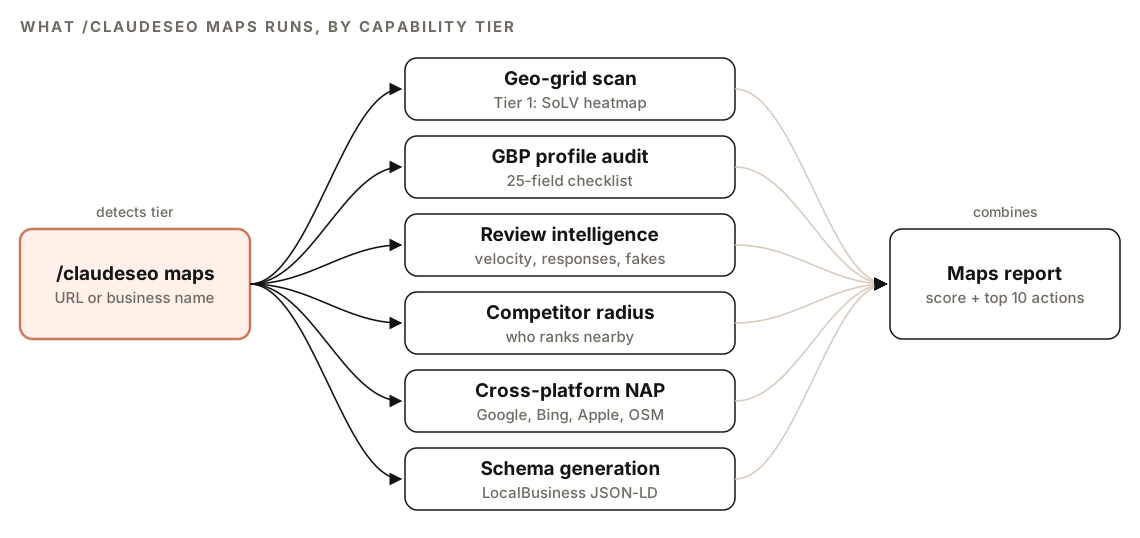
Before any analysis, the skill detects which tier you have and tells you at the start:
| Tier | What you need | What it adds |
|---|---|---|
| Tier 0 | Nothing extra | Competitor discovery via OpenStreetMap's Overpass API, geocoding via Nominatim, a static GBP checklist, schema generation, NAP guidance |
| Tier 1 | DataForSEO connected | Geo-grid rank tracking, live GBP profile audit, review intelligence, GBP post activity, Tripadvisor and Trustpilot reviews |
| Tier 2 | DataForSEO plus a Google Maps Platform API key | Google Places details, real-time business status, AI place summaries, photo analysis |
Tier 0 can also use Geoapify for point-of-interest search if you have a Geoapify API key. If DataForSEO isn't detected, the skill drops to Tier 0, runs the free analysis, and tells you which features need DataForSEO.
DataForSEO, Geoapify, and Google Maps Platform each need your own account, and their own pricing applies. Our guide to using DataForSEO with Claude Code covers connecting it.
How a geo-grid scan works
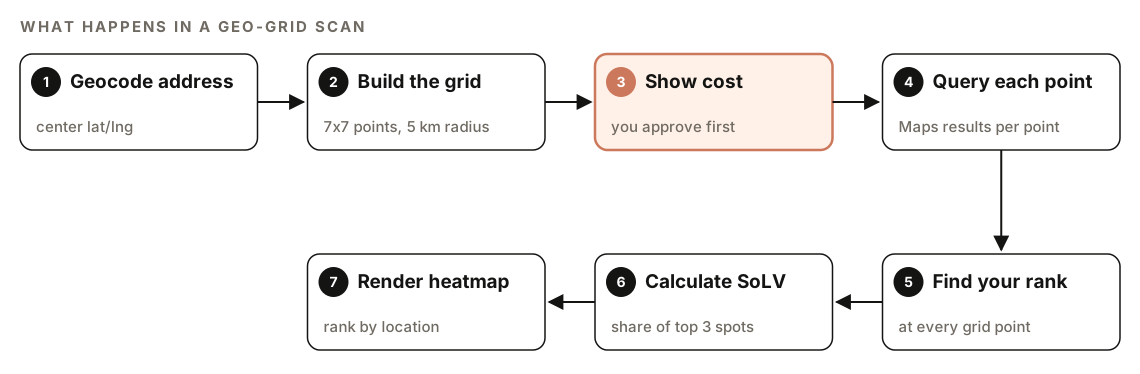
- Geocode the address. The skill converts your business address into a center latitude and longitude.
- Build the grid. It generates the grid points, 7x7 over a 5 km radius by default, using the Haversine formula to offset each point accurately on the Earth's curved surface.
- Show the cost. It prints the grid size, keyword count, and estimated cost, then asks you to confirm.
- Query each point. It requests Google Maps results through DataForSEO's Maps SERP API, with the search location set to that point's coordinates.
- Find your rank in the results at every point.
- Calculate SoLV with the formula above.
- Render the heatmap as an ASCII grid in the report, with your SoLV and average rank.
The cost prompt looks like this before every scan:
Geo-Grid Scan: [keyword] at [location]
Grid: 7x7 (49 points) | Keywords: [N] | Est. cost: $[amount]
DataForSEO credits will be consumed. Proceed?
Nothing is sent until you say yes. Each extra keyword multiplies the number of requests, so start with one or two keywords that matter most.
What else the maps audit checks
A full audit with /claudeseo maps <url> runs every analysis your tier allows and scores the business on a 0 to 100 Maps Health Score:
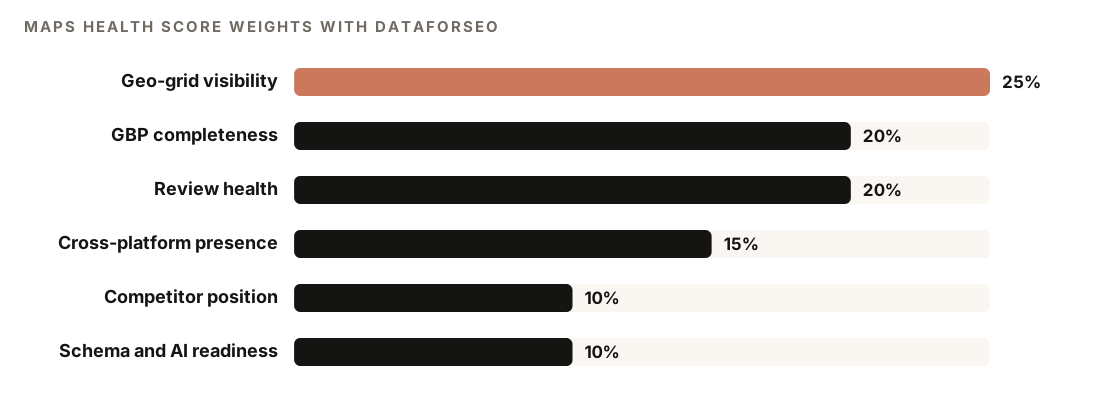
Without DataForSEO there's no geo-grid data, so the skill redistributes its 25 points: GBP completeness goes to 30, review health to 30, and cross-platform presence to 20.
GBP profile audit
The skill audits 25 Google Business Profile fields. With DataForSEO, it fetches your live profile and scores each field: 2 points if present and optimized, 1 if present, 0 if missing. It applies weight multipliers for your industry and normalizes the total to 0 to 100. At Tier 0, it reads the GBP signals visible on your website and marks anything it can't verify as "Unknown (requires DataForSEO for live data)" rather than guessing.
Review intelligence
With DataForSEO, the skill pulls your newest Google reviews and calculates review velocity (reviews per month over the last six months), flags long gaps without new reviews, analyzes the rating distribution, and works out your owner response rate (responses divided by total reviews). It adds Tripadvisor and Trustpilot reviews where available and compares platforms in one table.
It also flags possible fake reviews. A review is flagged when it matches two or more of these patterns:
- Uniform timing, such as several reviews in the same day or hour
- Reviewer accounts with little history or a single review
- Reviewer locations that don't fit the business location
- A spike of only 5-star reviews compared with the usual baseline
- Identical or near-identical text across reviews
- A sudden jump in volume with no matching marketing activity
Competitor radius mapping
At Tier 0, the skill queries OpenStreetMap through the Overpass API for businesses with the same category tag within a radius, then lists them by distance with name, address, phone, and website. With DataForSEO, it pulls the top 20 competitors from Google Maps results for your keyword and compares rating, review count, categories, photos, and attributes. It also calculates competitive density: competitors per square kilometer.
Cross-platform NAP verification
The skill checks your name, address, and phone on Google, Bing Places, Apple Maps, and OpenStreetMap, and classifies each as an exact match, partial match, missing, or conflicting. A name mismatch is Critical, an address mismatch High, and a phone mismatch Medium. Apple has no public API, so Apple Maps is a manual check, and the skill recommends claiming your listing through Apple Business Connect. It recommends claiming any unclaimed profile it finds.
LocalBusiness schema generation
From the data it collected, the skill generates LocalBusiness JSON-LD with the most specific subtype for your industry, filling in properties such as name, address, image, telephone, url, geo, and openingHoursSpecification, plus areaServed and sameAs for multi-location businesses. It won't generate self-serving review markup, because Google ignores review markup a business publishes about itself. Google's local business structured data guide documents the properties.
How to run geo-grid rank tracking with Claude Code
With ClaudeSEO installed (see our guide to installing SEO skills in Claude Code), run the full maps audit on your website:
/claudeseo maps https://www.example.comOr run one analysis at a time with a subcommand:
/claudeseo maps grid "emergency plumber" "Springfield, IL"
/claudeseo maps reviews "Example Plumbing" "Springfield, IL"
/claudeseo maps competitors "emergency plumber" "Springfield, IL"
/claudeseo maps gbp "Example Plumbing" "Springfield, IL"
/claudeseo maps nap "Example Plumbing"
/claudeseo maps schema "Example Plumbing"
grid and reviews need DataForSEO, while competitors, nap, and schema work at Tier 0. You can also ask in plain English:
Run a geo-grid scan for "emergency plumber" around our Springfield office and tell me where we drop out of the top three.For a multi-location business, the skill asks which location to analyze or offers a batch mode with a cost estimate per location. If geocoding fails, it asks you for coordinates or a more specific address. The maps specialist can also run inside a full site audit, where its findings appear under Maps Visibility.
How to read the maps report
The skill writes MAPS-ANALYSIS-{domain}.md with these sections:
## Maps Analysis: [domain]

### Maps Health Score: XX/100
| Dimension | Weight | Score |
|---|---|---|
| Geo-Grid Visibility / SoLV | 25% | XX |
| GBP Profile Completeness | 20% | XX |
| Review Health | 20% | XX |
| Cross-Platform Presence | 15% | XX |
| Competitor Position | 10% | XX |
| Schema & AI Readiness | 10% | XX |

### Capability tier: [detected tier]
### Geo-grid heatmap: SoLV XX%, average rank X.X
### GBP profile audit (field by field)
### Review intelligence
### Competitor landscape
### Cross-platform presence: Google / Bing / Apple / OSM
### Schema recommendation
### Top 10 prioritized actions
### Cost report (DataForSEO credits used)
### Limitations
Start with the heatmap. A common pattern is strong ranks near your address that fade with distance, which is what you'd expect. If you rank poorly even at the center point, distance isn't the problem: look at relevance and prominence, such as your categories, reviews, and website. Then compare the competitor landscape with your own profile: if the businesses beating you have more reviews or more complete profiles, that's your gap.
Work through the Top 10 prioritized actions from Critical to Low, and check Limitations to see what your tier couldn't assess.
How to improve your geo-grid results
- Fix NAP conflicts first. A name mismatch on any platform is Critical. Correct it at the source, then re-check with
/claudeseo maps nap. - Claim every profile. Claim your Google, Bing Places, and Apple Business Connect listings, and add or correct your OpenStreetMap entry.
- Complete the profile fields. The GBP audit shows every missing or unoptimized field. Fill them in, starting with those your industry weights highest.
- Keep reviews coming steadily. A steady flow looks natural, while a sudden burst is one of the fake-review signals the skill flags. If the audit finds gaps, ask every customer for a review, not just the happy ones.
- Close the competitor gap. Compare your rating, review count, photos, and categories with the top competitors in your radius.
- Add the generated schema. Add the LocalBusiness JSON-LD to your site, then validate it with
/claudeseo schema <url>. Our guide to schema markup with Claude Code covers validation.
Then re-run the grid with the same keyword, grid size, and center point so the comparison is fair.
Doing it without the skill
You can map nearby competitors for free with a plain Claude Code prompt that uses OpenStreetMap data:
Write and run a Python script that geocodes "[business address]" with the Nominatim API (send a descriptive User-Agent and stay at one request per second), then queries the Overpass API for all places tagged [OSM tag, e.g. craft=plumber] within 5 km. Output a table of name, address, phone, website, and distance from the address, sorted by distance.And if you can export your reviews to a CSV, Claude Code can analyze them:
Read reviews.csv (columns: date, rating, text, owner_response). Calculate reviews per month for the last six months, the longest gap between reviews, the rating distribution, and the owner response rate. Flag any reviews with near-identical text or several posted on the same day.A true geo-grid scan needs a data source that returns Google Maps results for a given coordinate, which is why the skill uses DataForSEO. The skill adds tier detection, cost confirmation, SoLV, the 25-field GBP audit with industry weights, cross-platform NAP severity, and one scored report.
Geo-grid tracking mistakes to avoid
- Checking rank from one spot. Your office or home location tells you about one point on the map, not your service area.
- Changing settings between scans. A different grid size, radius, or center point makes SoLV impossible to compare over time.
- Scanning too many keywords at once. Each keyword multiplies the requests. Start with the searches that bring paying customers.
- Ignoring the other map platforms. Bing Places, Apple Maps, and OpenStreetMap listings feed other apps and assistants. Keep them accurate and consistent.
- Marking up your own reviews. Self-serving review markup is ignored by Google. Put effort into real reviews instead.
Related guides
- Local SEO audit with Claude Code for the website side: GBP signals, NAP, local schema, and location pages
- How to use DataForSEO with Claude Code for live SERP and keyword data
- How to run a full SEO audit with Claude Code, which can include the maps checks
- The full Claude SEO skill list for every command in the suite
FAQ
What is geo-grid rank tracking?
Geo-grid rank tracking checks a business's Google Maps ranking for a keyword from many points spread across an area, such as a 7x7 grid. Because local rankings depend on the searcher's location, the grid shows where a business is visible and where it isn't, usually as a heatmap.
What is Share of Local Voice?
Share of Local Voice (SoLV) is the percentage of grid points where your business ranks in the top three for a keyword. The ClaudeSEO skill calculates it as top-three points divided by total points, times 100. It's a single number you can track over time.
Do I need DataForSEO to use /claudeseo maps?
Not for everything. Without it, the command maps competitors through OpenStreetMap, generates LocalBusiness schema, and guides cross-platform NAP checks. Geo-grid scans, live GBP audits, and review intelligence need a DataForSEO account, and DataForSEO's own pricing applies.
Why do my Google Maps rankings change depending on where I search?
Distance from the searcher is one of the main factors Google uses for local results, alongside relevance and prominence. The same search from two parts of town can return different businesses in a different order. That's why a single rank check can be misleading and a geo-grid gives a fuller picture.
How can you tell if Google reviews are fake?
Look for patterns: many reviews posted the same day, reviewers with no other reviews, reviewers far from the business, sudden spikes of 5-star reviews, and near-identical wording. The skill flags reviews that match two or more of these signals.
How is /claudeseo maps different from /claudeseo local?
/claudeseo maps analyzes your presence on map platforms through APIs: rankings, profile fields, reviews, competitors, and listings. /claudeseo local analyzes local SEO signals on your website. They complement each other, and each recommends the other where relevant.