
Link Building
Backlink Audit with Claude Code: Toxic Links and Gaps
Run a backlink audit with Claude Code: score your link profile, flag toxic links and risky anchors, and find competitor link gaps from multiple data sources.
A backlink audit reviews every site that links to yours: how many referring domains you have, how natural your anchor text looks, which links could be spam, and which sites link to competitors but not to you. With Claude Code, the ClaudeSEO /claudeseo backlinks command runs that audit, combines every link data source you've configured, and labels each number with its source.
This guide covers what to audit, how the command works, how to run it, and how to act on the results.
Key takeaways
- A complete backlink audit covers seven areas, from anchor text and toxic links to competitor gaps and lost links.
/claudeseo backlinks <url>combines up to five data sources and gives each one a confidence value.- The 0-100 Backlink Health Score needs data for at least four of its seven factors, or the report says INSUFFICIENT DATA.
- Subcommands handle competitor gaps, toxic links, new and lost links, and checks that known links still exist.
- Disavowing is a last resort. Most audits end with redirects for broken linked pages and an outreach list.
What is a backlink audit and why does it matter?
A backlink is a link from another website to yours. Search engines use links to discover pages and as one signal of trust. Two counts matter:
- Backlinks are every individual link. One sitewide footer link can create thousands.
- Referring domains are the distinct websites linking to you, usually the better measure of how widely you're cited.
Each link also carries signals an audit reads. Anchor text is the clickable text: "Acme Analytics" is branded, "acme.com" is a naked URL, "click here" is generic, and "best analytics software" is an exact-match keyword. Link attributes change how a link is treated: rel="sponsored" marks paid placements, rel="ugc" marks user-generated content, and rel="nofollow" covers other links a site doesn't vouch for (see Google's guide to qualifying outbound links). And source quality matters more than volume: a link from a relevant site in your market counts for far more than one from a page with thousands of outbound links.
Why audit? Because your link profile changes even when you do nothing. Sites delete pages, redesigns break URLs that earned links, and spam networks link to you. Google's spam policies treat link schemes, such as buying links or building site networks to manipulate rankings, as a violation. An audit shows whether any of that touches your site, and where your next good links could come from.
For how AI assistants mention and cite your brand, see our GEO and AI search features.
What the /claudeseo backlinks command does
The command is part of the Claude SEO skill suite. Give it a domain or URL and Claude Code works through a fixed sequence:
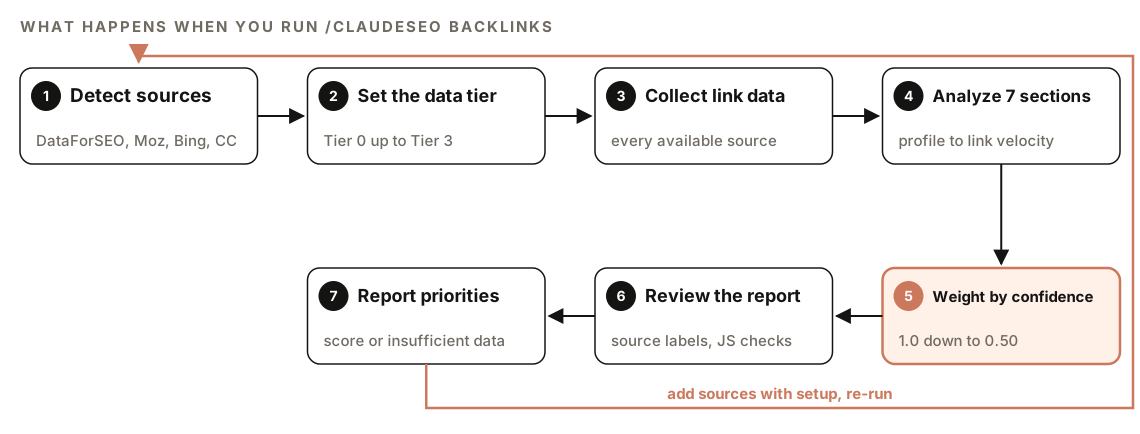
- Detect sources. It checks for DataForSEO, Moz, and Bing Webmaster Tools. Common Crawl and the verification crawler need no setup.
- Set the data tier. Tier 0 is Common Crawl plus the crawler. Tier 1 adds Moz, Tier 2 adds Bing, Tier 3 adds DataForSEO.
- Collect link data. Every available source runs, in a fixed order of preference.
- Analyze seven sections. These are covered below.
- Weight by confidence. Each source's confidence value feeds the health score.
- Review the report. A mandatory checklist runs first: every metric needs a source label, and JavaScript-rendered pages can't be reported as "link removed".
- Report priorities. You get the score, a table per section, prioritized issues, and link building opportunities.
With no API keys, the command still runs on Common Crawl data and suggests the setup subcommand.
Where the data comes from
| Source | What it provides | Setup needed | Confidence |
|---|---|---|---|
| DataForSEO | Summary, anchors, referring domains, spam scores, new and lost links | Extension and account | 1.0 |
| Verification crawler | Whether known links still exist | None, you supply the links | 0.95 |
| Moz API | Domain Authority, Page Authority, Spam Score, anchors, top pages | API key | 0.85 |
| Bing Webmaster Tools | Inbound links, anchors, countries, two-site comparison | API key, verified site | 0.70 |
| Common Crawl | Referring domain count, PageRank, harmonic centrality | None | 0.50 |
When DataForSEO and Moz disagree, the skill trusts DataForSEO and notes the discrepancy. DataForSEO needs its own account, and its pricing applies (see using DataForSEO with Claude Code). Moz and Bing need accounts and API keys under their own terms. Common Crawl's graph is domain-level: it counts who links to you, but not which pages, with what anchors, or how authoritative they are.
The seven sections of a backlink audit
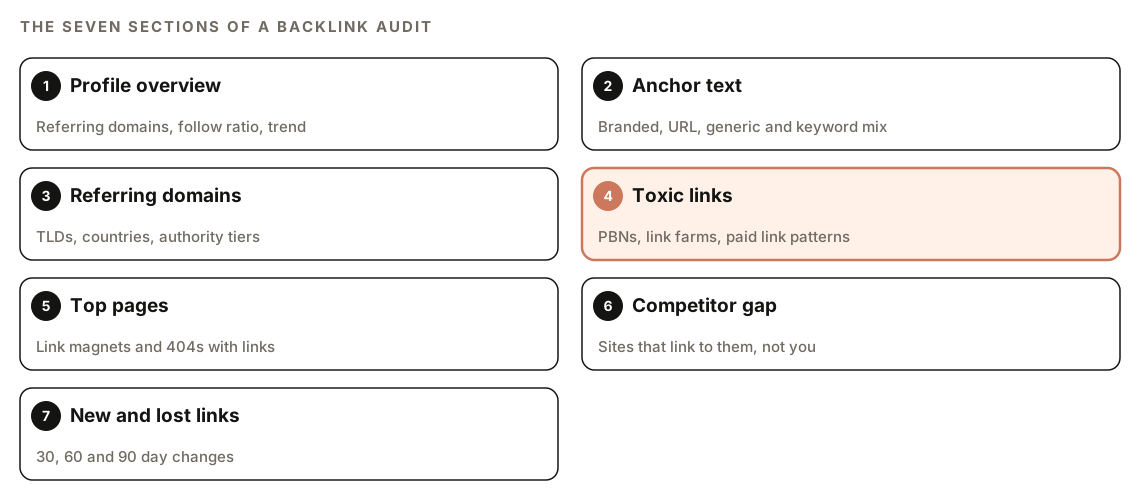
1. Profile overview
The headline numbers: total backlinks, referring domains, follow ratio, how concentrated your links are, and the trend. The skill rates them against fixed bands:
| Metric | Good | Warning | Critical |
|---|---|---|---|
| Referring domains | Over 100 | 20 to 100 | Under 20 |
| Follow ratio | Over 60% | 40-60% | Under 40% |
| Domain diversity | No domain over 5% | One domain over 10% | One domain over 25% |
| Trend | Growing or stable | Slow decline | Over 20% drop a quarter |
These bands are the skill's settings, not rules from Google. A new site can land in the critical band just because it's young: read it as "needs more links", not "penalized".
2. Anchor text distribution
Natural profiles are dominated by brand names and plain URLs, because that's how people link unprompted. The skill compares your mix with these ranges:
| Anchor type | Target range | Flag when |
|---|---|---|
| Branded | 30-50% | Under 15% |
| Naked URL | 15-25% | Not flagged |
| Generic | 10-20% | Not flagged |
| Exact-match keyword | 3-10% | Over 15% |
| Partial-match keyword | 5-15% | Over 25% |
| Long-tail or natural | 5-15% | Not flagged |
The flag that matters most is exact-match anchors above 15%. Bulk keyword anchors are the classic footprint of links that were placed rather than earned.
3. Referring domain quality
This checks top-level domains, link countries, and the spread of authority; healthy profiles have links from every tier. The skill treats 80% or more of links from countries irrelevant to your market as a sign of a private blog network (PBN), a group of sites built to pass links.
4. Toxic link detection
High-risk patterns are flagged straight away:
- Links from known private blog network domains
- A domain whose links all use the same exact-match anchor
- Links from penalized or deindexed domains
- Mass directory submissions (50 or more directory links)
- Link farms, meaning pages with more than 10,000 outbound links
- Paid link patterns, such as footer or sidebar links on every page of a domain
Medium-risk patterns are left for you to review: unrelated niches, reciprocal links, thin pages under 100 words, and more than 50 backlinks from one domain. Spam scores come from DataForSEO or Moz.
5. Top pages by backlinks
This shows your link magnets, pages with no backlinks (candidates for better internal linking), and pages that return 404 but still have backlinks. Each of those is link equity you can reclaim with a redirect.
6. Competitor gap analysis
The gap analysis sorts linking domains into three groups. Domains that link to your competitor but not you are opportunities, domains linking to both are relationships to keep, and domains linking only to you are your advantage. Opportunities come with their domain authority.
7. New and lost backlinks
Tracking changes over 30, 60, and 90 days needs DataForSEO. Other sources give a point-in-time snapshot, and the skill says so instead of guessing. Red flags are a sudden spike in new links (possibly negative SEO), a sudden loss of many links (removed content or a site penalty), and link growth that slows for three months or more.
How the Backlink Health Score works
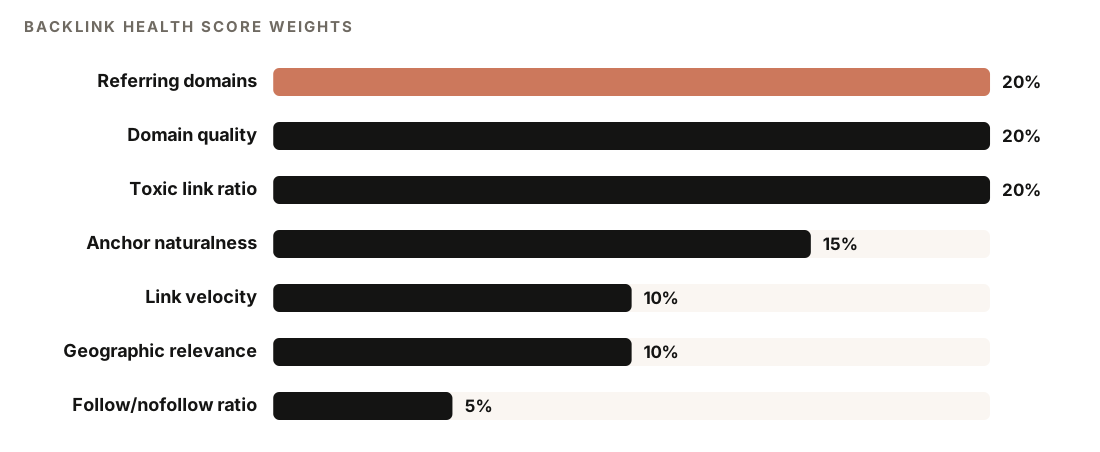
The skill weights referring domain count, domain quality, and toxic link ratio at 20% each, anchor text naturalness at 15%, link velocity and geographic relevance at 10% each, and follow ratio at 5%. Two rules keep the score honest:
- Confidence weighting. DataForSEO data counts at full confidence, Moz at 0.85, Bing at 0.70, and Common Crawl at 0.50. A factor with no data has its weight shared proportionally across the others.
- The data sufficiency gate. With four or more factors scored, you get a number. With fewer, the report shows
INSUFFICIENT DATA (X/7 factors scored)and lists the factor scores it has, each with source and confidence.
A low score built on thin data would look like a weak profile when the real problem is missing data. Link velocity needs DataForSEO, so without it the maximum is six factors.
How to run a backlink audit with Claude Code
Open Claude Code with ClaudeSEO installed (see our guide to installing SEO skills in Claude Code), then run:
/claudeseo backlinks https://www.example.comOr ask in plain English, and Claude picks the matching skill:
Audit the backlink profile for example.com. Flag toxic links and any anchor text that looks over-optimized.The subcommands focus the audit on one job:
/claudeseo backlinks gap https://www.example.com https://www.competitor.com
/claudeseo backlinks toxic https://www.example.com
/claudeseo backlinks new https://www.example.com
/claudeseo backlinks verify https://www.example.com --links known-links.txt
/claudeseo backlinks setup| Subcommand | What it does |
|---|---|
| gap | Lists sites that link to one domain but not the other |
| toxic | Runs toxic link detection with disavow recommendations |
| new | Reports new and lost backlinks (needs DataForSEO) |
| verify | Checks the links in your file still exist |
| setup | Shows how to add Moz and Bing API keys |
Bing data needs a site verified in Bing Webmaster Tools (our Bing Webmaster Tools guide covers it). Moz requests are paced to respect its rate limit; if Moz cuts off mid-run, the report says the data is partial.
The full site audit can also hand backlink analysis to the same specialist agent and file its findings under a Backlink Profile category.
How to read the backlink report
The report uses the same structure every time:
### Backlink Health Score: XX/100 (or INSUFFICIENT DATA)

| Section                  | Status         | Score  | Data Source           |
|--------------------------|----------------|--------|-----------------------|
| Profile Overview         | pass/warn/fail | XX/100 | [source (confidence)] |
| Anchor Distribution      | pass/warn/fail | XX/100 | [source (confidence)] |
| Referring Domain Quality | pass/warn/fail | XX/100 | [source (confidence)] |
| Toxic Links              | pass/warn/fail | XX/100 | [source (confidence)] |
| Top Pages                | info           | N/A    | [source (confidence)] |
| Link Velocity            | pass/warn/fail | XX/100 | DataForSEO only       |

### Critical Issues (fix immediately)
### High Priority (fix within 1 month)
### Medium Priority (ongoing improvement)
### Link Building Opportunities (top 10)
If the score says INSUFFICIENT DATA, the setup subcommand is the fastest route to a number. Check the Data Source column before trusting a figure: a Common Crawl count and a DataForSEO count don't measure the same thing.
- "Not found" has three meanings. The report says whether something wasn't crawled, fell below a threshold, or hit an error.
- JavaScript pages are marked unverifiable. If a linking page, such as a social media profile, builds its content with JavaScript, the report marks it
unverifiable_jsinstead of claiming the link was removed. - Some problems belong to other commands. The skill points you to
/claudeseo content <url>for E-E-A-T and/claudeseo technical <url>for crawl issues.
Then work through the priority groups in order. After any backlink analysis, the skill offers to turn the findings into a PDF with /claudeseo google report.
How to fix common backlink problems
Reclaim links that point to 404 pages
This is usually the quickest win: 301-redirect each 404 page that has backlinks to its closest live page. On Apache, that's one line per URL:
Redirect 301 /old-pricing-guide /guides/pricing
Redirect 301 /blog/2019-checklist /blog/seo-checklist
Claude Code can do the matching:
From the backlink report, list every 404 page that still has backlinks. For each one, find the closest live page in this repo and add a 301 redirect to our redirect config. Show me the diff before saving.Deal with toxic links carefully
Confirm the links still exist with verify, then ask the linking site to remove them if there's someone to ask. Only then consider a disavow file. Google's guidance is that most sites never need one; it's meant for cases with many spammy or artificial links that have caused, or are likely to cause, a manual action. The file is plain UTF-8 text with one domain or URL per line (lines starting with a hash are comments), uploaded in Google Search Console:
domain:spam-directory.example
https://link-farm.example/page-with-our-link.html
For over-optimized anchors, stop campaigns that produce exact-match anchors and ask partners to switch to branded ones.
Turn the gap list into outreach
Take the link building opportunities from the backlink report. Group them by type (publications, resource pages, partners, communities) and draft a short outreach note for the top five explaining which of our pages would help their readers.Doing it without the skill
You can run a basic review with plain Claude Code and data you already have. Google Search Console's Links report exports your top linking sites and top linking text as CSV:
Read the Search Console link exports in ./exports. Tell me how many referring domains I have, which domain accounts for the largest share of links, how anchor text splits between branded, naked URL, generic, and keyword anchors, and which linking domains look like directories, link farms, or unrelated sites. Output a table of domains to review.For links you earned through outreach, check they're still live:
For each URL in links.txt, fetch the page and check whether it links to example.com. Report the anchor text, the rel attribute, and the HTTP status. If a page looks JavaScript-rendered, say the link couldn't be verified instead of calling it removed.The skill adds what's tedious to rebuild each time: five combined sources, confidence labels, the toxic pattern reference, gap sorting, and the weighted score with its sufficiency gate.
Backlink audit mistakes to avoid
- Disavowing based on one metric. A high spam score is a reason to look, not proof of harm.
- Mixing up backlinks and referring domains. Ten thousand links from one site is still one referring domain.
- Calling JavaScript-rendered links "lost". If the crawler couldn't see the page, the status is unknown.
- Auditing once. Lost links and spam waves happen between audits, so re-run on a schedule.
Related guides
- How to run a full SEO audit with Claude Code, which can include the backlink profile
- How to use DataForSEO with Claude Code for full-confidence link data
- Bing Webmaster Tools and IndexNow with Claude Code for verified Bing link data
- The full Claude SEO skill list for every command in the suite
FAQ
What is a backlink audit?
A backlink audit reviews the links pointing to your site. It counts referring domains, checks anchor text and link quality, looks for spam patterns, and compares your links with competitors to find opportunities.
What makes a backlink toxic?
A toxic backlink looks like part of a link scheme rather than an editorial choice: links from private blog networks, link farms, mass directory submissions, paid sitewide footer links, or domains whose links all use one exact-match anchor. The skill flags these as high-risk and leaves borderline patterns, such as reciprocal links, for you to review.
Should I disavow toxic backlinks?
Usually not straight away. Google's guidance is that most sites don't need to disavow. Verify the links, try to get them removed, and disavow only when you have many clearly spammy links that have caused, or are likely to cause, a manual action.
Can you run a backlink audit without API keys?
Yes, with limits. The command always works with Common Crawl and the verification crawler, but at that tier it reports INSUFFICIENT DATA instead of a score. Moz, Bing, and DataForSEO each add more data under their own terms and pricing.
How many referring domains is good?
The skill rates more than 100 referring domains as good, 20 to 100 as a warning, and fewer than 20 as critical. Treat the bands as a guide, not a target: relevance and quality matter more than the count.