
Local SEO
Local SEO Audit with Claude Code: GBP, NAP and Reviews
Run a local SEO audit with Claude Code: check Google Business Profile signals, NAP consistency, reviews, citations, local schema and location pages.
A local SEO audit checks whether a business can be found by nearby customers searching for what it sells. It covers the Google Business Profile, the consistency of the business name, address, and phone number (NAP) across the web, reviews, citations, and the local signals on the website itself. With Claude Code, the ClaudeSEO /claudeseo local command runs that audit from a single URL, scores the site out of 100 across six dimensions, and hands you a prioritized list of fixes.
This guide covers how local search works, what the command checks, how to run it, and how to fix what it finds.
Key takeaways
- A local SEO audit covers your website and your listings together: GBP signals, NAP, citations, reviews, local schema, and location pages.
/claudeseo local <url>first detects whether you're a storefront, a service-area business, or a hybrid, and your industry, because that decides which checks apply.- The Local SEO Score weights six dimensions, with Google Business Profile signals weighted highest.
- Your name, address, and phone must match across the visible page, your LocalBusiness JSON-LD, and your Google Business Profile. The audit flags every mismatch.
- The report states what it can't see from your website, such as live map pack positions and GBP Insights data.
What is a local SEO audit and why does it matter?
Local SEO is the work of showing up when someone searches with local intent: "dentist near me" or "plumber in Springfield". These searches trigger the local pack (the map with a short list of businesses under it), Google Maps results, and ordinary organic results.
Google says local results are based mainly on three things: relevance (how well a listing matches the search), distance (how far the business is from the searcher or the location in the query), and prominence (how well known and well regarded the business is). You can't move the searcher, but you can influence relevance and prominence. A local SEO audit checks the signals behind both.
Those signals come from a handful of places:
- Google Business Profile (GBP): your free listing on Google Search and Maps, with categories, hours, photos, posts, and reviews.
- NAP: your business name, address, and phone number. Conflicting versions across sources make all of them harder to trust.
- Citations: listings of your business on directories such as Yelp, BBB, Bing Places, and Apple Business Connect.
- Reviews: how many you have, how recent they are, the average rating, and whether you respond.
- Your website: location and service pages, visible NAP, click-to-call links, and LocalBusiness structured data.
The type of business matters too. A brick-and-mortar business (a restaurant, a shop, a clinic) has an address customers visit. A service-area business (SAB), such as a plumber, travels to customers and often hides its address. A hybrid does both. An audit that ignores the difference flags a plumber's missing map embed as an error, when it's normal for that business.
What the /claudeseo local command does
The command is part of the Claude SEO skill suite and powers our local SEO feature. You give it a URL, and Claude Code works through the site in a fixed order:
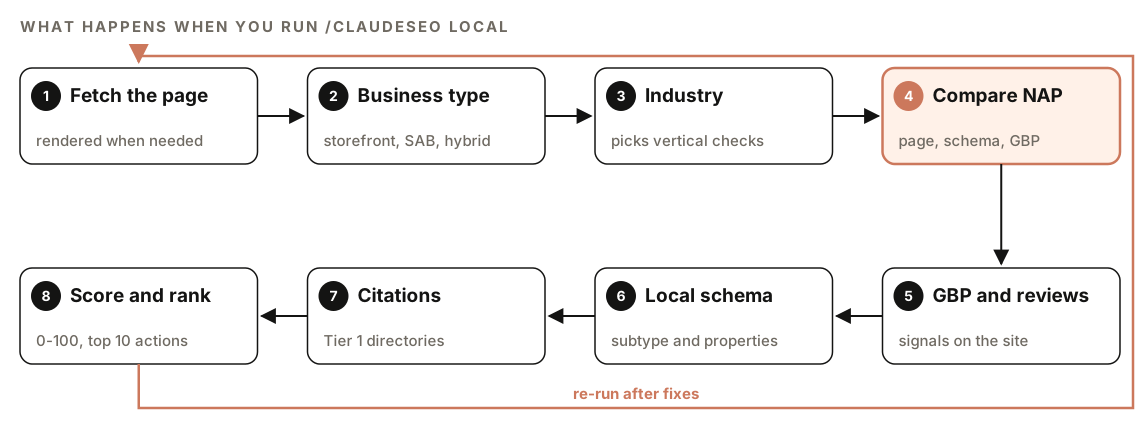
- Fetch the page. Map embeds, review widgets, and GBP badges are often injected with JavaScript, so on JavaScript-heavy sites the skill renders the page in a headless browser to see what visitors see.
- Detect the business type. A visible street address, a Maps embed, and "visit us at" point to brick-and-mortar. "Serving [area]", "we come to you", and
areaServedin schema without a street address point to a service-area business. Both together mean hybrid. Service-area businesses skip the map and physical address checks. - Detect the industry. The skill looks for signals of six verticals: restaurant (menus, reservations), healthcare (insurance, NPI numbers), legal (practice areas, bar admission), home services (free estimates, licensed and insured), real estate (listings, MLS), and automotive (inventory, VINs). If none match, it uses a generic LocalBusiness path. If the vertical is unclear, it shows the top two candidates with their evidence and asks you to confirm.
- Compare NAP sources. It extracts the name, address, and phone from the visible HTML, the LocalBusiness JSON-LD, and any GBP data on the page, then flags every discrepancy.
- Check GBP signals and reviews visible on the site.
- Validate local schema: the type, the required and recommended properties, and industry patterns.
- Check citations on major directories using
site:searches or direct page fetches. - Score and rank. It calculates the Local SEO Score and orders the top 10 actions from Critical to Low.
If the URL can't be reached, the skill reports the error instead of guessing. If it finds no local signals, it asks you to confirm the site is a local business, ideally with your GBP listing URL.
What the local SEO audit checks
The Local SEO Score is out of 100, split across six weighted dimensions:
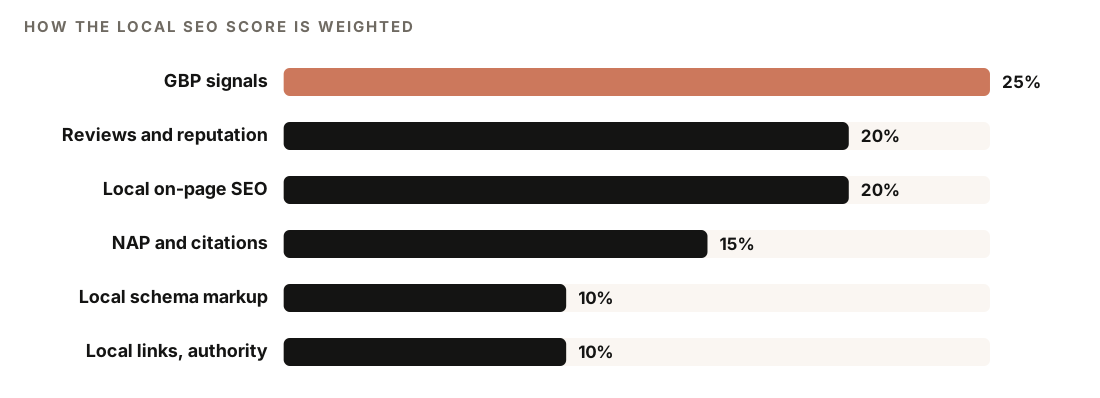
Each dimension is rated full, partial, or low against the skill's rubric.
Google Business Profile signals
The skill checks what your website reveals about your profile: a Maps embed, a place ID, or a reviews widget; whether your primary category fits what your pages say you do; evidence of secondary categories, posts, photos, and video; and whether business hours are visible on the page. Full marks need a GBP embed, aligned category signals, active posts, and photos.
Reviews and reputation
The skill treats review velocity, a steady flow of new reviews, as more important than the total count. It looks at the review count and star rating shown on the page or in schema, recency indicators, aggregateRating markup, reviews on third-party platforms, and whether the owner responds. Its rubric gives full marks for 10 or more reviews, a rating of 4.5 or higher, recent activity, owner responses, and presence on more than one platform.
It also checks for review gating: screening customers for satisfaction before sending only the happy ones to a review site. Google's policies prohibit it, and it can create FTC exposure too. For healthcare, the skill notes that review responses must not confirm or deny that a reviewer is a patient. For law firms, it flags attorney-client privilege.
Local on-page SEO
On the website itself, the skill checks for:
- A city or service keyword in the title tag and a local-intent H1
- NAP visible in the HTML, in the footer, header, or contact section
- One dedicated page for each core service
- A click-to-call
tel:link and a contact form above the fold - An embedded Google Map, lazy-loaded so it doesn't slow the page
- Hub-and-spoke internal linking, with every critical page within three clicks of the homepage
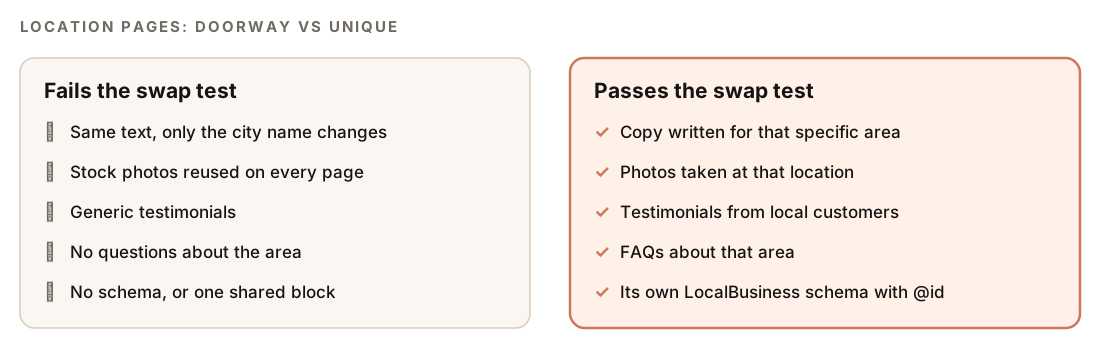
For multi-location sites, it checks that every location has its own crawlable URL (preferably server-rendered or static, not built in the browser), that locations sit in a subdirectory such as /locations/city-name/, and that each location page has its own LocalBusiness schema with a unique @id.
Location pages also get the swap test: if you could swap in another city name and the page would still make sense, it's a doorway page. Quality gates apply on large sites. At 30 or more location pages it warns and enforces at least 60% unique content per page, and at 50 or more it stops and asks you to justify continuing.
NAP consistency and citations
The skill compares your name, address, and phone across the visible page, the JSON-LD, and any GBP data it finds. If NAP is missing from the page HTML, it checks schema and meta tags, and if it's still absent, it flags a Critical issue.
For citations, it checks Tier 1 directories (Yelp, BBB, Facebook, and GBP signals) and recommends claiming Apple Business Connect and Bing Places, since not every map or AI assistant relies on Google's data. It also suggests the data aggregators Data Axle, Foursquare, and Neustar/TransUnion, which pass listings on to other directories, plus directories specific to your industry.
Local schema markup
Structured data isn't a direct ranking factor, but it states your details in a format search engines and AI systems parse reliably. The skill checks for LocalBusiness markup with the required name and address (as a PostalAddress) and the recommended geo (at least five decimal places), openingHoursSpecification, telephone, url, priceRange (under 100 characters), image, and aggregateRating.
It also checks that you use the most specific type: Restaurant rather than generic LocalBusiness, LegalService rather than the deprecated Attorney, and Dentist, MedicalClinic, or Hospital rather than generic MedicalBusiness. Service-area businesses should list named cities in areaServed. Google's local business structured data documentation lists the properties Google reads.
Local links and authority
From the page, the skill looks for local authority signals: Chamber of Commerce membership, BBB accreditation, local news coverage, sponsorships and community events, and placements on local "best of" lists.
How to run a local SEO audit with Claude Code
Open your project in Claude Code with ClaudeSEO installed (our guide to installing SEO skills in Claude Code covers setup), then run:
/claudeseo local https://www.example.comFor a multi-location business, run it on the homepage and on individual location pages:
/claudeseo local https://www.example.com/locations/springfield/You can also ask in plain English, and Claude picks the matching skill:
Run a local SEO audit on https://www.example.com. We're a dental clinic with one location. Check our Google Business Profile signals, NAP consistency, reviews, and local schema.The audit works from your website alone, with no API keys. If you've connected DataForSEO, the skill can also pull live GBP data, real-time local pack positions, and automated citation checks. DataForSEO needs your own account, and its pricing applies.
The local specialist can also run as part of a full site audit, where its findings go into the audit's Local SEO section.
How to read the local SEO report
The skill writes a file named LOCAL-SEO-ANALYSIS-{domain}.md with the same sections every time:
## Local SEO Analysis: [domain]

### Local SEO Score: XX/100
| Dimension | Weight | Score |
|---|---|---|
| GBP Signals | 25% | XX |
| Reviews & Reputation | 20% | XX |
| Local On-Page SEO | 20% | XX |
| NAP Consistency & Citations | 15% | XX |
| Local Schema Markup | 10% | XX |
| Local Link & Authority Signals | 10% | XX |

### Business type: [Brick-and-mortar / SAB / Hybrid]
### Industry vertical: [vertical] + industry-specific findings
### GBP optimization checklist (detected vs missing)
### Review health snapshot
### NAP consistency audit
| Field | Page HTML | Schema | GBP | Status |
### Citation presence (Tier 1 directories)
### Local schema status + ready-to-use fix
### Location page quality (multi-location only)
### Top 10 prioritized actions
### Limitations
Read the score table first to find the weakest dimension, then the NAP consistency audit, where fixes are usually quick. The Top 10 prioritized actions list is your work queue, sorted from Critical to Low.
Don't skip Limitations. A website audit can't see geo-grid rankings, Domain Authority, a full backlink profile, GBP Insights data, or your real-time position in the local pack. The report names those gaps and the paid tools that can fill them. For rankings across a map, see our guide to geo-grid rank tracking with Claude Code.
How to fix common local SEO problems
The skill's quick wins are small, fast changes:
- Fix any NAP discrepancy between the page, the schema, and your GBP
- Add LocalBusiness schema with the correct industry subtype
- Add
geocoordinates with at least five decimal places - Make the phone number a
tel:link for click-to-call - Put the city and main service in the title tag and H1
- Claim and complete Apple Business Connect and Bing Places listings
Here's a minimal LocalBusiness block with a specific subtype, five-decimal geo, and opening hours. Replace every value with your real details, matching your footer and GBP exactly:
{
  "@context": "https://schema.org",
  "@type": "Dentist",
  "@id": "https://www.example.com/#dentist",
  "name": "Example Dental",
  "url": "https://www.example.com/",
  "telephone": "+1-555-555-0100",
  "image": "https://www.example.com/images/clinic.jpg",
  "priceRange": "$$",
  "address": {
    "@type": "PostalAddress",
    "streetAddress": "123 Example Street",
    "addressLocality": "Springfield",
    "addressRegion": "IL",
    "postalCode": "00000",
    "addressCountry": "US"
  },
  "geo": {
    "@type": "GeoCoordinates",
    "latitude": 39.12345,
    "longitude": -89.12345
  },
  "openingHoursSpecification": [{
    "@type": "OpeningHoursSpecification",
    "dayOfWeek": ["Monday", "Tuesday", "Wednesday", "Thursday", "Friday"],
    "opens": "08:00",
    "closes": "17:00"
  }]
}
Check the result in Google's Rich Results Test before you deploy. Our guide to schema markup with Claude Code covers validation in more depth.
Bigger fixes take longer: a page for every core service, a steady review process, industry directory listings, and location pages rewritten to pass the swap test. Claude Code can apply the on-site fixes for you:
Using the local SEO report, add the corrected LocalBusiness JSON-LD to the site layout, make the footer phone number a tel: link, and update the homepage title and H1 to include our city and main service. Show me the diff before saving.Off-site fixes, like correcting a directory listing or replying to reviews, still happen on each platform.
Doing it without the skill
A basic NAP and schema check works with a plain Claude Code prompt, which is enough for a small site:
Fetch https://www.example.com and https://www.example.com/contact. Extract the business name, address, and phone number from the visible text (header, footer, contact section) and from any LocalBusiness JSON-LD. Compare them field by field and output a table showing each source and whether it matches. Then list any recommended LocalBusiness properties that are missing: geo, openingHoursSpecification, telephone, url, priceRange, image.And a swap test for location pages stored in your repo:
Read every page in ./content/locations/. For each one, imagine replacing the city name with a different city. Flag any page whose content would still read naturally after the swap, and list what local detail it lacks: local photos, area-specific testimonials, or local FAQs.The skill adds what's tedious by hand: business type and industry detection, the weighted score, citation checks, the right schema subtype per industry, review gating detection, quality gates for large location sets, and a clear list of what it couldn't assess.
Local SEO mistakes to avoid
- Different phone numbers in different places. A tracking number in the header and the main number in the schema is a NAP conflict. Pick one number for listings and markup.
- Doorway location pages. Pages that differ only by city name fail the swap test, and Google's spam policies treat doorway pages as spam.
- Generic schema types. Use
Restaurant,Dentist, orLegalServicewhen one fits, not plainLocalBusiness. - Review gating. Ask every customer for a review, not just the happy ones.
- Phone numbers as plain text. Use a
tel:link so mobile visitors can tap to call. - Treating Google as the only listing. Claim Bing Places and Apple Business Connect too, and keep them consistent.
Related guides
- Geo-grid rank tracking and maps SEO with Claude Code, for rankings across a map and platform-level listing checks
- How to run a full SEO audit with Claude Code, which includes the local checks
- Generative engine optimization guide, for visibility in AI answers, which
/claudeseo geo <url>audits in full - The full Claude SEO skill list for every command in the suite
FAQ
What is a local SEO audit?
A local SEO audit reviews what affects how a business appears in local search: its Google Business Profile, NAP consistency, citations, reviews, local schema, and its location and service pages. The result is a ranked list of gaps, so you know what to fix first.
What does NAP consistency mean?
NAP stands for name, address, and phone number. NAP consistency means those details match everywhere they appear: your website, your structured data, your Google Business Profile, and directories. Conflicting versions make all of them harder to trust.
Can Claude Code see my Google Business Profile?
By default, /claudeseo local reads the GBP signals visible on your website, such as Maps embeds, place IDs, and review widgets. It can't read GBP Insights. If you connect DataForSEO, the skill can pull live profile data and local pack positions. The /claudeseo maps command audits the profile itself.
What is the difference between /claudeseo local and /claudeseo maps?
/claudeseo local audits the local signals on your website through its HTML. /claudeseo maps audits how your business appears on map platforms through APIs, including geo-grid rank tracking, a field-by-field GBP audit, and NAP checks across Google, Bing, Apple, and OpenStreetMap. The two complement each other.
How often should I run a local SEO audit?
Run one whenever your business details change, such as a new address, phone number, or hours, and after launching new location or service pages. A regular check also catches drift, like a changed directory listing or reviews that stopped coming in.