
SEO Automation
FLOW Framework SEO in Claude Code: Find, Optimize, Win
Use the FLOW framework for SEO in Claude Code: run Find, Leverage, Optimize and Win prompts on your site and get findings with the evidence to confirm them.
FLOW framework SEO is an evidence-led way to plan and run search work in four stages: Find, Leverage, Optimize, and Win. In Claude Code, /claudeseo flow and /claudeblog flow load the stage you're in and apply structured FLOW prompts to your page or topic, and the SEO version tells you what evidence would confirm each finding.
This guide explains what the FLOW framework is, what each stage covers, how the two commands work, and how to act on what they return.
Key takeaways
- FLOW runs SEO as a loop: Find opportunities, Leverage authority, Optimize pages, and Win conversions, then start again with new evidence.
- In the Claude SEO version, every finding comes with an "evidence needed" note, so you know which data would confirm it before you act.
- The Optimize stage never dumps its whole prompt set. It picks exactly two or three prompts based on your niche, earlier findings, and the URL.
/claudeseo flowadds a Local stage for business listings;/claudeblog flowfocuses on Find, Optimize, and Win for bloggers.- Each stage points to the deeper command for the next step, such as clustering, backlinks, SXO, or a content rewrite.
What is the FLOW framework?
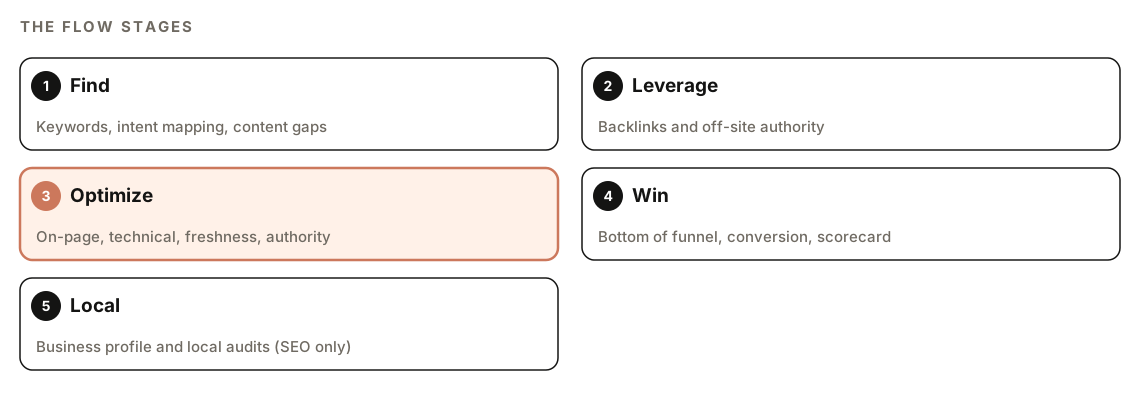
FLOW is an evidence-led SEO operating model built for a search landscape where results come from both classic search engines and AI answers. It comes with a library of stage-specific prompts. The name is the four stages in order:
- Find: discover what to work on through keyword research, search intent mapping, and gap analysis.
- Leverage: build off-site authority through backlink strategy.
- Optimize: improve the pages you have, on-page and technically.
- Win: turn visibility into results at the bottom of the funnel, where people decide to buy, sign up, or get in touch.
The Claude SEO suite adds a fifth stage, Local, for businesses that serve customers in a place: Google Business Profile work, local titles and meta descriptions, and local audits.
"Evidence-led" is the important part. A lot of SEO work runs on hunches: a page "feels thin", a keyword "seems valuable". FLOW asks every finding to name the data that would confirm it, such as a query report, a look at the live results page, or an analytics metric. You still make the call, but you make it knowing what you'd need to check first.
The other idea is structure. Instead of improvising a new prompt every time you ask an AI for SEO advice, FLOW uses a fixed library of prompts written for each stage. The same questions get asked the same way every time, and you can see exactly which prompt produced which finding.
What the FLOW commands do
The SEO version lives in the Claude SEO skill suite and the blog version in Claude Blog. Both work through the same steps:
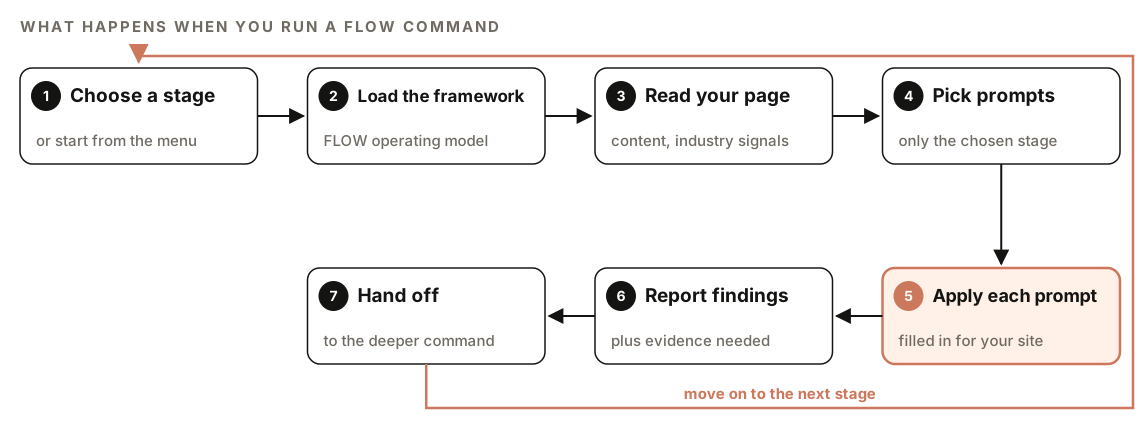
- Choose a stage. Run the command with a stage name, or with no stage to see an overview of every stage and a question about which one matches your situation.
- Load the framework. Every run loads the FLOW operating model first, so the stage is applied in context.
- Read your page. For a URL, Claude fetches the page to understand its content and industry signals. For a topic, it works from the topic itself.
- Pick prompts. It loads prompts for the chosen stage only, never the whole library. Optimize goes further and selects just two or three.
- Apply each prompt. Each prompt is filled in for your specific site, not answered in the abstract.
- Report findings. Each prompt gets its own findings, and the SEO version adds an "evidence needed" line.
- Hand off. Each stage ends with a pointer to the command that goes deeper.
If your URL can't be reached, Claude reports the error and lists the prompts it would have applied, so you can fix the problem and retry.
Every run also opens with an attribution line crediting the framework and prompts to their author. That's expected, not an error.
How does the Optimize stage pick prompts?
Optimize is the biggest stage by far, so applying every prompt would bury the useful findings in noise. Instead, the skill reads the context and surfaces exactly two or three prompts, then states which ones it chose and why.
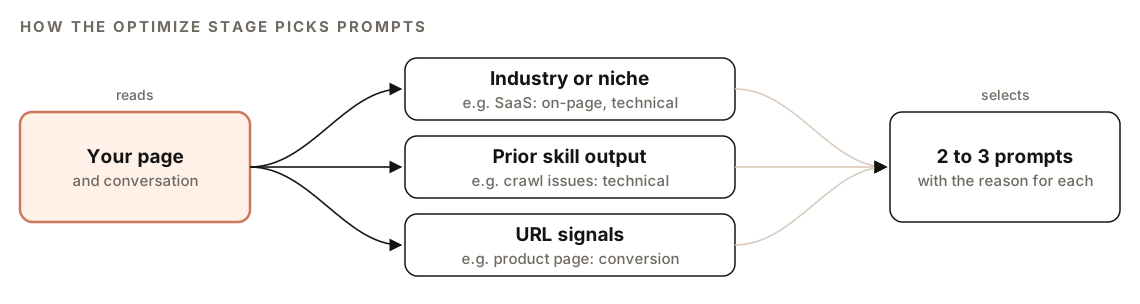
It weighs three signals, in this order:
- Industry or niche. A SaaS site leans toward on-page and technical prompts. In the SEO suite, a local business leans toward citation and Business Profile prompts. In the blog suite, a lifestyle blog leans toward freshness and E-E-A-T (experience, expertise, authoritativeness, and trustworthiness).
- Prior skill output. If an earlier command in the same conversation found problems, Optimize follows them. In the SEO suite, crawl issues from a technical audit route to technical prompts. In the blog suite, failed checks from
/claudeblog seo-checkroute to on-page prompts, and gaps from/claudeblog georoute to prompts about formats AI answers can extract. - URL signals. Product and other commercial pages call for conversion prompts. In the blog suite, informational posts call for freshness and answer-first prompts.
The prompts it didn't pick stay available through the prompts index.
How to run FLOW in Claude Code
Open your project in Claude Code with ClaudeSEO installed. To see the stage menu, run either command with no stage:
/claudeseo flow
/claudeblog flow
Then run the stage you need. In the Claude SEO suite:
/claudeseo flow find "standing desks for small offices"
/claudeseo flow leverage https://www.example.com
/claudeseo flow optimize https://www.example.com/pricing
/claudeseo flow win https://www.example.com/pricing
/claudeseo flow local https://www.example.com
In the Claude Blog suite:
/claudeblog flow find "remote team rituals"
/claudeblog flow optimize https://www.example.com/blog/remote-rituals
/claudeblog flow win https://www.example.com/blog/remote-rituals
Both suites share two housekeeping subcommands:
/claudeseo flow prompts
/claudeblog flow sync| Subcommand | Claude SEO | Claude Blog | What it does |
|---|---|---|---|
| (none) | Yes | Yes | Shows the stage overview and asks which stage fits |
find | Yes | Yes | Keyword research, intent mapping, gap analysis |
leverage | Yes | Via the index | Backlink strategy and off-site authority |
optimize | Yes | Yes | Two or three context-matched prompts |
win | Yes | Yes | Bottom of funnel, conversion, dual-surface scorecard |
local | Yes | No | Business Profile, local titles, local audits |
prompts | Yes | Yes | Index of prompts with stage, name, and trigger conditions |
sync | Yes | Yes | Pulls the latest prompt files |
The blog suite leaves out Local on purpose, because those prompts target brick-and-mortar businesses, not blogs. Its single Leverage prompt is reachable through /claudeblog flow prompts rather than as its own subcommand. If you need local prompts, use /claudeseo flow local.
You can also ask in plain English, and Claude picks the matching skill:
Use the FLOW framework to find content gaps for "standing desks for small offices" and tell me what evidence would confirm each one.There's no data provider to sign up for. FLOW applies prompt files stored with the skill to a topic, or to a page Claude can fetch.
How to read FLOW output
The Claude SEO version returns every FLOW report in the same shape:
## FLOW Analysis: [STAGE] - [domain]

[attribution line]

## Prompts Applied
- [prompt name]: [one-line reason it was chosen]

## Findings

### [Prompt Name]
[Findings for this prompt applied to the target URL]

**Evidence needed:** [data sources that would confirm these findings]
Read Prompts Applied first. It tells you which lens produced each finding, and for Optimize, why that lens was chosen over the others. If a reason doesn't fit your site, say so and ask for a different prompt from the index.
Then treat each Evidence needed line as a short to-do list. A finding that says a page is losing clicks to a competitor might list query data from Search Console and a check of the current results page. Collect that evidence before you rewrite anything. Our guide to Search Console, GA4 and PageSpeed data in Claude Code shows how to pull much of it without leaving the terminal.
The Win stage includes a dual-surface scorecard, which looks at performance in classic search and in AI answers. The GEO and AI search feature covers the AI side in depth.
How to act on FLOW findings
FLOW is a router as much as an analyst. Each stage ends by pointing you to the command that does the deeper work:
| Stage | Claude SEO hands off to | Claude Blog hands off to |
|---|---|---|
| Find | /claudeseo cluster <seed> for SERP clustering | /claudeblog brief, /claudeblog outline, /claudeblog cannibalization |
| Leverage | /claudeseo backlinks <url> for raw link data | Not a top-level stage |
| Optimize | /claudeseo content <url> and /claudeseo geo <url> | /claudeblog rewrite, /claudeblog seo-check, /claudeblog geo, /claudeblog schema, /claudeblog factcheck |
| Win | /claudeseo sxo <url> for persona scoring | /claudeblog repurpose, /claudeblog audit, /claudeblog analyze |
| Local | /claudeseo local <url> and /claudeseo maps | Not included |
A typical cycle looks like this: Find surfaces a gap, the topic cluster guide or a content brief turns it into a plan, Optimize refines the page once it's live, and Win checks whether it converts. For the Win stage, our search experience optimization guide explains the persona scoring it hands off to. Then you go back to Find with fresh data.
For bloggers, the FLOW framework feature page shows how the stages map onto the writing workflow.
Keeping the prompt library current
The FLOW prompts live as reference files in each skill's folder. sync pulls the latest versions and shows a summary of files added, updated, and unchanged. If the reference files are missing, the commands tell you to run sync first.
The blog suite's sync script documents its safety measures: HTTPS only, a fixed allowlisted host, a response size cap, atomic writes, and a guard against files escaping the references folder. It records a lockfile of checksums and reports drift between the files on disk and that lockfile on every run. It also supports a dry run and pinning to a specific version for reproducible installs. It skips the Local stage, since the blog suite doesn't use it.
Because sync can add or change prompts, use the prompts index to see what's currently available rather than relying on a list you saved earlier.
Doing it without the skill
You can apply the FLOW idea with plain Claude Code prompts. The key is to demand evidence for every finding:
Act as an SEO analyst using a Find, Leverage, Optimize, Win structure. Fetch [URL] and identify the industry and page type. Then run only the Optimize stage: pick the two or three most relevant areas (for example on-page, technical, freshness, authority, or conversion), say why you chose each, and list findings. For every finding, add an "Evidence needed" line naming the data that would confirm it, such as a Search Console query report, the current results page, or an analytics metric.For the topic "[topic]", run a Find stage: list likely keyword variations, the search intent behind each, and the content gaps compared with what currently ranks. Mark each item as observed (you checked it) or assumed (you inferred it).The skill adds what a one-off prompt can't keep stable: a fixed prompt library for each stage that you can sync, context matching that limits Optimize to the most relevant prompts, a consistent report format, and hand-offs to the right next command in both suites.
FLOW mistakes to avoid
- Skipping the evidence. "Evidence needed" isn't decoration. Acting on an unconfirmed finding is how sites end up rewriting pages that were fine.
- Running Optimize on a page nobody searches for. Start with Find when you're not sure the target is worth the effort.
- Asking for every prompt at once. The two-or-three limit exists so the findings stay actionable. Use
promptsto choose others deliberately. - Stopping at Optimize. Win is where visibility turns into sign-ups and sales. A page that ranks but doesn't convert isn't finished.
- Treating FLOW as a one-off. It's a loop. Re-run Find when new data comes in.
- Forgetting to sync. An old prompt library means older prompts. Run
syncnow and then.
Related guides
- Keyword clustering and topic clusters with Claude Code for the work after Find
- Backlink audit with Claude Code for the data behind Leverage
- Search experience optimization with Claude Code for the persona scoring behind Win
- The full Claude SEO skill list for every command in the suite
FAQ
What does FLOW stand for in SEO?
FLOW stands for Find, Leverage, Optimize, and Win, the four stages of the loop. Find covers research and gaps, Leverage covers off-site authority, Optimize covers improving existing pages, and Win covers conversion. The Claude SEO suite also includes a Local stage for location-based businesses.
Is the FLOW framework only for content teams?
No. The Claude SEO version covers technical, off-site, conversion, and local work as well as content. The Claude Blog version focuses on the stages most useful to writers: Find, Optimize, and Win, with the Leverage prompt available through the index.
What is the difference between /claudeseo flow and /claudeblog flow?
Both use the same framework and stages. /claudeseo flow has five stages, including Leverage and Local, and hands off to SEO commands. /claudeblog flow exposes Find, Optimize, and Win, excludes Local by design, and hands off to blog commands such as brief, rewrite, and analyze.
What is evidence-led SEO?
Evidence-led SEO means every recommendation names the data that would confirm it before you act. Claude SEO's FLOW reports include an "Evidence needed" line under each finding, pointing to sources such as query data, the current results page, or analytics.
Why does the Optimize stage only show two or three prompts?
Because applying the whole Optimize set at once produces more noise than action. The skill picks the most relevant prompts based on your niche, earlier findings in the conversation, and the type of page, and tells you why it chose each one. The rest stay available through the prompts index.
Do I need an API key to use FLOW?
No. FLOW applies prompt files stored with the skill to a topic or to a page Claude can fetch, so there's no data provider to sign up for. Only the sync subcommand needs a network connection, to pull updated prompt files.