
SEO Automation
Programmatic SEO with Claude Code (Without Thin Pages)
Plan and audit programmatic SEO pages with Claude Code: check your data, templates, URLs and indexing, and pass quality gates before you publish at scale.
Programmatic SEO is the practice of building many pages from one template and a structured dataset, so that each record (an integration, a glossary term, a city and service pair) gets its own page aimed at its own long-tail search. Done well, it answers thousands of specific queries with genuinely useful pages. Done badly, it produces near-identical pages that Google's spam policies treat as scaled content abuse, and that's the failure this guide is built to help you avoid.
We'll cover how programmatic SEO works, where the line sits between useful scale and thin pages, what the ClaudeSEO /claudeseo programmatic command checks, and how to run it before and after you publish.
Key takeaways
- Programmatic SEO works only when every record carries enough unique data to make its page worth reading on its own.
/claudeseo programmatic [url|plan]audits an existing page set or plans a new one, then scores it across six categories out of 100.- The skill's quality gates are the point: a warning at 100+ pages without review, a hard stop at 500+ pages without justification, and a thin-content flag below 40% unique content.
- Publish in batches of 50 to 100 pages, read a sample yourself, and watch indexing before you expand.
- Keep weak pages out of the index with noindex, canonicals, and a sitemap that lists only the pages you want found.
What is programmatic SEO and when does it work?
A programmatic page set has three parts: a dataset (a CSV file, a database table, or an API), a template that turns one record into one page, and a URL pattern that gives every record its own address. A software company might publish one page per integration at /integrations/[platform]. A reference site might publish one page per term at /glossary/[term]. A service business might publish /[city]/[service].
One template can cover a long tail of searches no team would write by hand. But if the only thing that changes from page to page is a name, you haven't built a thousand pages. You've built one page a thousand times.
The test the skill applies to every page is simple: would this page be worth publishing even if no other similar pages existed? An integration page with real setup steps and API details passes. A city page where the city name is the only difference fails, however many cities you have.
Where scaled content abuse begins
Google's spam policies define scaled content abuse as generating many pages mainly to manipulate search rankings rather than to help people. The policy applies no matter how the pages are made: by templates, by AI, by people, or by a mix. Using automation isn't the problem. Publishing pages that add nothing is.
The same policies cover site reputation abuse, which matters if you plan to publish programmatic content on someone else's high-authority domain rather than your own. The skill flags that setup as a risk.
Here's how the skill separates page types that hold up at scale from those that tend to cause trouble:
| Usually safe at scale | Risky at scale |
|---|---|
| Integration pages with real setup docs, API details, and screenshots | Location pages where only the city name changes |
| Template or tool pages with downloads and usage instructions | "Best [tool] for [industry]" pages with nothing industry-specific |
| Glossary pages with definitions of 200+ words, examples, and related terms | "[Competitor] alternative" pages without real comparison data |
| Product pages with unique specs, reviews, and comparison data | AI-generated pages with no human review and no unique value |
| Data-driven pages with unique statistics, charts, and analysis per record | Pages where more than 60% of the content is shared boilerplate |
What the /claudeseo programmatic command does
The command is part of the Claude SEO skill suite. Point it at a live section of your site to audit pages that already exist, or use plan to design a new page set before you build anything. Either way, Claude Code works through the same stages:
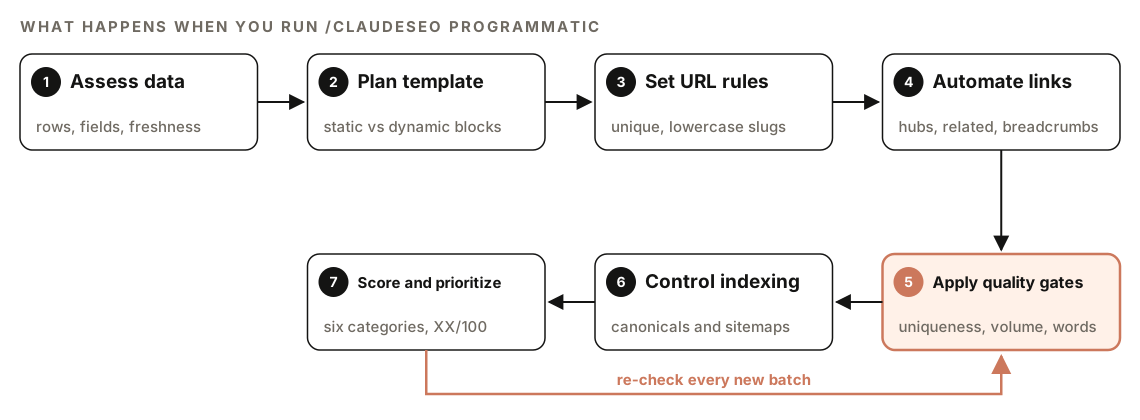
- Assess the data. It checks the source behind the pages: row counts, column uniqueness, and missing values for files; response structure, freshness, and rate limits for APIs; record counts, field completeness, and update frequency for databases.
- Plan the template. It maps where variables go (title, H1, body sections, meta description, schema), which blocks are shared and which are unique, and where conditional logic should hide sections that have no data.
- Set URL rules. Slugs come from the data, are lowercase and hyphenated, stay under 100 characters, avoid query parameters, and must be unique at generation time.
- Automate internal links. It plans hub pages, related-item links, breadcrumbs, and cross-links between pages that share attributes.
- Apply quality gates. It counts pages, measures unique content and word counts, and flags thin pages.
- Control indexing. It checks the canonical, sitemap, and noindex rules that keep low-value pages out of the index.
- Score and prioritize. It scores six categories and sorts the findings from critical to backlog.
If the URL has no template-generated pages, the command says so and suggests checking whether the pages render client-side or whether the URL points at the right section.
The quality gates that stop thin pages
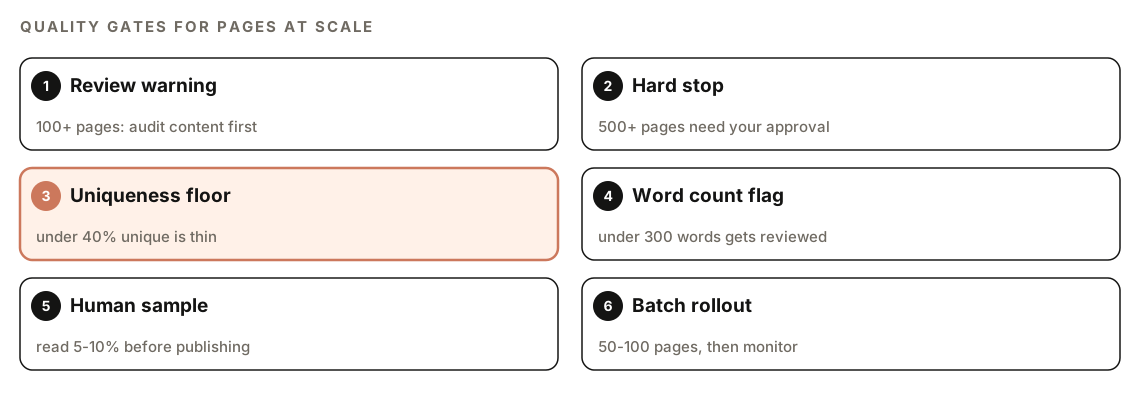
The gates are what keep this from being a page factory. These are the skill's settings:
| Gate | Threshold | What happens |
|---|---|---|
| Pages without content review | 100+ | Warning: audit the content before publishing |
| Pages without justification | 500+ | Hard stop: needs your explicit approval and a thin-content audit |
| Unique content per page | Below 40% | Flagged as thin content |
| Word count per page | Below 300 | Flagged for review |
When a page set crosses the thin-content threshold, the skill reports the unique content percentage, lists the pages below 40%, and asks you to acknowledge the findings before it continues. At the hard stop, it halts, presents what it found, and waits for your approval.
How uniqueness is measured
The skill calculates unique content as the words unique to a page divided by the total words on that page, times 100, measured against every other page in the set. Shared headers, footers, and navigation are left out of the calculation. Template boilerplate is counted. That last rule matters: an intro paragraph that appears on every page counts against every page.
Rollout safeguards
Passing the numbers isn't enough on its own. The skill also recommends:
- Reading a sample of 5 to 10% of generated pages yourself before publishing.
- Publishing in batches of 50 to 100 pages, then watching indexing and rankings for 2 to 4 weeks before adding more.
- Never publishing 500 or more programmatic pages at once without an explicit quality review.
Data that can carry a page
Thin pages often start with thin data. The skill checks that each record has enough unique attributes to produce distinct content, and it flags duplicate or near-duplicate records that share more than 80% of their field values. It also checks freshness, because stale data produces stale pages.
What the report scores
The report scores six categories, each out of 100, alongside one overall programmatic SEO score:
- Data quality: completeness, uniqueness, and freshness of the source records.
- Template uniqueness: whether dynamic sections add real information or only swap keywords, and whether there are "mad-libs" patterns, where names are dropped into otherwise identical text.
- URL structure: the URL rules above, plus a logical hierarchy and trailing slash usage that matches the rest of the site.
- Internal linking: hub pages, 3 to 5 related links per page chosen from data attributes, breadcrumbs with BreadcrumbList schema, and descriptive anchor text that varies rather than repeating one exact-match keyword. The skill's density guideline is 3 to 5 internal links per 1,000 words.
- Thin content risk: the quality gates.
- Index management: canonicals, sitemaps, and noindex rules.
The index rules are worth knowing even if you never run the skill. Every programmatic page needs a self-referencing canonical tag. Sort and filter variations point their canonical at the base URL. If a programmatic page overlaps with a hand-written page, the hand-written page is the canonical. Filtered views from faceted navigation stay out of the index, with the base category as the canonical page. Records with too little data are merged into aggregated pages instead of getting thin pages of their own.
For sitemaps, the skill generates entries for every indexable programmatic page, splits files at the protocol's 50,000-URL limit with a sitemap index, sets <lastmod> to the date the underlying data changed (not the date the page was generated), leaves noindexed pages out, and registers the sitemap in robots.txt. For sets above 10,000 pages, it recommends watching crawl stats in Search Console, and for every set, a monthly comparison of how many pages are indexed against how many you meant to have indexed.
How to run a programmatic SEO check
Open your project in Claude Code with ClaudeSEO installed (our guide to installing SEO skills in Claude Code covers setup). To audit a programmatic section that's already live:
/claudeseo programmatic https://www.example.com/integrations/To plan a new page set before you build it:
/claudeseo programmatic planYou can also describe the job in plain English, and Claude picks the matching skill:
I want to build one page per row in data/integrations.csv. Assess whether the data can support unique pages, propose the template, URL pattern, and internal linking, and tell me which quality gates the set would fail.The skill doesn't require a third-party API key or account.
How to read the results
The report always follows the same layout:
### Programmatic SEO Score: XX/100

### Assessment Summary
| Category | Status | Score |
| Data Quality | pass / warning / fail | XX/100 |
| Template Uniqueness | pass / warning / fail | XX/100 |
| URL Structure | pass / warning / fail | XX/100 |
| Internal Linking | pass / warning / fail | XX/100 |
| Thin Content Risk | pass / warning / fail | XX/100 |
| Index Management | pass / warning / fail | XX/100 |

### Critical Issues (fix immediately)
### High Priority (fix within 1 week)
### Medium Priority (fix within 1 month)
### Low Priority (backlog)

### Recommendations
Read the Thin Content Risk row first. A strong URL structure can't make up for pages that shouldn't exist. Then work down the priority sections. The Recommendations section groups the bigger changes: data source improvements, template changes, URL pattern adjustments, and what's needed to pass the quality gates.
A low Data Quality score often explains a low Template Uniqueness score: if records share most of their fields, no template can make the pages different. Fix the data first.
How to fix common programmatic SEO problems
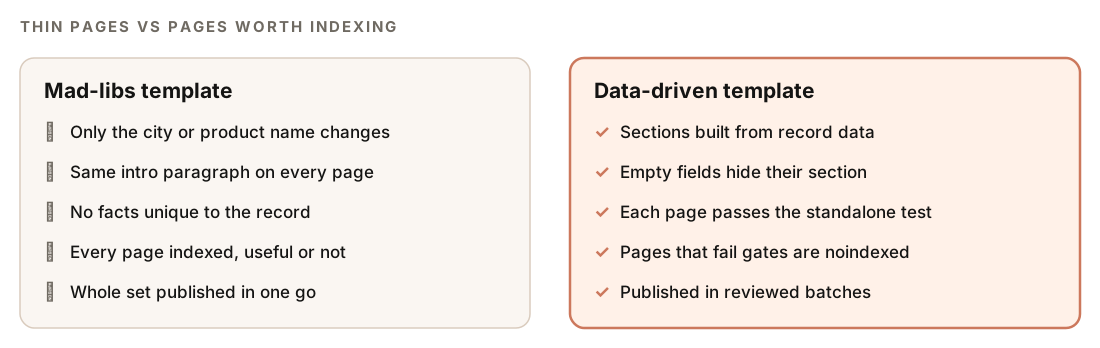
Mad-libs templates. Replace shared paragraphs with sections built from record fields, and hide any section whose field is empty. A template with conditional blocks looks like this (the syntax varies by framework):
<h1>{{ record.name }} integration setup</h1>
<p>{{ record.summary }}</p>
{% if record.setup_steps %}
  <h2>How to connect {{ record.name }}</h2>
  <ol>{% for step in record.setup_steps %}<li>{{ step }}</li>{% endfor %}</ol>
{% endif %}
{% if record.api_limits %}
  <h2>{{ record.name }} API limits</h2>
  <p>{{ record.api_limits }}</p>
{% endif %}
Records too thin to stand alone. Merge them into an aggregated page, such as one page per region instead of one per small town, rather than publishing a page per record.
Pages that fail the gates but must exist. Keep them for users and out of the index, and leave them out of the sitemap:
<meta name="robots" content="noindex, follow">Missing or wrong canonicals. Every indexable page points at itself, using the exact URL format the site uses:
<link rel="canonical" href="https://www.example.com/integrations/[platform]/">Sitemap dates that never change. Set <lastmod> from the record's last update, not the build time:
<url>
  <loc>https://www.example.com/integrations/[platform]/</loc>
  <lastmod>[date the record last changed]</lastmod>
</url>
Then ask Claude Code to make the changes:
Using the programmatic SEO report, update the integration page template so every section comes from record data and empty fields hide their section. Add a noindex rule for records below the quality gates, exclude them from the sitemap, and show me the diff before saving.Our XML sitemap audit guide covers sitemap indexes and lastmod in more depth.
Doing it without the skill
You can run a useful pre-launch check with plain Claude Code prompts. Start with the data:
Read data/[file].csv. Report the row count, the share of empty values per column, and which columns have mostly unique values. Then list pairs of rows where most field values match, and tell me which rows don't have enough distinct information to support their own page.Then check the output of your template on a small sample:
Fetch these five generated pages: [URLs]. Strip the header, footer, and navigation. For each page, show which sentences also appear on the other four, estimate how much of the text is unique to that page, and flag any page under 300 words. Then suggest template sections that could be built from record data instead of shared text.The skill adds the structure around those checks: consistent thresholds, a hard stop that waits for your approval, URL, linking, canonical, and sitemap rules in one pass, and a scored report you can re-run after every batch.
Programmatic SEO mistakes to avoid
- Starting with keywords instead of data. Keywords tell you what people search for. Only the data tells you whether you can say something unique about each one.
- Publishing the whole set at once. Batches let you see how Google treats the first pages before you commit to the rest.
- Skipping the human read. Numbers catch duplication. Only a person catches pages that are unique but useless.
- Competing with your own hand-written pages. When a programmatic page overlaps a manual one, the manual page should be the canonical.
- Letting the set grow unchecked. New records create new pages. Compare indexed pages to intended pages every month.
- Treating AI text as unique value. Rewording the same facts for every page doesn't add information. The E-E-A-T content checks explain what Google's quality guidelines reward instead.
Related guides
- Internal linking with Claude Code for hub pages and related links at scale
- Build comparison and alternatives pages with Claude Code, the right way to make "alternative" pages with real comparison data
- Technical SEO audit with Claude Code for canonicals, indexing, and crawl issues
- The full site audit for a site-wide health score beyond one page set
FAQ
Is programmatic SEO against Google's guidelines?
No. Google's spam policies target pages generated mainly to manipulate rankings without helping users, however they're made. Programmatic pages built on rich, accurate data are fine. Pages that only swap a name into identical text are the problem.
How many programmatic pages should I publish at once?
The skill recommends batches of 50 to 100 pages, then 2 to 4 weeks of watching indexing and rankings before you expand. It advises against publishing 500 or more programmatic pages at once without an explicit quality review.
How unique does each programmatic page need to be?
The skill flags any page with less than 40% unique content as thin, measured against every other page in the set. Shared headers, footers, and navigation don't count against you, but repeated template text does.
Can I use AI to write programmatic pages?
You can, but AI text doesn't make a page unique on its own. The skill lists AI-generated pages without human review and unique value as a penalty risk. Use AI to present real record data clearly, and review a sample of 5 to 10% of pages yourself before publishing.
How do I stop programmatic pages from causing index bloat?
Noindex pages that fail the quality gates, keep them out of your sitemap, and merge records with too little data into aggregated pages. Point sort and filter variations at the base URL with a canonical, and compare indexed pages with intended pages every month.
What's the difference between auditing and planning a page set?
Running /claudeseo programmatic with a URL audits pages that already exist. Adding plan designs a new set before you build it, covering the data, template, URL pattern, linking, and quality gates. Planning first is cheaper than cleaning up an index later.