
Content Operations
How to Create an SEO Content Brief with Claude Code
Create an SEO content brief with Claude Code: competitor scoring, content gaps, keyword placement, meta tags, and when to use a brief or an outline.
An SEO content brief is the plan a writer follows before drafting a page: what searchers expect, what the current top results cover and miss, which keywords go where, and what the page will add that nobody else offers. With Claude Code, you can generate a full brief from a topic or an existing URL in one command, built from the live search results and your own site's structure.
This guide explains what belongs in a good brief, how the three ClaudeSEO brief and outline commands differ, and how to run and check each one.
Key takeaways
- A good SEO content brief settles the angle, structure, and keyword plan before anyone writes, which is when changes are cheapest.
/claudeseo content-brief <topic>briefs any page type, scores the top competitors out of 40, and can brief improvements to an existing URL./claudeblog brief <topic>is the blog version, adding a content template, sourced statistics, citation capsules, and a distribution plan./claudeblog outline <topic>is the light option: a SERP-informed heading skeleton with word counts and FAQ slots.- Every brief must name a specific information gain, the new value your page adds. "More detail" doesn't count.
What is an SEO content brief and why does it matter?
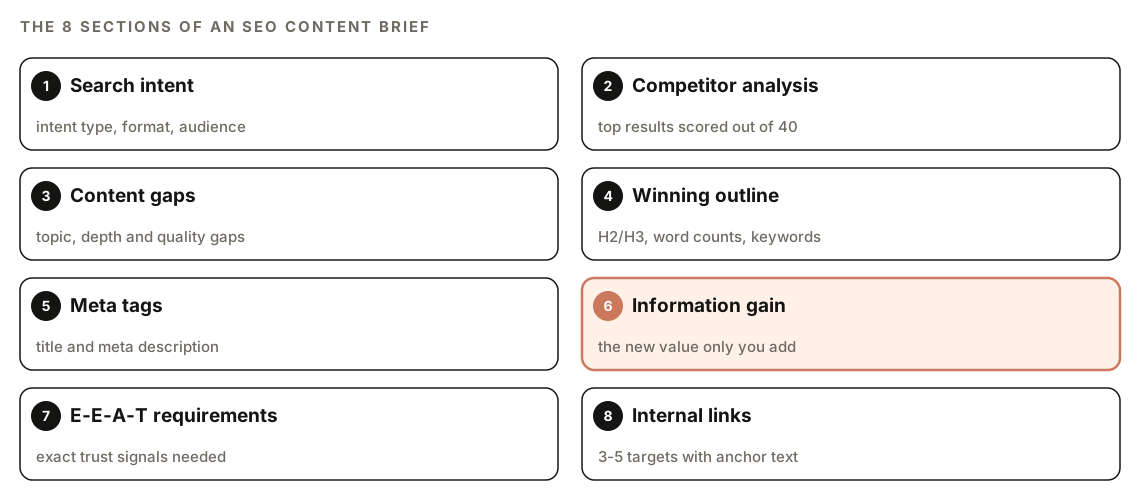
A content brief turns a keyword into instructions: what the searcher wants, which format ranks, which subtopics to cover and at what length, where the keyword goes, and which pages to link to.
Without one, three things tend to go wrong. The writer misreads the intent and produces a guide when searchers want a comparison. The page copies whatever ranks first, so it has nothing new to offer. And the basics slip: the keyword isn't in the title, and the page links to nothing.
A strong brief covers intent, competitors, an outline, keyword placement, meta tags, trust signals, internal links, and the information gain. That last one matters most. Google's guidance on creating helpful, people-first content asks whether your content offers original information or analysis and substantial value compared with other pages in the results. A brief that averages the top five results produces a sixth copy. One that names a real gap gives the page a reason to exist.
Which should you use: SEO brief, blog brief, or outline?
Three ClaudeSEO commands plan content before it's written. Here's how they compare.
| Compare | /claudeseo content-brief | /claudeblog brief | /claudeblog outline |
|---|---|---|---|
| Best for | Any page type: service, category, hub, or blog post | Blog posts aimed at Google and AI answers | Fast structure for a post you'll write soon |
| Input | Topic, keyword, or an existing page URL | Topic or keyword | Topic or keyword |
| Competitors reviewed | Top 5, each scored out of 40 | Top 3 to 5 | Top 5 |
| Improves existing pages | Yes, with keep and add-new sections | No | No |
| Keyword guidance | Placement and density rules per section | Primary, secondary, and question keywords | Primary keyword and intent |
| Statistics research | No | 8 to 12 sourced statistics | Notes on which stats to find |
| Extras | Information gain, E-E-A-T list, page-type template | Template pick, TL;DR, citation capsules, distribution plan | Linking zones and content gaps |
A simple rule of thumb:
- Use `/claudeseo content-brief` for pages that aren't blog posts, for improving a page that already exists, or when you want strict keyword and meta tag rules.
- Use `/claudeblog brief` for a blog post where you want the research done up front: statistics, a template, and visual and distribution plans.
- Use `/claudeblog outline` when you already know the angle and just need headings with word counts, or the writer has their own research.
Both blog commands save a file that /claudeblog write can pick up, which fits the drafting workflow in our guide to writing a blog post with Claude Code.
The SEO brief also has an outline-only mode. Ask for "just an outline" and it returns only the H1, URL slug, target word count, and H2/H3 outline, with a short writing note per section.
How the /claudeseo content-brief command works
The command is part of the Claude SEO skill suite. Give it a topic or a URL, and Claude Code works through the same sequence every time:
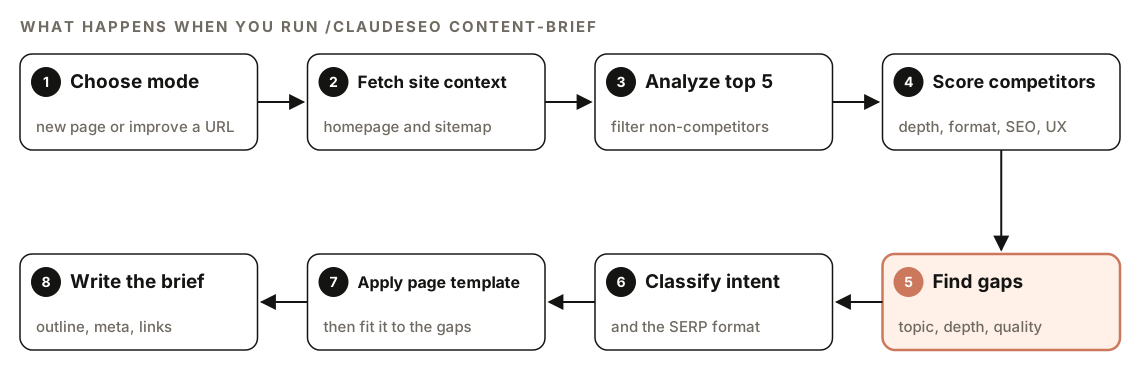
- Choose the mode. A page URL triggers improve mode. A keyword briefs a new page.
- Fetch site context. It reads your homepage and sitemap to learn what you offer and which pages exist.
- Analyze the top 5 results. It filters out non-competitors such as Wikipedia, Reddit, Amazon, YouTube, government sites, SEO tool pages, directories, and social platforms.
- Score competitors. Each real competitor gets 1 to 10 points on depth, formatting, SEO, and user experience, for a total out of 40.
- Find gaps. It sorts weaknesses into topic, depth, and quality gaps, and ranks them by impact times competitive advantage, divided by effort.
- Classify intent. It labels the query informational, commercial, transactional, or navigational, and notes the format that ranks: guide, listicle, comparison table, landing page, FAQ, video, or local pack.
- Apply a page-type template. It starts from a template for the page type, then adapts it to the gaps and intent.
- Write the brief. The output always follows the same structure.
New page mode vs improve mode
New page mode uses your homepage and sitemap for business context only. Improve mode fetches the existing page first, notes what's strong, thin, or outdated, and marks each outline section "keep and strengthen" or "add new". It avoids recommending a full rewrite when targeted improvements will win, which suits pages stuck on page two.
What goes into the brief
Competitor scores and gap types
The competitor table lists each competitor's URL, key H2s, estimated length, score, and main gap. The scores show where the bar is: a deep but badly formatted result leaves room for better structure, while one that's strong everywhere calls for a narrower angle.
Each gap type points to a fix. Topic gaps (subtopics nobody covers) need a new section. Depth gaps (shallow coverage) need examples or steps. Quality gaps (outdated facts, no expert view, poor formatting) need fresher facts, a practitioner's perspective, or a clearer layout.
The website relevance rule
Every heading, subtopic, keyword, and FAQ must be something your site can credibly write about. If a competitor covers a service you don't offer, the brief doesn't borrow that section. For hub, category, or "types of" pages, the outline must also include every relevant category that exists on your site, each with an internal link, and must not invent ones that don't.
Keyword placement and density
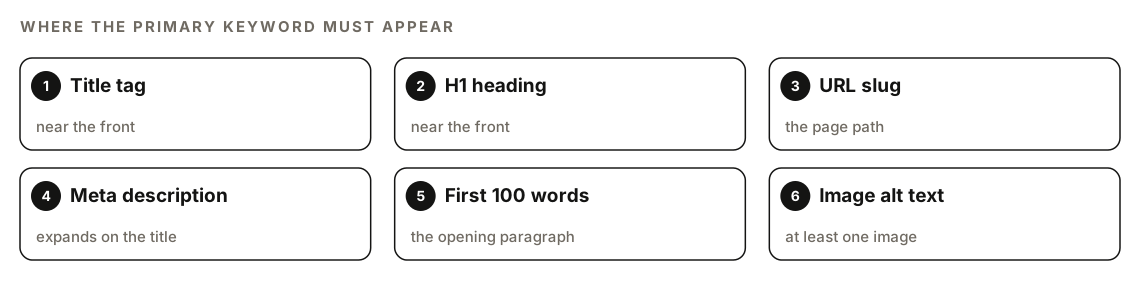
The brief requires the primary keyword in six places: the title tag and H1 (near the front of both), the URL slug, the meta description, the first 100 words, and at least one image alt text. It doesn't need to appear in every H2 or paragraph.
The skill's density guidance for the primary keyword is 0.5% to 2.0% of total words. Anything above 2% is flagged for review, and above 3% is treated as a keyword stuffing risk. Synonyms don't count toward density. Secondary keywords come in two groups, 5 to 8 close terms and 10 to 15 broader semantic terms, and each outline section says which keyword belongs in its heading.
Meta tags, information gain, and E-E-A-T
The brief drafts a title tag of no more than 60 characters, keyword first and brand last, plus a meta description in active voice that ends with a call to action and leaves out the brand name and quotation marks. Our guide to title tags and meta descriptions with Claude Code goes deeper on both.
Information gain is non-negotiable. Every brief must state exactly what the page adds that no ranking page provides: proprietary data or original research, case studies with real outcomes, expert quotes or first-hand experience, or an original framework. "More detail" and "better formatting" don't qualify.
The E-E-A-T section lists the trust signals needed, such as an author bio with relevant credentials, authoritative citations, dated statistics, and a last-updated date, which matter most for YMYL ("your money or your life") topics like health and finance. ClaudeSEO's E-E-A-T content analysis later checks whether the live page delivered. Finally, the brief suggests 3 to 5 internal links from real sitemap pages and says whether the page is a hub or a spoke.
What the blog brief and outline add
/claudeblog brief: the full plan for a blog post
/claudeblog brief <topic> collects the topic, audience, intent, and business context, inferring what you leave out. It finds a primary keyword, 3 to 5 secondary keywords, and 3 to 5 People Also Ask style questions, and recommends one of 12 content templates, such as how-to guide, comparison, or pillar page. It reviews the top 3 to 5 results, then gathers 8 to 12 statistics with each one's source, URL, date, and methodology.
The finished brief adds a TL;DR draft, a citation capsule plan (a self-contained 40 to 60 word passage per H2 that an AI answer can quote on its own), a visual plan, information gain prompts, links to and from the new post, and a distribution plan for Reddit, YouTube, LinkedIn, email, and X. It saves to briefs/[slug]-brief.md. If a DISCOURSE.md file from /claudeblog discourse is in your project root, the brief uses its themes to enrich the competitor and information gain sections.
/claudeblog outline: the skeleton
/claudeblog outline <topic> reviews the top 5 results for headings, length, visuals, FAQs, unique angles, and gaps, fetching the top 2 or 3 pages when snippets aren't enough. You get three title options, an H2/H3 outline with a word count per section, an answer-first prompt for each H2, chart and image markers, 3 to 5 FAQ questions, internal linking zones, and 3 to 5 content gaps. The skill writes 60% to 70% of H2s as questions, adds H3s only where a topic needs them, and makes section word counts add up to the target. It saves to outlines/[slug]-outline.md.
How to create an SEO content brief with Claude Code
Open your project in Claude Code with ClaudeSEO installed and run the command with a topic, or with a URL to brief improvements to an existing page:
/claudeseo content-brief commercial roof inspection
/claudeseo content-brief https://www.example.com/services/roof-inspection
You can also ask in plain English, and Claude picks the matching skill:
Write an SEO content brief for "commercial roof inspection" for example.com. It's a service page, and we only work in the UK.The blog commands work the same way:
/claudeblog brief how to choose a roofing contractor
/claudeblog outline how to choose a roofing contractor
Without a stated page type, the SEO brief detects one from the intent and says which. Without a word count, it uses the competitor average.
If you've connected DataForSEO or Ahrefs MCP tools to Claude Code, the SEO brief uses them for live SERP data, search volume, keyword difficulty, and competitor pages. Both are optional, both need an account with the provider, and the provider's own pricing applies.
How to read and use the brief
Every SEO brief uses this structure:
## Content Brief: [Primary Keyword]

### Search Intent
[Intent type, SERP format rewarded, target audience and knowledge level]

### Competitor Analysis
| # | URL | Key H2 Sections | Est. Words | Score | Main Gap |
|---|-----|-----------------|------------|-------|----------|
| 1 | [url] | [sections] | ~XX | XX/40 | [gap] |

### Content Gaps and Opportunities
### Winning Outline
**H1:** [H1 with primary keyword]
**URL Slug:** /[slug]
**Target Word Count:** ~XX words (competitor avg: ~XX words)

### Recommended Meta Tags
### Unique Angle and Information Gain
### E-E-A-T Requirements
### Internal Linking Opportunities
Before you hand it to a writer, check three things:
- The search intent. If it says commercial and you planned a how-to guide, rethink the page now.
- The information gain. If it asks for original data you don't have, swap in something you can deliver, such as first-hand experience or an expert quote.
- The "FS target" markers. These flag featured snippet opportunities. Open those sections with a short, direct answer.
Then hand the brief to a writer, or follow our guide to writing a blog post with Claude Code for drafting and publishing. If you haven't chosen the keyword yet, start with keyword research in Claude Code.
Doing it without the skill
Plain Claude Code can produce a solid brief from the same inputs:
I want to write a page targeting "[keyword]" on [your site URL]. First, fetch our homepage and sitemap and summarize what we offer. Then search for the keyword and review the top 5 results, skipping Wikipedia, Reddit, YouTube, marketplaces, directories, and SEO tool pages. For each competitor, list its H2 headings, approximate word count, and biggest weakness. Then write a brief with: the search intent and the format that ranks, an H2/H3 outline with a word count per section, where the primary keyword should appear, a title tag under 60 characters, a meta description, 3-5 internal links to real pages from our sitemap, and one specific thing our page will offer that no competitor does. Only suggest sections we can credibly write about.For an existing page, add: "Fetch [page URL] first, and mark each outline section as keep or add new."
The skill adds what's tedious to spell out each time: a fixed structure, competitor scoring, gap priorities, improve mode, density rules, page-type templates, and optional keyword data. The blog versions add templates, sourced statistics, and a saved file for /claudeblog write.
Mistakes to avoid
- Briefing from the keyword alone. Without your site context, a brief suggests sections you can't deliver and links that don't exist.
- Copying the top result's structure. That gets you to parity at best. The gaps are where a new page wins.
- Accepting a vague information gain. "More comprehensive" isn't a plan. Name the data, case study, or expert view you'll add.
- Rewriting a page that only needs additions. Use improve mode instead.
Related guides
- How to write a blog post with Claude Code, the full workflow from brief to published post
- Keyword research with Claude Code to choose the keyword before you brief it
- E-E-A-T content audit with Claude Code to check the live page against the brief's trust signals
- The full Claude SEO skill list for every command in the suite
FAQ
What should an SEO content brief include?
The search intent, what the top results cover and miss, an H2/H3 outline with word counts, keyword placement, a draft title and meta description, internal links, and a clear statement of what the page adds that competitors don't. For trust-sensitive topics, add the credentials and sources the page needs.
What is the difference between a content brief and an outline?
An outline is the page structure: headings, section lengths, and FAQ slots. A brief adds the reasoning behind it: intent, competitors, gaps, keyword rules, meta tags, and trust signals. In ClaudeSEO, /claudeblog outline produces the skeleton, while /claudeseo content-brief and /claudeblog brief produce the full plan.
Can AI write a good SEO content brief?
Yes, if it works from real inputs: the live search results and your own site structure, not just a keyword. Review the intent, the competitor list, and the information gain yourself, because those are the judgment calls that matter most.
What keyword density should a brief recommend?
The SEO brief's guidance is 0.5% to 2.0% of total words for the primary keyword, with anything above 2% flagged for review. It also requires the keyword in six places: title, H1, URL slug, meta description, first 100 words, and one image alt text.
Can I create a brief for a page that already exists?
Yes. Pass the page URL to /claudeseo content-brief and it runs in improve mode, keeping what works and marking each outline section as keep or add new instead of recommending a full rewrite.