
Content Operations
Refresh Old Blog Posts with Claude Code: Rewrite and Update
Refresh old blog posts with Claude Code: audit a post, approve a plan, replace unsourced stats, update freshness signals, and re-score before you republish.
To refresh old blog posts, you update the facts, sources, structure, and freshness signals on posts that already have a URL, links, and search history, so they stay accurate and keep earning traffic. In Claude Code, /claudeblog rewrite <file> audits an existing post, shows you a section-by-section plan, and rewrites it only after you approve. /claudeblog update <file> runs the same skill in a lighter freshness mode that keeps the post's structure.
This guide covers when a refresh beats a new post, what both commands change, how to run them, and how to check the result before you republish.
Key takeaways
- A refresh keeps the post's URL and the links it has earned. Most posts that lose traffic need a refresh, not a replacement.
/claudeblog rewrite <file>audits first, waits for your approval, then replaces unsourced statistics, restructures sections, and verifies the result./claudeblog update <file>is an alias for a freshness-focused rewrite: newer data, new developments, refreshed images, and minimal structural change.- The rewrite keeps the original publish date, sets
lastUpdatedto today, and treats a rewrite that scores lower than the original as a blocking failure.- Review every change as a diff and check every new statistic before you republish.
Why refresh old blog posts instead of writing new ones?
An older post has things a new post doesn't: an indexed URL, internal links pointing to it, maybe links from other sites, and a record of the queries it shows up for. A new post on the same topic throws that away and often competes with the old one for the same keyword.
Posts age in predictable ways:
- Statistics go out of date, or were never sourced in the first place.
- Steps, screenshots, and product names stop matching reality.
- Images break or look dated.
- Searchers start wanting a different format than the one the post uses.
- Newer posts on your own site cover the same ground.
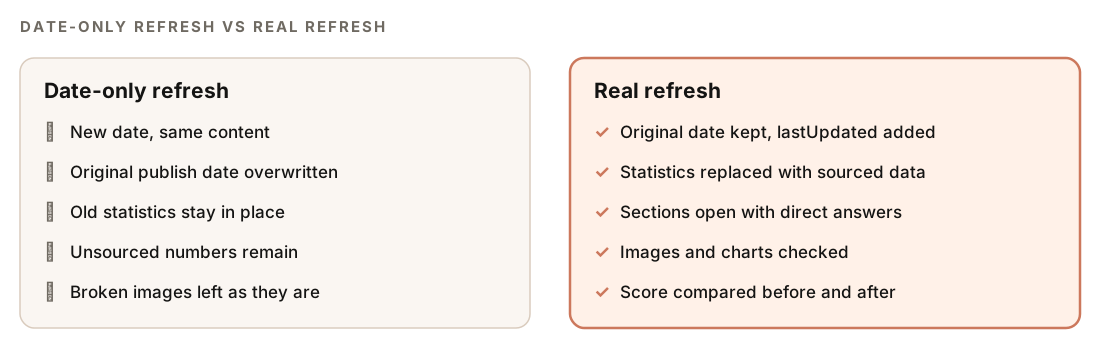
A refresh fixes those problems on the same URL, and it isn't the same as changing the date. Google's guidance on creating helpful, people-first content asks whether you're changing the date of pages to make them seem fresh when the content hasn't substantially changed. A real refresh changes what the reader gets.
Refresh, rewrite, merge, or remove?
| Situation | Best move |
|---|---|
| Facts and data are dated, but the structure still works | Freshness update |
| Thin, unsourced, or hard to scan, but the topic still matters | Full rewrite |
| Two of your posts target the same keyword | Merge them, or give each a distinct keyword |
| Topic no longer relevant and the post earns nothing | Remove it and redirect to the closest page |
Finding the posts that need work is a separate job: our guide to detecting content decay with Search Console builds a refresh list from real traffic data. This guide picks up once you know which post to fix.
What the /claudeblog rewrite command does
The rewrite command is part of the Claude Blog suite (see the full ClaudeSEO skill list). It works with Markdown, MDX, and HTML posts, and it runs in a fixed order:
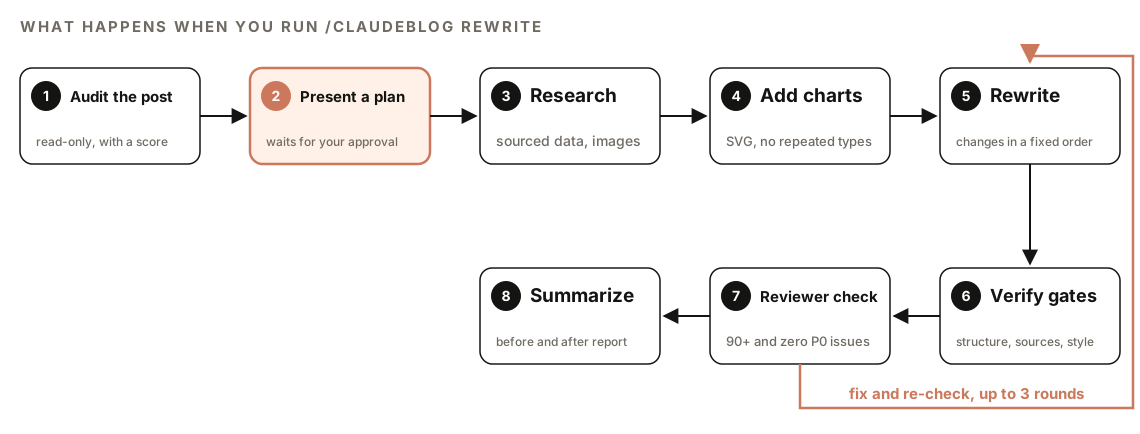
- Audit the post. This phase is read-only. It detects the format and runs a quality checklist: sourced versus unsourced statistics, answer-first formatting, image and chart counts, paragraph length, heading hierarchy, FAQ schema, freshness fields, self-promotion, and the quality of cited sources. It also scans the writing style, checks any video embeds, looks for other posts on your blog that target the same keyword, and calculates a current score out of 100.
- Present a plan. You get an audit summary and a section-by-section plan. Nothing changes until you approve it.
- Research. It looks for replacement data for any unsourced statistic, from tier 1 to 3 sources only. If the post has fewer than three images, it searches Pixabay and Unsplash and checks that each image URL returns HTTP 200.
- Add charts. If the post has fewer than two charts, it builds SVG charts from suitable data, never repeating a chart type, with a target of two to four charts per 2,000 words.
- Rewrite. It applies a set of changes in a fixed order, covered in the next section.
- Verify. It checks the result against a list of quality gates. For MDX posts, it also builds the project to catch compilation errors.
- Run the reviewer check. The Claude Blog reviewer must score the rewrite 90 or higher with zero P0 (blocking) issues. Failures go back for fixes, up to three rounds. After the third failure it stops and shows you the diagnostics.
- Summarize. You get a before-and-after report of the score and every change.
One rule applies only to rewrites: if the new version scores lower than the published original, that alone counts as a P0 issue.
About those tiers: tier 1 is official and primary sources such as government, university, and Google Search Central pages, tier 2 is original research and academic papers, and tier 3 is established industry publications. Generic blogs, affiliate sites, and unsourced roundups don't qualify.
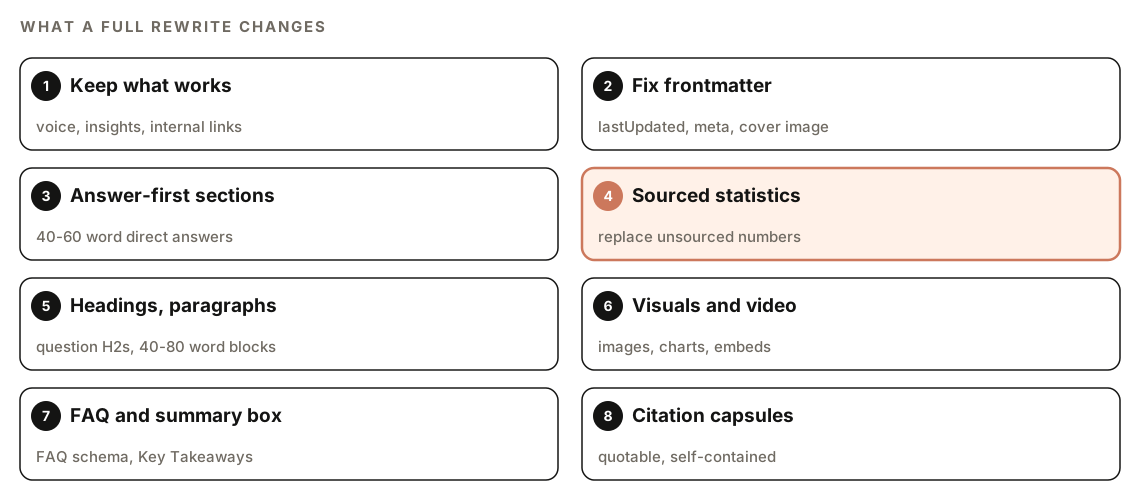
What a full rewrite changes
It keeps what already works
The first pass is preservation. The rewrite keeps the author's voice, original insights, first-hand experience, good existing images and charts, and internal links, before it edits anything.
Frontmatter and freshness signals
It adds a lastUpdated field with today's date and leaves the original date alone. It rewrites the meta description to 150 to 160 characters with one statistic, checks that tags and categories fit, and adds cover image fields if they're missing:
---
title: "[Post title]"
date: "[original date, unchanged]"
lastUpdated: "YYYY-MM-DD"
description: "[150-160 characters, fact-dense, one sourced statistic]"
coverImage: "/images/[slug]-cover.jpg"
coverImageAlt: "[What the image shows]"
ogImage: "/images/[slug]-og.jpg"
---
Answer-first sections and sourced statistics
Every H2 section should open with a 40 to 60 word paragraph that answers the heading's question directly and includes at least one statistic with a source. The rewrite searches for patterns such as "X% of" and "X out of Y", plus any claim without a source. It replaces them with data from tier 1 to 3 sources, attributed inline:
[Specific claim with a number] ([Source Name](https://source-url), [year]).Headings, paragraphs, FAQ, and summary box
Statement headings become questions where that reads naturally, with a target of 60 to 70 percent question headings. Two or three statement headings stay for variety, and the keyword appears in two or three headings. Any paragraph over 150 words is split, with a target of 40 to 80 words per paragraph and the most important sentence first.
If the post has no FAQ, the rewrite adds three to five questions with FAQ schema. If it has no summary, it adds a Key Takeaways box after the introduction: three to five bullets, 40 to 60 words in total.
Visuals and video
New images go after H2 headings, spaced evenly, and charts sit inside the sections they support. If the post has no YouTube embeds, the rewrite finds two or three relevant videos and embeds them with lazy loading and a noscript fallback, one after the introduction and the rest mid-article.
Citation capsules, originality, and style
For each H2, the rewrite writes or improves a citation capsule: a self-contained 40 to 60 word passage with one claim, one data point, and its source, phrased so an AI assistant could quote it without the surrounding text. Capsules count toward the AI citation readiness category of the score.
It also tags original value with markers such as [ORIGINAL DATA], [PERSONAL EXPERIENCE], and [UNIQUE INSIGHT], aiming for two or three per post. When a post has none, it asks you for first-hand data or experience to add.
Finally, it cleans up the style. Stock phrases like "it's important to note" and "harness the power of" get plain replacements, em dashes go, sentence length varies more, and contractions appear where they sound natural. Self-promotion drops to one brand mention at most, in an author bio context.
How to run a rewrite or a freshness update
Work on a branch so every change shows up as a diff:
git checkout -b refresh/old-postThen run the rewrite on the post:
/claudeblog rewrite content/blog/old-post.mdOr ask in plain English, with a request like "refresh this blog post":
Refresh the blog post at content/blog/old-post.md. Replace statistics that don't have a source, and keep my voice.For a lighter freshness pass on a post that's already in good shape, use the alias:
/claudeblog update content/blog/old-post.mdBecause nothing changes before you approve the plan, you can run the command just to see the audit and score. If the plan includes a change you don't want, say so before approving.
Rewrite or update: which one do you need?
Both commands run the same skill. The difference is how much they change:
| Aspect | Rewrite | Update |
|---|---|---|
| Focus | Full optimization for search and AI citations | Freshness |
| Structure | Restructures headings, paragraphs, and sections | Keeps the existing structure, minimal rewrites |
| Statistics | Replaces unsourced numbers with sourced data | Brings data up to the latest available |
| New material | Answer-first openings, FAQ, summary box, capsules | New developments since the last update |
| Images | Adds images and charts below the minimums | Refreshes images older than a year |
| Dates | Sets lastUpdated, keeps the original date | Sets lastUpdated |
Use update when the post still answers the query well but its numbers and examples have aged. Use rewrite when the post is thin, unsourced, or hard to scan, or when scoring the post puts it in a low band. The analyze command's batch mode suggests running the rewrite on each post, starting with the lowest score.
Refreshing sits in the review stage of the Claude Blog editorial workflow, where you score with analyze and then optimize with rewrite.
How to read the rewrite summary
The summary follows the same structure every time. Here it is trimmed to the main parts:
## Blog Optimization Complete: [Title]

### Score Change
- Before: [X]/100 ([Rating])
- After: [Y]/100 ([Rating])
- Content Quality: [Y]/30
- SEO Optimization: [Y]/25
- E-E-A-T Signals: [Y]/15
- Technical Elements: [Y]/15
- AI Citation Readiness: [Y]/15

### Cannibalization
- [Status: none found / flagged N posts / resolved]

### Changes Made
- [X] statistics replaced with sourced data
- [X] SVG charts added (types: ...)
- Answer-first formatting applied to [N] H2 sections
- FAQ schema injected with [N] questions
- lastUpdated set to [date]

### Ready for
- /claudeblog analyze <file> to verify final score
The score uses the five categories of 100-point content scoring: content quality (30 points), SEO (25), E-E-A-T (15), technical elements (15), and AI citation readiness (15). One verification gate requires the score to improve in all five categories, so check those numbers first.
A style section reports how many stock phrases were replaced and how sentence-length variation changed. Treat it as an editing aid: style signals point to formulaic passages, but they don't prove who or what wrote the text.
Then review in this order:
- Replaced statistics. Open every new source. Our guide to fact-checking AI content covers how to verify numbers against the pages they cite.
- Cannibalization. If the audit flagged another post on the same keyword, merge the two or move one to a related keyword, as our keyword cannibalization guide explains.
- Voice. Read the diff. If a section no longer sounds like you, rewrite it yourself.
Before you republish, ask Claude Code for a review of its own changes:
Show me the git diff for content/blog/old-post.md. List every statistic that was added or changed with its source URL, every heading that changed, and any internal link that was removed. Flag sentences that don't sound like the rest of the post.If your posts carry BlogPosting schema, make sure dateModified matches the new lastUpdated value.
Doing it without the skill
You can run a basic refresh with plain Claude Code prompts. Start with a read-only audit:
Read content/blog/old-post.md without editing it. List every statistic and whether it links to a source, any paragraph over 150 words, heading levels that skip, broken or missing images, facts or product details that may be out of date, and any other post in content/blog that targets the same main keyword. Then propose a section-by-section refresh plan and wait for my approval.Then apply the plan:
Apply the approved plan to content/blog/old-post.md. Keep my voice and every internal link. Replace unsourced statistics only with figures you can link to an official or primary source, and delete any you can't source. Open each H2 with a direct answer in two or three sentences. Set lastUpdated to today and leave the original date alone. Show me the diff before saving.The skill adds what's hard to repeat by hand: a fixed audit checklist, a 100-point score before and after, source tiers, image URL checks, built-in charts, and a reviewer gate that blocks any rewrite scoring below the original. For the rest of the writing process, see our guide to writing blog posts with Claude Code.
Mistakes to avoid when refreshing old posts
- Changing the date without changing the content. It doesn't help readers, and it makes your own update records unreliable.
- Changing the URL. Keep the slug. If you must move a post, redirect the old URL to the new one.
- Approving the plan without reading it. The plan is your chance to keep a product mention, a section, or an example you need.
- Trusting new statistics unchecked. Every replacement number should open to a page that actually states it.
- Stripping out experience. First-hand detail is often what earned the post its rankings. Keep it and add more.
Related guides
- Detect content decay with Search Console and Claude Code to find which posts to refresh
- How to fact-check AI content with Claude Code for verifying replaced statistics
- How to score a blog post before publishing to confirm the refresh scores higher
- How to write a blog post with Claude Code for the end-to-end writing workflow
FAQ
How often should you refresh old blog posts?
There's no fixed schedule that suits every blog. Refresh a post when its facts change, when it starts losing clicks, or when newer content on your site overlaps with it, and review your most important posts regularly.
Should you change the published date when you update a blog post?
Keep the original published date and add or update a "last updated" date instead. That's what the rewrite does: it leaves date alone and sets lastUpdated to today. Only change the updated date when the content has changed in a meaningful way.
Is it better to update an old blog post or write a new one?
If the old post targets the same keyword, updating it is usually better, because it keeps the URL and the links pointing to it. Write a new post only when the topic or search intent is different enough to deserve its own page.
Does refreshing old content help SEO?
It can, when the refresh makes the page more accurate, more complete, and easier to use than before. A new date on unchanged content doesn't make the page better. Measure the result in Search Console over the following weeks rather than assuming an improvement.
What's the difference between /claudeblog rewrite and /claudeblog update?
/claudeblog rewrite <file> is a full optimization: it restructures sections, replaces unsourced statistics, and adds elements like an FAQ and a summary box. /claudeblog update <file> is an alias for a freshness-focused rewrite that updates data, adds new developments, refreshes old images, and keeps the existing structure.
Will the rewrite change my writing voice?
It's designed not to: preserving the author's voice and first-hand insights is the rewrite's first step. Review the diff anyway, and rewrite any passage that no longer sounds like you.