
Content Operations
Blog Post Quality Score: Rate Drafts with Claude Code
Get a blog post quality score out of 100 with Claude Code: see how the five categories are weighted, run the analysis, and fix issues by severity.
A blog post quality score rates a draft against a fixed editorial checklist before it goes live, so you can fix thin sections, missing sources, and technical gaps while they're still cheap to fix. In Claude Code, /claudeblog analyze <file-or-url> scores any post out of 100 across five weighted categories, gives it a rating from Exceptional to Rewrite, and lists every issue by severity with a specific fix.
This guide explains what a quality score measures, how the categories are weighted, how to score a draft, a live URL, or a whole folder, and how to act on the report.
Key takeaways
- A quality score turns an editorial checklist into a number, so every post is judged by the same standard.
/claudeblog analyzeweights content quality at 30 points, SEO at 25, and E-E-A-T, technical elements, and AI citation readiness at 15 each.- Ratings run from Exceptional (90 to 100) down to Rewrite (below 60). The Claude Blog pipeline won't hand you a draft until its reviewer scores it 90 or higher.
- Fix Critical issues first. The report gives a location and a fix for each one.
- The score is an editorial tool, not a Google ranking factor. Use it to make posts more useful, not to collect points.
What is a blog post quality score?
A blog post quality score is a structured review expressed as a number. Instead of an editor reading a draft and saying "it feels thin", a scoring rubric checks specific things: Is the topic covered in depth? Can the target reader follow it? Are claims sourced? Is the heading structure clean? Is there a named author? Does the page have the schema and social tags it needs?
The number itself matters less than what it gives you:
- Consistency. Every post is held to the same standard, whoever wrote it.
- Priorities. A breakdown by category shows where a draft is weakest.
- Before and after. You can confirm that an edit or a refresh actually improved the post.
- Triage. Scoring a whole folder shows which old posts need work first.
Google doesn't publish a quality score you can check against, so no rubric can predict rankings. A good rubric is a proxy for the questions Google asks in its guidance on creating helpful, people-first content: does the content show real expertise, is it trustworthy, and does it leave the reader satisfied?
How the /claudeblog analyze command works
The analyze command is part of the Claude Blog suite (the full ClaudeSEO skill list shows every command). You give it a local file, a published URL, or a directory, and it works through the post in a fixed order:
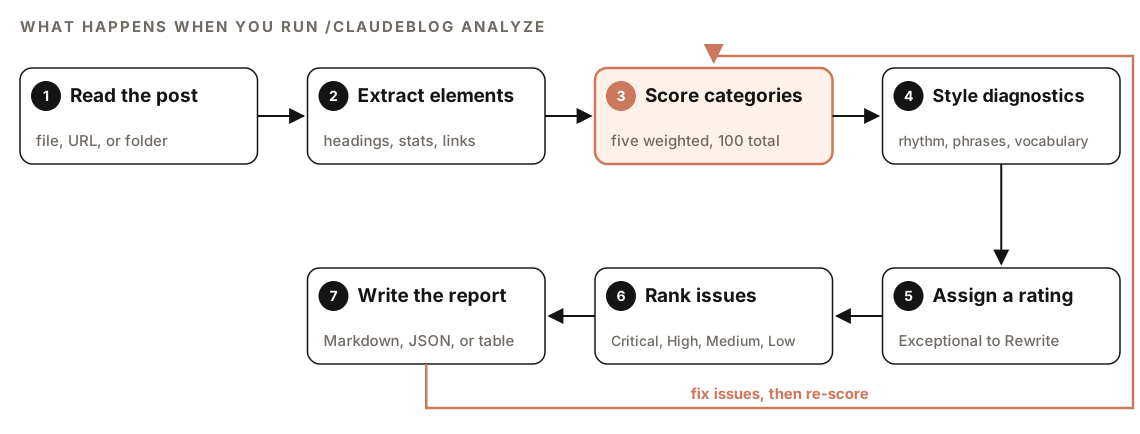
- Read the post. It reads a local file directly, fetches and extracts a URL, or scans a directory for blog files. It works with Markdown, MDX, HTML, and live pages.
- Extract the elements. It pulls out the frontmatter, heading structure, paragraph word counts, every statistic with or without a source, images and alt text, charts, internal and external links, the FAQ, schema types, and meta and social tags.
- Score five categories. Each category is scored against its checklist, for a total out of 100.
- Run style diagnostics. It measures sentence-length variation, flags stock phrases from a fixed list (including em dashes), and calculates vocabulary diversity. It quotes the passages that triggered a flag.
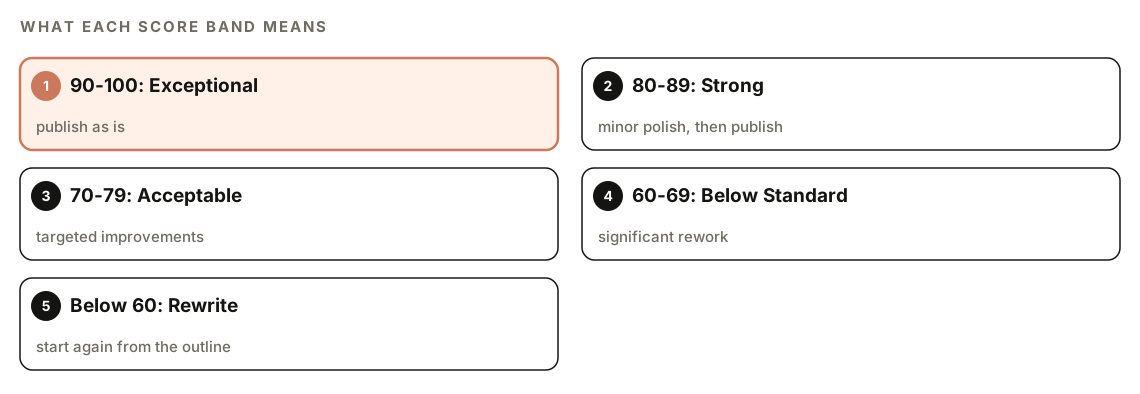
- Assign a rating. The total maps to one of five bands, from Exceptional to Rewrite.
- Rank issues. Every problem goes into Critical, High, Medium, or Low, with its location and a specific fix.
- Write the report. The default is a Markdown report. JSON and a compact table are available for automation and quick reviews.
The style diagnostics are reported separately from the five category scores. They point to flat or formulaic passages worth a second look. They don't prove who or what wrote the text, so treat them as editing prompts.
The five scoring categories and their weights
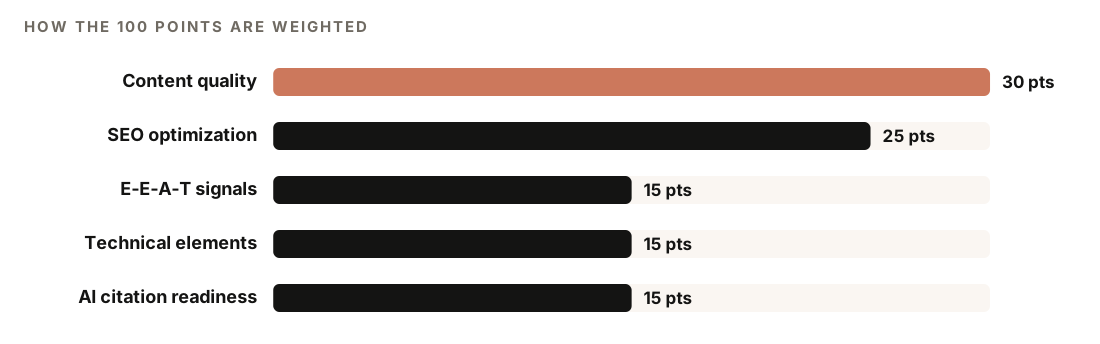
The same five categories and weights power 100-point content scoring across Claude Blog.
Content quality (30 points)
The largest category is about the writing itself. Depth and coverage of the topic is worth 7 points and readability 7. Originality and unique value is worth 5, sentence and paragraph structure 4, engagement elements such as a summary box 4, and grammar and clarity 3.
The structure check looks for an average sentence of 15 to 20 words, paragraphs of 40 to 80 words, and an H2 every 200 to 300 words. Readability targets depend on the audience. If you've set a writing persona, the analyzer uses that persona's band:
| Audience | Grade level | Flesch reading ease |
|---|---|---|
| Consumer | 6 to 8 | 60 to 80 |
| Professional | 8 to 10 | 50 to 60 |
| Technical | 10 to 12 | 30 to 50 |
| Default, no persona | 7 to 8 | 60 to 70 |
SEO optimization (25 points)
Heading hierarchy is worth 5 points: H1, then H2, then H3, with no skipped levels and the keyword in two or three headings. The title, keyword and topic focus, and internal linking are worth 4 points each, with 3 to 10 contextual internal links as the target. URL structure and the meta description are worth 3 each, and external links to reputable sources are worth 2.
E-E-A-T signals (15 points)
E-E-A-T stands for experience, expertise, authoritativeness, and trustworthiness, the qualities Google's quality raters look for. The analyzer checks for a named author with a real bio (not "Admin"), inline citations to tier 1 to 3 sources, and trust pages such as contact, about, and an editorial policy.
Citations score best with three parts: a year in the sentence, an inline citation that names the publisher and title, and the URL with a retrieval date in the source list. Tier 1 means official and primary sources such as government, university, and Google Search Central pages; tier 2 is original research; tier 3 is established industry publications. Generic blogs, affiliate sites, and content mills don't count.
Technical elements (15 points)
Schema markup is worth 4 points, led by BlogPosting structured data. Image optimization is worth 3: modern formats such as AVIF or WebP, descriptive alt text, and lazy loading on every image except the LCP image, the largest one visible when the page first loads. Structured elements like tables and lists, page speed signals, mobile-friendliness, and Open Graph and Twitter card tags are worth 2 points each.
AI citation readiness (15 points)
This category asks whether an AI assistant could extract and quote the post accurately. It looks for self-contained passages of roughly 120 to 180 words that make sense on their own, a clear and consistently named topic, answer-first sections with tables and lists that are easy to extract, and content that AI crawlers can read without running JavaScript.
How to run a quality check on a draft
Open your project in Claude Code with Claude Blog installed and point the command at a file:
/claudeblog analyze content/blog/my-draft.mdIt works on a published page too:
/claudeblog analyze https://www.example.com/blog/my-postOr ask in plain English, with a request like "score this blog post" or "check blog quality":
Score content/blog/my-draft.md and tell me the three changes that would raise it most.To score every post in a folder, give it the directory. Batch mode returns one row per post, and --sort score puts the lowest scores first:
/claudeblog analyze content/blog/ --sort scoreOther flags documented in the skill:
--format jsonfor machine-readable output you can feed into CI or a dashboard.--format tablefor a compact one-line summary per post.--rubricto add a 0 to 4 rating on ten editorial heuristics, each tagged with a severity from P0 (blocking) to P3.--cognitive-loadto add a per-section heatmap of concept density, which shows where a post asks too much of the reader.
Both --rubric and --cognitive-load add to the 100-point score. They don't replace it.
How to read the quality report
The Markdown report follows the same structure every time. Here it is trimmed to the main parts:
## Blog Quality Report: [Title]

**Score: [X]/100** - [Rating]

### Score Breakdown
| Category | Score | Max | Notes |
|----------|-------|-----|-------|
| Content Quality | X | 30 | [1-line summary] |
| SEO Optimization | X | 25 | [1-line summary] |
| E-E-A-T Signals | X | 15 | [1-line summary] |
| Technical Elements | X | 15 | [1-line summary] |
| AI Citation Readiness | X | 15 | [1-line summary] |

### Issues Found
**Critical (Must Fix)**
- [ ] [Issue with specific location and fix]

**High Priority**, **Medium Priority**, **Low Priority**
- [ ] [Same format: location and fix]

### Quick Stats
- Word count: [N]
- Paragraphs: [N] (X over 150 words)
- Statistics: [N] sourced / [N] unsourced
- Internal links: [N]
- Schema types: [list]

### Recommended Actions
1. [Most impactful fix: Critical items first]
The JSON export carries the same data in fields you can test in a build step. Here's its shape, trimmed:
{
  "file": "post.md",
  "title": "[Post title]",
  "score": "XX",
  "rating": "[Rating]",
  "categories": {
    "content_quality": { "score": "XX", "max": 30 },
    "seo_optimization": { "score": "XX", "max": 25 }
  },
  "issues": { "critical": [], "high": [], "medium": [], "low": [] }
}
| Score | Rating | What to do |
|---|---|---|
| 90 to 100 | Exceptional | Publish as is |
| 80 to 89 | Strong | Minor polish, then publish |
| 70 to 79 | Acceptable | Targeted improvements |
| 60 to 69 | Below Standard | Significant rework |
| Below 60 | Rewrite | Fundamental issues, start again from the outline |
Read the report top down. The total tells you which band you're in, and the breakdown shows which category is costing the most. Then work through Issues Found in severity order. Quick Stats is the fastest way to spot mechanical problems, such as unsourced statistics or paragraphs over 150 words.
How to raise a low score
Start with Critical issues, then High. Most fixes map directly to a check:
| Low category | Common fixes |
|---|---|
| Content quality | Fill coverage gaps, shorten long sentences, add a summary box, add first-hand detail |
| SEO optimization | Fix skipped heading levels, tighten the title, add contextual internal links |
| E-E-A-T signals | Add an author bio, cite sources inline, link trust pages |
| Technical elements | Add BlogPosting schema, alt text, WebP or AVIF images, social tags |
| AI citation readiness | Open sections with direct answers, make passages self-contained |
The report ends by suggesting /claudeblog rewrite <file> to apply its recommendations. That command audits the post, waits for your approval of a plan, and then rewrites it; our guide to refreshing and rewriting old blog posts covers it in detail. For smaller fixes, ask Claude Code directly:
Fix the Critical and High issues from the quality report in content/blog/my-draft.md. Don't invent statistics: if a claim has no source, mark it [NEEDS SOURCE] instead. Show me the diff before saving.Then run the analysis again to confirm the score went up.
Unsourced numbers deserve their own pass. Our guide to fact-checking AI content shows how to verify each statistic against the page it cites.
Where scoring fits in the Claude Blog pipeline
Drafts from Claude Blog get scored automatically. In the 4-agent content pipeline behind /claudeblog write, the last agent is a reviewer that applies the same 100-point system, and /claudeblog rewrite runs the same reviewer before showing you a rewrite. It's a blocking gate: a draft that scores below 90 or has any P0 issue, such as fabricated statistics or broken structure, goes back for fixes before you see it.
The reviewer is told to be strict. Its guidelines say not to inflate scores, to count statistics and headings exactly rather than estimate, to cite exact locations, and to mark anything it can't check from the file, such as page speed or mobile layout, as N/A.
Use /claudeblog analyze for everything else: drafts written by people, posts from other tools, published pages, and periodic checks of your whole archive.
Doing it without the skill
You can get a useful score from a plain Claude Code prompt if you give it a rubric:
Score content/blog/my-draft.md out of 100: content quality 30 (depth, readability for a general audience, originality, sentence and paragraph length, summary box, grammar), SEO 25 (heading hierarchy, title, keyword focus, 3-10 internal links, URL, meta description, external sources), E-E-A-T 15 (named author with bio, inline citations, trust pages), technical 15 (schema, image formats and alt text, tables and lists, social tags), AI citation readiness 15 (self-contained passages, answer-first sections, clear topic). Show a score per category, then list issues as Critical, High, Medium, or Low with the line and a fix for each. Be strict, and mark anything you can't check from the file as N/A.The skill adds what a one-off prompt won't keep consistent: fixed point values for every sub-check, persona-based readability bands, style diagnostics, batch scoring with sorting, JSON and table exports, and the optional rubric and cognitive-load views. Our guide to writing blog posts with Claude Code shows where scoring fits in the wider writing workflow.
Mistakes to avoid when scoring posts
- Treating the score as a ranking prediction. It measures editorial readiness. Rankings depend on much more.
- Chasing points instead of readers. Adding a statistic only to fill a checklist makes a post worse if the number doesn't help.
- Scoring once. Score the first draft, then score again after edits, so you know the changes helped.
- Reading only the total. Two posts with the same total can fail in completely different ways.
- Ignoring N/A items. A local file can't show page speed or mobile layout. Check those on the live page with PageSpeed Insights.
- Treating style flags as a verdict. They point to formulaic passages. They don't prove who wrote the text.
Related guides
- How to refresh and rewrite old blog posts to apply the report's fixes
- How to fact-check AI content with Claude Code for verifying every statistic
- Blog post SEO checklist with Claude Code for on-page checks before publishing
FAQ
What is a good blog post quality score?
On the Claude Blog scale, 80 to 89 is Strong and 90 or higher is Exceptional. Anything from 70 to 79 is Acceptable but needs targeted improvements, and below 70 needs significant rework. The Claude Blog pipeline holds its own drafts to 90 or higher.
Does a content quality score affect Google rankings?
No. Google doesn't see or use your score. It's an editorial tool that checks for qualities Google's guidance describes, such as depth, sourcing, clear structure, and trust signals, so a higher score means a post is better prepared, not guaranteed to rank.
How do you measure the quality of a blog post?
Use a fixed rubric so every post is judged the same way. Check coverage and readability, sourcing and author information, heading and link structure, technical elements like schema and image formats, and whether sections answer questions directly. Then rank the problems by severity and fix the worst first.
Can Claude Code score a published blog post?
Yes. Give /claudeblog analyze a URL instead of a file path, and it fetches the page and extracts the content before scoring. Scoring the live page is a good final check after you publish.
Does the analyzer detect AI-written content?
It reports style diagnostics: sentence-length variation, stock phrases from a fixed list, and vocabulary diversity, with the passages that triggered them. These highlight writing that reads as formulaic, whoever wrote it. They're reported separately from the category scores and don't prove authorship.
How do I score all the posts on my blog at once?
Point the command at your content folder, for example /claudeblog analyze content/blog/ --sort score. You get a summary table with one row per post and a priority queue that starts with the lowest scores.