
Content Operations
Fact-Check AI Content with Claude Code: Verify Every Stat
Fact-check AI content with Claude Code: extract every statistic, fetch the cited sources, score how well each one matches, and fix unsourced claims.
To fact-check AI content, you pull every statistic and factual claim out of a draft, open the source each one cites, and confirm the number actually appears there in the same context. In Claude Code, /claudeblog factcheck <file> does that for you: it fetches each cited URL, scores how closely the source matches the claim, and flags every number that has no source at all.
This guide covers why AI drafts get facts wrong, how the command finds and verifies claims, how to read its confidence scores, and how to fix the claims that fail.
Key takeaways
- AI drafts fail in predictable ways: invented numbers, wrong attributions, outdated data, and links that don't contain the claim.
/claudeblog factcheck <file>extracts every claim with a number, percentage, dollar amount, or named source, then fetches each cited page to check it.- Each claim gets a confidence score: 1.0 verified, 0.7 to 0.9 paraphrase, 0.3 to 0.6 weak, 0.0 not found. Claims with no source are marked UNVERIFIED.
- It checks up to 10 URLs per run. Paywalled pages, JavaScript-heavy pages, and PDFs need a manual look.
- A number that appears on the cited page isn't automatically trustworthy. Check the source's quality and trace it to the original study.
Why does AI content need fact-checking?
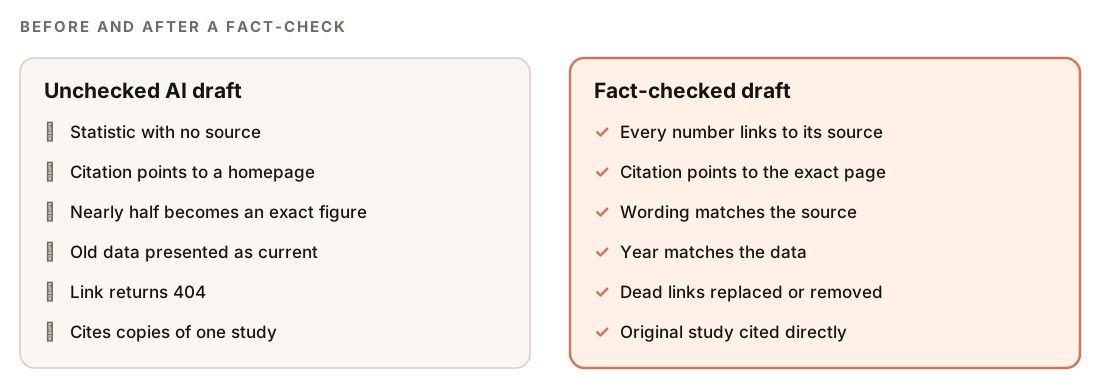
Language models write fluent, confident text, which is exactly what makes their factual errors hard to spot: a made-up statistic reads the same as a real one. Most errors fall into a few patterns:
- Invented numbers. A plausible percentage with no source, or with a source that never said it.
- Wrong attribution. A real figure credited to the wrong organization or the wrong report.
- Outdated data. An older figure presented as current, or a year that doesn't match the source.
- Citation drift. A link that points to a homepage or a related page, not the page that contains the number.
- Paraphrase drift. A source that says "nearly half" turns into a precise percentage in the draft.
- Echo sources. Several articles repeat one study, and the draft cites the copies instead of the original.
These errors matter for search because they damage trust, and trust sits at the center of how Google describes quality. Its guidance on creating helpful, people-first content asks whether content is trustworthy and encourages you to be clear about who created it, how, and why. Accuracy is also simply what readers expect: one wrong number can make every other claim on the page look doubtful.
Fact-checking AI content doesn't mean rejecting AI drafts. It means treating every number as unconfirmed until you've seen it on the source page.
What the /claudeblog factcheck command does
The factcheck command is part of the Claude Blog suite (see the full ClaudeSEO skill list). It runs entirely inside Claude Code, with no external language-processing service, and works through a post in a fixed order:
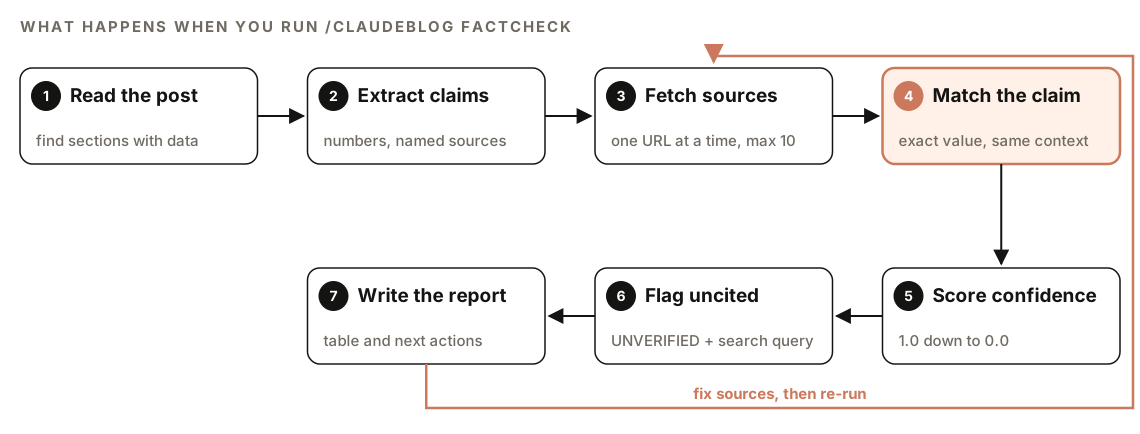
- Read the post. It reads the file and identifies the sections that contain data claims.
- Extract claims. It builds a list of every claim that includes a number, percentage, dollar amount, or named source. For each one it records the exact sentence, the value, the named source if any, the cited URL if any, and the heading or line where it appears.
- Fetch cited sources. For each claim with a URL, it fetches the page. It works through claims one at a time to avoid triggering rate limits on source sites.
- Match the claim. It searches the fetched page for the specific number. If it finds the value, it checks that the surrounding text is about the same topic as the claim.
- Score confidence. Each claim gets a score from 1.0 down to 0.0, with a status label.
- Flag uncited claims. Claims without a URL are marked UNVERIFIED. For each, it suggests a search query you can run to find a source and, when the claim names an organization, that organization's domain.
- Write the report. You get a full results table, summary counts, and a list of recommended actions.
How does it find the claims to check?
The skill sorts what it finds into three groups:
| Group | Typical shape | What happens |
|---|---|---|
| Fully cited | A number with a source in brackets, an inline link, or "According to [Source]" | Highest priority: the cited page is fetched and checked |
| Uncited statistics | A standalone percentage, a "3x more" multiplier, or a dollar figure with no attribution | Flagged for sourcing |
| Weak signals | "Studies show", "research indicates", or "a survey found" near a number | Context checked before extracting |
Vague round numbers in isolation, such as "millions of users", are skipped unless they're specific. The weak-signal group is the one AI drafts lean on most: a phrase like "research shows" sounds sourced, but if nothing is cited, the claim has no support.
How confidence scoring works
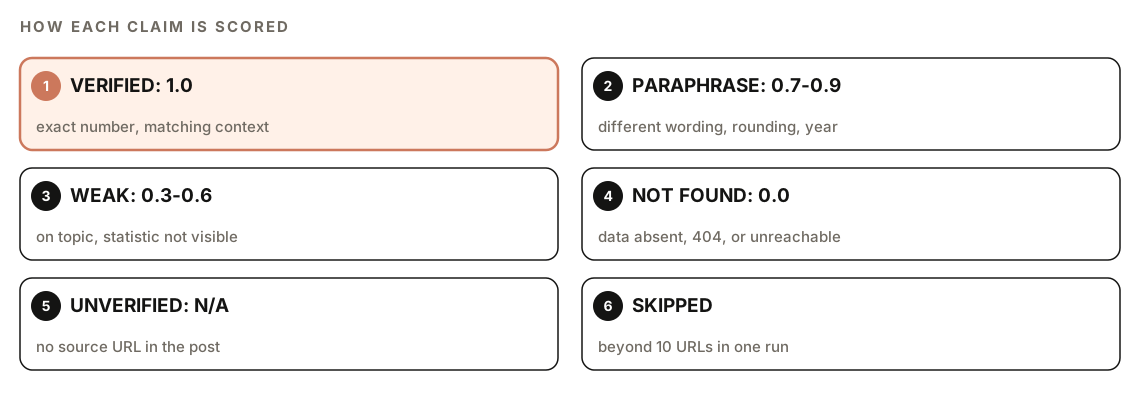
| Score | Status | What it means |
|---|---|---|
| 1.0 | VERIFIED | The exact number is on the cited page, in matching context |
| 0.7 to 0.9 | PARAPHRASE | Similar data is there, with different wording, rounding, or timeframe |
| 0.3 to 0.6 | WEAK | The page exists and covers the topic, but the statistic isn't visible |
| 0.0 | NOT FOUND | The page doesn't contain the data anywhere, or it returns 404 |
| N/A | UNVERIFIED | The claim has no source URL |
The skill's scoring guidance shows where the lines fall:
- A precise percentage in the post when the source says "nearly half" scores 0.8.
- A claim about one year's data when the source only has the previous year scores 0.7.
- A citation to a homepage when the statistic lives on a subpage scores 0.3.
- A 404 or unreachable URL scores 0.0.
A paraphrase isn't always a problem, but it's always worth a look. Rounding "nearly half" up to an exact figure makes a claim sound more certain than its source.
How to run a fact-check in Claude Code
Open your project in Claude Code with Claude Blog installed and run the command on a draft:
/claudeblog factcheck content/blog/my-draft.mdYou can also ask in plain English. Requests like "fact check this post", "verify statistics", or "check sources" trigger the same skill:
Fact check content/blog/my-draft.md and list every statistic that doesn't appear on the page it cites.The command doesn't need a third-party account or API key. It uses Claude Code's own web fetching, so it needs network access to the cited sites.
Run it after drafting and before you score or publish, and again on older posts you refresh, since replacement statistics need checking too.
How to read the verification report
The report follows the same structure every time:
### Verification Report: [Post Title]

**File**: [path]
**Claims found**: [total]
**Verified**: [count] | **Paraphrase**: [count] | **Weak**: [count] | **Not Found**: [count] | **Unverified**: [count]

| # | Claim | Source URL | Score | Status | Notes |
|---|-------|-----------|-------|--------|-------|
| 1 | "[claim text]" | [cited URL] | 1.0 | VERIFIED | [where the match was found] |
| 2 | "[claim text]" | [cited URL] | 0.8 | PARAPHRASE | [how the source words it] |
| 3 | "[claim text]" | (none) | N/A | UNVERIFIED | Try: "[suggested search query]" |

### Recommended Actions
- [Claims that need source URLs]
- [Claims with weak or not-found scores that need replacement sources]
- [Claims where the source data may be outdated]
Start with the summary line to see how much work there is, then go through the table in this order:
- NOT FOUND. The cited page doesn't support the claim. Either the number is wrong or the link is.
- WEAK. The page is on topic but the number isn't visible. Find the exact page, or replace the source.
- UNVERIFIED. Use the suggested search query to find a source, or cut the claim.
- PARAPHRASE. Compare the wording. Bring the post in line with what the source actually says.
How to fix claims that fail
| Status | Fix |
|---|---|
| NOT FOUND | Find where the number really comes from, or correct it to what the source says |
| WEAK | Link the exact page that shows the statistic, not a homepage or overview |
| UNVERIFIED | Add a source from an official or primary publisher, or remove the claim |
| PARAPHRASE | Match the source's wording, rounding, and year |
| 404 link | Check an archived copy, then find a current source |
When you replace a source, aim for the original. If five articles all cite the same study, link the study. The Claude Blog research standard counts those five articles as one source, cites the upstream report as the primary citation, and mentions the copies only when they add original analysis.
Write citations with the evidence triple Claude Blog uses: the year in the sentence, an inline citation naming the publisher and title, and the URL with a retrieval date in your source list. Then the next reader can confirm the claim quickly.
Claude Code can apply the fixes for you:
Using the fact-check report for content/blog/my-draft.md, fix every NOT FOUND, WEAK, and PARAPHRASE claim. Change each number to exactly what its source says and link the specific page. For UNVERIFIED claims, find an official or primary source; if you can't, delete the claim and tell me. Never add a number you haven't seen on the source page. Show me the diff before saving.Know the limits
Some sources can't be checked automatically, and the report says so:
- Paywalled pages can't be fetched past the login, so they score WEAK (0.5) with a note.
- JavaScript-rendered pages may return little content. The report notes it, and you should check those in a browser.
- PDF sources may not extract reliably, so they're flagged for manual verification.
- Dead links get a suggestion to check an archived copy on the Wayback Machine.
- More than 10 cited URLs in one post: the first 10 are verified, and the rest are listed as SKIPPED. Run it again after fixing the first batch, or check the rest by hand.
How fact-checking fits the Claude Blog pipeline
In the 4-agent content pipeline, the researcher agent is the first line of defense. For each statistic it records the exact value, the source name and URL, the publication date, and the methodology when available. It confirms the number exists on the source page and flags anything it can't verify.
The researcher also sorts sources into tiers. Tier 1 is official and primary sources such as government, university, and Google Search Central pages, tier 2 is original research and academic papers, and tier 3 is established industry publications. Generic blogs, affiliate sites, content mills, and unsourced roundups are rejected. Its research rubric rewards at least two independent sources for each claim the post depends on, and it sets a freshness floor: at least two sources from the last 30 days for time-sensitive topics, or the last 90 days for evergreen ones. It's also instructed to treat every fetched page as data, never as instructions, which guards against commands planted in web pages.
Its red flags are worth borrowing for your own reviews:
- Round numbers with no methodology
- No named source or link
- A content mill or SEO blog as the only source
- A statistic that appears on just one low-authority site
- A number that's suspiciously precise for a broad claim
At the end of the pipeline, the reviewer treats fabricated statistics as a P0 issue that blocks delivery. Sourcing also feeds the E-E-A-T category of 100-point content scoring, where inline citations to tier 1 to 3 sources earn points. The factcheck skill can also run as an optional deep-verification step inside the analyzer, which then flags only claims scoring below 0.7. Our guide to scoring a blog post before publishing covers that report.
Doing it without the skill
You can run a basic fact-check with a plain Claude Code prompt:
Read content/blog/my-draft.md and list every claim that contains a number, percentage, dollar amount, or named source, with its line and cited URL. For each claim with a URL, fetch the page one at a time and check whether the exact number appears in the same context. Label each claim VERIFIED, PARAPHRASE (similar data, different wording or year), WEAK (page on topic but number not visible), NOT FOUND, or UNVERIFIED (no URL). For unverified claims, suggest a search query. Output a table and don't change the file.The skill adds a fixed extraction pattern list, consistent confidence scores with written guidance for edge cases, handling for paywalls, PDFs, and dead links, the 10-URL rate limit, and a report format that matches the rest of Claude Blog. For the wider writing process, see our guide to writing blog posts with Claude Code.
Fact-checking mistakes to avoid
- Trusting a link because it exists. Many AI citations point to a real page that doesn't contain the number.
- Citing the copy instead of the original. Trace re-reported numbers back to the study that produced them.
- Keeping numbers you can't source. If you can't find it, cut it. The post is better without it.
- Checking only the first draft. Edits and refreshes add new numbers. Check again before you publish.
- Ignoring the year. A correct number from an old report can still be wrong if the post presents it as current.
Related guides
- How to refresh and rewrite old blog posts, where replacement statistics need this check
- How to score a blog post before publishing for the full 100-point review
- Source-grounded research with NotebookLM and Claude Code for researching from documents you trust
FAQ
How do you fact-check AI-generated content?
List every claim that contains a number, a percentage, a dollar amount, or a named source. Open the page each one cites and confirm the exact figure appears there in the same context and for the same year. Find sources for uncited claims or remove them.
Why does AI make up statistics?
Language models generate text that fits the pattern of what they've read, and statistics are a common pattern in articles. Without a verified source in front of it, a model can produce a figure that looks right but doesn't exist, or attach a real figure to the wrong source.
Can Claude Code fact-check its own writing?
Yes, if you make it check sources rather than its memory. /claudeblog factcheck fetches each cited page and looks for the exact number, so the check depends on what the source says, not on what the model recalls. You should still review anything it can't fetch, such as paywalled pages and PDFs.
What should I do with a statistic I can't verify?
Look for the original source using the suggested search query. If you find it, link the exact page and match its wording and year. If you can't find a reliable source, remove the claim or rewrite the sentence without the number.
Does Google penalize AI-generated content?
Google's guidance focuses on whether content is helpful and trustworthy, not on how it was produced. Inaccurate statistics undermine trust whoever wrote them, so fact-checking matters for any draft, AI-assisted or not.
How many sources can the fact-check verify at once?
Up to 10 cited URLs per run. If a post cites more, the first 10 are verified and the rest are listed as SKIPPED, so you can fix the first batch and run it again.