
International SEO
Hreflang Audit with Claude Code: Find and Fix Errors
Run an hreflang audit with Claude Code: validate every language version, fix missing return tags and bad ISO codes, and generate correct hreflang tags.
An hreflang audit checks that every language and country version of your pages points to the others correctly, so Google shows French searchers your French page and British searchers your UK page. With Claude Code, you can run that audit across a whole site in one command, get every broken tag ranked by severity, and generate the corrected tags in the format your site uses.
This guide explains how hreflang works, what the ClaudeSEO /claudeseo hreflang command checks, how to run it, and how to fix the errors it finds.
Key takeaways
- Hreflang only works when every page in a set lists itself and every alternate, and every alternate links back.
- Most hreflang errors are small typos with big effects:
en-ukinstead ofen-GB, a missing return tag, or tags on a non-canonical URL./claudeseo hreflang <url>validates eight rules, ranks issues from critical to low, and generates fixed tags as HTML, HTTP headers, or a sitemap.- Use the sitemap method for large or cross-domain sites. It's easier to keep complete and consistent.
- Technical correctness isn't the whole job. The audit also checks content parity and cultural fit between language versions.
What is hreflang and why does it break so often?
Hreflang is an HTML attribute (also available as an HTTP header or in an XML sitemap) that tells search engines which language and region each version of a page is for. A tag like hreflang="fr" says "this URL is the French version", and hreflang="en-GB" says "this URL is for English speakers in the United Kingdom".
The idea is simple. The implementation is fragile, for three reasons:
- It's all or nothing per page set. If the French page lists the English page but the English page doesn't list the French one back, search engines can ignore the relationship for both pages.
- It depends on exact codes. Language codes come from ISO 639-1 and region codes from ISO 3166-1 Alpha-2. Plausible-looking codes like
en-uk,jp, orengare invalid. - It interacts with canonicals. Hreflang on a URL that canonicalizes somewhere else is ignored, and a trailing slash mismatch between the canonical and the hreflang URL is enough to break the match.
Because the tags usually come from templates, one template mistake repeats across thousands of pages. That's why hreflang is a good job for an automated audit: the rules are strict, the checks are mechanical, and doing them by hand on a large site isn't realistic.
Google's own documentation on localized versions of your pages is the reference for all of the rules below.
What the /claudeseo hreflang command does
The command is part of the Claude SEO skill suite. You give it a URL, and Claude Code works through the site's international setup in a fixed order:
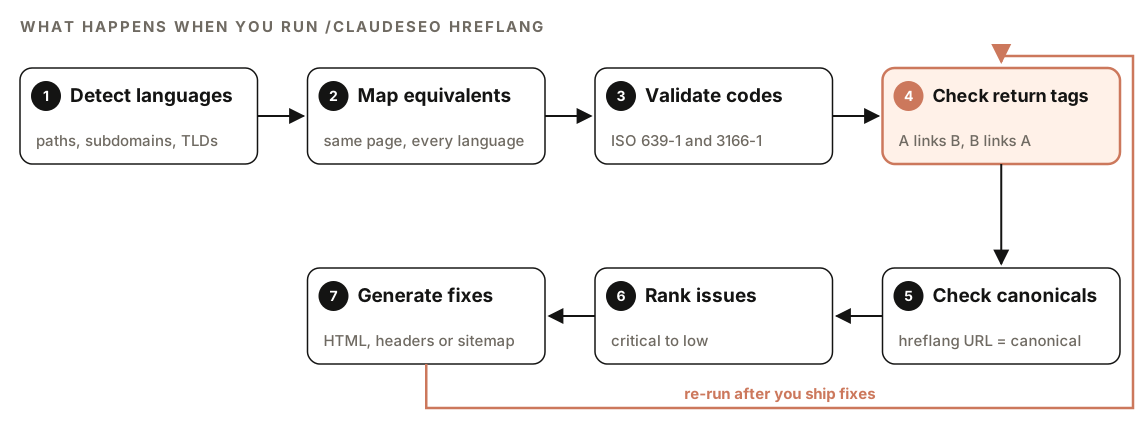
- Detect languages. It looks for language signals in URL paths (
/fr/), subdomains (fr.example.com), country domains (example.de), and the HTMLlangattribute. - Map equivalents. It matches each page to its versions in other languages, so it knows which URLs belong to the same set.
- Validate codes. Every language and region code is checked against the ISO standards.
- Check return tags. Every relationship must work in both directions.
- Check canonicals. Hreflang URLs must match canonical URLs exactly.
- Rank issues. Problems are sorted by severity, from critical to low.
- Generate fixes. It writes corrected tags in the implementation method you use.
If your site has no hreflang at all, the command doesn't guess. It reports the absence, lists the internationalization signals it found (subfolders, subdomains, or country domains), and recommends which implementation method fits your setup.
The eight rules every hreflang audit checks
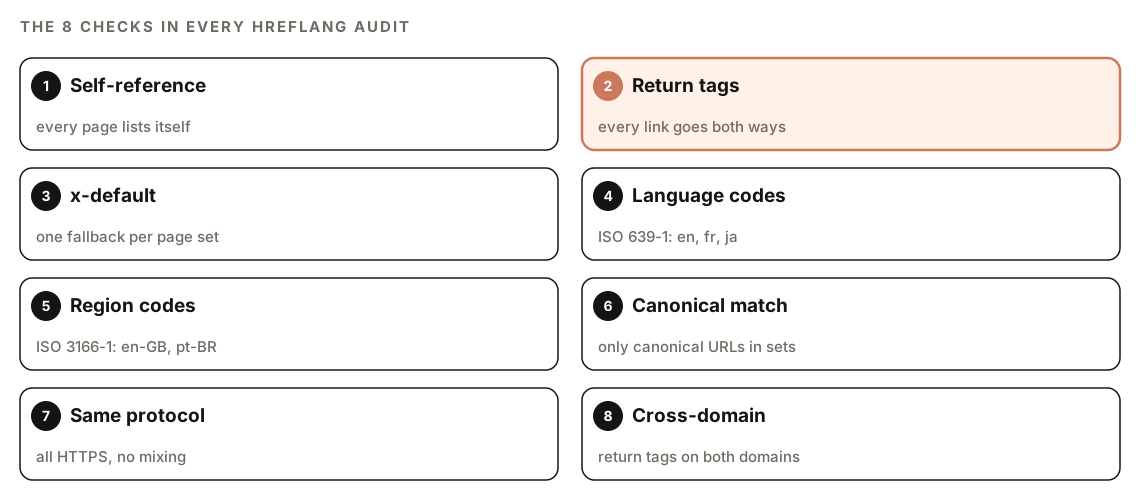
1. Self-referencing tags
Every page must include an hreflang tag pointing to itself, and that URL must match the page's canonical exactly. Leaving out the self-reference is a critical error, because it can make search engines discard the whole set.
2. Return tags
If page A lists page B, page B must list page A. With five languages, every page lists all five versions, itself included. The audit treats a missing return tag as critical.
3. x-default
The x-default value marks the fallback page for visitors whose language or region doesn't match any version, often a language selector or your main English page. There should be exactly one per set, and every version should include it.
4. Language codes
Language codes must be ISO 639-1 two-letter codes such as en, fr, de, or ja. Common mistakes the audit flags:
enginstead ofen(that's a three-letter ISO 639-2 code)jpinstead ofjafor Japanesezhon its own, which is ambiguous; use script variants such aszh-Hansorzh-Hant
5. Region codes
Region codes are optional, use ISO 3166-1 Alpha-2, and come after the language: en-US, en-GB, pt-BR. The classic mistakes are en-uk (the correct code is GB), es-LA (Latin America isn't a country), and a region with no language in front of it.
6. Canonical alignment
Hreflang belongs only on canonical URLs. If a page's canonical points somewhere else, its hreflang is ignored. The audit also catches near-misses such as a trailing slash on one URL and not the other.
7. Protocol consistency
Every URL in a set should use the same protocol. Sites that moved to HTTPS often still have http:// URLs in their hreflang tags, and the audit flags each one.
8. Cross-domain setups
Hreflang works across domains, for example example.com and example.de, but return tags are needed on both domains, and both should be verified in Google Search Console. For cross-domain sites, the skill recommends the sitemap method.
How to run an hreflang audit with Claude Code
Open your project in Claude Code with ClaudeSEO installed (our guide to installing SEO skills in Claude Code covers setup), then run:
/claudeseo hreflang https://www.example.comYou can also describe what you want in plain English, and Claude picks the matching skill:
Check the hreflang tags on https://www.example.com and tell me which language versions are missing return tags.To compare the content of language versions, not just their tags, run the content parity audit on a URL or on a local content folder:
/claudeseo hreflang audit https://www.example.com
/claudeseo hreflang audit ./content
How to read the hreflang report
The report follows the same structure every time:
## Hreflang Validation Report

### Summary
- Total pages scanned
- Language variants detected
- Issues found, split into Critical, High, Medium, and Low

### Validation Results
| Language | URL | Self-Ref | Return Tags | x-default | Status |

### Generated Hreflang Tags
### Recommendations
Start with the Summary to see the scale of the problem, then work through the Validation Results table one row at a time. Each row is one language version, with a pass or fail for the self-reference, the return tags, and x-default. The Generated Hreflang Tags section holds the corrected code, and Recommendations covers bigger changes, such as moving from HTML tags to a sitemap.
Fix issues in severity order. A missing return tag affects every page in the set, while a low-severity issue, such as having hreflang in both the HTML and the sitemap, mostly creates maintenance risk.
| Issue | Severity | Fix |
|---|---|---|
| Missing self-referencing tag | Critical | Add an hreflang tag pointing to the page itself |
| Missing return tags | Critical | Add matching tags on every alternate |
| Missing x-default | High | Point x-default to the fallback or selector page |
Invalid language code (eng) | High | Use the two-letter ISO 639-1 code |
Invalid region code (en-uk) | High | Use the ISO 3166-1 code (en-GB) |
| Hreflang on a non-canonical URL | High | Move tags to the canonical URL |
| HTTP and HTTPS mixed in one set | Medium | Use HTTPS everywhere |
| Trailing slash mismatch | Medium | Match the canonical URL exactly |
| Hreflang in both HTML and sitemap | Low | Pick one method |
How to fix hreflang errors
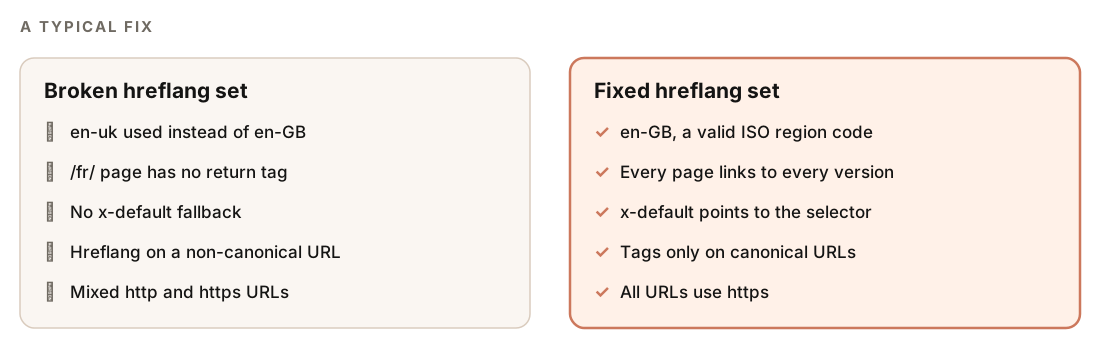
Most fixes happen in one place: the template or component that prints the tags. Fix the template and every page using it is corrected at once. Once you've reviewed the generated tags, ask Claude Code to apply them:
Apply the corrected hreflang tags from the report to the layout that renders the <head> in this repo. Keep one method only, and show me the diff before saving.Choosing an implementation method
| Method | Best for | Watch out for |
|---|---|---|
| HTML link tags | Smaller sites with few variants per page | Long <head> sections that are hard to maintain |
| HTTP headers | Non-HTML files such as PDFs | Server or CDN configuration that's easy to forget |
| XML sitemap | Large sites and cross-domain setups | Keeping the sitemap in sync with real pages |
Here's what a correct set looks like with HTML link tags. Every language version carries this same block:
<link rel="alternate" hreflang="en-US" href="https://example.com/page" />
<link rel="alternate" hreflang="en-GB" href="https://example.co.uk/page" />
<link rel="alternate" hreflang="fr" href="https://example.com/fr/page" />
<link rel="alternate" hreflang="x-default" href="https://example.com/page" />
And the same set in an XML sitemap. Note the xmlns:xhtml namespace, and that every URL entry repeats the full list of alternates, itself included:
<url>
  <loc>https://example.com/fr/page</loc>
  <xhtml:link rel="alternate" hreflang="en-US" href="https://example.com/page" />
  <xhtml:link rel="alternate" hreflang="fr" href="https://example.com/fr/page" />
  <xhtml:link rel="alternate" hreflang="x-default" href="https://example.com/page" />
</url>
Sitemaps are limited to 50,000 URLs per file, so large sites split them and list the files in a sitemap index. Our guide to XML sitemap audits with Claude Code covers that side.
Beyond tags: content parity and cultural fit
Correct tags point people to the right page. They don't guarantee the page is any good in that language. The skill includes two checks that go further.
Content parity compares language versions of each page: whether the page exists in every declared language, whether the H2 and H3 structure matches, whether titles, meta descriptions, and schema are localized, whether word counts look plausible for each language, and whether translations have fallen behind the original. The result is a parity matrix with a score per page and a prioritized list of actions.
Cultural adaptation checks whether each version fits its market. Do the calls to action match local expectations? Are trust signals, such as certifications and legal pages, the right ones for that country? Are there leftover brand references from another market? Are numbers, dates, currencies, and phone numbers in the local format? A German page showing "1,000.00" instead of "1.000,00" is a small detail that makes a page feel foreign.
If you write content in several languages, the multilingual blog workflow and content localization with Claude Code guides show how to produce versions that pass these checks from the start.
Doing it without the skill
You can run a basic hreflang check with plain Claude Code prompts. This catches the most common errors on a small site:
Fetch these URLs: [list every language version of one page]. For each, extract every hreflang tag and the canonical URL. Then check: does each page reference itself, does every page reference every other version, is there exactly one x-default, are all language codes ISO 639-1 and region codes ISO 3166-1 Alpha-2, and does each hreflang URL exactly match the target page's canonical? Output a table of problems.The skill adds the parts that are tedious to repeat: discovering every language version automatically, checking full page sets across a site, cross-domain and protocol checks, parity and cultural reviews, severity ranking, and ready-to-ship fixes in all three formats.
Hreflang mistakes to avoid
- Pointing hreflang at redirects. Every URL in a set should return a 200 status and be the final destination.
- Using hreflang as a translation tool. It tells search engines which version to show; it doesn't translate anything or fix thin translations.
- Mixing methods. HTML tags on some pages and sitemap entries on others make it very hard to keep sets complete.
- Forgetting new pages. A new English page without its French and German equivalents leaves gaps in every set it belongs to. Re-run the audit after launches.
- Language-only codes when you target countries. If you sell differently in the US and the UK, use
en-USanden-GB, not justen.
Related guides
- How to run a full SEO audit with Claude Code, which includes international SEO checks
- Technical SEO audit with Claude Code for canonicals, redirects, and indexing
- The full Claude SEO skill list for every command in the suite
FAQ
What is an hreflang audit?
An hreflang audit checks the tags that connect language and country versions of your pages. It confirms that every page references itself and all its alternates, that every relationship has a return tag, that codes are valid ISO codes, that URLs match their canonicals, and that each set has an x-default fallback.
What happens if hreflang return tags are missing?
Search engines may ignore the hreflang relationship for both pages. In practice, the wrong language version can appear in search results, or the versions can compete with each other instead of each showing in its own market.
Is en-UK a valid hreflang code?
No. The ISO 3166-1 code for the United Kingdom is GB, so the correct value is en-GB. Region codes are uppercase by convention, and the language code always comes first.
Should I put hreflang in the HTML or the sitemap?
Both work. HTML tags are easiest on small sites with a few language versions. An XML sitemap is easier to keep complete on large sites and is the better choice for cross-domain setups. Pick one method and use it consistently.
Do I need x-default?
It isn't strictly required, but it's strongly recommended. Without it, visitors whose language or region doesn't match any version have no defined fallback. The audit treats a missing x-default as a high-severity issue.
Can Claude Code fix hreflang tags automatically?
Yes. After the audit, Claude Code can apply the generated tags to the template, layout, or sitemap that produces them, and show you the diff first. Review the changes, deploy, and re-run the audit to confirm every set is complete.