
Content Operations
Repurpose Blog Content with Claude Code: X, LinkedIn, Email
Repurpose blog content with Claude Code: turn one post into an X thread, LinkedIn article, YouTube script, Reddit post, and newsletter excerpt in one run.
When you repurpose blog content, you turn one researched post into formats that work natively on other channels: a thread on X, an article on LinkedIn, a video script, a Reddit discussion, and a newsletter section. In Claude Code, /claudeblog repurpose <file> reads a finished post, pulls out its key insights and sourced statistics, and writes each format to its platform's conventions, saving every piece as its own file.
This guide explains what good repurposing looks like, what the ClaudeSEO command produces for each platform, how to run it, and how to review the output before anything gets posted.
Key takeaways
- Repurposing isn't pasting the same text everywhere. Each platform needs its own length, structure, and tone.
/claudeblog repurpose <file>creates an X thread, a LinkedIn article, a YouTube script, a Reddit post, and an email excerpt, or only the platforms you choose.- Every format is built from the post's own insights and sourced statistics, so the claims stay consistent across channels.
- Each piece gives value on its own and links back to the full post, which stays the complete, long-form answer.
- Outputs are saved to a
repurposed/folder with one file per platform, ready for you to review and schedule.
What does it mean to repurpose blog content?
A good blog post takes real work: research, sources, structure, and editing. Publishing it on your site is only the start. Many of the people you want to reach spend their time on other channels, and they won't visit your blog unless something there gives them a reason.
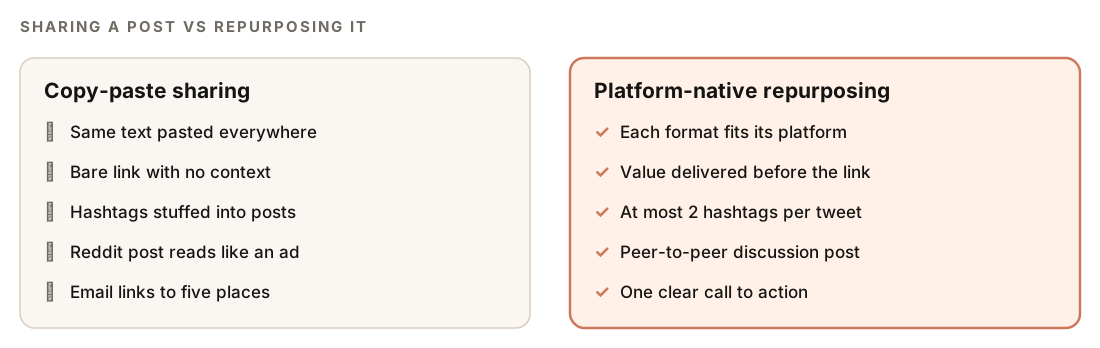
Repurposing takes the substance of the post, its argument, findings, and best examples, and rebuilds it for each channel. That's different from sharing a link. A link with a one-line teaser asks people to leave the platform before they've seen any value. A repurposed piece delivers value where the reader already is and offers the full post as the next step.
Three principles make it work:
- Native format. A thread, a professional article, a video script, a community post, and a newsletter section each have their own length, structure, and tone. Content that ignores those conventions reads as an ad.
- Standalone value. Each piece should be useful even if nobody clicks through. That's what earns attention, and on communities like Reddit it's what keeps a post from reading as self-promotion.
- One source of truth. Every format draws on the same post, so facts, numbers, and recommendations stay consistent. The blog post remains the canonical long-form answer, and the other pieces point back to it.
Repurposing can also reinforce the post itself. When the topic you wrote about is also discussed in a community thread or a video, the skill applies what the FLOW approach calls dual-surface thinking: the blog can cite the community discussion, and the community post references the blog as the full answer. The FLOW framework treats communities and video as one of the surfaces where people find content, and /claudeblog flow win includes a scorecard for covering both.
What the /claudeblog repurpose command does
The command is part of the Claude Blog skill suite and is the last step of the editorial workflow: plan, brief, write, score, optimize, then repurpose. It works in a fixed order.
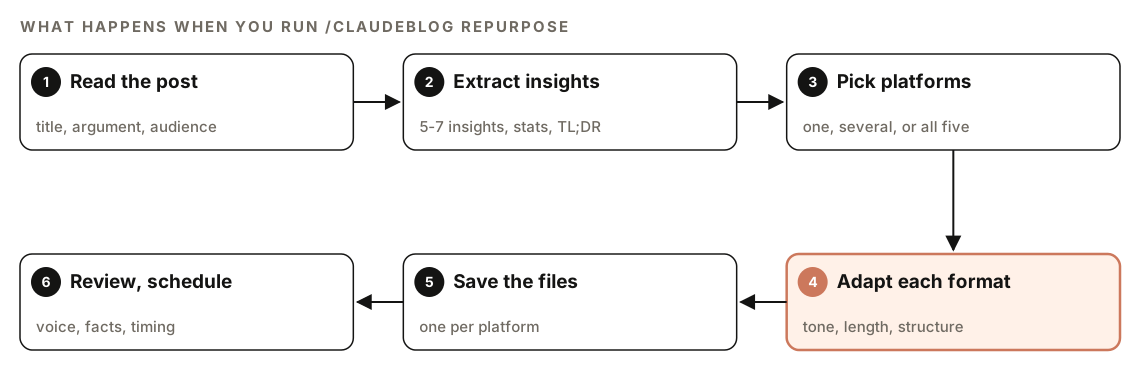
- Read the post. It reads the file and notes the title, the main argument in one or two sentences, the target audience, and the topic category (used to choose subreddits and hashtags).
- Extract insights. It pulls out 5 to 7 key insights, each written as a standalone statement, every sourced statistic with its attribution, any notable quotes, and a TL;DR of two or three sentences.
- Pick platforms. It asks which formats you want: an X thread, a LinkedIn article, a YouTube script, a Reddit post, an email excerpt, or all five. If you name a platform up front, it skips the question and writes only that one.
- Adapt each format. It writes each piece to that platform's rules for length, structure, and tone.
- Save the files. Each piece is saved to a
repurposed/folder, which is created if it doesn't exist. - Review and schedule. It prints a summary of what it created. Reviewing, adjusting to your brand voice, and scheduling are your job.
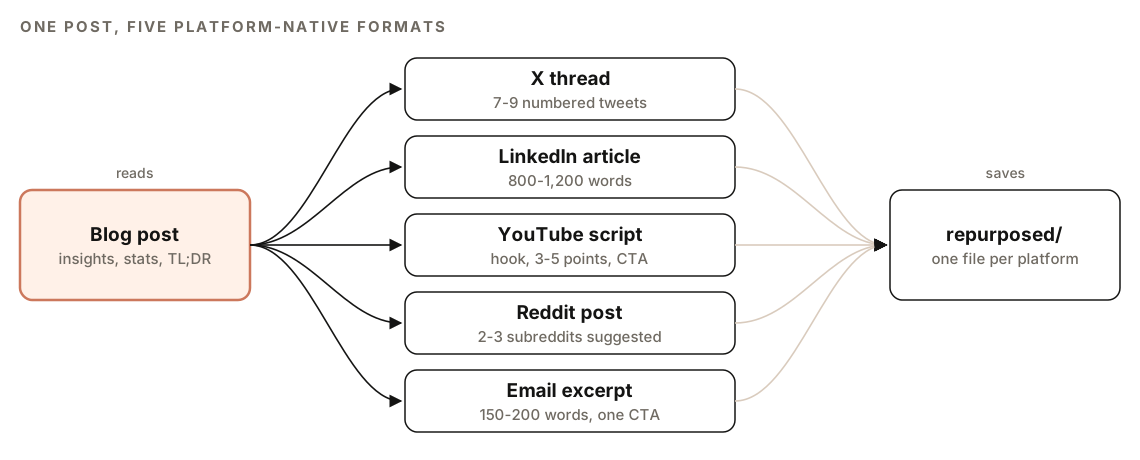
What it produces for each platform
| Format | Size | Structure |
|---|---|---|
| X thread | 7 to 9 tweets | Hook, one insight per tweet, closing link |
| LinkedIn article | 800 to 1,200 words | Hook, short paragraphs, numbered takeaways, question |
| YouTube script | 3 to 5 talking points | Hook, intro, main points with visual cues, CTA |
| Reddit post | 3 to 5 data points | Question or observation, findings, discussion prompt |
| Email excerpt | 150 to 200 words | Subject, preview text, TL;DR, 3 takeaways, one CTA |
X thread
The first tweet is the hook: a curiosity gap, a surprising number from the post, or a contrarian take, following the pattern "[Surprising stat or contrarian take]. Here's what [audience] needs to know:". Tweets 2 to 6 each carry one insight that makes sense on its own, with a sourced statistic where possible and line breaks for readability. The final tweet sums up the main takeaway and links to the full post.
The skill numbers tweets (1/, 2/, and so on), keeps every tweet under 280 characters, uses no more than 2 hashtags per tweet, and keeps the tone conversational, direct, and dense with insight.
LinkedIn article
The LinkedIn version runs 800 to 1,200 words, shorter than the original and more personal. The first two or three lines, the part visible before "See more", open with a personal story, an observation, or a contrarian take, and never with a cliché like "I'm excited to share". The body uses bold for emphasis, short paragraphs of one to three sentences, numbered takeaways, and 2 to 3 statistics with sources, written in the first person.
It closes with a question that invites comments. The skill keeps external links out of the body and adds a note to post the blog link in the first comment instead.
YouTube script
The script is built for viewers who decide quickly whether to keep watching:
- Hook (0 to 15 seconds): a bold statement or question from the post's strongest insight.
- Intro (15 to 60 seconds): three things viewers will learn, why it matters now, and a brief credibility statement.
- Main content: 3 to 5 talking points taken from the post's H2 sections, each with a key point, supporting data, and a practical example.
- Call to action (final 15 to 30 seconds): a reason to subscribe, the blog link in the description, and a tease of the next related video.
The script includes production cues such as [SHOW CHART: description], [CUT TO SCREENCAST], [B-ROLL: description], and [TEXT ON SCREEN: key stat]. It also comes with metadata: an estimated duration (the skill assumes about 150 spoken words per minute), a suggested title under 60 characters, a thumbnail concept, and a description with timestamps, the blog link, and key takeaways.
Reddit post
Reddit gets the most careful treatment, because communities there have strict norms about self-promotion. The skill suggests 2 to 3 relevant subreddits, taking into account each one's size, rules, posting conventions, and whether it allows links or prefers text posts.
The title is framed as a question or observation, never as "check out my new blog post". The post leads with a question or an interesting finding, shares 3 to 5 data points with sources as if reporting to peers, uses Reddit's Markdown formatting, and ends with a discussion prompt. The skill's guidance is to keep self-promotion to no more than 10% of your posts. It avoids clickbait titles, makes the post valuable without a click, and adds the blog link naturally at the end. The tone is peer-to-peer and humble, never salesy.
Email newsletter excerpt
The newsletter section is 150 to 200 words. The subject line is 40 to 60 characters and driven by curiosity or value, not clickbait, and the preview text is 40 to 90 characters that add to the subject instead of repeating it. The body has a two- or three-sentence TL;DR, three key takeaways each with a statistic and source, and a single call to action, such as a "Read the full analysis" button. Paragraphs are one or two sentences, and key phrases are bold for people who scan.
How to run the repurpose command
Open your project in Claude Code with Claude Blog installed and point the command at a finished post:
/claudeblog repurpose content/blog/my-post.mdPick the platforms when asked. To go straight to one format, name it in plain English:
Repurpose content/blog/my-post.md as a LinkedIn article.The output lands in a repurposed/ folder in your project:
repurposed/
  my-post-twitter-thread.md
  my-post-linkedin-article.md
  my-post-youtube-script.md
  my-post-reddit-post.md
  my-post-email-newsletter.md
Repurpose only posts you're happy with. If the post still needs work, write and score it first. The four-agent content pipeline researches, drafts, checks, and scores a post before you get it, and our guide to writing a blog post with Claude Code covers that step.
How to review the repurposed content
After saving, the command prints a summary in this format:
## Repurposed Content: [Blog Title]

### Generated Outputs
- Twitter/X thread: repurposed/[slug]-twitter-thread.md ([X] tweets)
- LinkedIn article: repurposed/[slug]-linkedin-article.md (~[X] words)
- YouTube script: repurposed/[slug]-youtube-script.md (~[X] min estimated)
- Reddit post: repurposed/[slug]-reddit-post.md ([X] subreddits suggested)
- Email excerpt: repurposed/[slug]-email-newsletter.md (~[X] words)

### Quick Stats
- Key insights extracted: [X]
- Statistics reused: [X] across [Y] platforms
- Total content pieces: [X]

### Next Steps
Treat every file as a strong first draft. Before posting, check four things:
- Facts. Every number should appear in the original post with its source. Repurposing should never add a statistic the post doesn't support.
- Voice. Adjust each piece to sound like you, especially the LinkedIn article, which is meant to be personal. Our guide to brand voice and writing personas shows how to give Claude a voice profile to follow.
- Rules. Read each suggested subreddit's rules yourself before posting there.
- Links. Confirm every link points to the published post, not a draft or local URL.
You can ask Claude Code to make the edits:
Edit repurposed/my-post-linkedin-article.md to sound more like our recent posts in content/blog: shorter sentences, no exclamation marks. Then check that every statistic in the five repurposed files appears in content/blog/my-post.md with the same source, and list any that don't.How to schedule repurposed content
The repurpose command writes the content; the editorial calendar decides when it goes out. /claudeblog calendar schedules distribution for every new post: LinkedIn and X on publish day, Reddit 2 to 3 days later, the email newsletter in a weekly batch, and a companion YouTube video for pillar posts only. Its content mix also reserves a slice of each month for repurposed pieces. Our guide to blog strategy and editorial calendars covers that planning.
You don't need every format for every post. Pick the channels where your audience actually is, and save video scripts for your most important posts, since they take the most effort to produce.
Doing it without the skill
You can repurpose a post with a plain Claude Code prompt:
Read content/blog/my-post.md. Extract its 5 to 7 key insights and every statistic with its source. Then write: (1) an X thread of 7 to 9 numbered tweets, each under 280 characters, with a hook first and a link to the post last; (2) a LinkedIn post of 800 to 1,200 words with a strong first two lines, short paragraphs, and a closing question, with no links in the body; (3) a 150 to 200 word newsletter section with a subject line, preview text, a TL;DR, three takeaways, and one call to action. Use only statistics that appear in the post. Save each to repurposed/.The skill adds the parts that are easy to forget: the YouTube script with production cues and metadata, subreddit suggestions with self-promotion safeguards, length rules for every format, and the same structure every time.
Repurposing mistakes to avoid
- Pasting the same text everywhere. Each platform has its own conventions; ignoring them makes the post read as an ad.
- Holding back the value. A teaser that withholds the point gives people no reason to click.
- Adding new claims. Keep every statistic traceable to the original post and its source.
- Treating Reddit as a link channel. Lead with genuine insight and follow each community's rules.
- Too many calls to action. The email format uses one link so readers aren't split between competing choices.
- Posting without review. Check voice, facts, and links before anything goes live.
Related guides
- Blog strategy and editorial calendar with Claude Code
- How to write a blog post with Claude Code
- Brand voice and writing personas in Claude Code
- The full Claude Blog skill list
FAQ
How do you repurpose a blog post for social media?
Pull out the post's key insights and sourced statistics, then rebuild them in each platform's format: a numbered thread for X, a personal, shorter article for LinkedIn, a discussion post for Reddit. Make each piece useful on its own and link back to the full post. /claudeblog repurpose does this for five formats in one run.
How long should a LinkedIn article from a blog post be?
The skill writes LinkedIn articles of 800 to 1,200 words, shorter than the original post. It focuses the opening two or three lines on a hook, since that's what readers see before "See more", and adds a more personal, first-person angle than the blog.
How many tweets should a thread have?
The skill writes threads of 7 to 9 tweets: a hook, one insight per tweet, and a closing tweet with the link. Each tweet stays under 280 characters and works even when read on its own.
Can you post blog content on Reddit?
Yes, if the post gives genuine value to the community and follows its rules. Frame it as a discussion, share the findings in the post itself, and add your link at the end. The skill suggests 2 to 3 subreddits and checks whether each allows links.
Is repurposed content duplicate content?
Repurposed pieces aren't copies. The command rewrites the post into shorter, platform-specific formats with their own structure, and each one links back to the original. The full post on your blog stays the complete, canonical version.
How often should you repurpose blog posts?
Repurpose your strongest posts, not every post. The editorial calendar reserves a share of each month for repurposed pieces, about one a month at two posts a week. Prioritize pillar posts and posts with original data or clear findings.