
SEO Automation
SEO Strategy Plan: How to Build One with Claude Code
Build an SEO strategy plan with Claude Code: competitor analysis, site architecture, a content calendar, KPI targets, and a four-phase 12-month roadmap.
An SEO strategy plan is a written roadmap that connects your business goals to the pages you'll build, the searches they'll target, the technical work underneath them, and the numbers that show it's working. With Claude Code and ClaudeSEO, /claudeseo plan <type> builds that plan from an industry template: it analyzes your top competitors, designs your site architecture, drafts a content calendar, and lays out a four-phase roadmap across 12 months.
This guide covers what a good SEO strategy includes, how the command builds one, what each output file contains, and how to turn the plan into work.
Key takeaways
- An SEO strategy plan links goals, audience, competitors, site structure, content, and technical work to KPIs you can measure.
/claudeseo plan <type>starts from an industry template (SaaS, local service, e-commerce, publisher, agency, or generic) and works through six stages from discovery to roadmap.- You get five files: the strategy, a competitor analysis, a content calendar, an implementation roadmap, and a site structure.
- The roadmap runs in four phases: foundation (weeks 1-4), expansion (weeks 5-12), scale (weeks 13-24), and authority (months 7-12).
- It works for new sites too. Without a URL, it switches to new-site planning and skips the steps that need a live site.
What is an SEO strategy plan?
An SEO strategy is the set of decisions that come before the work: who you want to reach, what they search for, which pages will answer those searches, how those pages connect, and how you'll know it's working. A plan writes those decisions down in order, with dates and measurable targets.
Without a plan, SEO turns into a list of disconnected tasks. You publish a post because a keyword tool suggested it, fix a warning because an audit flagged it, and add a landing page because a competitor has one. Each task might be fine on its own. Together they cause familiar problems: several pages competing for the same search, important pages with no internal links pointing to them, and content that doesn't support anything the business sells.
A good plan prevents that by settling five things up front:
- Goals and KPIs. What success means in numbers you can track, such as organic traffic, rankings for priority keywords, and indexed pages.
- Competitive position. Who already ranks for what you want, and where they're weak.
- Site architecture. The URL hierarchy, the main topic areas (often called content pillars), and how pages link to each other.
- Content strategy. Which pages to create, in what order, and how often.
- Technical foundation. The hosting, speed, structured data, and mobile requirements every page depends on.
An SEO audit and an SEO plan work together. An audit looks back at what's broken on an existing site. A plan looks forward at what to build next. If you have a live site, a full SEO audit gives the plan an honest starting point.
What the /claudeseo plan command does
The command is part of the Claude SEO skill suite. You choose a business type, and Claude Code works through six stages:
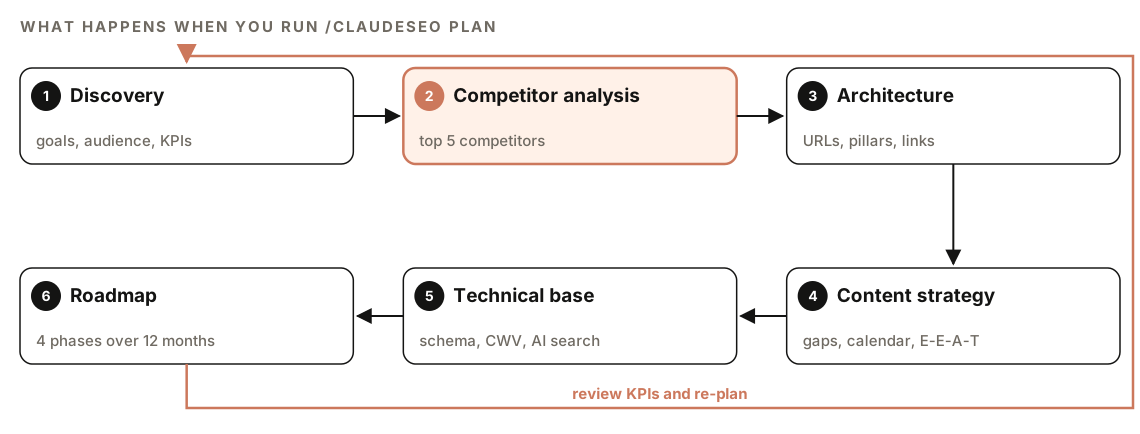
- Discovery. It gathers your business type, target audience, competitors, and goals, plus your budget, timeline, and KPIs. If you have a live site, it assesses where it stands today.
- Competitive analysis. It identifies your top five competitors and analyzes their content strategy, schema usage, and technical setup. It looks for keyword gaps and content opportunities, assesses their E-E-A-T signals (experience, expertise, authoritativeness, and trust), and estimates their domain authority.
- Architecture design. It loads the template for your business type, then designs your URL hierarchy and content pillars, plans internal linking, structures the sitemap with quality gates applied, and shapes the information architecture around user journeys.
- Content strategy. It finds content gaps against competitors, lists the page types you need with estimated counts, picks blog and resource topics with a publishing cadence, plans how to build E-E-A-T (author bios, credentials, experience signals), and puts it all into a prioritized content calendar.
- Technical foundation. It sets hosting and performance requirements, a schema plan for each page type, Core Web Vitals baseline targets, AI search readiness requirements, and mobile-first considerations.
- Implementation roadmap. It turns everything into four phases, each with clear goals.
Industry templates
The plan starts from one of six templates:
| Template | Use it for |
|---|---|
| SaaS | SaaS and software companies |
| Local service | Businesses serving customers in a specific area |
| E-commerce | Online stores |
| Publisher | Content publishers and media sites |
| Agency | Agencies and consultancies |
| Generic | Any business that doesn't fit the others |
If you give it a business type it doesn't recognize, or the matching template is missing, it falls back to the generic template and tells you so.
Not sure which type fits? The audit in the same suite detects business type from homepage signals, and they're a useful guide. A pricing page and "free trial" suggest SaaS. An address, a service area, and a Maps embed suggest a local service. Product pages and "add to cart" suggest e-commerce. Author pages and publication dates suggest a publisher. Case studies and a portfolio suggest an agency.
Live competitive data with DataForSEO
DataForSEO is optional. If its tools are connected, the plan uses them for real competitive data: competitor domains, keyword overlap between domains, traffic estimates, search volume, keyword difficulty, and local business listings. It runs on your own DataForSEO account, so DataForSEO's pricing applies. Without it, the competitor authority figures in the plan are estimates, so check them before you commit budget.
How to build an SEO strategy plan with Claude Code
Install ClaudeSEO first. Our guide to installing SEO skills in Claude Code covers it. Then run the command with your business type:
/claudeseo plan saasOther types work the same way:
/claudeseo plan ecommerce
/claudeseo plan publisher
/claudeseo plan agency
You'll get a much better plan if you add context. Plain English works, and it lets you include the details discovery asks for:
Build an SEO strategy plan for https://www.example.com. We're a local plumbing company serving [city] and nearby suburbs. Our main competitors are [competitor 1], [competitor 2], and [competitor 3]. Goal: more calls from organic search for emergency and installation work. Budget: [amount] per month and one part-time writer. Timeline: 12 months.Phrases like "SEO strategy", "SEO roadmap", "keyword strategy", "site architecture", and "content calendar" all load the planning skill.
New site or existing site? If you include a URL, the plan assesses the current site and runs the competitive gap analysis against it. If you don't, it switches to new-site planning. It skips the current-site assessment and the gap analysis that need a live URL, and plans from scratch.
Have these ready before you start:
- The competitors you actually lose customers to, even if they aren't the biggest sites.
- The KPIs you'll report on, and who you report them to.
- A realistic budget and team size, since they decide how much you can publish.
- Current numbers, if you have them: organic traffic, rankings, indexed pages, and Core Web Vitals.
What the plan produces
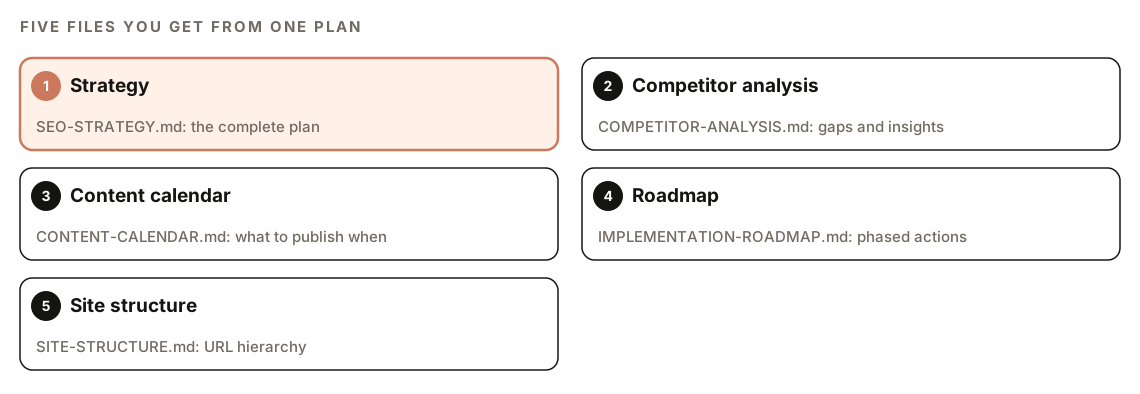
| File | What's in it |
|---|---|
SEO-STRATEGY.md | The complete strategic plan |
COMPETITOR-ANALYSIS.md | Competitive insights from the competitor research |
CONTENT-CALENDAR.md | The content roadmap, with priorities |
IMPLEMENTATION-ROADMAP.md | The phased action plan |
SITE-STRUCTURE.md | URL hierarchy and site architecture |
Splitting the plan into files is practical. The site structure goes to whoever builds the site, the content calendar goes to writers, and the roadmap is what you review with a client or manager.
The KPI targets table
The strategy sets targets at three checkpoints against your baseline:
| Metric           | Baseline | 3 Month | 6 Month | 12 Month |
|------------------|----------|---------|---------|----------|
| Organic Traffic  | XX       | XX      | XX      | XX       |
| Keyword Rankings | XX       | XX      | XX      | XX       |
| Domain Authority | XX       | XX      | XX      | XX       |
| Indexed Pages    | XX       | XX      | XX      | XX       |
| Core Web Vitals  | XX       | XX      | XX      | XX       |
Fill the baseline column with real numbers from Search Console, your analytics, and a Core Web Vitals report before you accept any targets. A target without a baseline can't be measured. Keep in mind that domain authority is a third-party estimate of link strength, not a Google metric, so use it as a rough comparison with competitors.
Success criteria
The skill holds every plan to four success criteria: clear, measurable goals for each phase, defined resource requirements, identified dependencies, and risk mitigation strategies. Use them as a checklist when you review the draft. If a phase has no measurable goal, or the calendar assumes more writers than you have, ask Claude to revise it.
The four-phase SEO roadmap
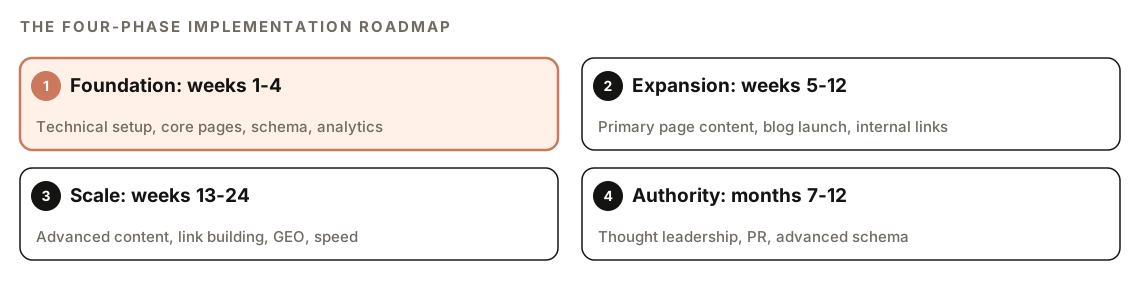
| Phase | Timing | Main work |
|---|---|---|
| Foundation | Weeks 1-4 | Technical setup, core pages (home, about, contact, main services), essential schema, analytics and tracking |
| Expansion | Weeks 5-12 | Content for primary pages, blog launch with initial posts, internal linking, local SEO setup if it applies |
| Scale | Weeks 13-24 | Advanced content, link building and outreach, GEO, performance optimization |
| Authority | Months 7-12 | Thought leadership, PR and media mentions, advanced schema, continuous optimization |
GEO here means generative engine optimization: making content easy for AI search systems such as Google AI Overviews and ChatGPT to find and cite.
The order matters more than the exact dates. Tracking goes in first, so you can tell whether later phases work. Internal linking comes in phase 2, while the site is still small enough to structure cleanly. Link building waits until there's content worth linking to. If you already have a site with solid technical health, phase 1 may take days rather than weeks, and that's fine.
How to turn the plan into work
A plan is only useful if it changes what you do next week. Here's one way to work through it with Claude Code:
- Set the baseline. On an existing site, run
/claudeseo audit <url>and fix the Critical issues first. They belong in phase 1. - Turn pillars into clusters. Run
/claudeseo cluster <seed>for each content pillar to group related keywords into topic clusters. - Brief each page. Use
/claudeseo content-brief <topic>for each calendar item before anyone writes. - Write and publish. Draft posts with
/claudeblog write <topic>. - Review at each checkpoint. Compare results with the KPI table at 3, 6, and 12 months, and adjust the calendar.
For the content side, the FLOW framework (Find, Leverage, Optimize, Win) adds an evidence-led loop for finding opportunities, improving existing pages, and scoring content.
To turn the roadmap into a task list, ask:
Read IMPLEMENTATION-ROADMAP.md and CONTENT-CALENDAR.md. List every Phase 1 task as a checklist, note the page or file each one affects, and flag any task that depends on another.Doing it without the skill
You can get a usable first draft from plain Claude Code. The more context you give, the better it gets:
I run [business type] at [URL]. Our audience is [audience], our competitors are [list], and our 12-month goal is [goal]. Build an SEO strategy with: (1) a competitor comparison covering content, schema, and technical setup, (2) a URL hierarchy with 3-5 content pillars, (3) a prioritized content calendar for the first 12 weeks, (4) schema types for each page type, and (5) a phased roadmap with measurable goals per phase and a KPI table with baseline, 3, 6, and 12-month columns. Mark anything you estimated rather than measured.The skill adds what keeps plans consistent from one project to the next: industry templates, a fixed six-stage process, sitemap quality gates, optional live competitive data, and five separate files that are easy to hand to a writer, a developer, or a client.
Mistakes to avoid
- Setting targets without a baseline. Record current traffic, rankings, and indexed pages before you accept any targets.
- Copying competitors. Competitive analysis finds gaps. It isn't a list of pages to clone.
- Over-planning location pages. At 30 or more location pages, the suite warns and requires at least 60% unique content per page. At 50 or more, it stops until you justify them. Pages that only swap the city name are a doorway-page risk.
- Committing to a cadence you can't keep. A smaller calendar you actually publish beats an ambitious one you abandon.
- Skipping phase 1. Content built on a site that can't be crawled or measured is wasted effort.
- Never revisiting the plan. Review it at each checkpoint and re-plan when results or priorities change.
Related guides
- How to run a full SEO audit with Claude Code to set your baseline
- The full site audit feature page for what the audit checks
- Blog strategy and editorial calendar with Claude Code for planning the blog side
- Keyword research with Claude Code for filling each pillar with the right searches
FAQ
What should an SEO strategy plan include?
Goals and KPIs, an audience definition, competitor analysis, site architecture, a content strategy with a calendar, technical requirements, and a phased roadmap. The /claudeseo plan output covers all of these across five files, including a KPI table with targets at 3, 6, and 12 months.
How long does an SEO strategy take to show results?
It depends on your site, your competition, and how consistently you execute, so no honest plan can promise a date. The roadmap covers 12 months, with KPI checkpoints at 3, 6, and 12 months, so you can see whether the work is moving the numbers and adjust early.
What's the difference between an SEO audit and an SEO strategy?
An audit finds problems on an existing site and ranks them by priority. A strategy decides what to build next and in what order. On an existing site, run the audit first, so its Critical fixes become part of the plan's foundation phase.
Can I create an SEO plan for a brand-new website?
Yes. If you don't provide a URL, the command switches to new-site planning. It skips the current-site assessment and the gap analysis that need a live site, and plans the architecture, content, technical foundation, and roadmap from scratch.
Do I need DataForSEO to build an SEO plan?
No, it's optional. When it's connected, the plan uses it for competitor domains, keyword overlap, traffic estimates, search volume, and keyword difficulty. It runs on your own DataForSEO account, so the provider's pricing applies.
Which business types does /claudeseo plan support?
SaaS, local service, e-commerce, publisher, and agency each have their own template, and a generic template covers everything else. If you enter a type it doesn't recognize, it uses the generic template and tells you.