
Content Operations
Blog Content Audit with Claude Code: Score Every Post
Run a blog content audit with Claude Code: score every post, find orphan pages, stale content and cannibalization, and get a prioritized action queue.
A blog content audit is a systematic review of every post on your blog: how good each one is, whether it's still current, how well it's linked, and whether posts compete with each other. With Claude Code, one command scans your whole content folder, scores every post, finds orphan pages, stale posts, and keyword overlap, and gives you a prioritized action queue saved as a single report.
This guide explains what a blog content audit covers and why it matters, how the ClaudeSEO /claudeblog audit command works, how to read its report, and how to fix the problems it finds.
Key takeaways
- A blog content audit looks at the whole archive at once, so you can spot patterns that post-by-post reviews miss: orphan posts, overlapping topics, and groups of stale posts.
/claudeblog audit [directory]runs six analysis agents in parallel across every post, covering content quality, SEO, schema, links, freshness, and AI readiness.- On top of the per-post checks, it detects topic cannibalization, builds an internal link graph to find orphan and dead-end pages, and estimates the effort to refresh stale posts.
- Everything lands in
blog-audit-report.md, including a prioritized action queue that starts with the lowest-scoring post.- The audit tells you what to fix. Follow-up commands like
/claudeblog analyzeand/claudeblog geogo deeper on individual posts.
What is a blog content audit and why does it matter?
A blog content audit is an inventory and health check of your published posts. A technical SEO audit asks whether search engines can crawl and index your pages. A content audit asks whether the pages are worth finding once they get there, and whether they work together as a body of content.
Blogs need this more than most sections of a site, because they grow by accumulation. Every post is written at a different time, often by a different person, against whatever standards applied that year. After a few years, the archive usually has some recognizable problems:
- Uneven quality. Early posts are shorter, thinner, or structured differently from what you publish now.
- Stale information. Posts that were accurate when written now contain outdated facts, steps, or recommendations.
- Orphan posts. Some posts have no internal links pointing to them, so readers and crawlers rarely find them.
- Overlapping topics. Two or three posts target the same keyword and compete with each other.
- Missing basics. Older posts lack meta descriptions, alt text, or structured data that newer posts have.
None of these shows up when you look at one post at a time. An orphan or a cannibalizing post looks fine on its own. You only see the problem when you map every post against every other post.
What you get out of an audit
A good content audit ends with decisions, not just data. For each post, you want to know whether to leave it alone, improve it, refresh it, merge it with another post, or link to it more. The ClaudeSEO audit is built around that: it ranks posts by score, lowest first, with the top issue and a recommended action for each, so you finish with a work queue rather than a spreadsheet to interpret.
What the /claudeblog audit command does
The command is part of the Claude Blog skill suite. It works through your blog in seven steps:
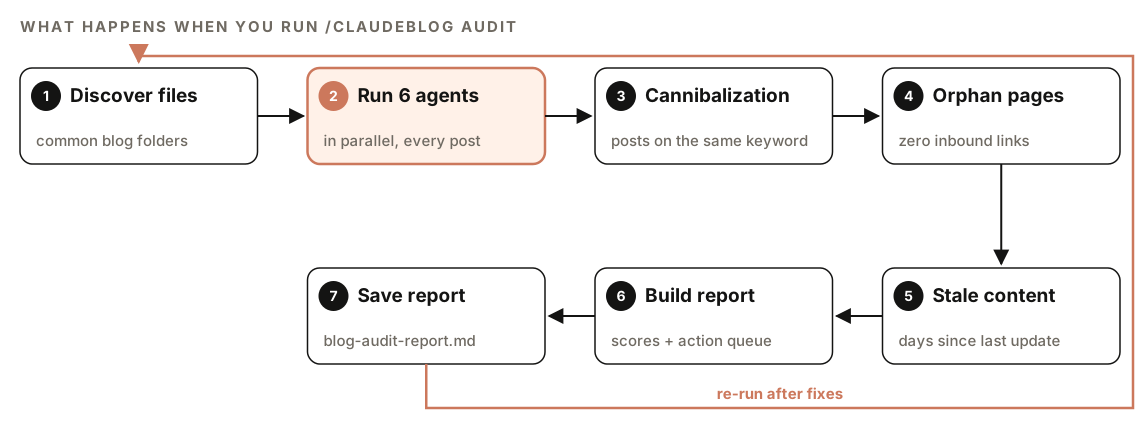
- Discover files. It finds every
.md,.mdx, and.htmlfile in common blog folders, such ascontent/,posts/,blog/,src/content/,_posts/,pages/blog/,articles/, andsrc/pages/blog/. It filters out files that aren't posts, like README, CHANGELOG, LICENSE, config files, andpackage.json, and reports how many posts it found and where. - Run six agents in parallel. Each post is analyzed by six specialized agents at once, described in the next section.
- Detect cannibalization. It compares posts to find ones targeting the same primary keyword.
- Find orphan pages. It builds a map of internal links and finds posts nothing links to.
- Find stale content. It reads update dates from frontmatter and ranks posts by refresh priority.
- Build the report. It combines everything into a summary dashboard, per-post scores, and an action queue.
- Save the report. It writes the full report to
blog-audit-report.mdin your project root.
If no posts turn up in the standard folders, the skill searches the whole project for Markdown files with blog-like frontmatter (a title, a date, and a description), so unusual folder structures still get audited.
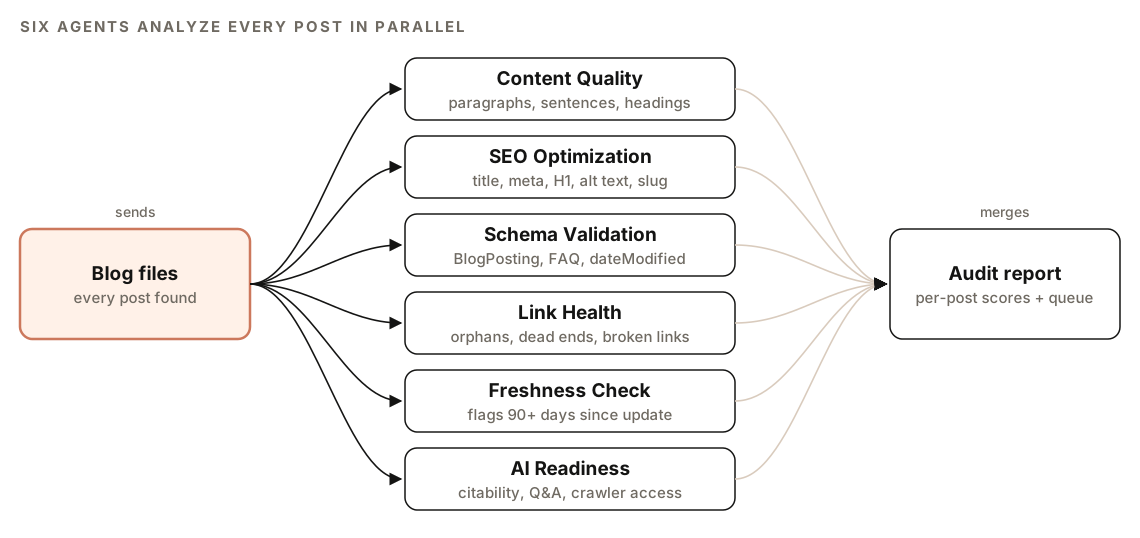
What the blog audit checks
Content quality
The content quality agent scores each post and checks its readability. It targets paragraphs of 40 to 80 words with a hard limit of 150, sentences of 15 to 20 words, and a Flesch Reading Ease score between 60 and 70. It also looks at heading structure, including whether headings are phrased as questions.
SEO optimization
The SEO agent checks the on-page basics for every post: title tag length (50 to 60 characters), meta description length (150 to 160 characters), whether the H1 is present and unique, image alt text coverage, internal and external link counts, and the quality of the URL slug.
Schema validation
The schema agent detects structured data across all posts. It checks that BlogPosting schema is complete, that FAQ schema is present and correctly formatted, and that dateModified matches the lastUpdated value in your frontmatter. Missing or malformed schema gets flagged.
Link health
The link agent maps every internal link between posts into a directed graph. From that graph it finds orphan pages (zero inbound internal links), dead-end pages (zero outbound internal links), and broken internal link targets. It also recommends places where two posts should link to each other.
Freshness
The freshness agent reads lastUpdated or dateModified from each post, calculates the days since the last update, flags posts that haven't been updated in 90 days or more, and categorizes them by refresh priority.
AI citation readiness
The AI readiness agent scores how easy each post is for AI answer engines to quote. It checks passage-level citability, question-and-answer formatting, entity clarity, whether the post has TL;DR boxes and citation capsules, and whether AI crawlers can access the page.
Cannibalization, orphans, and stale content
After the six agents finish, three site-wide checks run across all posts together:
- Topic cannibalization. The skill extracts each post's primary topic from its title, H1, meta description, and first paragraph, normalizes the keywords, and flags posts targeting the same one. Each pair gets a recommendation: merge two weak posts into one strong post, 301 redirect the weaker post to the stronger one, or differentiate them so they target distinct intents.
- Orphan pages. For every orphan, it recommends two or three existing posts that should link to it, chosen by topic relevance.
- Stale content. Posts updated more than 180 days ago are high priority, 90 to 180 days are medium, and under 90 days are low. Each stale post also gets a refresh effort estimate.
The skill's refresh effort estimates look like this:
| Effort | What it involves | Skill's estimate |
|---|---|---|
| Light refresh | Update statistics, check links | 1-2 hours |
| Moderate refresh | Rewrite sections, add new data | 3-4 hours |
| Heavy refresh | Full rewrite recommended | 5+ hours |
How to run a blog content audit
Open your project in Claude Code with ClaudeSEO installed, then run:
/claudeblog auditTo audit one folder only, pass its path:
/claudeblog audit ./src/content/blogYou can also ask in plain English, and Claude picks the matching skill:
Audit every blog post in this project and tell me which posts need work first.The audit reads your local Markdown, MDX, and HTML files and doesn't require any API keys. When it finishes, it tells you where the report was saved, summarizes the total number of posts, the average score, and the count of critical issues, and suggests what to run next.
How to read the blog audit report
The report opens with a summary dashboard:
## Blog Audit Report

**Audit Date:** [date]
**Total Posts:** N
**Average Score:** XX/100

### Health Overview
| Metric | Count |
|--------|-------|
| Posts Scoring 90+ (Excellent) | N |
| Posts Scoring 70-89 (Good) | N |
| Posts Scoring 50-69 (Needs Work) | N |
| Posts Scoring <50 (Poor) | N |
| Orphan Pages | N |
| Dead-End Pages | N |
| Cannibalization Issues | N |
| Stale Content (90+ days) | N |
Then comes a per-post table, with each post's overall score out of 100 broken down into five categories, and the prioritized action queue:
### Per-Post Scores
| Post | Score | Content | SEO | E-E-A-T | Technical | AI Citation | Issues |
|------|-------|---------|-----|---------|-----------|-------------|--------|
| [filename] | XX/100 | XX | XX | XX | XX | XX | [count] |

### Prioritized Action Queue (Lowest Score First)
| Priority | Post | Score | Top Issue | Recommended Action |
|----------|------|-------|-----------|--------------------|
| 1 | [file] | XX | [issue] | [action] |
| 2 | [file] | XX | [issue] | [action] |
The report finishes with three tables: topic cannibalization (keyword, competing posts, and the merge, redirect, or differentiate recommendation), orphan pages (each with its recommended link sources), and stale content (last updated date, days stale, priority, and refresh effort).
How to prioritize
Start with the dashboard to see the shape of the problem: a few weak posts need a different plan from a gap shared by most posts.
Then work the action queue from the top, since it lists the lowest-scoring posts first. Use the per-post table to see *why* a post scored low: a weak SEO category is often a quick fix, while a weak content category usually means a rewrite. Fix orphan pages and cannibalization in batches, because each fix touches several posts at once. Schedule stale posts by priority and effort, so a week's work mixes a heavy refresh with a few light ones.
The five categories are the same areas our 100-point content scoring covers for individual drafts: content quality, SEO, E-E-A-T, technical elements, and AI citation readiness.
How to fix what the audit finds
Low-scoring posts
The skill suggests running /claudeblog analyze <file> on the lowest-scoring post first, which gives a detailed single-post breakdown. Our guide to scoring a blog post before publishing covers that command. For posts that need more than polish, our guide to refreshing and rewriting old blog posts walks through the rewrite.
Orphan and dead-end pages
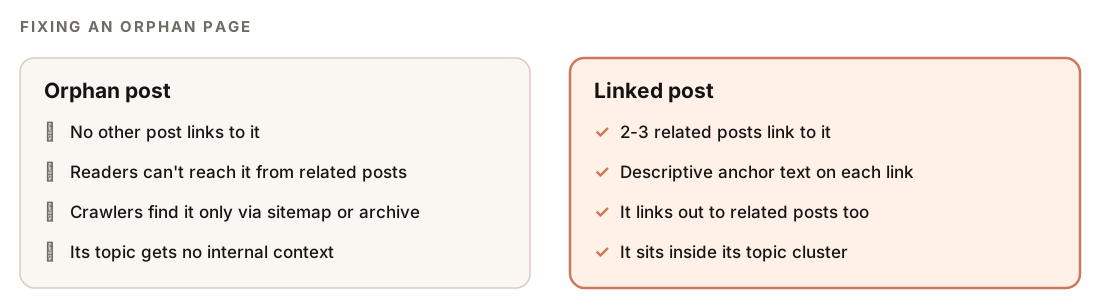
Use the recommended link sources from the report. Each orphan comes with two or three related posts that should link to it, so you can ask Claude Code to add them:
For each orphan page in blog-audit-report.md, add one contextual link from each of its recommended source posts. Put the link in a sentence where it fits naturally, use descriptive anchor text, and show me the diffs before saving. Then add at least one outbound link to a related post on every dead-end page.Our guide to internal linking with Claude Code covers anchor text and link placement in more depth.
Cannibalization
The audit flags posts that share a primary keyword. For a more detailed analysis, with severity levels, an intent check, and optional ranking data, run the dedicated check covered in our guide to finding and fixing keyword cannibalization.
Stale posts and schema dates
Work through stale posts by priority, using the effort estimates to plan the week. After each refresh, update lastUpdated in the frontmatter and make sure dateModified in your schema matches, since the audit checks that the two agree. A minimal BlogPosting block with both dates looks like this:
{
  "@context": "https://schema.org",
  "@type": "BlogPosting",
  "headline": "[Post title]",
  "datePublished": "[YYYY-MM-DD]",
  "dateModified": "[YYYY-MM-DD]",
  "author": { "@type": "Person", "name": "[Author name]" }
}
The full list of properties is on the schema.org BlogPosting page. Date-based staleness is only one signal, though. To find posts that are actually losing traffic, see our guide to detecting content decay with Search Console.
AI readiness
For key posts that score low on AI citation readiness, the skill suggests running /claudeblog geo <file>, which runs a dedicated AI citation optimization audit on that post.
Doing it without the skill
You can run a basic blog content audit with plain Claude Code prompts. This builds the inventory most audits start from:
Find every blog post in this project (.md, .mdx, and .html files in the content folders; skip README, CHANGELOG, and config files). For each post, extract the title, title length, meta description length, number of H1s, word count, lastUpdated or date field, days since that date, number of images without alt text, and every internal link. Then build a table of inbound and outbound internal links per post, flag orphans (no inbound links), dead ends (no outbound links), and posts not updated in 90+ days, and group posts whose titles target the same main keyword. Save the result as content-audit.md.Then ask for decisions, not just data:
Using content-audit.md, give each post one recommended action: keep, improve, refresh, merge with another post, or add internal links. Explain each choice in one sentence and sort the list so the posts needing the most work come first.The skill adds what's hard to repeat consistently: six focused agents running in parallel, fixed thresholds for readability and on-page elements, schema and AI readiness checks, a proper internal link graph with recommended link sources for every orphan, refresh effort estimates, and the same report format on every run, so you can compare audits over time.
Blog content audit mistakes to avoid
- Auditing without acting. Put the top items in the action queue into your calendar before you close the report.
- Ignoring traffic. The queue starts with the lowest-scoring posts. Weigh that against which posts actually bring in readers, so a high-traffic post with a fixable gap doesn't wait behind a post nobody visits.
- Bumping dates without changing content. Updating
lastUpdatedon an unchanged post clears it from the stale list without making it any better. - Deleting instead of merging. When two posts compete, merge them and redirect the weaker URL rather than deleting one and losing its links.
- Fixing orphans with a single link. Use the two or three recommended sources, so the post is connected to its topic, not just technically reachable.
- Auditing once. Re-run the audit after a round of fixes, and on a regular schedule, so you can see the average score and issue counts move.
Audits fit best as a recurring step in your editorial workflow, between planning new posts and refreshing old ones.
Related guides
- Find and fix keyword cannibalization with Claude Code for a deeper overlap analysis
- Detect content decay with Search Console and Claude Code to find posts losing traffic
- How to refresh and rewrite old blog posts, the next step for low-scoring and stale posts
- The full ClaudeSEO skill list for every command in both suites
FAQ
What is a blog content audit?
A blog content audit is a review of every post on your blog for quality, SEO, freshness, internal linking, and topic overlap. The goal is a decision for each post: keep it, improve it, refresh it, merge it, or link to it more. It differs from a technical SEO audit, which focuses on crawling, indexing, and site performance.
How often should you audit your blog content?
Run a full audit whenever you plan a new quarter of content, and again after a big round of fixes to confirm they worked. Blogs that publish often benefit from more frequent audits, because new posts create new overlap and new linking gaps. With a single command, re-running the audit is cheap.
What is an orphan page on a blog?
An orphan page is a post with no internal links pointing to it from other posts. Readers can't reach it by following related links, and search engines get no internal signal about where it fits. The fix is to add contextual links from two or three related posts.
Should I delete old blog posts after an audit?
Usually not as a first step. Most old posts are better refreshed, merged into a stronger post, or linked into their topic cluster. If you do remove a post, 301 redirect its URL to the closest relevant page so its links and visitors aren't lost.
What's the difference between a content audit and a content inventory?
A content inventory is the list: every post with its title, date, URL, and basic metrics. A content audit evaluates that list and decides what to do with each post. The ClaudeSEO audit does both, producing per-post scores and a prioritized action queue from the same scan.