
AI Search
Track Brand Mentions in AI Answers with Claude Code
Track brand mentions in AI answers with Claude Code and Profound: citation rates per platform, 30-day trends, missing prompts, competitors and alerts.
To track brand mentions in AI answers, you choose the questions your customers actually ask, check how often ChatGPT, Perplexity and other AI assistants name or cite your brand in the answers, and watch that rate over weeks instead of judging it from a single reply. With Claude Code and ClaudeSEO, the /claudeseo profound command pulls this data from Profound, a dedicated AI visibility platform, and turns it into citation rates, trends, prompt gaps, competitor lists and alerts.
This guide explains how AI citation tracking works, what each Profound subcommand returns, how to set it up, and how to act on what you find.
Key takeaways
- AI answers change from run to run, so brand visibility is a rate measured across a set of prompts and over time, not a yes or no from one screenshot.
/claudeseo profoundhas four subcommands,citations,prompts,competitorsandalerts, each run against a brand name.- You need a Profound account with API access and an API key. Profound's own pricing applies.
- The skill treats ChatGPT and Perplexity as Profound's native coverage and sends Gemini, Google AI Overviews and AI Mode questions to the SE Ranking integration.
- Tracking shows where you stand. To change the numbers, hand off to
/claudeseo geo, which audits crawler access, citability and brand signals.
What does it mean to track brand mentions in AI answers?
Ask an AI assistant "what's the best accounting software for a small agency?" and the answer usually names a few products and often links to the pages it drew from. Tracking brand mentions in AI answers means measuring, on a schedule, whether your brand is among those names and sources for the questions that matter to your business.
It's the AI search version of rank tracking, but three things work differently.
Mentions and citations are different signals
A mention is your brand name appearing in the text of an answer. A citation is one of your pages shown as a source, usually as a link or a footnote. You can be mentioned without being cited, when the model knows your brand but sourced the answer elsewhere. You can also be cited without being named prominently. Both matter: mentions shape what people think of you, and citations send visitors to your site. Whenever you read an AI visibility report, check which of the two a number counts.
One answer is not a measurement
AI answers are generated fresh each time. The same prompt can produce a different set of brands tomorrow, for another user, in another country, or after a model update. A screenshot of one answer tells you what happened once. To measure visibility, you ask the same prompts repeatedly and count how often your brand appears. The result is a rate, for example "cited in XX of every 100 tracked answers on Perplexity this month."
Trends matter more than snapshots
Because single answers vary, the useful question is direction: is your rate rising or falling, on which platform, and for which prompts? A time series with week-over-week and month-over-month change separates normal noise from a real shift, such as a competitor overtaking you or a page that stopped being cited.
Our generative engine optimization guide covers the wider strategy of earning visibility in AI search. This guide focuses on measurement.
What the /claudeseo profound command does
The command is part of the Claude SEO skill suite. It connects Claude Code to Profound, a platform built specifically for tracking brand mentions in the answers of large language models (LLMs). Profound polls AI platforms continuously and publishes the results as a time series, so trend changes are ready whenever you ask.
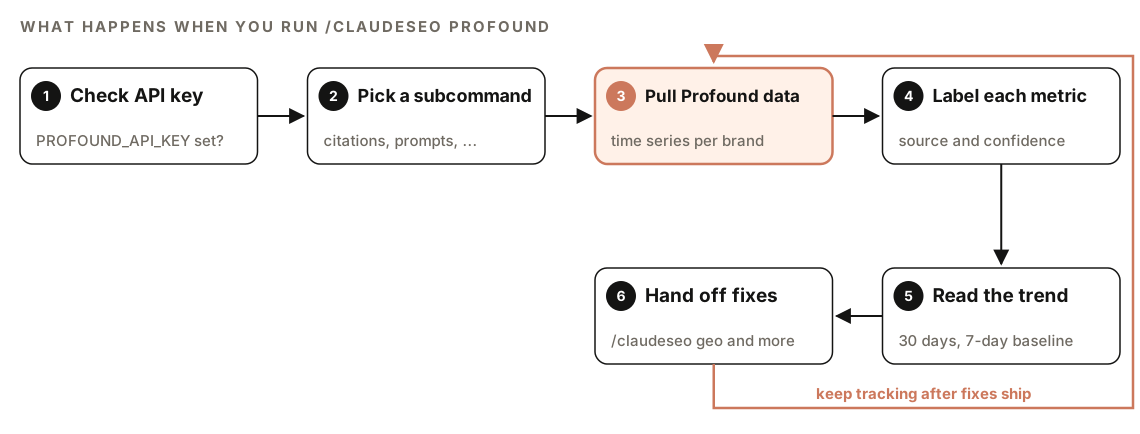
- Check the API key. Before any call, the skill confirms that the
PROFOUND_API_KEYenvironment variable is set. If it's missing, no request is made. - Pick a subcommand. You choose the question: citation rates, prompts, competitors or alerts.
- Pull Profound data. The skill requests the data for your brand from Profound's API.
- Label each metric. Every number is attributed to Profound, marked as live data, and given a confidence value, so you always know where a figure came from.
- Read the trend. Citation rates come with a 30-day trend, and alerts compare recent movement with a 7-day baseline.
- Hand off fixes. For platforms Profound doesn't cover natively, or for changes to your pages, the skill points you to the right ClaudeSEO command.
After you ship changes, keep tracking to see whether the rate moves.
The four Profound subcommands
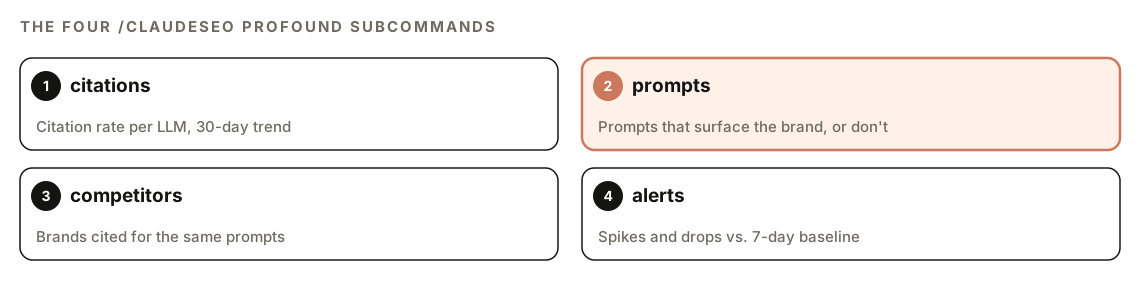
citations: your rate on each platform
citations returns your current citation rate for each LLM, plus the trend over the last 30 days. It's your headline number. Read it per platform, not as one blended figure. You can be strong on one assistant and absent from another, and the causes can differ.
prompts: where you show up and where you don't
prompts lists the top prompts that surface your brand and the ones that fail to. The second list is often the more useful one. A prompt that fails to surface you is a content or authority gap with a clear target: you know the exact question your page needs to answer best.
competitors: who gets cited next to you
competitors shows which brands are cited alongside yours for the same prompts. This is your real competitive set in AI search, and it isn't always the list you know from organic search. A review site or an adjacent product can take up space in AI answers without appearing in your keyword reports.
alerts: spikes and drops
alerts flags sudden spikes or drops compared with a 7-day baseline. Treat it as an early warning. A drop can follow a model update, new content from a competitor, or a change on your own site, such as a page that moved, broke, or started blocking a crawler.
How to set up and run Profound in Claude Code
You need three things before the first call:
- A Profound account with API access and an API key. Profound is a third-party platform, and its own pricing applies.
- The Profound extension for Claude SEO. Run its installer: a shell script, with a PowerShell version for Windows.
- The `PROFOUND_API_KEY` environment variable, set where Claude Code runs. Keep the key out of your repository and any file you commit.
If the skill suite isn't installed yet, start with our guide to installing SEO skills in Claude Code. Then run any of the four subcommands against your brand:
/claudeseo profound citations Acme
/claudeseo profound prompts Acme
/claudeseo profound competitors Acme
/claudeseo profound alerts Acme
You can also ask in plain English, and Claude picks the matching skill:
Use Profound to show me how often Acme is cited in ChatGPT and Perplexity answers, how that changed over the last 30 days, and which prompts we're missing.How to read the results
Each subcommand returns one part of the picture. Combined, the elements look like this (placeholders only):
## AI citations: [brand]

| Platform   | Citation rate | 30-day trend | Source                           |
|------------|---------------|--------------|----------------------------------|
| ChatGPT    | XX%           | +X / -X      | Profound (live, confidence X.XX) |
| Perplexity | XX%           | +X / -X      | Profound (live, confidence X.XX) |

### Prompts that surface [brand]
### Prompts that fail to surface [brand]
### Brands cited alongside [brand]
### Alerts vs. 7-day baseline
Work through it in this order:
- Check the source label. When you combine figures from several tools, keep the labels so nobody compares numbers measured differently.
- Compare platforms. A big gap between two assistants can point to a platform-specific issue, such as a blocked crawler.
- Read the trend before the level. A low rate that's climbing is better news than a high rate that's sliding.
- Turn missing prompts into a to-do list. Each one maps to a page you should improve or create.
- Study the competitors. Open the pages cited for your missing prompts and note what they answer that you don't.
What Profound covers, and where the other tools come in
The skill treats ChatGPT and Perplexity as Profound's native coverage. For Gemini, Google AI Overviews and Google AI Mode, it defers to /claudeseo seranking. For an AI Overviews citation rate, it also cross-references DataForSEO's AI visibility tools through /claudeseo dataforseo when you have them connected. Our guide to using DataForSEO with Claude Code covers that setup.
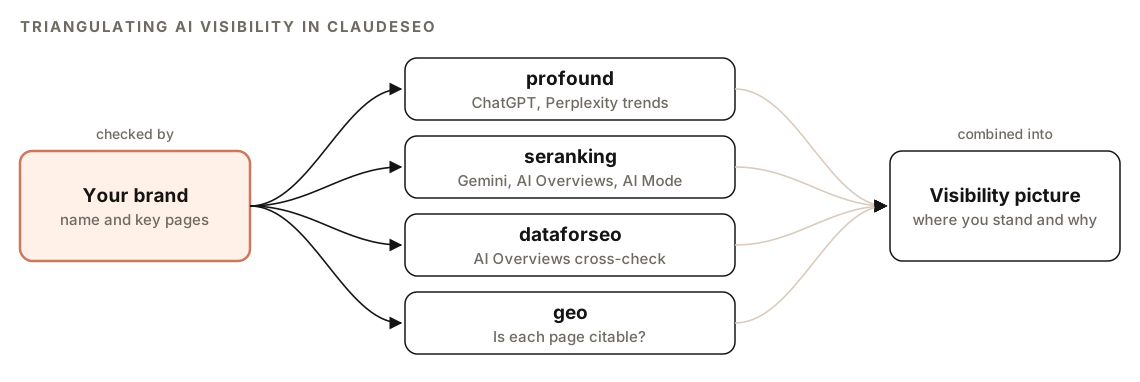
Checking the same question with more than one source is triangulation. When two independent tools agree on the direction of a trend, you can trust it more than either one alone.
How to raise your AI citation rate
Tracking shows the gap. It doesn't close it. For an end-to-end AI search audit, the Profound skill hands back to /claudeseo geo <url>, the audit behind our GEO and AI search optimization features. Run it on the pages that should be winning your missing prompts. It checks:
- AI crawler access. Whether robots.txt allows GPTBot, OAI-SearchBot, ClaudeBot and PerplexityBot. The skill treats crawlers that only collect training data, such as CCBot, as optional to block.
- llms.txt. Whether the file is present, missing or malformed.
- Citability. Direct answers in the first 40 to 60 words of each section, question-based headings, self-contained answer blocks, and specific statistics with their sources.
- Authority and brand signals. Authorship, dates, citations, entity presence, and brand mentions on Wikipedia, Reddit, YouTube and LinkedIn.
- Technical accessibility. Whether the main content is in the server-rendered HTML or only appears after JavaScript runs.
It returns a GEO readiness score from 0 to 100, separate scores for Google AI Overviews, ChatGPT, Perplexity and Bing Copilot, and the top five changes ranked by impact, with effort estimates.
Fix crawler access first
A blocked crawler can't fetch your page, so it's the cheapest problem to rule out. A robots.txt that allows the AI search crawlers the audit looks for:
User-agent: OAI-SearchBot
Allow: /

User-agent: PerplexityBot
Allow: /

User-agent: ClaudeBot
Allow: /

User-agent: GPTBot
Allow: /
Rewrite pages for the prompts you're missing
Then work on the pages themselves. Paste a missing prompt into a fix request:
Profound shows we're not cited for the prompt "[prompt]". Find the page in this repo that should answer it. Add a question-style H2 that matches the prompt, rewrite the first two sentences under it so they answer the question directly, and keep the section self-contained. Show me the diff before saving.For drafts that haven't been published yet, /claudeblog geo <file> scores AI citation readiness before the post goes live. Our page on search and AI readiness scoring explains what it looks at. Google's guidance on AI features and your website is a useful reminder that standard SEO best practices still apply to AI Overviews and AI Mode.
Profound or SE Ranking: which should you use?
The Profound skill describes itself as a pair with SE Ranking for wider coverage. Here's how they differ, per the skill files:
| Question | Profound | SE Ranking |
|---|---|---|
| Command | /claudeseo profound [cmd] <brand> | /claudeseo seranking [cmd] |
| How data is collected | Continuous polling, published as a time series | Prompts sampled on demand |
| Platforms, per the skills | ChatGPT and Perplexity natively | ChatGPT, Gemini, Perplexity, AI Overviews, AI Mode |
| Best for | Trends, week-over-week change, alerts | A share-of-voice snapshot across five AI surfaces |
Choose Profound when you care about movement over time and early warnings. Choose SE Ranking when you need breadth, especially Google's AI surfaces. Our guide to measuring AI share of voice covers the SE Ranking side in detail.
Doing it without the skill
You can run a manual version with plain Claude Code prompts. Start by building a prompt set and a tracking sheet:
Create a prompt tracking sheet for AI visibility. Write 25 prompts a buyer of [product category] would ask an AI assistant, grouped by stage: research, comparison and purchase. Avoid prompts that contain our brand name. Save them as prompts.csv with columns: prompt, stage, platform, date, brand_mentioned, brand_cited, cited_url, competitors_named.Then run the prompts yourself in each assistant, copy the answers, and let Claude Code do the tallying:
Here are the answers I copied from ChatGPT and Perplexity for the prompts in prompts.csv: [paste]. Fill in the sheet. Mark whether [brand] is mentioned or cited, list every cited URL and every competitor named. Then give me the mention rate per platform and the prompts where competitors appear but we don't.This works as a monthly spot check, but it's manual, small, and hard to repeat consistently. The skill adds continuously collected data from Profound, 30-day trends, prompt gap lists, competitor co-citations and baseline alerts, with every number labeled by source.
Mistakes to avoid
- Judging visibility from one answer. Sample repeatedly and read rates, not anecdotes.
- Tracking only branded prompts. "Is Acme any good?" tells you little. Track the category questions people ask before they know your name.
- Blending platforms into one number. Each assistant draws on different sources, so read and fix them separately.
- Treating mentions and citations as the same thing. A mention without a citation sends no visitors.
- Reacting to every dip. Check whether a drop persists beyond the baseline before you rewrite pages.
- Blocking the crawlers you want citations from. Re-check robots.txt after every site migration or CDN change.
Related guides
- The generative engine optimization guide for the strategy behind AI visibility
- Measuring AI share of voice with Claude Code for SE Ranking's five-platform view
- Using DataForSEO with Claude Code for live SERP and AI visibility data
- The full Claude SEO skill list for every command in the suite
FAQ
How do I track my brand in ChatGPT answers?
Build a set of prompts your customers ask, run them repeatedly, and record whether ChatGPT mentions or cites your brand. A tool like Profound does this continuously and keeps the history. In Claude Code, /claudeseo profound citations <brand> returns your current rate per platform with a 30-day trend.
What is an AI citation rate?
In general terms, it's how often your brand appears as a cited source in AI answers to the prompts you track, usually expressed per platform. Because answers vary from run to run, a rate measured over many prompts and days is far more reliable than a single result. Check each tool's documentation for exactly how it counts.
What is the difference between a brand mention and a citation in AI search?
A mention is your brand name in the answer text. A citation is your page shown as a source, often with a link. Mentions influence perception, while citations can send traffic, so track both and know which one each number measures.
Do I need a Profound account to use /claudeseo profound?
Yes. The command calls Profound's API with your own API key, so you need a Profound account with API access, and Profound's pricing applies. The skill checks for the PROFOUND_API_KEY environment variable before making any call.
Does Profound track Google AI Overviews?
Within ClaudeSEO, the skill treats ChatGPT and Perplexity as Profound's native coverage. For Google AI Overviews, AI Mode and Gemini, it defers to /claudeseo seranking, with DataForSEO's AI visibility tools as a cross-check for AI Overviews. For Profound's current platform list, check Profound's own documentation.
How often should I check AI citations?
Weekly is a sensible rhythm for most brands, with alerts covering sudden changes in between. Look at month-over-month trends before deciding a page needs work, because single-week movements are often noise.