
AI Search
AI Share of Voice: How to Measure It with Claude Code
Measure AI share of voice across ChatGPT, Gemini, Perplexity, AI Overviews and AI Mode with Claude Code and SE Ranking, then raise a low score.
AI share of voice measures how often your brand appears in AI-generated answers to the questions your market asks, platform by platform, compared with your competitors. In Claude Code, /claudeseo seranking ai-visibility <brand> uses SE Ranking's API to measure it across ChatGPT, Gemini, Perplexity, Google AI Overviews and Google AI Mode in one query, with a confidence note for every number.
This guide explains what AI share of voice means, how to calculate it properly, what the SE Ranking command returns, and how to improve a low score.
Key takeaways
- AI share of voice is a sampled measurement: it depends on which prompts you track, how many, and on which platforms.
/claudeseo seranking ai-visibility <brand>returns five scores, one each for ChatGPT, Gemini, Perplexity, AI Overviews and AI Mode.- Three of the scores count brand appearances in the answer, and two count citations inside Google's AI features, so don't average them blindly.
- You need an SE Ranking account with API access and an API key. SE Ranking's API uses unit accounting, and its own pricing applies.
- A score is a starting point. Raise it with
/claudeseo geo, which audits citability, crawler access and brand signals.
What is AI share of voice?
Share of voice is an old marketing idea: of all the attention in your market, how much goes to you? In advertising, it compares your share of ads or impressions with competitors'. In SEO, it compares your visibility across a set of tracked keywords.
AI share of voice applies the same idea to AI answers. When people ask ChatGPT, Gemini or Perplexity for a recommendation, the answer names a handful of brands. Your AI share of voice describes how much of that space you hold.
Presence rate and relative share
You'll see two ways of expressing it, and they answer different questions:
- Presence rate: the share of sampled prompts where your brand appears in the answer. If you track 50 prompts and appear in XX of them, that's your rate. This is what the SE Ranking skill reports for each platform.
- Relative share: your mentions divided by the total mentions of every brand you track, across the same prompts. This shows how you compare with competitors in the same answers.
Presence rate tells you how visible you are. Relative share tells you who's winning. To get a competitive view from presence rates, run the same measurement for each competitor on the same prompt set and compare the results side by side.
Why the prompt set decides everything
AI answers vary by the wording of the question, so the score depends heavily on which prompts you sample. A prompt set full of your brand name inflates the score. A prompt set of generic questions nobody asks tells you little. Good prompt sets mirror real buyer questions across the journey, from "what is [category]?" to "[product A] vs [product B]", and stay the same over time so you can compare one month with the next.
Why sample size matters
Every number is an estimate from a sample. With 20 prompts, each prompt moves your rate by 5 points, so a single answer changing can look like a big swing. With 200 prompts, each one moves it by half a point. That's why the SE Ranking skill attaches a confidence note to every score, based on sample size. Read small samples as rough signals, not precise figures.
For the bigger picture of earning visibility in AI search, see our generative engine optimization guide.
What the /claudeseo seranking command does
The command is part of the Claude SEO skill suite and connects Claude Code to the SE Ranking REST API. Its ai-visibility subcommand is the share-of-voice measurement:
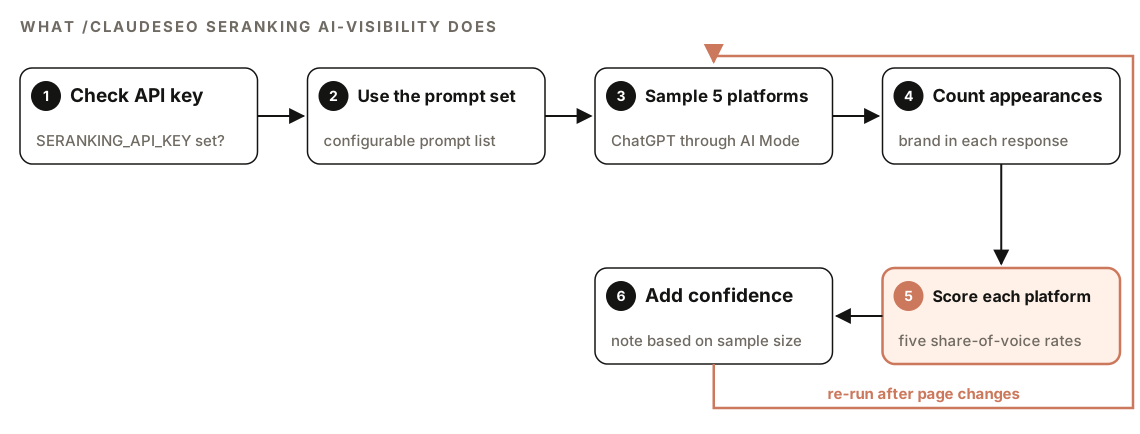
- Check the API key. Before any call, the skill verifies that
SERANKING_API_KEYis set. If it isn't, it tells you to run the installer instead of failing silently. - Use the prompt set. SE Ranking samples answers across a configurable set of prompts.
- Sample five platforms. ChatGPT, Gemini, Perplexity, Google AI Overviews and Google AI Mode are covered in a single query.
- Count appearances. Each sampled response is checked for your brand.
- Score each platform. You get one share-of-voice percentage per platform.
- Add confidence notes. Each score comes with a note on how far to trust it, based on the sample size.
Run it again after you change your pages, using the same prompts, to see whether the scores move.
The five AI share-of-voice scores
The ai-visibility output has one field per platform. The skill defines them like this:
| Field | Platform | What it measures |
|---|---|---|
| chatgpt_sov | ChatGPT | Share of sampled prompts where the brand appears in the response |
| gemini_sov | Google Gemini | Same measure, against Gemini |
| perplexity_sov | Perplexity | Same measure, against Perplexity |
| ai_overviews_sov | Google AI Overviews | Brand citation rate inside AI Overviews |
| ai_mode_sov | Google AI Mode | Brand citation rate inside AI Mode |
Appearance and citation are not the same measure
Look closely at the definitions. The ChatGPT, Gemini and Perplexity fields count whether your brand appears in the answer. The AI Overviews and AI Mode fields measure your citation rate inside those Google features. A brand can be named often but cited rarely, or the reverse. Compare each platform with itself over time, and with competitors on the same platform, rather than averaging five numbers into one.
AI Mode coverage
The skill's notes describe AI Mode coverage as US English first. If your market is elsewhere, check what SE Ranking supports for your language and country before you rely on that score.
The other SE Ranking subcommands
The same integration also returns classic search data, which is handy when you want AI and organic visibility from one provider:
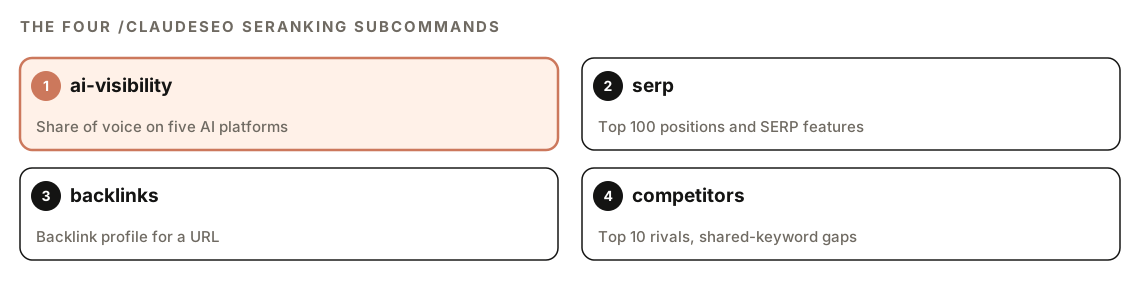
- `serp <keyword>` returns the top 100 organic positions and the SERP features shown for a keyword.
- `backlinks <url>` returns a backlink profile, an alternative data source if you don't use Ahrefs or DataForSEO.
- `competitors <url>` returns your top 10 organic competitors and the shared-keyword gaps between you.
Comparing competitors with the brands that crowd you out of AI answers is useful. If the two lists differ, your AI competition isn't the same as your organic competition, and your content plan should reflect both.
How to run an AI share of voice check
You need three things first:
- An SE Ranking account with API access and an API key. SE Ranking is a third-party service. Its API uses unit accounting, each query consumes units, and SE Ranking's own pricing applies.
- The SE Ranking extension for Claude SEO. Run its installer: a shell script, with a PowerShell version for Windows.
- The `SERANKING_API_KEY` environment variable, set where Claude Code runs. Keep it out of version control.
If the skill suite isn't installed yet, follow our guide to installing SEO skills in Claude Code. Then run:
/claudeseo seranking ai-visibility AcmeThe other subcommands follow the same pattern:
/claudeseo seranking serp "project management software"
/claudeseo seranking backlinks https://www.example.com
/claudeseo seranking competitors https://www.example.com
Or describe what you want in plain English:
Use SE Ranking to measure Acme's AI share of voice across ChatGPT, Gemini, Perplexity, AI Overviews and AI Mode, then run the same check for our two main competitors so I can compare.Because each query uses API units, plan competitor comparisons before you run them. The skill can log API spend across the providers you use, which helps when SE Ranking is one of several paid data sources.
How to read your AI share of voice results
The report gives each platform as a percentage with its confidence note. The layout looks like this, with placeholders in place of real values:
## AI share of voice: [brand]

| Platform            | Share of voice | Confidence note           |
|---------------------|----------------|---------------------------|
| ChatGPT             | XX%            | [note based on sample size] |
| Gemini              | XX%            | [note based on sample size] |
| Perplexity          | XX%            | [note based on sample size] |
| Google AI Overviews | XX%            | [note based on sample size] |
| Google AI Mode      | XX%            | [note based on sample size] |
Read it in this order:
- Confidence notes first. A low-confidence score is a hint, not a finding. Don't rewrite pages because of a small sample.
- Find the weakest platform. A large gap on one platform usually has a platform-specific cause. Google's AI features can only link to pages that are indexed in Google Search, for example, so check indexing first when AI Overviews or AI Mode is your weak spot.
- Compare with competitors. Run the same check for two or three competitors. Your presence rate means more next to theirs.
- Track the change. Save each report and re-run on a regular schedule with the same prompt set.
How to raise your AI share of voice
The SE Ranking skill measures visibility. For platform-specific deep dives, such as ChatGPT only or Perplexity only, it hands off to /claudeseo geo <url>, which includes guidance on brand mention signals. That audit powers our GEO and AI search optimization features and scores each page from 0 to 100:
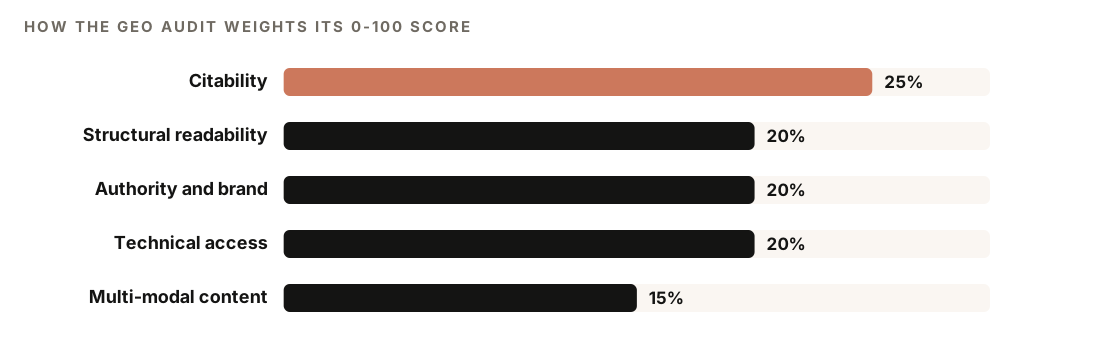
Those weights suggest where to start:
- Citability. Answer the question directly in the first 40 to 60 words of each section, use question-based headings, and write self-contained blocks that make sense when quoted alone.
- Structural readability. Clear headings, short paragraphs, lists and tables where the content suits them.
- Authority and brand signals. Real authors, dates and sources, plus brand presence where AI systems look for it. The audit checks mentions on Wikipedia, Reddit, YouTube and LinkedIn.
- Technical accessibility. Allow AI search crawlers such as OAI-SearchBot and PerplexityBot in robots.txt, and make sure your main content is in the server-rendered HTML.
- Multi-modal content. Supporting media such as images and video, not just text.
For traditional link and content work, the skill points to /claudeseo backlinks and /claudeseo content. Our backlink audit guide covers the first.
Once you know which prompts you're losing, give Claude Code a focused task:
Our AI share of voice is low for questions like "[prompt]". Find the page in this repo that targets that topic. Add a question-style H2 for it, answer it in the first two sentences, add a comparison table if the topic involves options, and list any claims that need a source. Show me the diff.Before new posts go live, /claudeblog geo <file> scores a draft's AI citation readiness. Our page on search and AI readiness explains the checks.
SE Ranking or Profound?
ClaudeSEO also connects to Profound through /claudeseo profound. The skill files describe the two as complementary. SE Ranking samples prompts on demand and covers five AI surfaces, including Gemini, AI Overviews and AI Mode. Profound polls continuously and publishes a time series, which makes week-over-week trends and spike or drop alerts its strength. Use SE Ranking for a broad snapshot, and Profound for ongoing monitoring of ChatGPT and Perplexity. Our guide to tracking brand citations in AI answers covers the Profound side.
Doing it without the skill
You can build a basic share-of-voice tracker with plain Claude Code. Start with a prompt set grounded in real search demand:
Read gsc-queries.csv, exported from Google Search Console. Pick the 40 non-branded queries with the most impressions and rewrite each one as a question a person would ask an AI assistant. Save them to prompts.csv with columns: prompt, source_query, intent.Run the prompts in each assistant, record which brands each answer names, then have Claude Code do the maths:
Write a Python script that reads sov.csv with columns prompt, platform, date and brands_mentioned (semicolon-separated). For each platform, calculate our presence rate for "[brand]" with a 95% Wilson confidence interval, and our relative share: our mentions divided by all mentions of these tracked brands: [list]. Print one table per platform and flag any platform with fewer than 30 prompts as low confidence.This gives you the method, but the sampling is manual and slow, and Google's AI features are hard to sample consistently by hand. The skill adds automated sampling across five platforms in one query, per-platform scores with confidence notes, and SERP, backlink and competitor data from the same connection.
Mistakes to avoid
- Averaging the five scores. They don't all measure the same thing, and each platform has different causes.
- Changing the prompt set between runs. You'll measure the change in prompts, not the change in visibility.
- Trusting tiny samples. Read the confidence note before acting on a number.
- Using branded prompts. Questions that already contain your name will mention you. Track the questions buyers ask first.
- Ignoring organic search. A page must be indexed and eligible to appear in Google Search before AI Overviews or AI Mode can link to it.
- Forgetting unit costs. Plan competitor runs, because every query uses API units.
Related guides
- Tracking brand citations in AI answers for Profound trends and alerts
- The generative engine optimization guide for AI search strategy
- Backlink audits with Claude Code for the authority side
- The full Claude SEO skill list for every command in the suite
FAQ
What is AI share of voice?
AI share of voice is how much of the space in AI-generated answers your brand holds for the questions your market asks. It's usually measured per platform, such as ChatGPT or Google AI Overviews, either as a presence rate or as a share of all brand mentions across a fixed prompt set.
How do you calculate AI share of voice?
Pick a fixed set of prompts, sample each AI platform's answers, and count how often your brand appears. Presence rate is the share of prompts where you appear. Relative share is your mentions divided by the mentions of all tracked brands. Repeat with the same prompts over time.
What is a good AI share of voice?
There's no universal benchmark, because scores depend on the prompt set, the platform and the market. Judge your score against competitors measured on the same prompts, and against your own trend. A rising score with a solid confidence note is a good sign.
Do I need an SE Ranking account to use /claudeseo seranking?
Yes. The command calls SE Ranking's API with your own key, so you need an SE Ranking account with API access. SE Ranking's API uses unit accounting and its own pricing applies. The skill checks for the SERANKING_API_KEY environment variable before every call.
Which AI platforms does the SE Ranking integration cover?
The ai-visibility subcommand reports share of voice for ChatGPT, Google Gemini, Perplexity, Google AI Overviews and Google AI Mode in a single query. The skill notes that AI Mode coverage is US English first.
How many prompts do I need to measure AI share of voice?
More prompts give more stable numbers. With a small set, each answer moves the rate by several points, so treat results as rough signals. Whatever size you choose, keep the set the same between runs so the results are comparable.