
International SEO
Multilingual Blog SEO with Claude Code: Translate + Hreflang
Multilingual blog SEO with Claude Code: write once, translate with localized keywords and metadata, and generate hreflang tags, sitemap entries and a JSON map.
Multilingual blog SEO means publishing each post in several languages so every version can rank in its own market: translated text, keywords people there actually search for, localized metadata, and hreflang tags that connect the versions. In Claude Code, /claudeblog multilingual <topic> --languages <codes> writes a post, translates and localizes it, and generates the hreflang files in one run, while /claudeblog translate <file> --to <codes> translates a post you already have.
This guide explains what multilingual SEO requires, how both commands work, what they produce, and how to publish the result without breaking hreflang.
Key takeaways
- Each language version needs its own URL, its own keywords and metadata, and hreflang tags that list every version, itself included.
/claudeblog multilingualruns six phases: configure, write the original, translate, localize, generate hreflang assets, and summarize./claudeblog translategives each target language its own translator agent, keeps markdown, links and code intact, and flags machine-translation artifacts for review.- Language codes are ISO 639-1 (
de,ja), with an optional ISO 3166-1 region (pt-BR). A code likejpis rejected with a suggestion.- The generated hreflang files use placeholder URLs. Replace them with your real URLs, then validate the live pages.
What is multilingual blog SEO?
Multilingual SEO makes each language version of your content findable by people who search in that language. Google's guidance on managing multi-regional and multilingual sites sets out the basics:
- One URL per language. Put each version on its own URL: a subfolder (
/de/), a subdomain (de.example.com), or a country domain (example.de). Don't switch languages on one URL based on cookies or browser settings. - No forced redirects. Don't redirect visitors automatically based on their perceived language. Offer a visible language switcher instead.
- Hreflang annotations. Tell search engines which URL is for which language or region, so each market sees its own version.
The content itself also has to work in each market.
Why translation alone isn't enough
- Keywords don't translate one to one. German searchers may use a local term, or the English term borrowed as is. A literal translation of your keyword can miss both.
- Metadata needs its own work. Titles, meta descriptions, slugs, and alt text left in English undercut a translated body.
- Formats differ.
1,000.50in English is1.000,50in German, and dates, currencies, and quotation marks change too. - Machine translation leaves traces. Literal idioms and English word order make a page read as imported, even when every word is technically correct.
Both commands are built around these problems.
What the /claudeblog multilingual command does
The multilingual command is the one-command pipeline in the Claude Blog suite (see the full ClaudeSEO skill list). Give it a topic and a list of languages, and it runs six phases:
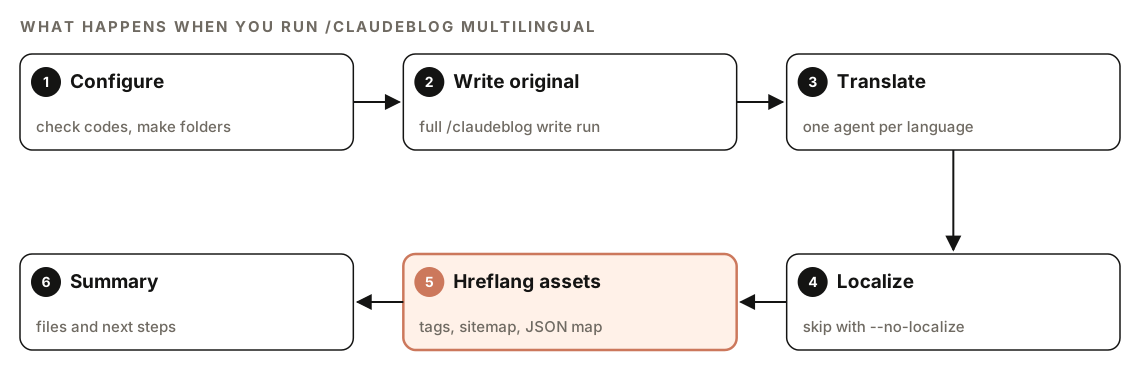
- Configure. It validates every language code, detects your project's output format, and creates a
multilingual/folder with one subfolder per language. A target that matches the source language is dropped with a notice. Output always stays inside your project. - Write the original. It runs the full
/claudeblog writeworkflow, so the source post gets everything the 4-agent content pipeline adds, including template selection, sourced statistics, FAQ schema, and internal-link zones. - Translate. Each target language goes through the translate workflow, in parallel where possible, and lands in its own folder with a localized slug.
- Localize. Unless you pass
--no-localize, each translation gets a cultural adaptation pass: local brand examples, adapted calls to action, local legal references, and the right formality. Our guide to content localization with Claude Code covers that pass in depth. - Generate hreflang assets. It writes copy-paste hreflang tags, a sitemap fragment, a JSON language map for your CMS, and, on request, localized schema.
- Summarize. A delivery summary lists every file and the steps to publish.
If one translation fails, the others still complete and the summary suggests a retry command. With more than 10 target languages, the skill warns that the run will take a while and continues once you confirm.
The command takes these arguments:
| Argument | Required | Default | What it does |
|---|---|---|---|
<topic> | Yes | None | The blog topic or working title |
--languages | Yes | None | Comma-separated target language codes |
--source | No | en | The language the original is written in |
--no-localize | No | Off | Skip cultural adaptation and translate only |
--format | No | Auto | Output as md, mdx, or html |
If you leave out --languages, the skill asks once before running anything.
How does /claudeblog translate work?
Already have a post? /claudeblog translate <file> --to <codes> handles only the translation step, and it's also what the multilingual command uses internally. It reads a markdown, MDX, or HTML file and detects the source language from the frontmatter lang field, the HTML lang attribute, or the text itself. Then it validates each target code and rejects invalid ones with a suggestion: jp gets "Did you mean ja for Japanese?"
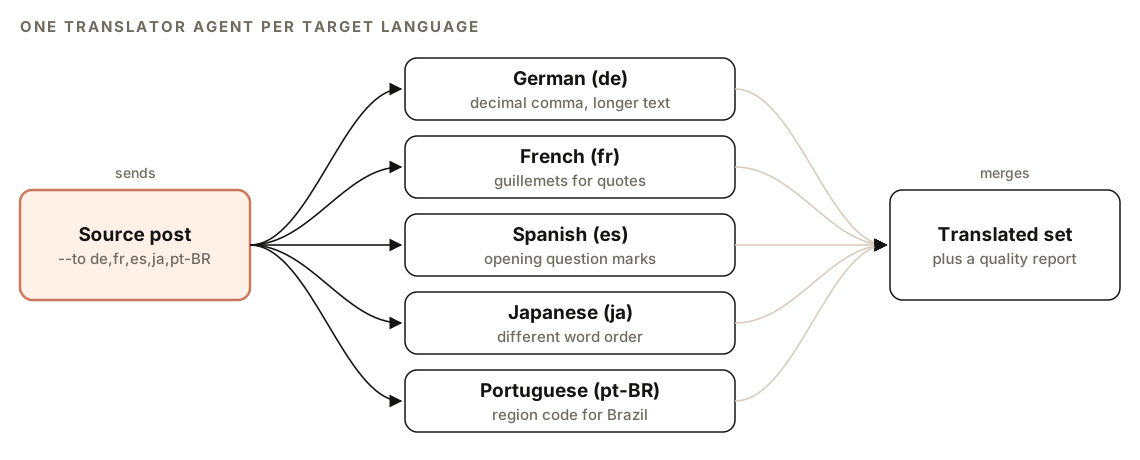
Each language then goes to its own translator agent. The agents work as SEO-aware localizers, not word-for-word translators. For every decision they ask whether a native speaker would write it that way, whether local searchers will find it, and whether the SEO elements suit that market.
What gets translated and what stays the same
| Translated | Kept unchanged |
|---|---|
| Frontmatter title, description, and tags | Frontmatter keys |
| Headings and body paragraphs | Markdown and HTML structure |
| Image alt text and figure captions | Image and link URLs |
| Text labels inside SVG charts | SVG attributes such as position and size |
| FAQ questions and answers | Code blocks, apart from meaningful comments |
| Key takeaways, CTAs, and link anchors | Internal-link markers |
| User-facing strings in schema | Schema keys, person names, and cited organizations |
When a translated chart label runs longer than the original, as German text often does, the agent widens the chart or reduces the font size rather than cutting words off.
Keyword localization
Before translating, the skill decides for each keyword whether the source term is the established term in the target market. Some English terms are used as is; the skill's own example is "Content Marketing", which stays in German. Otherwise it swaps in the local equivalent that people actually search for, and the translator uses it consistently in the title, meta description, and headings.
The skill files don't name a keyword data source for this decision, so treat it as a strong first pass. For keywords that matter, confirm local demand with your own data; our keyword research guide shows how in Claude Code.
SEO elements and quality guardrails
Each translation gets frontmatter written for its market rather than copied: a localized title of 50 to 60 characters with the local keyword, a meta description of 150 to 160 characters, a localized slug, and locale fields:
lang: "de"
translatedFrom: "en"
translatedDate: "YYYY-MM-DD"
slug: "[localized-slug]"
If the post has schema, the agent sets inLanguage and adds translationOfWork pointing back to the source URL. The skill then checks structural integrity: the same number of H2 and H3 sections as the original, every image present with translated alt text, chart labels translated, and the same number of FAQs.
Finally, it scans for machine-translation artifacts:
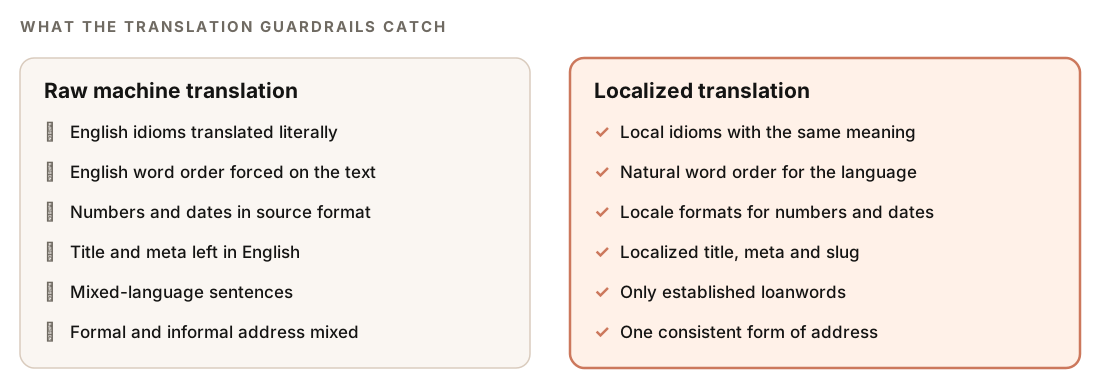
Literal idioms, unnatural word order, mixed-language sentences, numbers and dates in source format, and frontmatter left in the source language are each flagged with the file path, line number, and a suggested fix, and the translator reworks flagged passages before delivery. The agent also keeps formal and informal address consistent and matches the original's tone.
How to run multilingual blog SEO with Claude Code
Write a new post in English and publish it in four more languages:
/claudeblog multilingual "how to plan a content calendar" --languages de,fr,es,pt-BRWrite the original in German, translate only, and output MDX:
/claudeblog multilingual "[topic]" --languages en,fr --source de --no-localize --format mdxTranslate a post you've already published:
/claudeblog translate content/blog/[post].md --to de,fr,jaOr describe what you want in plain English:
Translate content/blog/[post].md into German and Japanese. Localize the keywords and metadata, keep all links and code blocks unchanged, and flag anything that reads like machine translation.The translate command saves files under translations/{lang}/; the multilingual command uses multilingual/{lang}/. Claude's own translator agents do the translating; the skill files don't list a separate translation service or API key.
What hreflang assets does it generate?
The multilingual command writes three files to the multilingual/ folder. The first, hreflang-tags.html, holds the tags to paste into the <head> of every language version:
<link rel="alternate" hreflang="en" href="{source-url}" />
<link rel="alternate" hreflang="de" href="{de-url}" />
<link rel="alternate" hreflang="fr" href="{fr-url}" />
<link rel="alternate" hreflang="x-default" href="{source-url}" />
The generator follows the core hreflang rules: every page lists all versions including itself, every relationship is reciprocal, all URLs share one protocol (HTTPS) and one trailing-slash convention, and x-default points to the source-language version. If you have a language selector page, you can point x-default there instead. Our hreflang audit guide explains each rule and the errors that break them.
The second, hreflang-sitemap.xml, expresses the same set as a sitemap fragment, with one <url> block per language version, each repeating every alternate:
<url>
  <loc>{source-url}</loc>
  <xhtml:link rel="alternate" hreflang="en" href="{source-url}" />
  <xhtml:link rel="alternate" hreflang="de" href="{de-url}" />
  <xhtml:link rel="alternate" hreflang="fr" href="{fr-url}" />
  <xhtml:link rel="alternate" hreflang="x-default" href="{source-url}" />
</url>
The third, hreflang-map.json, maps every version for CMS integration:
{
  "sourceSlug": "[source-slug]",
  "sourceLanguage": "en",
  "generatedDate": "YYYY-MM-DD",
  "versions": [
    { "lang": "en", "slug": "[source-slug]", "file": "en/[source-slug].md", "title": "[Title]", "description": "[Description]" },
    { "lang": "de", "slug": "[localized-slug]", "file": "de/[localized-slug].md", "title": "[Localized title]", "description": "[Localized description]" }
  ],
  "hreflang": { "method": "html", "x-default": "en" }
}
If you ask for it, or a post's frontmatter has schema: true, each version also gets BlogPosting JSON-LD with inLanguage and a translationOfWork reference to the source. For richer schema such as FAQ or Person markup, run /claudeblog schema <file> on each version.
With or without Claude SEO
If the Claude SEO suite is installed alongside Claude Blog, as it is in the bundle, the multilingual command hands hreflang validation to /claudeseo hreflang. Without it, the command uses its own minimal generator and notes in the summary that validation was structural only. In Claude SEO, hreflang is also part of the indexability checks in a technical SEO audit.
How to read the delivery summary
Every run ends with the same summary format:
## Multilingual blog complete: [Title]

### Original
- Language: [source]
- File: multilingual/[source]/[slug].md

### Translations
| Language | File | Localized | Keywords adapted |

### International SEO assets
- multilingual/hreflang-tags.html
- multilingual/hreflang-sitemap.xml
- multilingual/hreflang-map.json

### Next steps
Check the Translations table first: every language you asked for should appear, with a count of adapted keywords. A missing row means that translation failed, so rerun it with the retry command from the summary. Run on its own, the translate command's report adds a pass or fail per language for structure, meta tags, and formats, plus the number of flagged machine-translation artifacts. Read every flagged passage before you publish.
How to publish a multilingual post set
The generated files are a starting point. The summary's next steps are:
- Replace the URL placeholders in the hreflang tags and sitemap with your final canonical URLs.
- Merge the sitemap fragment into your existing sitemap. Our XML sitemap audit guide covers sitemap structure.
- Resolve internal links. Replace
[INTERNAL-LINK]placeholders with links to pages in the same language. - Audit the set for completeness with the locale audit.
- Validate hreflang. With Claude SEO installed, run
/claudeseo hreflang audit ./multilingualon the new files, then/claudeseo hreflang <url>on the live pages once they're published.
/claudeblog locale-audit multilingual/
/claudeseo hreflang https://www.example.com/blog/
Watch for these code and URL errors:
| Problem | Fix |
|---|---|
jp or eng as a language code | Use the ISO 639-1 codes ja and en |
en-uk as a region code | Use the ISO 3166-1 code: en-GB |
| Placeholder URLs left in the tags | Replace them with final canonical URLs |
Doing it without the skill
You can translate a post well with a plain Claude Code prompt, as long as you spell out the SEO parts:
Translate content/blog/[post].md into German for readers in Germany. First list the primary and secondary keywords and decide, for each, whether Germans search for the English term or a German one. Translate naturally, not word for word. Keep all markdown, URLs, and code blocks unchanged. Translate alt text and the FAQ, use German number, date, and quotation formats, and write a new title, meta description, and slug for the German market. Save it to content/de/ with lang, translatedFrom, and translatedDate in the frontmatter.Then generate the hreflang set:
For content/en/[post].md, content/de/[post].md, and content/fr/[post].md, with final URLs [list], generate hreflang link tags for each page. Every page must list all three versions including itself, use ISO 639-1 codes, and include x-default pointing to the English version. Also give me the matching sitemap entries.The skill adds what's tedious to repeat: the whole write, translate, localize, and hreflang chain in one command, parallel translator agents, structural checks, artifact guardrails, and the JSON language map.
Mistakes to avoid
- Translating keywords literally. Check what people in each market actually search for.
- Leaving metadata behind. Titles, descriptions, slugs, and alt text need translating as much as the body.
- Publishing placeholder URLs. Hreflang with
{url}in it does nothing. - Mixing hreflang methods. Use HTML tags or the sitemap, not some of each.
- Letting translations go stale. When the source changes, update the translations;
translatedDateshows how old each one is. - Skipping human review. Have a fluent speaker read each version before it goes live.
Related guides
- Hreflang audit with Claude Code for every hreflang rule in depth
- Content localization and locale QA with Claude Code for cultural adaptation and multilingual audits
- XML sitemap audit with Claude Code for merging hreflang entries into your sitemap
FAQ
What is multilingual SEO for a blog?
It's the work of making each language version of a post rank in its own market: a separate URL per language, keywords and metadata chosen for each market, local formats, and hreflang tags that tell search engines which version to show.
Should I use subfolders or subdomains for different languages?
Google supports subfolders, subdomains, and country domains. Subfolders on one domain, such as /de/ and /fr/, are usually the easiest to set up and maintain. Whatever you choose, give every language its own URL and connect the versions with hreflang.
Is machine-translated content bad for SEO?
Unreviewed output often is, because literal idioms, English word order, and untranslated metadata make pages read poorly for local visitors. The translate skill flags those patterns, but a fluent human review before publishing is still the safest standard.
Do I need hreflang on a multilingual blog?
It's strongly recommended. Without it, search engines have to guess which version suits which searcher, and the wrong language can show up in results. It only works when every version lists every other version and itself, with valid ISO codes.
Should I translate URL slugs?
Usually, yes. A localized slug matches the language of the page and is easier for local readers to understand. The translate skill gives each version a localized slug. Keep slugs stable once published, and redirect the old URL if you ever change one.
What's the difference between translation and localization?
Translation changes the language. Localization adapts the examples, legal references, calls to action, and formality so the page fits one market. The multilingual command runs both by default, and --no-localize limits it to translation.